App Builder by Infragistics vs. Eclipse

Overview
ProductRatingMost Used ByProduct SummaryStarting Price
App Builder
Score 7.0 out of 10
N/A
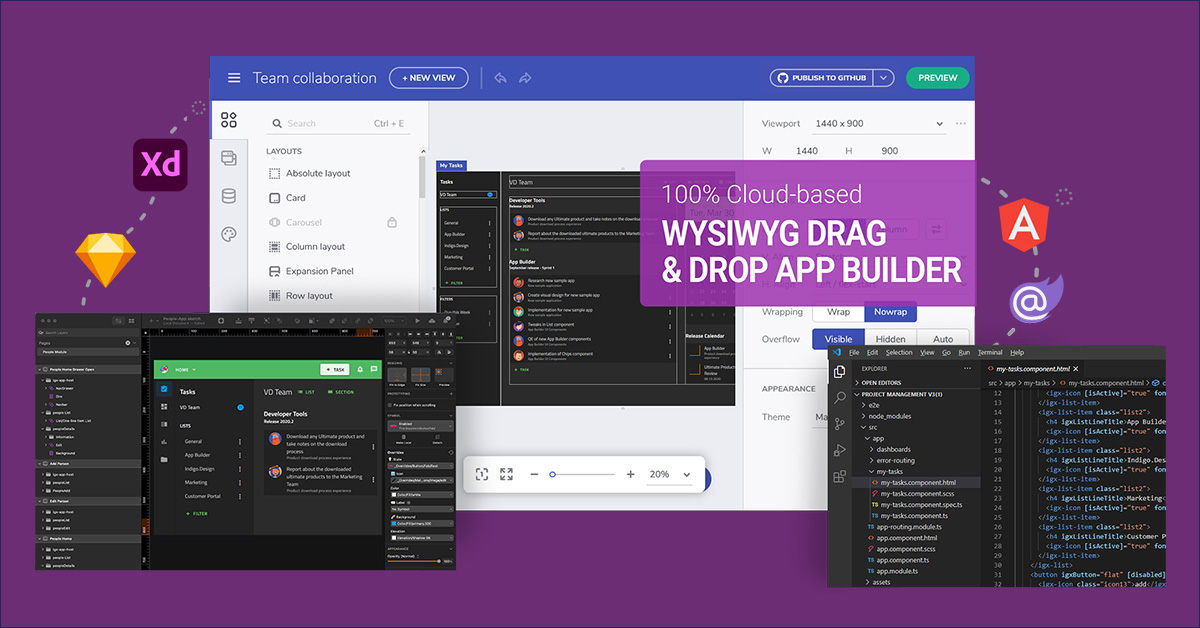
App Builder - Design and Build Real Apps Fast The brand-new App Builder aims to provide design and development teams with a solution to help them deliver apps quickly and efficiently, without losing focus on UX. Users can start an app from scratch or choose from a library of pre-built app templates or responsive screen layouts and then customize with a toolbox of 60+ UI controls to kick-start the next digital product design. If a design already exists in Sketch or Adobe…
$1,295
per year per user
Eclipse
Score 8.2 out of 10
N/A
Eclipse is a free and open source integrated development environment (IDE).N/A
Pricing
App Builder by InfragisticsEclipse
Editions & Modules
Ignite UI
$1,295
per year per user
Infragistics Professional
$1,295
per year per user
Infragistics Ultimate
$1,495
per year per user
No answers on this topic
Offerings
Pricing Offerings
App BuilderEclipse
Free Trial
YesNo
Free/Freemium Version
NoNo
Premium Consulting/Integration Services
NoNo
Entry-level Setup FeeNo setup feeNo setup fee
Additional DetailsThis product is free to use for non-commercial, educational purposes for students in K-12 grades or University programs, and for educators to use in a classroom setting as examples/tools in their curriculum.
More Pricing Information
Community Pulse
App Builder by InfragisticsEclipse
Features
App Builder by InfragisticsEclipse
Low-Code Development
Comparison of Low-Code Development features of Product A and Product B
App Builder by Infragistics
5.8
3 Ratings
37% below category average
Eclipse
-
Ratings
Visual Modeling6.02 Ratings00 Ratings
Drag-and-drop Interfaces7.53 Ratings00 Ratings
Reusability6.02 Ratings00 Ratings
Platform Scalability3.61 Ratings00 Ratings
Best Alternatives
App Builder by InfragisticsEclipse
Small Businesses
Creatio
Creatio
Score 9.1 out of 10
Visual Studio
Visual Studio
Score 8.8 out of 10
Medium-sized Companies
Quixy
Quixy
Score 9.9 out of 10
Visual Studio
Visual Studio
Score 8.8 out of 10
Enterprises
Creatio
Creatio
Score 9.1 out of 10
Visual Studio
Visual Studio
Score 8.8 out of 10
All AlternativesView all alternativesView all alternatives
User Ratings
App Builder by InfragisticsEclipse
Likelihood to Recommend
7.0
(5 ratings)
7.8
(73 ratings)
Likelihood to Renew
5.5
(1 ratings)
9.0
(1 ratings)
Usability
-
(0 ratings)
9.0
(2 ratings)
Support Rating
-
(0 ratings)
6.8
(19 ratings)
User Testimonials
App Builder by InfragisticsEclipse
Likelihood to Recommend
Infragistics
App Builder will be great where you have a small team with limited resources. Obviously this product is only good if you are starting a new project. I have used Radzen before which does almost the same thing using a database first approach, but it was a real pain as the application crashes a lot.
Read full review
Open Source
I think that if someone asked me for an IDE for Java programming, I would definitely recommend Eclipse as is one of the most complete solutions for this language out there. If the main programming language of that person is not Java, I don't think Eclipse would suit his needs[.]
Read full review
Pros
Infragistics
  • Layout
  • Theme and Styles
  • Code Generation
Read full review
Open Source
  • Eclipse organizes imports well and does a good job presenting different programming languages.
  • Eclipse auto formats source code allowing customization and increased readability.
  • Eclipse reports errors automatically to users rather than logging it to the console.
  • Eclipse has coding shortcuts and auto-correction features allowing faster software development.
Read full review
Cons
Infragistics
  • Data interface (web services)
  • Documentation
Read full review
Open Source
  • While the DB integration is broad (many connectors) it isn't particularly deep. So if you need to do serious DB work on (for example) SQL Server, it is sometimes necessary to go directly to the SQL Server Studio. But for general access and manipulation, it is ok.
  • The syntax formatting is sometimes painful to set up and doesn't always support things well. For example, it doesn't effectively support SCSS.
  • Using it for remote debugging in a VM works pretty well, but it is difficult to set up and there is no documentation I could find to really explain how to do it. When remote debugging, the editor does not necessarily integrate the remote context. So, for example, things like Pylint don't always find the libraries in the VM and display spurious errors.
  • The debugging console is not the default, and my choice is never remembered, so every time I restart my program, it's a dialog and several clicks to get it back. The debugging console has the same contextual problems with remote debugging that the editor does.
Read full review
Likelihood to Renew
Infragistics
No answers on this topic
Open Source
I love this product, what makes it one of the best tool out in the market is its ability to function with a wide range of languages. The online community support is superb, so you are never stuck on an issue. The customization is endless, you can keep adding plugins or jars for more functionalities as per your requirements. It's Free !!!
Read full review
Usability
Infragistics
No answers on this topic
Open Source
It has everything that the developer needs to do the job. Few things that I have used in my day-to-day development 1. Console output. 2. Software flash functionality supporting multiple JTAG vendors like J-LINK. 3. Debugging capabilities like having a breakpoint, looking at the assembly, looking at the memory etc. this also applies to Embedded boards. 4. Plug-in like CMake, Doxygen and PlantUML are available.
Read full review
Support Rating
Infragistics
No answers on this topic
Open Source
I gave this rating because Eclipse is an open-source free IDE therefore no support system is available as far as I know. I have to go through other sources to solve my problem which is very tough and annoying. So if you are using Eclipse then you are on your own, as a student, it is not a big issue for me but for developers it is a need.
Read full review
Alternatives Considered
Infragistics
They're different products. for grid design maybe Balsamiq is a bit better.
Read full review
Open Source
The installation, adaptability, and ease of usage for Eclipse are pretty high and simple compared to some of the other products. Also, the fact that it is almost a plug and play once the connections are established and once a new user gets the hang of the system comes pretty handy.
Read full review
Return on Investment
Infragistics
  • + Allowed for fast design and mock ups
  • + Allowed for efficient asset delivery to development team
  • + allows for revisions and updates; with code generation
Read full review
Open Source
  • This development environment offers the possibility of improving the productivity time of work teams by supporting the integration of large architectures.
  • It drives constant change and evolution in work teams thanks to its constant versioning.
  • It works well enough to develop continuous server client integrations, based on solid or any other programming principle.
Read full review
ScreenShots

App Builder Screenshots

Screenshot of Use pre-built themes and typography (Material, Bootstrap & Fluent) or customize to match your own app theme and corporate branding on a per-control, per-screen, or per-app basis.Screenshot of With a rich layout system and complete toolbox of components, create screens and full apps in minutes instead of hours!Screenshot of Import Sketch and Adobe XD Designs! With one click, take your static designs and get interactive, responsive apps with real UI components and styling. Import designs from the design system into a real, component-based app. Figma import coming soon!