AppsAnywhere vs. Thinfinity VirtualUI

Overview
ProductRatingMost Used ByProduct SummaryStarting Price
AppsAnywhere
Score 9.8 out of 10
Enterprise companies (1,001+ employees)
AppsAnywhere is a software delivery platform that gives students and staff access to the software they need to get their work done wherever they are, both on and off campus. Boasting more than 2 million students at over 200 universities and colleges worldwide, the vendor states AppsAnywhere improves student outcomes by making software available on any device, including BYOD, thanks to their unique approach to virtualization. Used by higher ed institutions, including University…N/A
Thinfinity VirtualUI
Score 10.0 out of 10
N/A
Thinfinity® VirtualUI enables dual Platform solutions allowing Windows-based desktop applications to function as web applications, which can be accessed remotely from any HTML5 web browser. Since launched in 2015, it has helped organizations to embrace digital transformation by extending the life Cycle of business-critical applications. To enable Thinfinity® VirtualUI in an application’s project, the user adds one line of code to source code. The user can then deliver desktop…N/A
Pricing
AppsAnywhereThinfinity VirtualUI
Editions & Modules
No answers on this topic
Offerings
Pricing Offerings
AppsAnywhereThinfinity VirtualUI
Free Trial
YesYes
Free/Freemium Version
NoYes
Premium Consulting/Integration Services
NoNo
Entry-level Setup FeeRequiredNo setup fee
Additional Details
More Pricing Information
Community Pulse
AppsAnywhereThinfinity VirtualUI
Considered Both Products
AppsAnywhere
Chose AppsAnywhere
I recently had the opportunity to compare AppsAnywhere with Oracle VM, Amazon Workspaces, and Kasm Workspaces. I found that AppsAnywhere was the most intuitive and easiest to use out of the four, and it also had the best customer support. Its powerful cloud-based technology …
Chose AppsAnywhere
The AppsAnywhere team is very quick in setting up things and also having everything in a single place. The bundle of the apps can be easily configured as the documentation is also very straightforward while setting up things and also having the team to work accordingly …
Chose AppsAnywhere
the only other way of providing students access to specialised software wherever they are that I've used myself is probably VMware Horizon, where students log in to a machine in the cloud that is pre-configured to run the software they need, and they run it there. This is much …
Chose AppsAnywhere
It's much more straight-forward and light-weight.
Chose AppsAnywhere
Both AppsAnywhere and Amazon WorkSpaces are software that allows users to have access to their files and applications from basically and device, such as Mac and Windows, tablets, etc. Both AppsAnywhere and Amazon WorkSpaces make remote work accessible for users in easy to …
Chose AppsAnywhere
AppsAnywhere is more reliable and easy to used, it's value for money. I find a good review about this software online, good match for my organization and businesses. AppsAnywhere is the first choice for my organization and we are happy with the AppsAnywhere support team and …
Thinfinity VirtualUI

No answer on this topic

Features
AppsAnywhereThinfinity VirtualUI
Application Virtualization
Comparison of Application Virtualization features of Product A and Product B
AppsAnywhere
7.1
Ratings
8% below category average
Thinfinity VirtualUI
-
Ratings
Application support7.60 Ratings00 Ratings
Device support6.60 Ratings00 Ratings
Ease of deployment7.30 Ratings00 Ratings
Application packaging6.90 Ratings00 Ratings
Security6.90 Ratings00 Ratings
Best Alternatives
AppsAnywhereThinfinity VirtualUI
Small Businesses
Parallels RAS
Parallels RAS
Score 9.5 out of 10
Parallels RAS
Parallels RAS
Score 9.5 out of 10
Medium-sized Companies
Nutanix AHV
Nutanix AHV
Score 9.0 out of 10
Nutanix AHV
Nutanix AHV
Score 9.0 out of 10
Enterprises
Nutanix AHV
Nutanix AHV
Score 9.0 out of 10
Nutanix AHV
Nutanix AHV
Score 9.0 out of 10
All AlternativesView all alternativesView all alternatives
User Ratings
AppsAnywhereThinfinity VirtualUI
Likelihood to Recommend
8.2
(0 ratings)
-
(0 ratings)
Usability
8.0
(0 ratings)
-
(0 ratings)
User Testimonials
AppsAnywhereThinfinity VirtualUI
Likelihood to Recommend
AppsAnywhere is basically suitable for its purpose, despite some usability problems. In our place, applications can in principle be delivered to other machines (not owned by us but by the end-user), who are not even on-site - provided the user can connect to our domain, almost any kind of device is ok. However, I have not tried that myself. The UI could let people work faster, but only by a little, and most people get there in the end. It is basically quite simple to use and appealing to look at
Read full review
No answers on this topic
Pros
  • you can use AppsAnywhere to open and launch windows application on operating system through AppsAnywhere web page.
  • AppsAnywhere system is compatible with my all devices and operating system work perfectly.
  • You need persistent internet connection to used this software from anywhere.
Read full review
No answers on this topic
Cons
  • The search function could be more intuitive.
  • I feel like there could be more options for customizing the look and feel of the app.
Read full review
No answers on this topic
Usability
Almost everyone you tell to use it to access a specialist application can find the software they need and install it. However, surprisingly many have difficulties finding AppsAnywhere under the start menu or on the task bar - it is not a icon or name they recognise, and they really want to lunch the target specialist software (Zbrush or whatever). Once you find it, many people ignore the search function which is probably the fastest method, and browse the long list alphabetically, because the standard filters do not help much. Favouriting is rarely used as it is too burdensome and not an issue for users when they are looking for the applicationt hey need.
Read full review
No answers on this topic
Alternatives Considered
I recently had the opportunity to compare AppsAnywhere with Oracle VM, Amazon Workspaces, and Kasm Workspaces. I found that AppsAnywhere was the most intuitive and easiest to use out of the four, and it also had the best customer support. Its powerful cloud-based technology made it easy to access applications from any device without having to worry about compatibility issues. The user experience was also great and I found that I could easily customize my workspace according to my needs.
Read full review
No answers on this topic
Return on Investment
  • It has increase new courses usage by 40%
  • The engagement of the user is increasing 15%
  • increase of user by 10%
Read full review
No answers on this topic
ScreenShots

AppsAnywhere Screenshots

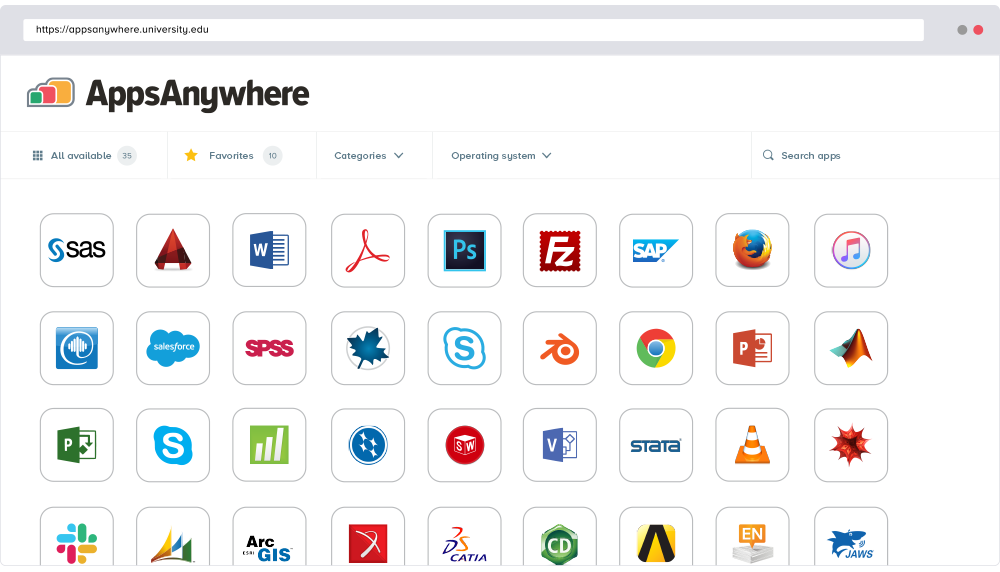
Screenshot of AppsAnywhere brings together all university or college software apps into a single app store platform, on any device.

Thinfinity VirtualUI Screenshots

Screenshot of