
AWS CloudFormation vs. ValueBlue BlueDolphin
AWS CloudFormation vs. ValueBlue BlueDolphin
| Product | Rating | Most Used By | Product Summary | Starting Price |
|---|---|---|---|---|
 AWS CloudFormation | N/A | AWS CloudFormation gives developers and systems administrators a way to create and manage a collection of related AWS resources, provisioning and updating them in a predictable fashion. Use AWS CloudFormation’s sample templates or create templates to describe the AWS resources, and any associated dependencies or runtime parameters, required to run an application. Users don’t need to figure out the order for provisioning AWS services or the subtleties of making those dependencies work.… | $0 | |
 BlueDolphin | N/A | ValueBlue, headquartered in Utrecht, supports agile business transformation, providing a strategic planning and collaboration solution for enterprises. Their collaboration solution BlueDolphin combines Enterprise Architecture, Business Process Management and Data Modeling into a strategic steering mechanism for large organizations and enterprises in Europe, US and Asia. | N/A |
| AWS CloudFormation | ValueBlue BlueDolphin | |||||||||||||||
|---|---|---|---|---|---|---|---|---|---|---|---|---|---|---|---|---|
| Editions & Modules |
| No answers on this topic | ||||||||||||||
| Offerings |
| |||||||||||||||
| Entry-level Setup Fee | No setup fee | No setup fee | ||||||||||||||
| Additional Details | There is no additional charge for using AWS CloudFormation with resource providers in the following namespaces: AWS::*, Alexa::*, and Custom::*. In this case you pay for AWS resources (such as Amazon EC2 instances, Elastic Load Balancing load balancers, etc.) created using AWS CloudFormation as if you created them manually. You only pay for what you use, as you use it; there are no minimum fees and no required upfront commitments. When you use resource providers with AWS CloudFormation outside the namespaces mentioned above, you incur charges per handler operation. Handler operations are create, update, delete, read, or list actions on a resource. | — | ||||||||||||||
| More Pricing Information | ||||||||||||||||
| AWS CloudFormation | ValueBlue BlueDolphin |
|---|
| AWS CloudFormation | ValueBlue BlueDolphin | |||||||||||||||||||||
|---|---|---|---|---|---|---|---|---|---|---|---|---|---|---|---|---|---|---|---|---|---|---|
| Configuration Management |
|
| AWS CloudFormation | ValueBlue BlueDolphin | |
|---|---|---|
| Small Businesses |  HashiCorp Terraform Score 8.7 out of 10 |  IBM Blueworks Live Score 8.9 out of 10 |
| Medium-sized Companies |  Ansible Score 9.2 out of 10 | IBM Blueworks Live Score 8.9 out of 10 |
| Enterprises | Ansible Score 9.2 out of 10 | IBM Blueworks Live Score 8.9 out of 10 |
| All Alternatives | View all alternatives | View all alternatives |
| AWS CloudFormation | ValueBlue BlueDolphin | |
|---|---|---|
| Likelihood to Recommend | 8.0 (7 ratings) | - (0 ratings) |
| Usability | 8.0 (2 ratings) | - (0 ratings) |
| AWS CloudFormation | ValueBlue BlueDolphin | |
|---|---|---|
| Likelihood to Recommend |  Amazon AWS
| ValueBlue No answers on this topic |
| Pros | Amazon AWS
| ValueBlue No answers on this topic |
| Cons | Amazon AWS
| ValueBlue No answers on this topic |
| Usability | Amazon AWS
| ValueBlue No answers on this topic |
| Alternatives Considered | Amazon AWS
| ValueBlue No answers on this topic |
| Return on Investment | Amazon AWS
| ValueBlue No answers on this topic |
| ScreenShots | AWS CloudFormation Screenshots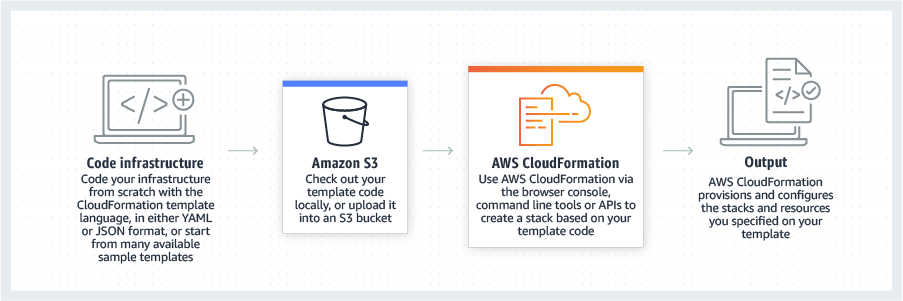    |