BizTalk360 is a Microsoft BizTalk administration tool, from Kovai.co. Users can check CPU and memory usage, start and stop Windows services, and access Event Logs with BizTalk360. Execute SQL Server queries and Stored Procedures, control SQL Server jobs, and check database sizes without leaving BizTalk360.
N/A
IDERA SQL Diagnostic Manager
Score 8.0 out of 10
N/A
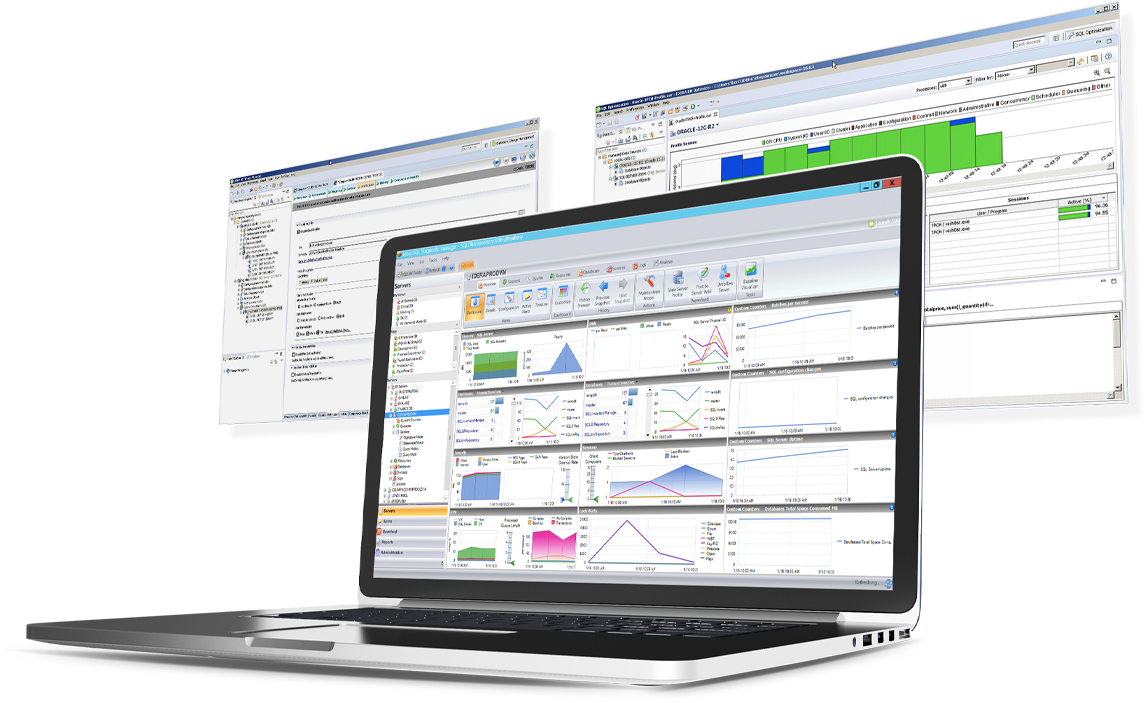
SQL Diagnostic Manager for Microsoft SQL Server helps database administrators to find and fix Microsoft SQL Server performance problems in physical, virtual, and cloud environments. Unlike its competition, it provides effective scalability, advanced SQL query analysis and optimization, prescriptive analysis with corrective SQL scripts, powerful automated alert responses, broad PowerShell integration, complete customization, and extensive support for current and legacy Microsoft SQL Server and…
$1,996
per instance with first year maintenance included
Pricing
BizTalk360
IDERA SQL Diagnostic Manager
Editions & Modules
No answers on this topic
Standard via eCommerce
1,996.00
per instance with first year maintenance included
Offerings
Pricing Offerings
BizTalk360
IDERA SQL Diagnostic Manager
Free Trial
Yes
Yes
Free/Freemium Version
No
No
Premium Consulting/Integration Services
No
No
Entry-level Setup Fee
No setup fee
No setup fee
Additional Details
—
—
More Pricing Information
Community Pulse
BizTalk360
IDERA SQL Diagnostic Manager
Considered Both Products
BizTalk360
Verified User
Anonymous
Chose BizTalk360
In our company, BizTalk360 is used extensively because of its simplicity and the fact that it gives practically everything you need to accomplish routine tasks without the need for a console. Additionally, alarms save a lot of time and keep items on the radar by alerting, …
JBoss is well suited and supports for Open Source Applications where I used to work with BizTalk360 mainly with Windows Servers. BizTalk360 performs pretty much well with Windows. BizTalk360 really performs well with middleware.
IDERA SQL Diagnostic Manager for SQL Server is an excellent tool, however I think Solarwinds Database Perfromance Analyzer is a slightly stronger more well rounded product
IDERA SQL Diagnostic Manager for SQL, Redgate SQL, and MonitorLogicMonitor are similar products to each other. We decided on IDERA SQL Diagnostic Manager for SQL because our experience with locating heavy queries has been very good and it provides real-time monitoring of all …
SQL Server [Business Intelligence] Manager works well with Microsoft products. It has several advanced features along with dashboards and alerts that can be configured to user's need.
All the toolsets we looked at have the same basic feature sets. We felt like IDERA SQL Diagnostic Manager for SQL Server had more features (SQL Doctor features) and better historical features. More toolsets now have a lot of these features, but for eight years, IDERA SQL …
SQL Server Business Intelligence Manager does what SQL Server Management Studio should already do natively. So it actually fills up important gaps Microsoft left in its product.
We compared SQL Server Business Intelligence Manager to our current tool Solarwinds Database Performance Analyzer. Where Solarwinds was deficient, SQL BI manager filled the gap. At the end of the day they were both different tools with different purposes so we concluded it was …
In my experience, BizTalk360 was very helpful when exchanging and directing a Message to Multiple Endpoints including multiple educational platforms. I did not observe any major issues in the latency.
If you have several SQL servers and don't have a lot of time or resources to constantly monitor them, SQLdm will be very helpful. For one or two servers, it might be overkill. All of our servers are virtual, so having a tool that can monitor host metrics as well as guest metrics is a plus as well.
SQLdm does a good job of providing information at a high level, but also allows me to drill down to specific queries and events if needed. I don't always need to sift through tons of details to get the information I need. It also gives a very wide range of information from SQL specific metrics, to OS metrics, to VM metrics, all the way up to host server metrics.
I like how the alert and notification system can be customized. For example, if you know a certain server regularly has long-running queries, you can adjust the alert to not fire unless a query has been running for 30 minutes while the rest of the servers fire after 30 seconds. That is very helpful in not being bombarded at dinner with alerts from a server similar to, "I've been at 90% cpu for 26 milliseconds!!!!!!!...and now it's back down to 30%" Good information to know, but not something you need to literally lose sleep over.
I like how you can configure different servers to be monitored differently. For example, you can have a group of servers called DEVELOPMENT that you can turn on heavier monitoring on so you can test how changes in applications might affect the SQL environment, but in the PRODUCTION group, you may only want to enable the heavier analysis and logging when performance issues are actively being reported.
Windows client has some issues. When you have small time intervals for your data collection, it can cause the client to become unresponsive and require you to restart it.
It takes more time to get the web client running than it does to get the windows client running.
The visualizations have been the same for the last eight years--could use a little bit of a refresh.
In our company, BizTalk360 is used extensively because of its simplicity and the fact that it gives practically everything you need to accomplish routine tasks without the need for a console. Additionally, alarms save a lot of time and keep items on the radar by alerting, monitoring, or a variety of other purposes.
SQL Server [Business Intelligence] Manager works well with Microsoft products. It has several advanced features along with dashboards and alerts that can be configured to user's need.