
TrustRadius: an HG Insights company

IDERA SQL Diagnostic Manager

Score8.1 out of 10

20 Reviews and Ratings

What is IDERA SQL Diagnostic Manager?

SQL Diagnostic Manager for Microsoft SQL Server helps database administrators to find and fix Microsoft SQL Server performance problems in physical, virtual, and cloud environments. Unlike its competition, it provides effective scalability, advanced SQL query analysis and optimization, prescriptive analysis with corrective SQL scripts, powerful automated alert responses, broad PowerShell integration, complete customization, and extensive support for current and legacy Microsoft SQL Server and Windows.

Media

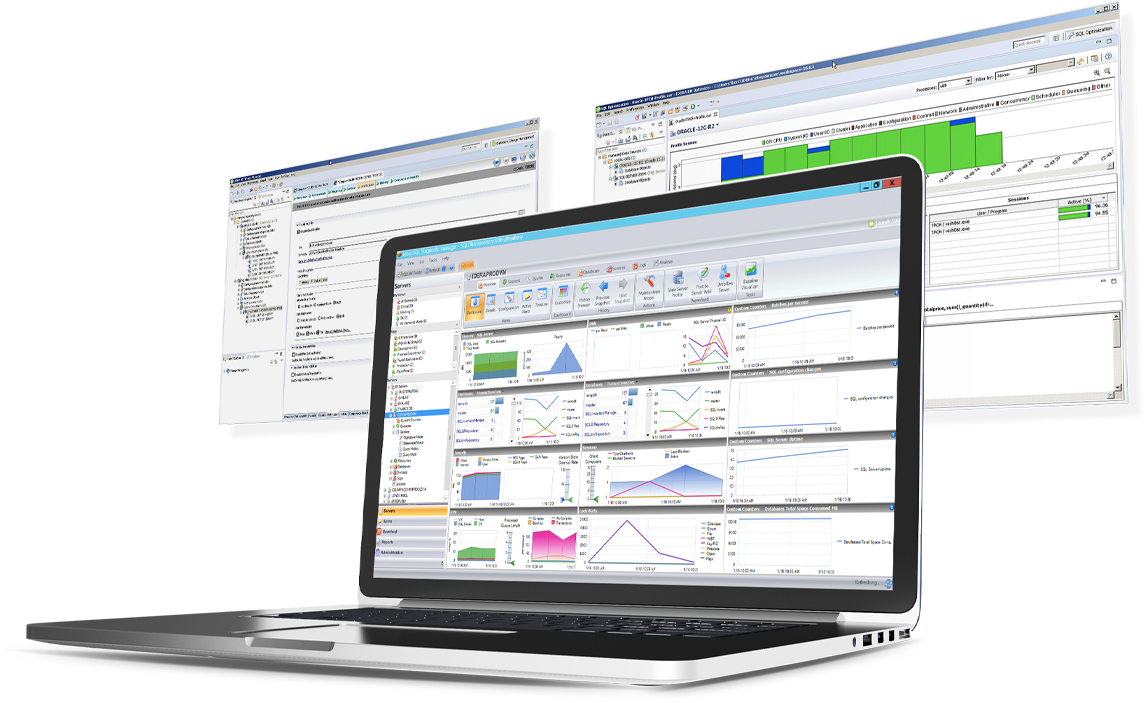
SQL Diagnostic Manager for SQL Server

Top Performing Features

  • Performance dashboard

    Dashboard displays consolidated data with drill-down capability

    Category average: 9.1

  • Top SQL

    Details about any long-running or high impact statements

    Category average: 8.6

  • Historical trend data

    Historical trends and anomalies for SQL tuning

    Category average: 8.6

Areas for Improvement

  • Intelligent alerting

    Customizable alerts and reports indicating outlier values from baseline

    Category average: 7.9

  • Virtualization support

    Root cause analysis for virtual platforms like VMWare or Hyper-V

    Category average: 8.4

IDERA SQL Diagnostic Manager for SQL Server Smart Dashboard

Pros

  • Database query optimization.
  • Monitoring of databases in real time.
  • Performance analysis and trends in the database.

Cons

  • Detection of heavy database queries.
  • Monitoring of database configuration changes.
  • Obtaining data from multiple database servers simultaneously.

Return on Investment

  • Reduce development hours by locating the queries to be optimized.
  • Reduce hardware cost by requiring fewer hardware resources by optimizing database queries.
  • Provides a very complete scorecard.

Alternatives Considered

Redgate SQL Monitor and LogicMonitor

Other Software Used

Oracle SQL Developer, MariaDB MaxScale, SolarWinds Database Performance Analyzer

IDERA SQL Diagnostic Manager for SQL Server fits the bill

Pros

  • Ease of setup--agentless
  • Flexible in terms of configuring alerts and thresholds
  • Cost effective

Cons

  • Windows client has some issues. When you have small time intervals for your data collection, it can cause the client to become unresponsive and require you to restart it.
  • It takes more time to get the web client running than it does to get the windows client running.
  • The visualizations have been the same for the last eight years--could use a little bit of a refresh.

Return on Investment

  • Quickly identify issues around deadlocks and blocking. Quickly allowing for resolution
  • Quickly and easily enable automation around issues so we can reduce the amount of time it takes for resolution of issues
  • Having built-in tools to view things such as index fragmentation--allows you to quickly find correlations in performance issues

Alternatives Considered

Spotlight, Redgate SQL Monitor, SQL Sentry and SolarWinds Database Performance Analyzer

Other Software Used

Slack, GitHub, SQL Server Integration Services, Amazon QuickSight

Great Overall Performance and monitoring software suite.

Use Cases and Deployment Scope

We use IDERA SQL Diagnostic Manager to help us monitor, manage and maintain our SQL Server environment. This helps us proactively instead of reactively deal with and manager our environment properly.

Pros

  • SQL Server Monitoring
  • Alerts
  • Diagnostics

Cons

  • Better alerting
  • More granular notifications
  • More customizable alerting and monitoring

Return on Investment

  • Helps us quickly identify and locate performance issues
  • Reduces amount of time to be alerted to major issues

Alternatives Considered

SolarWinds Database Performance Analyzer

Other Software Used

SolarWinds Database Performance Analyzer, SolarWinds Database Performance Monitor

Great monitoring and alerting for MS SSAS, SSRS and SSIS

Use Cases and Deployment Scope

We're using SQL Server Business Intelligence Manager to monitor our SQL Server BI platforms (analysis services, reporting services, and integration services). It's great at collecting metrics and KPIs regarding query execution and performance for SSAS in both standard and cube models, and also provides great insights for packages executed by SSIS.

Pros

  • Great monitoring capabilities for SSAS, SSRS, and SSIS.
  • Tuning features for SSAS cubes.
  • Configurable alerts.

Cons

  • Some advanced features are hard to get without proper training.
  • Usability has room for improvement.

Return on Investment

  • We've prevented several SSAS outages because of SQL Server Business Intelligence Manager's timely alerts.
  • We've greatly reduced cubes calculation times with SQL Server Business Intelligence Manager's tuning features.

SQLdm is a very clear window into your SQL environment

Pros

  • SQLdm does a good job of providing information at a high level, but also allows me to drill down to specific queries and events if needed. I don't always need to sift through tons of details to get the information I need. It also gives a very wide range of information from SQL specific metrics, to OS metrics, to VM metrics, all the way up to host server metrics.
  • I like how the alert and notification system can be customized. For example, if you know a certain server regularly has long-running queries, you can adjust the alert to not fire unless a query has been running for 30 minutes while the rest of the servers fire after 30 seconds. That is very helpful in not being bombarded at dinner with alerts from a server similar to, "I've been at 90% cpu for 26 milliseconds!!!!!!!...and now it's back down to 30%" Good information to know, but not something you need to literally lose sleep over.
  • I like how you can configure different servers to be monitored differently. For example, you can have a group of servers called DEVELOPMENT that you can turn on heavier monitoring on so you can test how changes in applications might affect the SQL environment, but in the PRODUCTION group, you may only want to enable the heavier analysis and logging when performance issues are actively being reported.

Cons

  • While there is reporting present in the app, I don't find it to be very configurable. I eventually pointed our reporting software at the SQLdm database so I could craft my own reporting. The reporting that's there is sufficient for a lot of things, but for more detailed analysis and trending, it's a little light
  • The config right out of the box feels a little heavy to me. It leans towards the side of over monitoring and over notifying. For example, I view "critical" alerts as those that I'd want to be woken up at 3am for. After a fresh install, I felt like I was getting so many "critical" alerts that I was starting to ignore them. I had to spend a good bit of time tweaking.
  • Sometimes the interface seems laggy. Switching between individual servers and switching screens can take what feels like a long time. I'm not sure if it's the way I have the client configured or something up with my machine, but this app in particular feels slower than it should.

Return on Investment

  • It saves me a significant amount of time each week, freeing me up for other important tasks. I couldn't possibly monitor each server individually to the extent that SQLdm does.
  • With the wealth of information I can get to easily, I can be more proactive in taking care of my environments rather than reactive. The times when other people notice something happening before I do are few and far between.