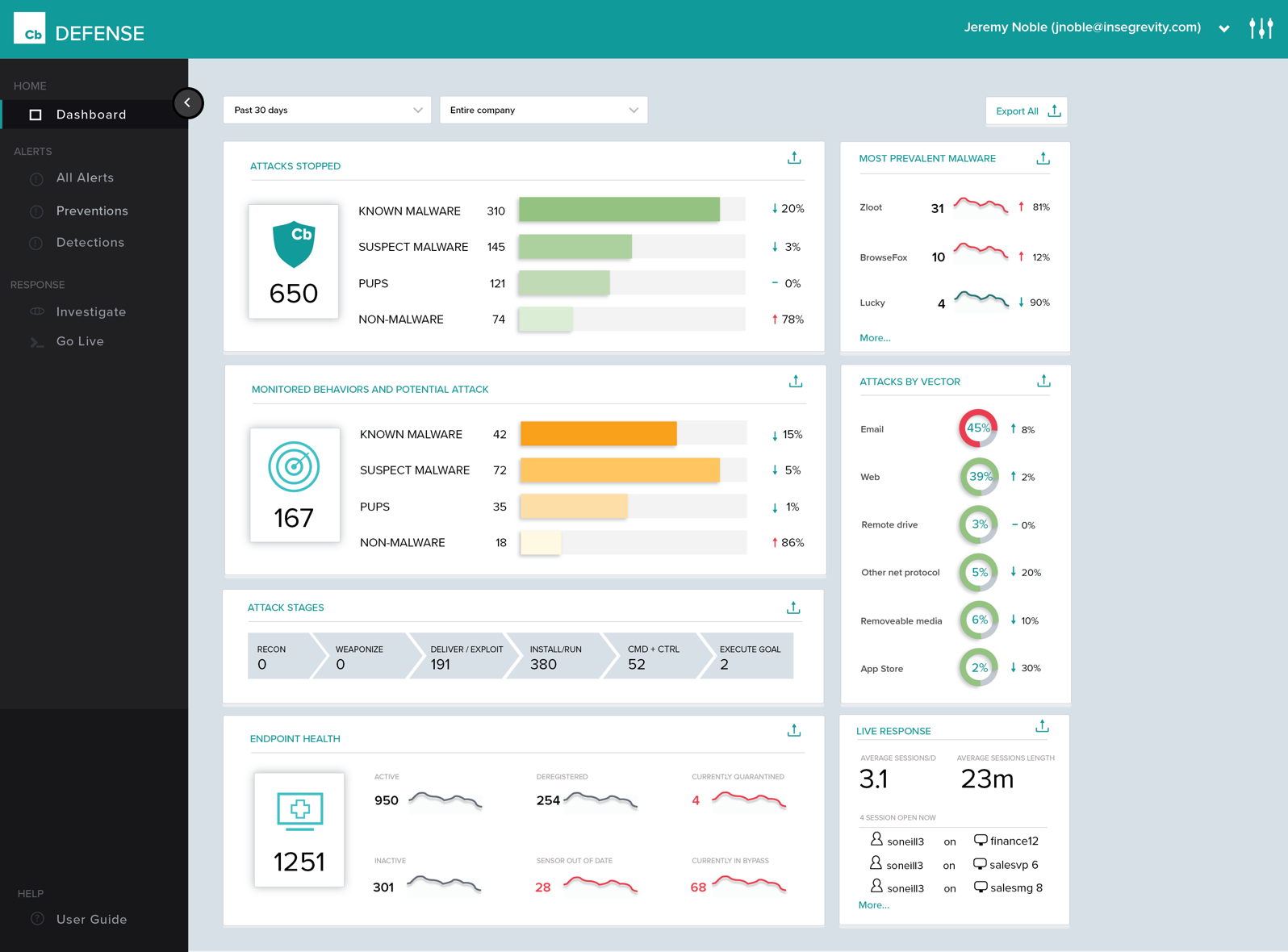
Carbon Black Endpoint is an endpoint security and "next-gen antivirus (NGAV)" that uses machine learning and behavioral models to analyze endpoint data and uncover malicious activity to stop all types of attacks before they reach critical systems.
N/A
Proxmox VE
Score9.2 out of 10
N/A
Proxmox Virtual Environment is an open source server virtualization management solution based on QEMU/KVM and LXC. Users can manage virtual machines, containers, highly available clusters, storage and networks via a web interface or CLI. Proxmox VE code is licensed under the GNU Affero General Public License, version 3. The project is developed and maintained by Proxmox Server Solutions GmbH.
$7.50
per month
Pricing
Carbon Black Endpoint
Proxmox VE
Editions & Modules
No answers on this topic
Community
€ 90
year & CPU socket
Basic
€ 280
year & CPU socket
Standard
€ 420
year & CPU socket
Premium
€ 840
year & CPU socket
Offerings
Pricing Offerings
Carbon Black Endpoint
Proxmox VE
Free Trial
No
No
Free/Freemium Version
No
Yes
Premium Consulting/Integration Services
No
No
Entry-level Setup Fee
No setup fee
No setup fee
Additional Details
—
Proxmox Virtual Environment's source code is published under the free software license GNU AGPL, v3 and thus is freely available for download, use and share. A Proxmox VE Subscription is an additional service program that helps IT professionals and businesses keep Proxmox VE deployments up-to-date. A subscription provides access to the stable Proxmox VE Enterprise Repository delivering software updates and security enhancements, technical help and support.
Cb Defense has been working very well in our organization. It is giving us much better insight into the applications that people are running on their systems (without authorization). This software is also great because it provides visibility into systems that are remote (off the network but still have Internet access). The out of band feature is great to help ensure that the systems are protected even when a user is traveling.
A de minimis incentive was given to thank the reviewer for their time. The incentive was not used to bias or drive a particular response, nor was the incentive contingent on a positive endorsement. More Info
We used Proxmox to implement private cloud services, for clusters of a small number of servers, from 3 to 11 with and without high availability. Allways with ZFS file systems, and we used to install the root pool in SSDs mirrored and use other pools with RAID 10 in groups of four, for the virtual machines and containers, for the backups and snapshots, we used magnetic disks with RAID 10, in groups of four. Do not use an even number of servers because does not facilitates the implementation of High Availability, because the corosync service must have an odd number of servers to detect a failed server for the quorum system. We used a variety of servers, from clone PCs with AMD Ryzen with 6 cores and 12 threads with 64 GB of RAM no ECC, to high end servers with 64 cores and 128 threads per cpu and 2 cpus per server, with AMD EPYC Rome or Milan, 2 terabytes of RAM ECC.
A de minimis incentive was given to thank the reviewer for their time. The incentive was not used to bias or drive a particular response, nor was the incentive contingent on a positive endorsement. More Info
History of Process Execution, really anything that happens in the system is easily seen within the Dashboard. I can determine if a bad actor has infected the system, be it malware, backdoor, rootkit, Trojan, then from that point, I can put the system into Quarantine.
Being able to quarantine the system from the Dashboard. With these type of tools, pulling the power and running a hard drive image is not needed. Put the system in quarantine, start the analysis. A year ago, the network engineer might move the system into a VLAN that has no access to anything, except the system performing the remote analysis... Now I do not have to rely on anyone to move a system, power it down, pull the drive, or image the drive. I can just start the analysis right from my workstation.
The Live Response, again goes hand in hand with the quarantine feature.
By now, I am sure you see a process. Its simple, and easy and all done from a cloud-based console, called the dashboard. .. deploy the agent, create the policy, and active live response, set up email alerts, and monitor your endpoints... you are now ready to perform a triage in the event of an infection. We have step 1, step 2, step 3... but, just remember, things do happen, nothing is perfect, but this product has its advantages.
A de minimis incentive was given to thank the reviewer for their time. The incentive was not used to bias or drive a particular response, nor was the incentive contingent on a positive endorsement. More Info
Policy management can be cumbersome. It is simple to set up a single policy but you have no way to apply the rules to multiple groups. If you need to set up the same rule to multiple policies, you need to type it over again.
Agent updates can be very slow to deploy. We use a mix of rolling out updates via the web console and our management appliance. It can take several weeks to update all agents.
We can be confused on why a rule will apply to a file. Sometimes something is blocked but we don't understand why.
A de minimis incentive was given to thank the reviewer for their time. The incentive was not used to bias or drive a particular response, nor was the incentive contingent on a positive endorsement. More Info
The web UI does not work as well on mobile devices. It is useable, but a mobile optimised / responsive UI would be nice to have. There is a mobile app, so that may alleviate this issue, but I have not yet tried it.
Support in the community forums could be better. There are paid support plans, but new users trying out the software will not have access to this. Answers to questions can sometimes be terse, and I can imagine this may put some people off.
The wiki is a bit hit and miss with certain topics. I've often seen outdated or missing information, and the whole thing looks like it could do with some polish. I'd love to see it opened up for the community to add to.
A de minimis incentive was given to thank the reviewer for their time. The incentive was not used to bias or drive a particular response, nor was the incentive contingent on a positive endorsement. More Info
Proxmox VE provides the most capable, yet stable virtualization platform in the market today. Licensing options are also competitive and cost-effective for support, and support is extremely fast and knowledgable of getting issues resolved as quickly and soundly as possible.
A de minimis incentive was given to thank the reviewer for their time. The incentive was not used to bias or drive a particular response, nor was the incentive contingent on a positive endorsement. More Info
The console of the product is very easy to use. It provides great detailed information about all aspects of things occurring on the endpoint. It was easy to deploy and set up. The centralized cloud-based interface has made it easy to add two domains and manage them under a single pane with multiple admins. The only reason I wouldn't give it a higher score is a little bit of lag between updated info from the clients and also the lack of accountability in the deployment process. You set the deployment up for multiple machines and can't easily see if it was successful and/or it takes a while to see if it succeeded or failed.
A de minimis incentive was given to thank the reviewer for their time. The incentive was not used to bias or drive a particular response, nor was the incentive contingent on a positive endorsement. More Info
The interface is easy to use for most of it, but still lacks screens for some configurations. Also, a few of the screens are not as intuitive as they could be. This is specially true with disk and network configuration, where some graphic/visual representations of the configurations would be very useful
A de minimis incentive was given to thank the reviewer for their time. The incentive was not used to bias or drive a particular response, nor was the incentive contingent on a positive endorsement. More Info
Proxmox VE's ha-cluster functionality is very much improved, though does have a not-very-often occurrence of failure. In a 2-node cluster of Proxmox VE, HA can fail causing an instance that is supposed to migrate between the two nodes stop and fail until manually recovered through the command-line tools provided. Other than this, the HA clustering capability of Proxmox VE has proven to be reliable in 3 or more clustered environments with much less chance of these failures to occur.
A de minimis incentive was given to thank the reviewer for their time. The incentive was not used to bias or drive a particular response, nor was the incentive contingent on a positive endorsement. More Info
Proxmox VE's interfacing is always fast to load, both the Web interface and the command-line tool interfaces. Reporting is practically real time almost all the time, and you can see everything in mere seconds, easily able to identify if something is wrong or it everything is in tip-top shape as always desired
A de minimis incentive was given to thank the reviewer for their time. The incentive was not used to bias or drive a particular response, nor was the incentive contingent on a positive endorsement. More Info
First, I need to disclose that our support is provided by SecureWorks. We purchased CB Defense from them, and they provide 24x7 monitoring and notification services for the solution and its deployment on our endpoints. To date, we are very pleased with this arrangement
A de minimis incentive was given to thank the reviewer for their time. The incentive was not used to bias or drive a particular response, nor was the incentive contingent on a positive endorsement. More Info
A de minimis incentive was given to thank the reviewer for their time. The incentive was not used to bias or drive a particular response, nor was the incentive contingent on a positive endorsement. More Info
A de minimis incentive was given to thank the reviewer for their time. The incentive was not used to bias or drive a particular response, nor was the incentive contingent on a positive endorsement. More Info
Cb is cloud-based and has a more advanced policy management. It also has better forensics information. Cost was similar, but Cb added cost savings in terms of IT management resources. We also have the ability to talk directly with engineers and have input on feature updates.
A de minimis incentive was given to thank the reviewer for their time. The incentive was not used to bias or drive a particular response, nor was the incentive contingent on a positive endorsement. More Info
Proxmox VE is cheaper than VMware, especially upscaling an HA architecture. Compared with other free or less expensive solutions, Proxmox VE is high compatible with more types of hardware solutions and more VM types. From my point of view, Proxmox VE has no competitor at the same price level, it offers the most complete and production-ready HA solution.
A de minimis incentive was given to thank the reviewer for their time. The incentive was not used to bias or drive a particular response, nor was the incentive contingent on a positive endorsement. More Info
Proxmox VE provides everything you need to quickly add new storage mediums, network and local, as well as networking interfaces, such as using Linux standard bridges and now Open-vSwitch bridges which can be even more scalable than before. Proxmox VE 4.0 dropped support for OpenVZ in favor of the more well supported and native LXC and made an upgrade path to it very simple.
A de minimis incentive was given to thank the reviewer for their time. The incentive was not used to bias or drive a particular response, nor was the incentive contingent on a positive endorsement. More Info
A de minimis incentive was given to thank the reviewer for their time. The incentive was not used to bias or drive a particular response, nor was the incentive contingent on a positive endorsement. More Info
A de minimis incentive was given to thank the reviewer for their time. The incentive was not used to bias or drive a particular response, nor was the incentive contingent on a positive endorsement. More Info