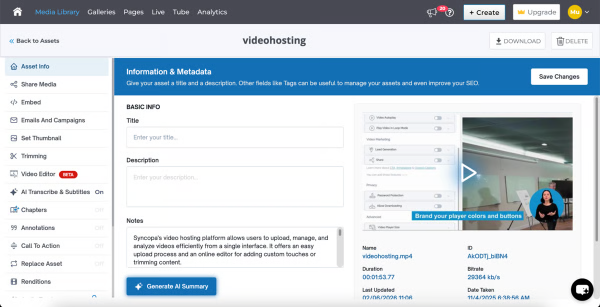
Cincopa is a video knowledge management platform that converts video and document assets into searchable, structured knowledge environments. The solution utilizes Artificial Intelligence (AI) to index multimedia content, allowing users to query libraries using natural language to locate specific information within media files. Key Capabilities Structured Knowledge Environments: The platform organizes Video Assets and Digital Documents into categorized…
$99
per month
Verint Knowledge Management
Score 8.0 out of 10
N/A
Verint Knowledge Management aim to help agents find and share the information needed to answer both customer inquiries and questions they may have themselves. The solution helps ensure the answers agents access are consistent, up to date, and easily accessible.
N/A
Pricing
Cincopa
Verint Knowledge Management
Editions & Modules
Starter
$99.00
per month
Growth
$349.00
per month
KM Professional
Contact Sales
per year Per Interaction
KM Enterprise
Contact Sales
KM Enterprise
Contact Sales
per year Per Interaction
Offerings
Pricing Offerings
Cincopa
Verint Knowledge Management
Free Trial
No
No
Free/Freemium Version
No
No
Premium Consulting/Integration Services
No
Yes
Entry-level Setup Fee
Optional
Optional
Additional Details
—
—
More Pricing Information
Community Pulse
Cincopa
Verint Knowledge Management
Features
Cincopa
Verint Knowledge Management
Video Marketing
Comparison of Video Marketing features of Product A and Product B
Cincopa
8.6
17 Ratings
12% above category average
Verint Knowledge Management
-
Ratings
Lead generation
7.014 Ratings
00 Ratings
Video personalization
9.914 Ratings
00 Ratings
eCommerce
8.76 Ratings
00 Ratings
Support for advertisements
8.59 Ratings
00 Ratings
Video SEO
8.913 Ratings
00 Ratings
Integration to Marketing Automation
8.69 Ratings
00 Ratings
Video Platform Integrations
Comparison of Video Platform Integrations features of Product A and Product B
Cincopa
8.2
5 Ratings
28% above category average
Verint Knowledge Management
-
Ratings
Integration to Salesforce.com
8.24 Ratings
00 Ratings
Integration to Marketo
8.24 Ratings
00 Ratings
Integration to HubSpot
8.35 Ratings
00 Ratings
Video Security
Comparison of Video Security features of Product A and Product B
Cincopa
9.2
16 Ratings
7% above category average
Verint Knowledge Management
-
Ratings
Video access controls
9.016 Ratings
00 Ratings
User management
9.016 Ratings
00 Ratings
Video link sharing
9.915 Ratings
00 Ratings
Internal video
9.013 Ratings
00 Ratings
External video
9.014 Ratings
00 Ratings
Video Player
Comparison of Video Player features of Product A and Product B
Cincopa
9.0
19 Ratings
9% above category average
Verint Knowledge Management
-
Ratings
Player customization
9.019 Ratings
00 Ratings
Embedded videos
9.018 Ratings
00 Ratings
Video quality / Bandwidth controls
9.016 Ratings
00 Ratings
Mobile compatibility
9.017 Ratings
00 Ratings
Video Analytics
Comparison of Video Analytics features of Product A and Product B
Cincopa
9.9
14 Ratings
23% above category average
Verint Knowledge Management
-
Ratings
Per viewer tracking
10.013 Ratings
00 Ratings
Per video tracking
9.914 Ratings
00 Ratings
Video analytics dashboard
9.712 Ratings
00 Ratings
Video Hosting, Management & Storage
Comparison of Video Hosting, Management & Storage features of Product A and Product B
Cincopa
8.7
15 Ratings
1% above category average
Verint Knowledge Management
-
Ratings
On-Demand video
9.010 Ratings
00 Ratings
Live streaming
9.06 Ratings
00 Ratings
Video upload & format support
8.115 Ratings
00 Ratings
Video library / File management
9.015 Ratings
00 Ratings
Video portal
8.110 Ratings
00 Ratings
Video Engagement
Comparison of Video Engagement features of Product A and Product B
I would say that Cincopa is a first-stop for any dev project without an internal gallery option. This is especially true if the person in charge of content or building the galleries is not a coder. Cincopa makes designing a good looking gallery and inserting it into nearly any webpage a pretty simple process, so it is a great starting place. There may be other options that would fit a different development project better (internal gallery functions or a full-scale DAM with importable galleries), but for our purposes Cincopa was (and is) a perfect fit.
Verint KMS is great for organizing content by categories for different teams and by different topics. It is easy to search and the Related Content makes moving from one piece of content to the next relevant piece quite easy. On the authoring side, the ability to schedule publishing or expiration is very handy. It is also really easy to make edits and have content ready and published for readers quickly. Verint's KMS isn't well suited if your users wish to be able to organize their favourited content or if you need a wide-range of options on the authoring end of things.
The tools to submit and manage user feedback are very effective - they help us respond quickly and interconnect the feedback to the applicable content.
The end user experience is clean and feels familiar, making it optimal to support a group of people who generally have never experienced a KM application before.
Our audience responds well to our ability to insert images, GIFs, videos, PDFs, and more into our content.
The number of pictures for the upload should be slightly higher.
The previous calculation of the traffic is difficult.
If many pictures have to be deleted from a gallery, that does not happen so fast, because only 50 pictures are loaded. Then you have to scroll all the way down and wait until the next 50 images are loaded, in order to be able to mark them for deletion. This takes a while with 800 pictures for example.
The authoring side could be improved with additional options for fonts and easier formatting for table content. I have issues with trying to add colour to one portion of a table and not the other, so I have to resort to creating in Word first and then copying over to Verint. There is also no option to create steps in one row and the next step in the next row. I end up just adding 1., 2., etc. manually.
Many users would like to be able to organize their bookmarks into folders and the system doesn't allow this. Many have taken to creating bookmark folders in Microsoft Edge instead.
There were a few bugs that went on for a few months that made the initial launch of the KMS more difficult for the users and on the authoring side. The issues were with how the search results came up and what displayed for related content. It wasn't the best first impression for our agents using the system while on calls and made it more difficult. The issues were fixed after a few months of use.
Cincopa is very easy to use, especially to the uninitiated. You don't need a degree in CS or years of experience to set-up a fantastic looking gallery. The interface is self-explanatory for the most part and very easy to use. The drag-and-drop functionality makes it simple and inviting for all users.
Verint KM has many features that - when used the 'right way' can expedite search, content usage, and maintenance. Unfortunately, not all end users want to be bothered with 'the right way' and are looking for simplistic and predictive options (which any KM solution would be hard-pressed to deliver).
The support and development teams for Knowledge are exceptional. They are attentive and truly care about the experience of their customers and their goals
Cincopa has nice templates that are easy to use. The images can be moved about, more images added, and the size changed.
I particularly like the Pinterest style template, as it fits in well with the number of images that I need to display on my website. The more choices displayed, the more likely customers are to order.
All of these tools were very useful and practical. For our decision, it came down to understanding our core audience - we determined our average associate was largely unfamiliar with call center and office work in their prior work experience, and as such they would not have previously worked in a KM application before. To help adoption, we sought the solution with the simplest and most familiar interface, and based on internal focus group feedback, that was Verint KM Pro.
The video that we uploaded to our website will show prospects in the area around our apartment community and hopefully give them a good idea of how close they can be to work/school.
Our video will result in more apartments being rented which will have a positive impact on our ROI.
Our video will give residents and prospects a positive image of our community.
Content is easier to keep up to date and publish on an urgent basis.
Some users love the system, while others still find it difficult to find the information they need and miss the former guides we used. I think this is a result of the system issues that persisted for a few months after launch and will hopefully improve with time.
Users love being able to submit feedback and it makes it easier for errors, missing information and out of date information to be caught and fixed.