ClickHelp is an online documentation tool from the company of the same name headquartered in Yerevan, Armenia, used by software companies to create user manuals, knowledge bases, FAQs, tutorials, etc., and publish them instantly in their portal.
$194
per month
MadCap Xyleme
Score6 out of 10
N/A
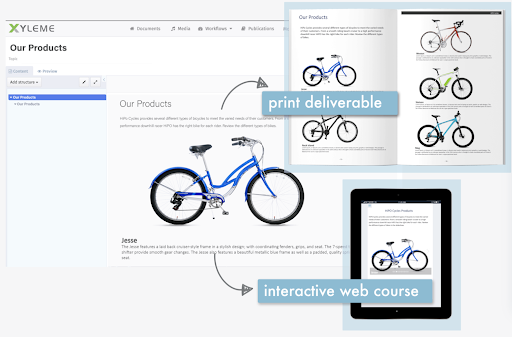
Xyleme is a robust Component and Learning Content Management Solution dedicated to providing users with an easy and safe way to create and disseminate learning materials and other business-related content. It comes equipped with several features that focus on creating a central, single source of truth for an organization’s content.
ClickHelp is great for both big and small documentation teams. The platform is not too complex to overwhelm a small team, and neither is it too simple for a well-advanced documentation team. Scale ClickHep depending on your documentation needs, and the features are simple to understand. I also appreciate the extensive documentation that is available for new users to ClickHelp. The ClickHelp knowledgebase provides answers to every scenario, use case, feature, and functionality. The ClickHelp support team is also very responsive.
A de minimis incentive was given to thank the reviewer for their time. The incentive was not used to bias or drive a particular response, nor was the incentive contingent on a positive endorsement. TR verified that a representative sample of customers was invited. More Info
Building and keeping up to date modular content (blocks).
Maintaining and updating large content library where meaning team members might be working on the same content but using the content in different context (e.g. learning and internal comms).
Creating learning content by new/recently onboarded team members.
Create simple learning courses with some level of interactively, medium interactivity (tabs, image maps, slider reveal images), create different types of knowledge checks/assessments from multiple choice to drag and drop activities); embed videos and other HTML elements .
Integrate with LMS, apply SCORM rules etc
Better to use in combination with other media creation tools like Vyond, Storyline. Some things can get tricky (compatibility).
Less appropriate: 1. If you need to build highly interactive learning experience 2. When you don't have a team member you can dedicate specifically to customize templates in Xyleme for your organizational needs (looks, functionality etc.) or and to train team members on this software. You'd need someone on your team to collaborate with Xyleme closely to customize functions for your organization's needs. 3. When #2 and you want a modern/in trend looking output and not willing to compromise on what it looks and feels.
A de minimis incentive was given to thank the reviewer for their time. The incentive was not used to bias or drive a particular response, nor was the incentive contingent on a positive endorsement. More Info
A de minimis incentive was given to thank the reviewer for their time. The incentive was not used to bias or drive a particular response, nor was the incentive contingent on a positive endorsement. TR verified that a representative sample of customers was invited. More Info
A de minimis incentive was given to thank the reviewer for their time. The incentive was not used to bias or drive a particular response, nor was the incentive contingent on a positive endorsement. More Info
The See Also element should be able to automatically update when a new topic is added. Currently, we have to manually remove and re-add the element to do that.
Ability to host image files externally (eg. S3, Dropbox), like it is done for videos. This will help save storage.
Image files from imported projects are always duplicated, perhaps a bug, but it needs to be looked into.
A de minimis incentive was given to thank the reviewer for their time. The incentive was not used to bias or drive a particular response, nor was the incentive contingent on a positive endorsement. TR verified that a representative sample of customers was invited. More Info
several features advertised as device agnostic or mobile friendly do not work properly on mobile
finicky in many ways, sometimes you need to tinker with details for to long to make things work properly
many UI solutions/elements that are not intuitive at all (even using the tool almost every day you need to make effort to remember how things are done)
A de minimis incentive was given to thank the reviewer for their time. The incentive was not used to bias or drive a particular response, nor was the incentive contingent on a positive endorsement. More Info
ClickHelp provides an extensive array of features compared to what we used previously. The WYSIWYG editor is so simple, yet brings with it really cool content editing elements. Publishing content is straightforward with ClickHelp. I can publish a part of a document for partial updates, or create a new publication. I get to host multiple versions of one product documentation based on the software versions we support. The analytics provided is also very insightful.
A de minimis incentive was given to thank the reviewer for their time. The incentive was not used to bias or drive a particular response, nor was the incentive contingent on a positive endorsement. TR verified that a representative sample of customers was invited. More Info
We are able to cater to all our end-users regardless of the software version they are using, simply because we are able to provide multiple product documentation versions.
Our documentation publishing time was reduced significantly due to the smooth process on ClickHelp.
With one platform where all our product documentation can be housed, we are expanding technical documentation to other products.
A de minimis incentive was given to thank the reviewer for their time. The incentive was not used to bias or drive a particular response, nor was the incentive contingent on a positive endorsement. TR verified that a representative sample of customers was invited. More Info
A de minimis incentive was given to thank the reviewer for their time. The incentive was not used to bias or drive a particular response, nor was the incentive contingent on a positive endorsement. More Info