TrustRadius: an HG Insights company

ConceptDraw PROJECT vs. Planview ProjectAdvantage

Save this comparison

Save this comparison

Add Product

Recommended Comparisons

    Overview
    ProductRatingMost Used ByProduct SummaryStarting Price

    ConceptDraw PROJECT

    Score9 out of 10
    N/AConceptDraw PROJECT is a project management tool providing a set of options to plan and implement projects successfully, and belongs to the ConceptDraw OFFICE suite. The core features of the tool are task and resource management and reporting, along with change control. The vendor says managing multiple projects is simple due to the Gantt Chart and Multi-Project Views and shared Resource Pool. Tasks that occur on a…N/A

    Planview ProjectAdvantage

    Score8.9 out of 10
    N/APlanview ProjectAdvantage is a project and portfolio management (PPM) platform for mid-sized organizations and developing project management offices (PMOs). The platform centralizes project, program, resource, financial, and performance data through configurable workflows, dashboards, and AI-assisted planning tools. The vendor reports that organizations across IT, research and development, and product development use ProjectAdvantage to plan work, allocate…N/A
    Pricing
    ConceptDraw PROJECTPlanview ProjectAdvantage
    Editions & Modules
    No answers on this topic
    No answers on this topic
    Offerings
    Pricing Offerings
    ConceptDraw PROJECTPlanview ProjectAdvantage
    Free Trial
    YesYes
    Free/Freemium Version
    NoNo
    Premium Consulting/Integration Services
    NoYes
    Entry-level Setup FeeNo setup feeRequired
    Additional DetailsPrice varies for Individual, Commercial, Academic, Nonprofit and Government—
    More Pricing Information
    Features
    ConceptDraw PROJECTPlanview ProjectAdvantage
    Project Management
    Comparison of Project Management features of ConceptDraw PROJECT and Planview ProjectAdvantage
    Feature
    ConceptDraw PROJECT
    9.0
    3 Ratings
    16% above category average
    Planview ProjectAdvantage
    -
    Ratings
    Task Management9.63 Ratings00 Ratings
    Resource Management9.63 Ratings00 Ratings
    Gantt Charts9.63 Ratings00 Ratings
    Scheduling9.53 Ratings00 Ratings
    Email integration10.01 Ratings00 Ratings
    Timesheet Tracking7.01 Ratings00 Ratings
    Budget and Expense Management7.93 Ratings00 Ratings
    Professional Services Automation
    Comparison of Professional Services Automation features of ConceptDraw PROJECT and Planview ProjectAdvantage
    Feature
    ConceptDraw PROJECT
    9.4
    3 Ratings
    20% above category average
    Planview ProjectAdvantage
    -
    Ratings
    Project & financial reporting9.43 Ratings00 Ratings
    Best Alternatives
    ConceptDraw PROJECTPlanview ProjectAdvantage
    Small Businesses
    Any.do
    Score8 out of 10
    No answers on this topic
    Medium-sized Companies
    KanbanFlow
    Score7.3 out of 10
    Microsoft Project Server
    Score5.1 out of 10
    Enterprises
    Microsoft To Do
    Score7.9 out of 10
    Planview PPM Pro
    Score8.9 out of 10
    All AlternativesView all alternativesView all alternatives
    User Ratings
    ConceptDraw PROJECTPlanview ProjectAdvantage
    Likelihood to Recommend
    9.6
    (3 ratings)
    10.0
    (3 ratings)
    Support Rating
    9.4
    (3 ratings)
    10.0
    (1 ratings)
    User Testimonials
    ConceptDraw PROJECTPlanview ProjectAdvantage
    Likelihood to Recommend
    CS Odessa LLC
    Getting started - using the Gantt chart to enter tasks in any order and then using those tasks to initially define a MindMap to further explore alternative dependencies. The alternative works better when initiating a project with significant unknowns.
    Read full review
    Planview
    Yes, definitely. We wanted a flexible but robust software and Sciforma seemed to be the best fit
    Read full review
    Pros
    CS Odessa LLC
    • Integration with ConceptDraw Mindmap makes work breakdown very easy.
    • We have cross-functional teams where team members often work on different projects in parallel. The multi project management feature has been a blessing over these years.
    • Another import feature is the availability of many different predefined report generation templates that made it very easy to communicate different aspects of the project to different stakeholders.
    Read full review
    Planview
    • Scheduling tasks.
    • Assigning resources and cost items.
    • Managing a team.
    Incentivized
    Read full review
    Cons
    CS Odessa LLC
    • Non-intuitive keyboard shortcuts
    • No advanced reporting or estimates
    Incentivized
    Read full review
    Planview
    • The largest con for me is the clunky UI. It's not very intuitive, and has a larger learning curve to become a proficient user.
    • Reports are functional, but could use some improvements.
    • It can be slow at times, and you have to wait to make sure your changes are saved before moving on.
    Incentivized
    Read full review
    Support Rating
    CS Odessa LLC
    Online tutorials always available + chat, email and phone. Questions answered promptly and completely.
    Read full review
    Planview
    This software allows project and portfolio managers to analyze and prioritize projects based on resource allocation and available effort. It helps you compare the sorecast effort with resource availability. You can email, call or tweet them if you have concerns.
    Incentivized
    Read full review
    Alternatives Considered
    CS Odessa LLC
    ConceptDraw has a much simpler licensing and pricing model. Perpetual license and ability to use in offline mode was an important criteria for us. Perfect bundle for small and medium business.
    Read full review
    Planview
    We were looking at vendors but they didn't meet our expectations and weren't flexible enough.
    Read full review
    Return on Investment
    CS Odessa LLC
    • Inexpensive way to present a professional project plan when needed
    Incentivized
    Read full review
    Planview
    • Before Sciforma we were running projects out of Excel and emails. Using a cloud based application means that everyone is viewing information in real time.
    • Our executive leadership knows that they have one place to go for a real time status on all of our strategic projects.
    Incentivized
    Read full review
    ScreenShots

    ConceptDraw PROJECT Screenshots

    Screenshot of Resource AllocationScreenshot of Gantt Chart ViewScreenshot of Multiproject DashboardScreenshot of Split and Recurring TasksScreenshot of Micro ReportsScreenshot of Custom Fields to a Project Schedule

    Planview ProjectAdvantage Screenshots

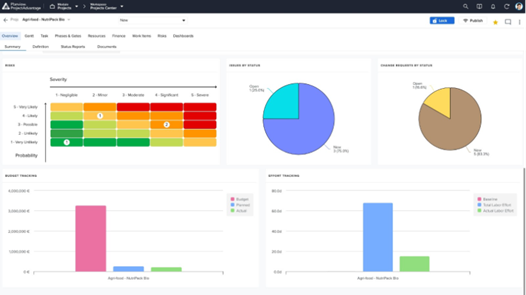
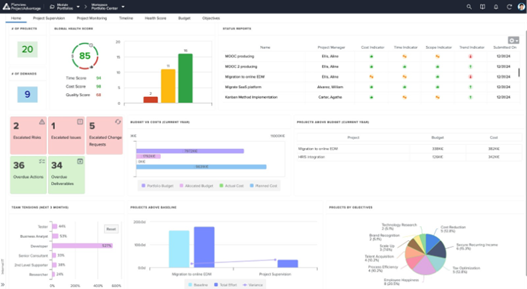
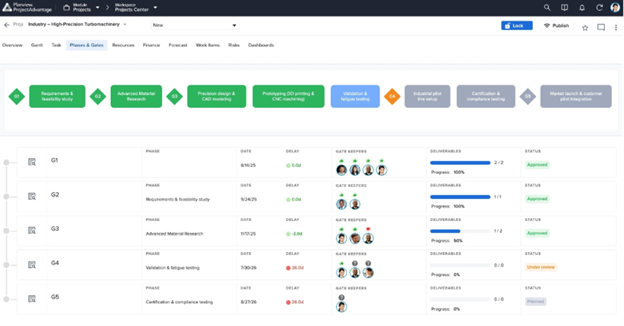
    Screenshot of Project Dashboard Summary View - A consolidated dashboard showing project health, status, and key metrics at a glance.Screenshot of Dashboard Summary View - A portfolio-level dashboard summarizing project performance, financials, and overall portfolio health.Screenshot of Resource Forecast and Capacity View - Visualize resource demand against available capacity to plan and allocate teams effectively.Screenshot of Phase Gate - Summary View Page - Track project progression through governance gates with clear milestone visibility.Screenshot of Demand / Idea Qualification - Capture, evaluate, and qualify incoming ideas and demands before they enter the pipeline.