DashboardFox vs. Klipfolio Klips

Overview
ProductRatingMost Used ByProduct SummaryStarting Price
DashboardFox
Score 0.0 out of 10
N/A
DashboardFox is cloud-based business intelligence and dashboard software from 5000fish, built for teams that create and deliver dashboards and reports to clients, departments, or business units. It is priced by monthly active users (MAU) rather than per seat, so organizations pay for a tier instead of for every login, and accounts that do not sign in are not counted. Row-level security, white-label branding, and custom domains are included in every plan, which…
$99
per month Monthly Active User (MAU)
Klipfolio Klips
Score 9.2 out of 10
Small Businesses (1-50 employees)
Klipfolio is a customizable dashboard and reporting platform that provides real-time business insights. It is used by small to mid-sized businesses and agencies to track performance metrics and create tailored reports, and to consolidate, transform, and visualize data.
$90
per month
Pricing
DashboardFoxKlipfolio Klips
Editions & Modules
Starter
$99
per month Monthly Active Users (MAU)
Growth
$249
per month Monthly Active Users (MAU)
Scale
$499
per month Monthly Active Users (MAU)
Starter
$4,995
one-time fee per user
Growth
$9,995
one-time fee per user
Business
$14,995
one-time fee per user
Premium
$19,995
one-time fee per user
Base
$90
per month
Grow
$190
per month
Team
$350
per month
Offerings
Pricing Offerings
DashboardFoxKlipfolio Klips
Free Trial
YesYes
Free/Freemium Version
NoNo
Premium Consulting/Integration Services
YesYes
Entry-level Setup FeeNo setup feeOptional
Additional DetailsA primary pricing consideration is the licensing model: DashboardFox is priced by monthly active users (MAU), not per seat. You pay for a tier, and only users who actually log in count toward it — recipients who view shared or scheduled reports without logging in are excluded. For teams with many occasional or read-only users, this is often more cost-effective than per-seat BI tools. Feature inclusion is also notable: row-level security, white-label branding, custom domains, and unlimited reports and dashboards are standard on every plan, including the $99/month Starter tier. Higher tiers scale capacity (more MAU, concurrent load, larger datasets, FastCache, Server Sync) and support levels rather than unlocking core features. Connecting data sources incurs no cost — there are no per-connector fees and no ETL requirement. Additional factors for buyers: annual billing provides a 20% discount; every plan includes a 7-day trial with no credit card required; discounts are available for nonprofits, education, government, and agencies/resellers; and for teams preferring to avoid subscriptions, a self-hosted perpetual license is available from $4,995, with the first year of upgrades and priority support included.Discount available for annual pricing. There are various implementation and training options available, from a 60 Day Proof of Concept, to Onboarding & Training, or ongoing dedicated Data Hero support.
More Pricing Information
Community Pulse
DashboardFoxKlipfolio Klips
Features
DashboardFoxKlipfolio Klips
BI Standard Reporting
Comparison of BI Standard Reporting features of Product A and Product B
DashboardFox
-
Ratings
Klipfolio Klips
9.0
33 Ratings
11% above category average
Pixel Perfect reports00 Ratings9.13 Ratings
Customizable dashboards00 Ratings8.933 Ratings
Report Formatting Templates00 Ratings9.13 Ratings
Ad-hoc Reporting
Comparison of Ad-hoc Reporting features of Product A and Product B
DashboardFox
-
Ratings
Klipfolio Klips
8.6
33 Ratings
10% above category average
Drill-down analysis00 Ratings8.35 Ratings
Formatting capabilities00 Ratings7.85 Ratings
Integration with R or other statistical packages00 Ratings9.12 Ratings
Report sharing and collaboration00 Ratings9.133 Ratings
Report Output and Scheduling
Comparison of Report Output and Scheduling features of Product A and Product B
DashboardFox
-
Ratings
Klipfolio Klips
9.4
33 Ratings
14% above category average
Publish to Web00 Ratings8.931 Ratings
Publish to PDF00 Ratings9.228 Ratings
Report Delivery Scheduling00 Ratings10.017 Ratings
Data Discovery and Visualization
Comparison of Data Discovery and Visualization features of Product A and Product B
DashboardFox
-
Ratings
Klipfolio Klips
9.3
33 Ratings
18% above category average
Pre-built visualization formats (heatmaps, scatter plots etc.)00 Ratings8.932 Ratings
Location Analytics / Geographic Visualization00 Ratings9.133 Ratings
Predictive Analytics00 Ratings10.01 Ratings
Best Alternatives
DashboardFoxKlipfolio Klips
Small Businesses
Yellowfin
Yellowfin
Score 8.6 out of 10
Supermetrics
Supermetrics
Score 9.8 out of 10
Medium-sized Companies
Reveal
Reveal
Score 10.0 out of 10
Supermetrics
Supermetrics
Score 9.8 out of 10
Enterprises
Kyvos Semantic Layer
Score 9.5 out of 10
IBM Analytics Engine
Score 7.1 out of 10
All AlternativesView all alternativesView all alternatives
User Ratings
DashboardFoxKlipfolio Klips
Likelihood to Recommend
-
(0 ratings)
8.8
(35 ratings)
Usability
-
(0 ratings)
9.5
(13 ratings)
Support Rating
-
(0 ratings)
9.1
(12 ratings)
Implementation Rating
-
(0 ratings)
8.2
(1 ratings)
User Testimonials
DashboardFoxKlipfolio Klips
Likelihood to Recommend
5000fish
No answers on this topic
Klipfolio
Using Klipfolio is one of the finest ways we can expand our business because it is so simple to use and always has new features that make it better. We also appreciate the excellent customer service they offer. There are several benefits to making this investment in your company's efficiency and profitability. We think it's worth the money.
Read full review
Pros
5000fish
No answers on this topic
Klipfolio
  • All my reporting requirements have been met.
  • Salesforce, HubSpot, Mailchimp, Google Drive, and other business applications are quite easy to integrate with.
  • The information you need is at your fingertips in a matter of seconds.
  • Whenever I have a question, the customer service is always there to answer it.
Read full review
Cons
5000fish
No answers on this topic
Klipfolio
  • While Klipfolio covers so many of the bases, one area where I would like to see expansion would be offering additional design and graphics themes for even more customization.
  • Klipfolio has an extensive offering but might be even better if there were a way that we could integrate with some small to mid-sized CRM solutions for audience list segmentation and marketing integrations.
  • It would be interesting if Klipfolio could enable us to overlay the data learnings for cross-referencing of multiple client campaigns for comparative insights.
Read full review
Usability
5000fish
No answers on this topic
Klipfolio
My initial impressions of the software have been extremely positive. There are YouTube tutorials that explain how to make klips. The intuitive design of the UI It appears that everything in this software has been thoroughly tested to create all the visualizations that can be imagined as well as the user input controls that allow users to have exactly the data they want to be displayed in seconds, considering the various functions and formulas available in the Excel integrations and the extensive list of other services that can be integrated.
Read full review
Support Rating
5000fish
No answers on this topic
Klipfolio
It provides all the necessary information to be able to carry out the analysis of any type of business, to know how money is managed virtually, what to do to have greater visibility, in addition to being a platform that is always accessible and allows continuous and efficient work.
Read full review
Implementation Rating
5000fish
No answers on this topic
Klipfolio
None at all; just be sure of what information you will need for working.
Read full review
Alternatives Considered
5000fish
No answers on this topic
Klipfolio
These and many other BI tools are the most direct competitors. I only have experience with Klipfolio and Tableau. Tableau is definitely more capable, but much more difficult to learn and use. Klipfolio is simple and really packs a punch for its simplicity. I have yet to run into a major problem with it lacking a needed functionality.
Read full review
Return on Investment
5000fish
No answers on this topic
Klipfolio
  • It made reporting a breeze as we didn't have to spend time creating the reports
  • The reporting forum really helped give our team more metrics to add to reporting
  • Always ready to view Dashboard meant stakeholders could view reports at any given time
Read full review
ScreenShots

DashboardFox Screenshots

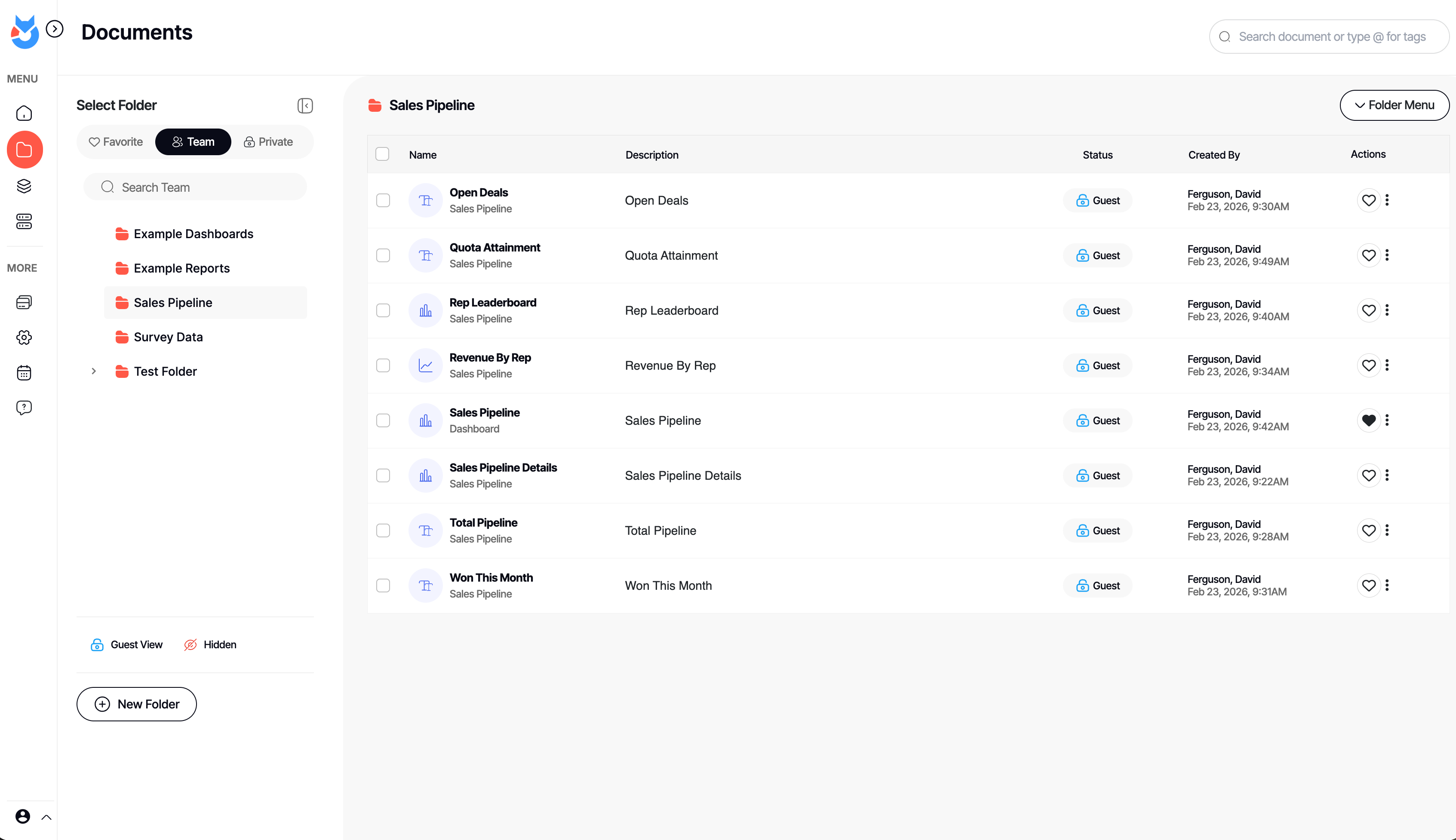
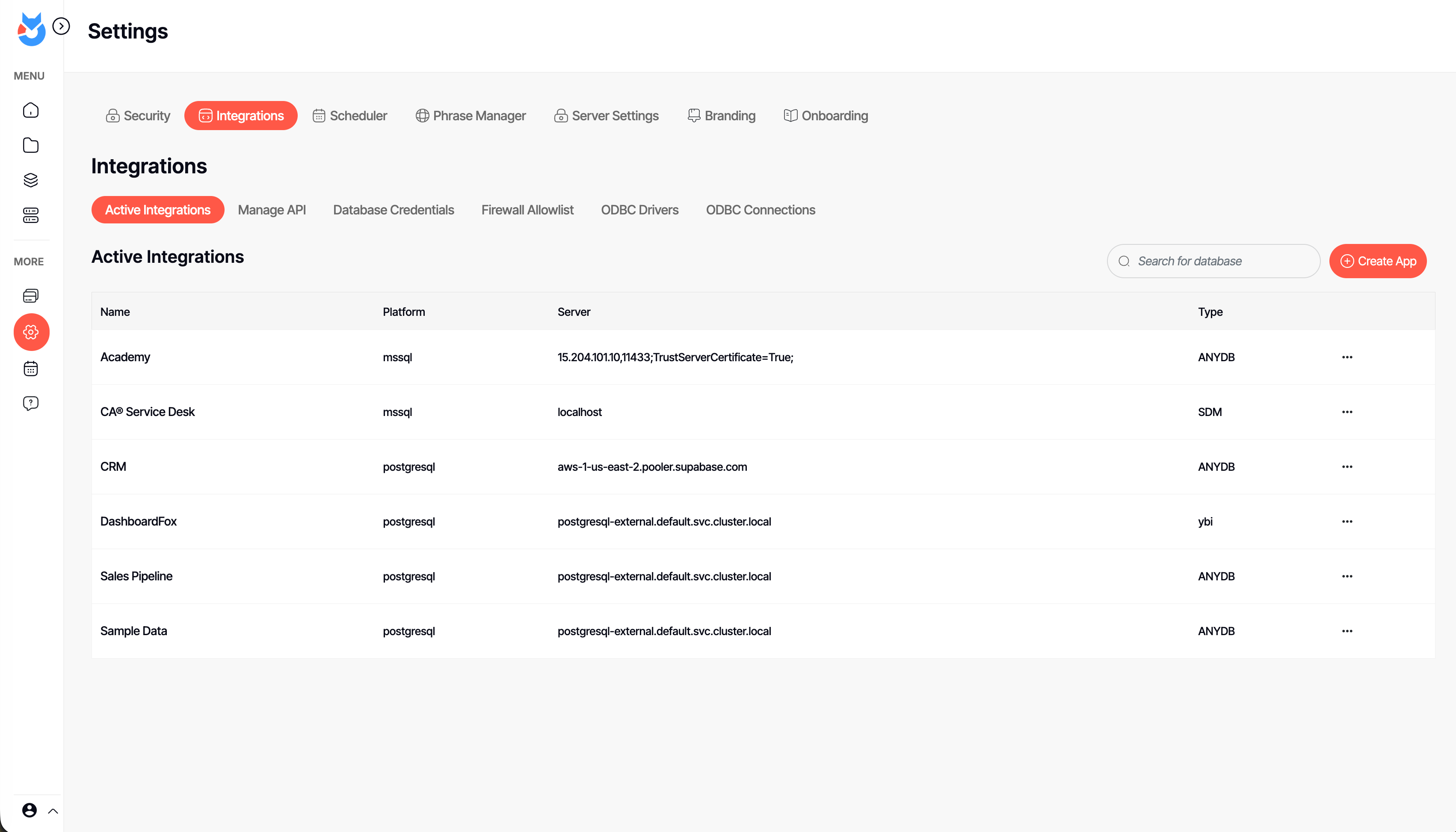
Screenshot of an interactive DashboardFox sales pipeline dashboard with KPI tiles, a revenue-by-rep chart, and a rep leaderboard. Business users filter by region, industry, or fiscal year and save their own views — self-service analytics with no SQL required.Screenshot of the Documents library in DashboardFox, where teams organize dashboards and reports into Team, Private, and Favorite folders. Share them with colleagues or clients, control guest access per item, and find any report fast with search and tags.Screenshot of DashboardFox's report Composer: pick fields, apply formulas and sorting, and preview the result live as a chart. Build dashboards and reports across 20+ visualizations without writing code, then save and share them with your team or clients.Screenshot of the App Builder in DashboardFox, where admins connect a data source and choose the exact tables and fields users can report on. Set up governed self-service reporting once, so business users only ever see the data they're allowed to.Screenshot of DashboardFox admin settings: manage data-source integrations, ODBC drivers, API access, scheduling, branding, and security in one place. Connect SQL Server, PostgreSQL, and more with no ETL, and white-label the experience for your clients.Screenshot of a single DashboardFox report shown as a color-coded calendar heatmap, flagging good, watch, and bad days at a glance. Open any report from the library, refresh or schedule it, and deliver it branded to your team or clients.

Klipfolio Klips Screenshots

Screenshot of an example of a customized dashboard. For showcasing KPIs, tracking performance, or telling complex data stories, Klips lets the user tailor layouts, visuals, and insights, ensuring dashboards are suitable for internal teams or external stakeholders.Screenshot of visualizations, with descriptive text blocks and live data to communicate more than just numbers. Klips lets users insert real-time data directly into text to add context, improving interpretation. Progress towards goals and trends can be tracked using vibrant charts, colors, and text descriptions.Screenshot of one example of the over 30 chart types available, some including bar graphs, pie charts, and heatmaps. The library of pre-built Klip templates connect to popular data sources like Google Analytics, HubSpot, or Salesforce. These templates can be modified.Screenshot of Klipfolio’s formula engine. Similar to Excel, the Klip Editor can be used to clean, transform, and analyze data using functions. Users can perform complex calculations, manipulate dates or text, and add logic or statistical formulas.Screenshot of the Klip editor, used to take precise control over visual properties, customizing font sizes, colors, and styles to match a brand, or to emphasize key metrics. Set decimal places for numerical data, and add prefixes or suffixes—such as currency symbols or percentages—for clear and professional formatting. It also supports conditional formatting, and dynamic colors or icons to highlight trends, anomalies, or thresholds. These tools allow the user to craft Klips that not only deliver insights but also communicate them at a glance.Screenshot of a Klipfolio Klips dashboard. These allow users to customize every aspect, from layouts and fonts to colors and chart styles, ensuring that dashboards align with a brand. For presenting on a laptop, a big-screen TV, or by sharing published links, dashboards are designed to look exceptional in both light and dark modes.