The DataRobot AI Platform is presented as a solution that accelerates and democratizes data science by automating the end-to-end journey from data to value and allows users to deploy AI applications at scale. DataRobot provides a centrally governed platform that gives users AI to drive business outcomes, that is available on the user's cloud platform-of-choice, on-premise, or as a fully-managed service. The solutions include tools providing data preparation enabling users to explore and…
$0
Google BigQuery
Score8.8 out of 10
N/A
Google's BigQuery is part of the Google Cloud Platform, a database-as-a-service (DBaaS) supporting the querying and rapid analysis of enterprise data.
$6.25
per TiB (after the 1st 1 TiB per month, which is free)
A de minimis incentive was given to thank the reviewer for their time. The incentive was not used to bias or drive a particular response, nor was the incentive contingent on a positive endorsement. More Info
Lead Data Scientist in Information Technology at Euskaltel (Telecommunications, 1001-5000 employees)
Chose DataRobot
DataRobot is the product that seemed to have the most professional platform all in all. It was also the best one for the second part of the model development, which is monitoring what the model is doing in production and governing what that model was doing, giving us the …
A de minimis incentive was given to thank the reviewer for their time. The incentive was not used to bias or drive a particular response, nor was the incentive contingent on a positive endorsement. More Info
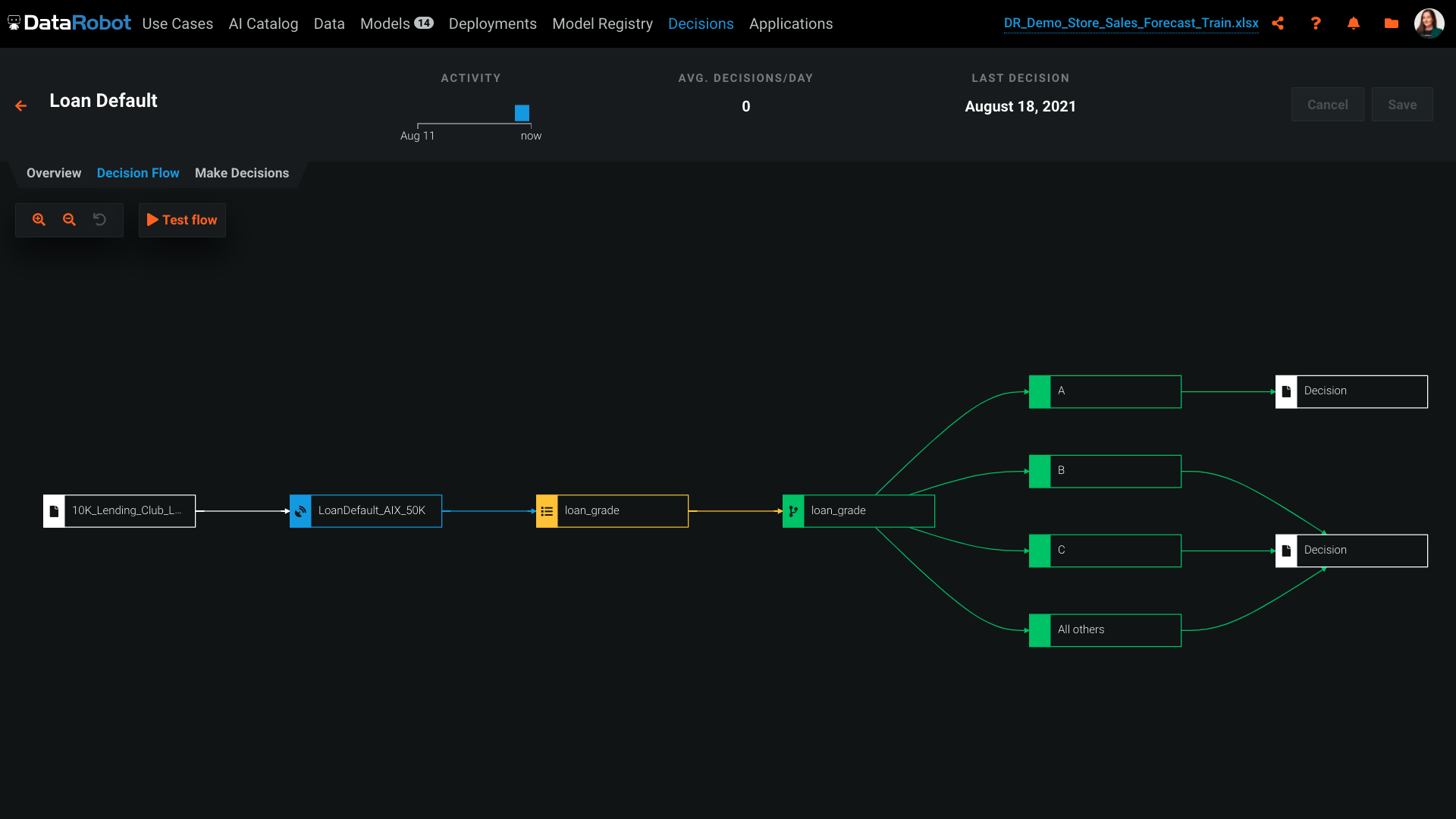
DataRobot can be used for risk assessment, such as predicting the likelihood of loan default. It can handle both classification and regression tasks effectively. It relies on historical data for model training. If you have limited historical data or the data quality is poor, it may not be the best choice as it requires a sufficient amount of high-quality data for accurate model building.
A de minimis incentive was given to thank the reviewer for their time. The incentive was not used to bias or drive a particular response, nor was the incentive contingent on a positive endorsement. More Info
Event-based data can be captured seamlessly from our data layers (and exported to Google BigQuery). When events like page-views, clicks, add-to-cart are tracked, Google BigQuery can help efficiently with running queries to observe patterns in user behaviour. That intermediate step of trying to "untangle" event data is resolved by Google BigQuery. A scenario where it could possibly be less appropriate is when analysing "granular" details (like small changes to a database happening very frequently).
A de minimis incentive was given to thank the reviewer for their time. The incentive was not used to bias or drive a particular response, nor was the incentive contingent on a positive endorsement. TR verified that a representative sample of customers was invited. More Info
DataRobot helps, with algorithms, to analyze and decipher numerous machine-learning techniques in order to provide models to assist in company-wide decision making.
Our DataRobot program puts on an "even playing field" the strength of auto-machine learning and allows us to make decisions in an extremely timely manner. The speed is consistent without being offset by errors or false-negatives.
It encompasses many desired techniques that help companies in general, to reconfigure in to artificial intelligence driven firms, with little to no inconvenience.
A de minimis incentive was given to thank the reviewer for their time. The incentive was not used to bias or drive a particular response, nor was the incentive contingent on a positive endorsement. More Info
GSheet data can be linked to a BigQuery table and the data in that sheet is ingested in realtime into BigQuery. It's a live 'sync' which means it supports insertions, deletions, and alterations. The only limitation here is the schema'; this remains static once the table is created.
Seamless integration with other GCP products.
A simple pipeline might look like this:-
GForms -> GSheets -> BigQuery -> Looker
It all links up really well and with ease.
One instance holds many projects.
Separating data into datamarts or datameshes is really easy in BigQuery, since one BigQuery instance can hold multiple projects; which are isolated collections of datasets.
A de minimis incentive was given to thank the reviewer for their time. The incentive was not used to bias or drive a particular response, nor was the incentive contingent on a positive endorsement. More Info
The platform itself is very complicated. It probably can't function well without being complicated, but there is a big training curve to get over before you can effectively use it. Even I'm not sure if I'm effectively using it now.
The suggested model DataRobot deploys often not the best model for our purposes. We've had to do a lot of testing to make sure what model is the best. For regressive models, DataRobot does give you a MASE score but, for some reason, often doesn't suggest the best MASE score model.
The software will give you errors if output files are not entered correctly but will not exactly tell you how to fix them. Perhaps that is complicated, but being able to download a template with your data for an output file in the correct format would be nice.
A de minimis incentive was given to thank the reviewer for their time. The incentive was not used to bias or drive a particular response, nor was the incentive contingent on a positive endorsement. More Info
Please expand the availability of documentation, tutorials, and community forums to provide developers with comprehensive support and guidance on using Google BigQuery effectively for their projects.
If possible, simplify the pricing model and provide clearer cost breakdowns to help users understand and plan for expenses when using Google BigQuery. Also, some cost reduction is welcome.
It still misses the process of importing data into Google BigQuery. Probably, by improving compatibility with different data formats and sources and reducing the complexity of data ingestion workflows, it can be made to work.
A de minimis incentive was given to thank the reviewer for their time. The incentive was not used to bias or drive a particular response, nor was the incentive contingent on a positive endorsement. More Info
DataRobot presents a machine-learning platform designed by data scientists from an array of backgrounds, to construct and develop precise predictive modeling in a fraction of the time previously taken. The tech invloved addresses the critical shortage of data scientists by changing the speed and economics of predictive analytics. DataRobot utilizes parallel processing to evaluate models in R, Python, Spark MLlib, H2O and other open source databases. It searches for possible permutations and algorithms, features, transformation, processes, steps and tuning to yield the best models for the dataset and predictive goal.
A de minimis incentive was given to thank the reviewer for their time. The incentive was not used to bias or drive a particular response, nor was the incentive contingent on a positive endorsement. More Info
We have to use this product as its a 3rd party supplier choice to utilise this product for their data side backend so will not be likely we will move away from this product in the future unless the 3rd party supplier decides to change data vendors.
A de minimis incentive was given to thank the reviewer for their time. The incentive was not used to bias or drive a particular response, nor was the incentive contingent on a positive endorsement. TR verified that a representative sample of customers was invited. More Info
I think overall it is easy to use. I haven't done anything from the development side but an more of an end user of reporting tables built in Google BigQuery. I connect data visualization tools like Tableau or Power BI to the BigQuery reporting tables to analyze trends and create complex dashboards.
A de minimis incentive was given to thank the reviewer for their time. The incentive was not used to bias or drive a particular response, nor was the incentive contingent on a positive endorsement. More Info
I have never had any significant issues with Google Big Query. It always seems to be up and running properly when I need it. I cannot recall any times where I received any kind of application errors or unplanned outages. If there were any they were resolved quickly by my IT team so I didn't notice them.
A de minimis incentive was given to thank the reviewer for their time. The incentive was not used to bias or drive a particular response, nor was the incentive contingent on a positive endorsement. More Info
I think Google Big Query's performance is in the acceptable range. Sometimes larger datasets are somewhat sluggish to load but for most of our applications it performs at a reasonable speed. We do have some reports that include a lot of complex calculations and others that run on granular store level data that so sometimes take a bit longer to load which can be frustrating.
A de minimis incentive was given to thank the reviewer for their time. The incentive was not used to bias or drive a particular response, nor was the incentive contingent on a positive endorsement. More Info
As I am writing this report I am participating with Datarobot Engineers in an complex environment and we have their whole support. We are in Mexico and is not common to have this commitment from companies without expensive contract services. Installing is on premise and the client does not want us to take control and they, the client, is also limited because of internal IT regulations ,,, soo we are just doing magic and everybody is committed.
A de minimis incentive was given to thank the reviewer for their time. The incentive was not used to bias or drive a particular response, nor was the incentive contingent on a positive endorsement. More Info
BigQuery can be difficult to support because it is so solid as a product. Many of the issues you will see are related to your own data sets, however you may see issues importing data and managing jobs. If this occurs, it can be a challenge to get to speak to the correct person who can help you.
A de minimis incentive was given to thank the reviewer for their time. The incentive was not used to bias or drive a particular response, nor was the incentive contingent on a positive endorsement. More Info
I've done machine learning through python before, however having to code and test each model individually was very time consuming and required a lot of expertise. The data Robot approach, is an excellent way of getting to a well placed starting point. You can then pick up the model from there and fine tune further if you need.
A de minimis incentive was given to thank the reviewer for their time. The incentive was not used to bias or drive a particular response, nor was the incentive contingent on a positive endorsement. More Info
PowerBI can connect to GA4 for example but the data processing is more complicated and it takes longer to create dashboards. Azure is great once the data import has been configured but it's not an easy task for small businesses as it is with BigQuery.
A de minimis incentive was given to thank the reviewer for their time. The incentive was not used to bias or drive a particular response, nor was the incentive contingent on a positive endorsement. TR verified that a representative sample of customers was invited. More Info
We have continued to expand out use of Google Big Query over the years. I'd say its flexibility and scalability is actually quite good. It also integrates well with other tools like Tableau and Power BI. It has served the needs of multiple data sources across multiple departments within my company.
A de minimis incentive was given to thank the reviewer for their time. The incentive was not used to bias or drive a particular response, nor was the incentive contingent on a positive endorsement. More Info
Google Support has kindly provide individual support and consultants to assist with the integration work. In the circumstance where the consultants are not present to support with the work, Google Support Helpline will always be available to answer to the queries without having to wait for more than 3 days.
A de minimis incentive was given to thank the reviewer for their time. The incentive was not used to bias or drive a particular response, nor was the incentive contingent on a positive endorsement. More Info
Previously, running complex queries on our on-premise data warehouse could take hours. Google BigQuery processes the same queries in minutes. We estimate it saves our team at least 25% of their time.
We can target our marketing campaigns very easily and understand our customer behaviour. It lets us personalize marketing campaigns and product recommendations and experience at least a 20% improvement in overall campaign performance.
Now, we only pay for the resources we use. Saved $1 million annually on data infrastructure and data storage costs compared to our previous solution.
A de minimis incentive was given to thank the reviewer for their time. The incentive was not used to bias or drive a particular response, nor was the incentive contingent on a positive endorsement. TR verified that a representative sample of customers was invited. More Info