Bentley ProjectWise vs. DocBoss

Overview
ProductRatingMost Used ByProduct SummaryStarting Price
ProjectWise
Score 9.0 out of 10
N/A
Bentley Systems offers ProjectWise, a construction management software for keeping construction project personnel and engineers up-to-date with most recent progress information, with daily logs and punchlists, risk item lifecycle management through identification, creation, tracking and resolution, RFI management, and document storage with automated sharing.N/A
DocBoss
Score 0.0 out of 10
N/A
DocBoss is cloud-based document control software built exclusively for equipment suppliers, manufacturers, fabricators, and distributors managing vendor documentation on EPC capital projects. DocBoss automates the most time-consuming document control tasks: building and maintaining the document register, applying customer-specific cover sheets, formatting, and numbering, generating transmittals and submittal packages, routing documents for internal review, and producing…N/A
Pricing
Bentley ProjectWiseDocBoss
Editions & Modules
No answers on this topic
Offerings
Pricing Offerings
ProjectWiseDocBoss
Free Trial
NoNo
Free/Freemium Version
NoNo
Premium Consulting/Integration Services
NoNo
Entry-level Setup FeeNo setup feeNo setup fee
Additional Details
More Pricing Information
Community Pulse
Bentley ProjectWiseDocBoss
Best Alternatives
Bentley ProjectWiseDocBoss
Small Businesses
Revit
Revit
Score 8.9 out of 10
Square 9 Softworks
Square 9 Softworks
Score 9.3 out of 10
Medium-sized Companies
Revit
Revit
Score 8.9 out of 10
MSB Docs
MSB Docs
Score 9.4 out of 10
Enterprises
Revit
Revit
Score 8.9 out of 10
M‑Files
M‑Files
Score 8.9 out of 10
All AlternativesView all alternativesView all alternatives
User Ratings
Bentley ProjectWiseDocBoss
Likelihood to Recommend
9.0
(4 ratings)
-
(0 ratings)
Usability
9.0
(2 ratings)
-
(0 ratings)
User Testimonials
Bentley ProjectWiseDocBoss
Likelihood to Recommend
Bentley Systems
ProjectWise is good for really large projects with many team members. I would not recommend it for small projects or those with a small team of people working on them. It is best for technical people and those who plan to use it daily. There are better FTP options out there if you just want to use them for file sharing.
Read full review
DocBoss
No answers on this topic
Pros
Bentley Systems
  • Maintain an audit trail of all documentation.
  • Integrate title blocks with the ProjectWise database.
  • Keep documentation for all projects in a single application that anyone with the appropriate authority can access.
Read full review
DocBoss
No answers on this topic
Cons
Bentley Systems
  • It's worse than a virus, it WILL get into every part of your system, with the only way to get rid of it is to do a full system format.
  • Integration is dependent on if Bentley wishes to support your software.
  • DMS system, it just makes it incompatible with native programs unless you have integration, which is at Bentley's discretion for support, exporting to your system is a work around, though this takes significant time to export and to re-teach PW linked file locations when you reimport it.
  • Clunky user interface, if you want to work on more than 1 file at a time expect to be at least 50-80% slower.
  • a Labyrinth of forms that are prone to user error.
  • Interface straight out of Windows 2000, and that's generous.
  • Inability to delete or even "Recycle bin" files, this is more an admin issue but most PW instance lock out deleting files, which makes it impractical for general use.
  • Encourages unnecessary and convoluted workflows, This comes down to the Pro of "The backend is customisable," it may be customisable but this encourages system admins to write convoluted and time consuming workflows just because they can.
  • Seems to require an IT team to manage it - this probably relates to the highly customisable component.
Read full review
DocBoss
No answers on this topic
Usability
Bentley Systems
It is simple to use once users become familiar with it & it has a familiar Windows-like interface.
Read full review
DocBoss
No answers on this topic
Alternatives Considered
Bentley Systems
I think ProjectWise is better for technical users than Dropbox, one drive, or SharePoint. It is less intuitive than any of the others though. It is better for restoring files and creating an audit trail than any of the other programs. It is better for sharing large files in a short period of time than SharePoint or one drive. It is also better for larger teams and larger projects than SharePoint or Dropbox.
Read full review
DocBoss
No answers on this topic
Return on Investment
Bentley Systems
  • Provides a central place for people to store files.
  • Incredibly long time to fill out forms to initialise a file. 4 hours to update files instead of about 10mins.
  • Significantly longer to open drawings. up to 1.5mins to open vs about 10seconds.
  • Can't easily batch script over files, thus making this workflow either ineffective or redundant. Scripts can take 10mins to do an hours worth of repetitive tasks.
  • Restricts you to 1 file at a time, so rather than in the morning opening 10-15 files at once and doing other work while they open you have to site their and open via dialogue boxes each and every file. This can take 10-15mins of your morning run.
  • People seem to email more documents unofficially now, which kind of defeats the first point.
Read full review
DocBoss
No answers on this topic
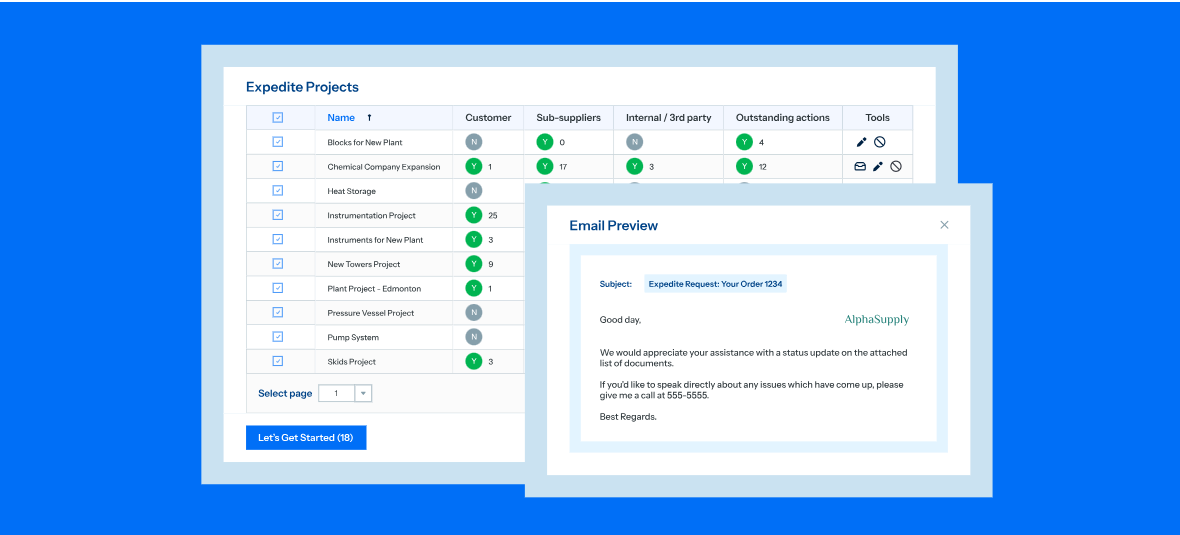
ScreenShots

DocBoss Screenshots

Screenshot of the interface for automated document flow between teams, customers, and suppliers to speed up approvals and reduce manual tracking.Screenshot of the dashboard to create and manage document placeholders.Screenshot of where to uto-fill customer cover pages in seconds, or all templates. Auto-fill supplier document indexes (SDIs), transmittal sheets, stamps—even the content of submittal emails.Screenshot of where to generate fully bookmarked and hyperlinked databooks with a click, tailored to your customer’s specifications.Screenshot of real-time reporting, used to track document status, get automated reminders, and send expedite requests.Screenshot of an example of visibility into document status, including history and location.