Eluvium Password Manager vs. ManageEngine ADSelfService Plus

Overview
ProductRatingMost Used ByProduct SummaryStarting Price
Eluvium Password Manager
Score 0.0 out of 10
N/A
N/A
$5
one-time fee
ManageEngine ADSelfService Plus
Score 9.2 out of 10
Mid-Size Companies (51-1,000 employees)
ManageEngine's Self-Service Plus provides self-service password management, multi‑factor authentication, and single sign-on solution.
$295
per year for 100 users
Pricing
Eluvium Password ManagerManageEngine ADSelfService Plus
Editions & Modules
Basic
$5
one-time fee
Free edition
$0
No Expiration Offers most of the features for up to 50 users.
Standard edition
Starts at $295
per year for 100 users.
Professional edition
Starts at $345
per year for 100 users.
Endpoint MFA Standard edition
Starts at $195
per year for 100 users.
Endpoint MFA Professional edition
Starts at $295
per year for 100 users.
Offerings
Pricing Offerings
Eluvium Password ManagerManageEngine ADSelfService Plus
Free Trial
YesYes
Free/Freemium Version
NoYes
Premium Consulting/Integration Services
NoYes
Entry-level Setup FeeNo setup feeOptional
Additional DetailsFailover and Secure Gateway Services add-on is $395 SMS add-on starts at $595 for 2000 SMS credits.
More Pricing Information
Best Alternatives
Eluvium Password ManagerManageEngine ADSelfService Plus
Small Businesses
RoboForm
RoboForm
Score 8.4 out of 10
RoboForm
RoboForm
Score 8.4 out of 10
Medium-sized Companies
1Password
1Password
Score 9.2 out of 10
1Password
1Password
Score 9.2 out of 10
Enterprises
KeePass
KeePass
Score 8.9 out of 10
KeePass
KeePass
Score 8.9 out of 10
All AlternativesView all alternativesView all alternatives
User Ratings
Eluvium Password ManagerManageEngine ADSelfService Plus
Likelihood to Recommend
-
(0 ratings)
8.9
(10 ratings)
Usability
-
(0 ratings)
8.7
(10 ratings)
User Testimonials
Eluvium Password ManagerManageEngine ADSelfService Plus
Likelihood to Recommend
Eluvium Software
No answers on this topic
ManageEngine A Div of Zoho Corporation Pvt Ltd
If you need users to reset passwords but don't have VPN access to your network, this is one of the best options. It also works very well for helping a locked-out user, provided they have taken the time to set up their account. Then, of course, they need to remember the details, but when they have dotted all of the i's, it just works.
Read full review
Pros
Eluvium Software
No answers on this topic
ManageEngine A Div of Zoho Corporation Pvt Ltd
  • Remote password changes when not connected to a VPN or at a remote office
  • MFA for certain user groups allows standard users to work normally without additional effort
  • Excellent reporting
  • MFA for certain services such as terminal access greatly enhances security to these servers.
Read full review
Cons
Eluvium Software
No answers on this topic
ManageEngine A Div of Zoho Corporation Pvt Ltd
  • Assist with post-implementation reviews to ensure we configured everything correctly
  • Better integration with mobile devices such as an app to change M365 passwords for our mobile-only users
  • It would be great if password changes of mobile users updates the AD so these accounts don't reflect as dormant AD accounts.
Read full review
Usability
Eluvium Software
No answers on this topic
ManageEngine A Div of Zoho Corporation Pvt Ltd
For end users the product is very easy to use. For administration, you may need to do some looking around or contact support to achieve complex tasks. However the product is very flexible. Every dialog box, banner, etc can be customized if needed. Also, support is very good at helping with any issues.
Read full review
Alternatives Considered
Eluvium Software
No answers on this topic
ManageEngine A Div of Zoho Corporation Pvt Ltd
I did some research but did not find any other solutions that worked the same way or did what I needed it to do. I've used other manage engine products in the past and knew I could trust their software.
Read full review
Return on Investment
Eluvium Software
No answers on this topic
ManageEngine A Div of Zoho Corporation Pvt Ltd
  • Much fewer help tickets for users with expiring passwords.
  • The automated emails mean we don't miss anyone whose password is expiring.
  • We've also used the MFA option for admin access to servers, adding that little extra peace of mind that they are secure.
Read full review
ScreenShots

ManageEngine ADSelfService Plus Screenshots
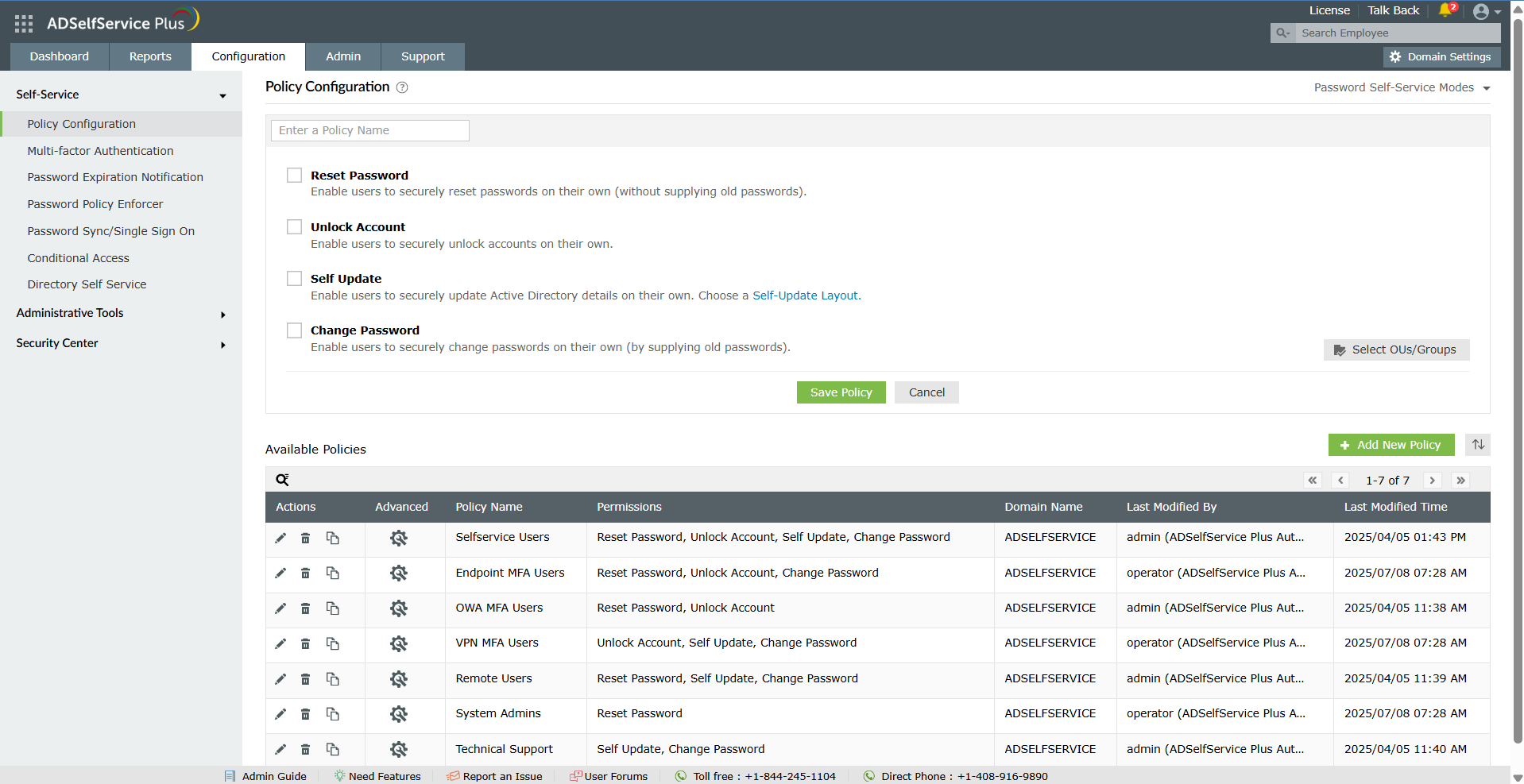
Screenshot of the dashboard to monitor password security, MFA adoption, and self-service activity from a centralized dashboard for improved visibility and control.Screenshot of the self-service password reset and account unlock capabilities, to reduce help desk tickets and streamline account recovery.Screenshot of multi-factor authentication for endpoints, VPNs, applications, and remote access.Screenshot of secure single sign-on and password sync for established and custom applications.Screenshot of the dashboard offering granular visibility into MFA enrollment status across users and OUs with detailed, exportable reports to simplify compliance audits and strengthen access security.