TrustRadius: an HG Insights company

Save this comparison

Save this comparison

Add Product

Recommended Comparisons

    Overview
    ProductRatingMost Used ByProduct SummaryStarting Price

    Engageform by 4screens

    Score10 out of 10
    Small Businesses (1-50 employees)
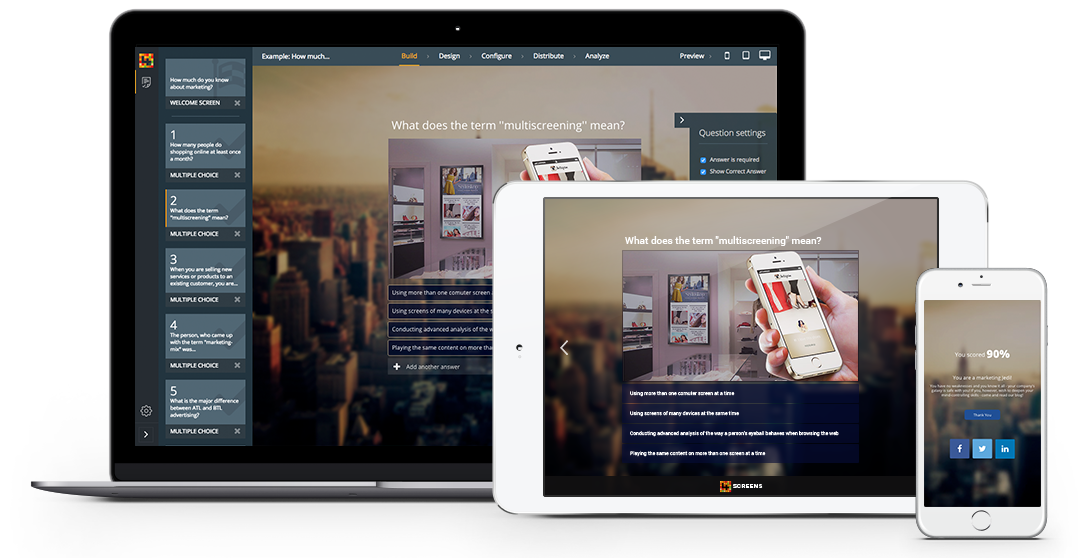
    Engageform is an interactive content creation platform. Users can quickly create viral quizzes, surveys and polls. Users can also generate leads, drive social traffic to their website and get feedback from their customers. According to the vendor, users can also create Buzzfeed like quizzes and engage users - all in real time and on all screens.

    $25

    GoToMyPC

    Score8.6 out of 10
    N/AGoToMyPC is a remote administration offering from GoTo (formerly LogMeIn) with mobile deployment to work on files, programs, and networks from home or while traveling.N/A
    Pricing
    Engageform by 4screensGoToMyPC
    Editions & Modules
    Basic
    $25
    Standard
    $75
    Pro
    $175
    No answers on this topic
    Offerings
    Pricing Offerings
    Engageform by 4screensGoToMyPC
    Free Trial
    NoYes
    Free/Freemium Version
    YesNo
    Premium Consulting/Integration Services
    YesNo
    Entry-level Setup FeeNo setup feeNo setup fee
    Additional Details
    More Pricing Information
    Community Pulse
    Engageform by 4screensGoToMyPC
    Considered Both Products
    4screens
    No answer on this topic
    GoTo formerly LogMeIn
    No answer on this topic
    Key User Insights
    Would buy again
    No answers on this topic
    96%
    Would buy again
    95 Answers
    Delivers good value for the price
    No answers on this topic
    94%
    Delivers good value for the price
    78 Answers
    Happy with the feature set
    No answers on this topic
    97%
    Happy with the feature set
    96 Answers
    Lived up to sales and marketing promises
    No answers on this topic
    94%
    Lived up to sales and marketing promises
    90 Answers
    Implementation went as expected
    No answers on this topic
    97%
    Implementation went as expected
    95 Answers
    Features
    Engageform by 4screensGoToMyPC
    Remote Administration
    Comparison of Remote Administration features of Engageform by 4screens and GoToMyPC
    Feature
    Engageform by 4screens
    -
    Ratings
    GoToMyPC
    3.8
    103 Ratings
    70% below category average
    Screen sharing00 Ratings7.167 Ratings
    File transfer00 Ratings5.383 Ratings
    Instant message00 Ratings2.320 Ratings
    Secure remote access with Smart Card authentication00 Ratings2.514 Ratings
    Access to sleeping/powered-off computers00 Ratings1.648 Ratings
    Over-the-Internet remote session00 Ratings8.084 Ratings
    Initiate remote control from mobile00 Ratings2.353 Ratings
    Remote management of servers & workstations00 Ratings3.656 Ratings
    Remote Active Directory® management00 Ratings2.724 Ratings
    Centralized management dashboard00 Ratings2.428 Ratings
    Session record00 Ratings2.626 Ratings
    Annotations00 Ratings2.49 Ratings
    Monitoring and Alerts00 Ratings7.521 Ratings
    Multi-platform remote control00 Ratings2.624 Ratings
    Best Alternatives
    Engageform by 4screensGoToMyPC
    Small Businesses
    Contently
    Score9.9 out of 10
    N-able Take Control
    Score7.2 out of 10
    Medium-sized Companies
    CoSchedule Marketing Suite
    Score10 out of 10
    Remote Desktop Manager
    Score9.6 out of 10
    Enterprises
    PathFactory
    Score8.3 out of 10
    BeyondTrust Privileged Remote Access
    Score9.1 out of 10
    All AlternativesView all alternativesView all alternatives
    User Ratings
    Engageform by 4screensGoToMyPC
    Likelihood to Recommend
    -
    (0 ratings)
    8.1
    (106 ratings)
    Likelihood to Renew
    -
    (0 ratings)
    9.1
    (5 ratings)
    Usability
    -
    (0 ratings)
    8.0
    (24 ratings)
    Availability
    -
    (0 ratings)
    9.1
    (2 ratings)
    Performance
    -
    (0 ratings)
    9.1
    (2 ratings)
    Support Rating
    -
    (0 ratings)
    9.1
    (13 ratings)
    Implementation Rating
    -
    (0 ratings)
    9.1
    (3 ratings)
    Configurability
    -
    (0 ratings)
    9.1
    (2 ratings)
    Product Scalability
    -
    (0 ratings)
    9.1
    (2 ratings)
    User Testimonials
    Engageform by 4screensGoToMyPC
    Likelihood to Recommend
    4screens
    No answers on this topic
    GoTo formerly LogMeIn
    I think GoToMyPC is well-suited for any scenario I have encountered, although I only have experience using it in a small firm setting. Otherwise, for working from home and traveling or file retrieval, it has proved more than adequate. I have not encountered a scenario that I thought was less than appropriate.
    Incentivized
    Read full review
    Pros
    4screens
    No answers on this topic
    GoTo formerly LogMeIn
    • I am able to easily access both of my home monitors on GoToMyPC by simply clicking on a slider bar.
    • I have access to all of my drives and programs as if I were sitting in my office.
    • GoToMyPC allows me to print to my office printers so I can complete paperwork and print it for my colleagues back in the office to use.
    Read full review
    Cons
    4screens
    No answers on this topic
    GoTo formerly LogMeIn
    • Transfer or copy files from the computer drive (c drive) to your active desktop file folders.
    • The ability to set your own "Time Out" too often I have to log back in if switching between computer screens.
    • Easier way to print documents to printers not connected to the computer being accessed.
    Incentivized
    Read full review
    Likelihood to Renew
    4screens
    No answers on this topic
    GoTo formerly LogMeIn
    I have been using GotomyPC for 20 years and it's gotten better with time. It's the best remote app that I've tried. The others were harder to use and not as functional. It allows us to work from anywhere just as if we were in the office. Even being able to print to my remote location is a wonderful way of doing work. I don't have to drag it to my remote device, It will just print without any hassle
    Incentivized
    Read full review
    Usability
    4screens
    No answers on this topic
    GoTo formerly LogMeIn
    Really easy to use-even if you forget your password frequently like me. The reset password feature is not cumbersome and does not require phoning Customer Service. Just a few clicks and a bit of creativity to come up with a new password. I like this "easy button" approach. Definitely recommend.
    Incentivized
    Read full review
    Reliability and Availability
    4screens
    No answers on this topic
    GoTo formerly LogMeIn
    I've never had a problem unless the host computer itself is having an issue - such as being off line.
    Read full review
    Performance
    4screens
    No answers on this topic
    GoTo formerly LogMeIn
    Everything loads quickly. The only lag has been when our internet provider didn't fix our connection. Once that was resolved, no problems.
    Read full review
    Support Rating
    4screens
    No answers on this topic
    GoTo formerly LogMeIn
    I have never had to contact support. The product is so easy to use I have not needed help (yet). But if I had to contact them, I am sure they would be just as great to work with as the product itself is.
    Incentivized
    Read full review
    Implementation Rating
    4screens
    No answers on this topic
    GoTo formerly LogMeIn
    It set up quickly and assigning log ins to various computers was simple. I don't think you need many insights into the product. It's easy to implement and easy to use. Since it's a work tool, it needs be that way. I wouldn't want the tool to have any learning curve when some of the people using it are not tech savvy. They are accessing their work computers for files or to work on apps that their remote devices might not have loaded.
    Incentivized
    Read full review
    Alternatives Considered
    4screens
    No answers on this topic
    GoTo formerly LogMeIn
    I recently started having problems with Splashtop - slow response/freezes/drops, and after troubleshooting everything
    internet and hardware related, decided to check out GoToMyPC as one step
    in troubleshooting. GoToMyPC has better response
    time and has been more reliable. So far I am pleased with the switch with just a couple of minor matters mentioned earlier in review.
    Incentivized
    Read full review
    Scalability
    4screens
    No answers on this topic
    GoTo formerly LogMeIn
    I can use it on all of my devices - even my Galaxy phone. Once you log into your device, you work on it as if you were physically in front of it. Not much complexity in that. If you can work on your own device, you can work on it through another device - even a phone.
    Incentivized
    Read full review
    Return on Investment
    4screens
    No answers on this topic
    GoTo formerly LogMeIn
    • Increased productivity since I can access remotely
    • Ability to use my laptop making my desktop a mobile workstation
    • Ability to provide answers at closed-door meetings about budgeting, expenses, invoices without needing to leave the room to look it up on my desktop.
    Read full review
    ScreenShots

    Engageform by 4screens Screenshots

    Product screenshot