TrustRadius: an HG Insights company

Save this comparison

Save this comparison

Add Product

Recommended Comparisons

    Overview
    ProductRatingMost Used ByProduct SummaryStarting Price

    eSUB Construction Software

    Score7 out of 10
    N/AeSUB is a SaaS platform for commercial subcontractors running large, complex, long duration projects to proactively track and manage their costs, deadlines, deliverables and correspondence; the vendor says this can result in operational efficiencies and improved profits. eSUB is a cloud and mobile-based solution enabling real-time field updates from connected smartphones, tables and mobile PC users.

    $39

    per month per user

    TaskQue

    Score9 out of 10
    N/ATaskQue is a productivity management tool. It offers auto task assignment features, different workflow templates for various industries and functional departments, and a list of collaboration tools designed to facilitate remote workers.

    $0

    up to 10 users

    Pricing
    eSUB Construction SoftwareTaskQue
    Editions & Modules
    Base
    $39
    per month (annually) per user
    Advanced
    $59
    per month (annually) per user
    Premium
    Contact
    Basic
    $0.00
    up to 10 users
    Business
    $5.00
    per user
    Offerings
    Pricing Offerings
    eSUB Construction SoftwareTaskQue
    Free Trial
    YesYes
    Free/Freemium Version
    NoYes
    Premium Consulting/Integration Services
    NoYes
    Entry-level Setup FeeNo setup fee$5 per user
    Additional Details—For 10 users, its free. After that, we charge $5.00 per user.
    More Pricing Information
    Features
    eSUB Construction SoftwareTaskQue
    Human Resource Management
    Comparison of Human Resource Management features of eSUB Construction Software and TaskQue
    Feature
    eSUB Construction Software
    1.0
    1 Ratings
    150% below category average
    TaskQue
    -
    Ratings
    Employee demographic data1.01 Ratings00 Ratings
    Employment history1.01 Ratings00 Ratings
    Job profiles and administration1.01 Ratings00 Ratings
    Workflow for transfers, promotions, pay raises, etc.1.01 Ratings00 Ratings
    Organizational charting1.01 Ratings00 Ratings
    Organization and location management1.01 Ratings00 Ratings
    Compliance data (COBRA, OSHA, etc.)1.01 Ratings00 Ratings
    Payroll Management
    Comparison of Payroll Management features of eSUB Construction Software and TaskQue
    Feature
    eSUB Construction Software
    1.0
    1 Ratings
    149% below category average
    TaskQue
    -
    Ratings
    Pay calculation1.01 Ratings00 Ratings
    Support for external payroll vendors1.01 Ratings00 Ratings
    Off-cycle/On-Demand payment1.01 Ratings00 Ratings
    Benefit plan administration1.01 Ratings00 Ratings
    Direct deposit files1.01 Ratings00 Ratings
    Salary revision and increment management1.01 Ratings00 Ratings
    Reimbursement management1.01 Ratings00 Ratings
    Asset Management
    Comparison of Asset Management features of eSUB Construction Software and TaskQue
    Feature
    eSUB Construction Software
    1.0
    1 Ratings
    149% below category average
    TaskQue
    -
    Ratings
    Tracking of all physical assets1.01 Ratings00 Ratings
    Reporting & Analytics
    Comparison of Reporting & Analytics features of eSUB Construction Software and TaskQue
    Feature
    eSUB Construction Software
    2.5
    1 Ratings
    102% below category average
    TaskQue
    -
    Ratings
    Dashboards4.01 Ratings00 Ratings
    Standard reports4.01 Ratings00 Ratings
    Custom reports1.01 Ratings00 Ratings
    Data exportability1.01 Ratings00 Ratings
    Construction Project & Field Management
    Comparison of Construction Project & Field Management features of eSUB Construction Software and TaskQue
    Feature
    eSUB Construction Software
    3.5
    2 Ratings
    74% below category average
    TaskQue
    -
    Ratings
    Plan distribution & viewing1.02 Ratings00 Ratings
    Plan markups & sharing1.02 Ratings00 Ratings
    Issue tracking & punchlists1.02 Ratings00 Ratings
    Photo documentation1.02 Ratings00 Ratings
    Jobsite reports10.02 Ratings00 Ratings
    Document sharing1.02 Ratings00 Ratings
    RFI tools10.02 Ratings00 Ratings
    Collaboration & approvals1.02 Ratings00 Ratings
    As-built drawings1.02 Ratings00 Ratings
    Mobile app5.02 Ratings00 Ratings
    Submittal design and management4.02 Ratings00 Ratings
    Checklists1.01 Ratings00 Ratings
    Meeting Minutes3.01 Ratings00 Ratings
    Specifications2.01 Ratings00 Ratings
    Change orders10.01 Ratings00 Ratings
    Estimating
    Comparison of Estimating features of eSUB Construction Software and TaskQue
    Feature
    eSUB Construction Software
    2.4
    2 Ratings
    104% below category average
    TaskQue
    -
    Ratings
    Takeoff tools1.01 Ratings00 Ratings
    Job costing7.02 Ratings00 Ratings
    Cost databases2.02 Ratings00 Ratings
    Cost calculator1.02 Ratings00 Ratings
    Bid creation1.01 Ratings00 Ratings
    Project Management
    Comparison of Project Management features of eSUB Construction Software and TaskQue
    Feature
    eSUB Construction Software
    -
    Ratings
    TaskQue
    7.8
    1 Ratings
    2% above category average
    Task Management00 Ratings10.01 Ratings
    Resource Management00 Ratings9.01 Ratings
    Scheduling00 Ratings9.01 Ratings
    Workflow Automation00 Ratings7.01 Ratings
    Team Collaboration00 Ratings7.01 Ratings
    Support for Agile Methodology00 Ratings7.01 Ratings
    Support for Waterfall Methodology00 Ratings7.01 Ratings
    Document Management00 Ratings8.01 Ratings
    Mobile Access00 Ratings9.01 Ratings
    Timesheet Tracking00 Ratings7.01 Ratings
    Change request and Case Management00 Ratings6.01 Ratings
    Professional Services Automation
    Comparison of Professional Services Automation features of eSUB Construction Software and TaskQue
    Feature
    eSUB Construction Software
    -
    Ratings
    TaskQue
    7.5
    1 Ratings
    2% below category average
    Quotes/estimates00 Ratings7.01 Ratings
    Project & financial reporting00 Ratings8.01 Ratings
    Best Alternatives
    eSUB Construction SoftwareTaskQue
    Small Businesses
    CMiC Construction Platform
    Score7.5 out of 10
    Any.do
    Score8 out of 10
    Medium-sized Companies
    Autodesk Build
    Score8.6 out of 10
    KanbanFlow
    Score7.3 out of 10
    Enterprises
    Revit
    Score8.9 out of 10
    Microsoft To Do
    Score7.9 out of 10
    All AlternativesView all alternativesView all alternatives
    User Ratings
    eSUB Construction SoftwareTaskQue
    Likelihood to Recommend
    2.0
    (3 ratings)
    9.0
    (1 ratings)
    Support Rating
    9.0
    (2 ratings)
    9.0
    (1 ratings)
    User Testimonials
    eSUB Construction SoftwareTaskQue
    Likelihood to Recommend
    eSUB Construction Software
    If you are doing any sort of new construction, eSUB is a budget friendly option for managing the process. It's helpful for keeping track of submittals, RFI's and for foreman doing Daily Work Reports. It is not suited really well for plan management and scheduling. The modules for these are not well thought through. Also if you specialize in service work or projects that have short durations (i.e. 1-2 weeks or less), eSUB isn't the best option for you. It would take too long to set up a job vs the time it takes to do the job.
    Incentivized
    Read full review
    TaskQue
    Companies that face issues due to chaos in terms of document management can really take advantage by organizing all their documents at a single place. TaskQue is inappropriate for project costing requirements in big projects.
    Read full review
    Pros
    eSUB Construction Software
    • It is built with subcontractors in mind. There are many PM software available but this one aims at the commercial subcontractor.
    • It does a great job covering the basics of typical commercial work. There are areas that allow you to customize such as adding reservations of rights to documents.
    • It can integrate with Microsoft quite a bit, we use this in our work every day and being able to export or sync data/calendars has been helpful.
    Incentivized
    Read full review
    TaskQue
    • Workload management.
    • Auto task management.
    Read full review
    Cons
    eSUB Construction Software
    • I have no suggestions at the moment and if I ever do have a question, concern or suggestion, a quick email to eSUB gets a quick response.
    Incentivized
    Read full review
    TaskQue
    • I think Gantt charts should be here to be used as a project management tool. Moreover, affiliation with productivity tools such as time-tracking tools can make it much better.
    Read full review
    Support Rating
    eSUB Construction Software
    It has been helpful whenever I've called. They have been able to walk me through solutions and even direct me to the right answer. There was only 1hr difference between time zones so this was manageable. If we experienced bugs, their IT department was helpful at remedying and they were always rolling out updates.
    Incentivized
    Read full review
    TaskQue
    We inquired using the
    TaskQue community forum and got a timely response regarding my queries. We really
    appreciate it.
    Read full review
    Alternatives Considered
    eSUB Construction Software
    eSUB is not even close when it comes to the offerings that the others have. eSUB is a happy medium for the functionality it provides and is at an affordable price point that it doesn't break the bank. Other solutions are a lot more integrated into the company processes and procedures, which means more upfront investment to get the platform to go live. eSUB's simplicity makes it easier to roll out because it doesn't integrate with as many aspects of the business.
    Incentivized
    Read full review
    TaskQue
    TaskQue’s most unique
    feature is the queue feature which enables you to assign tasks automatically.
    We were seriously fed up with the manual assignment of tasks.
    Read full review
    Return on Investment
    eSUB Construction Software
    • eSUB saves time as you don't have to type, print and send documents.
    • I like to call it "set it up once, use it a million times" as once you set up a customer, vendor etc... you can use them across multiple platforms.
    • It saves money as you don't need a pool of resources to manage a project due to its ease of use.
    Incentivized
    Read full review
    TaskQue
    • High customer retention.
    • Optimized project and task deliveries.
    Read full review
    ScreenShots

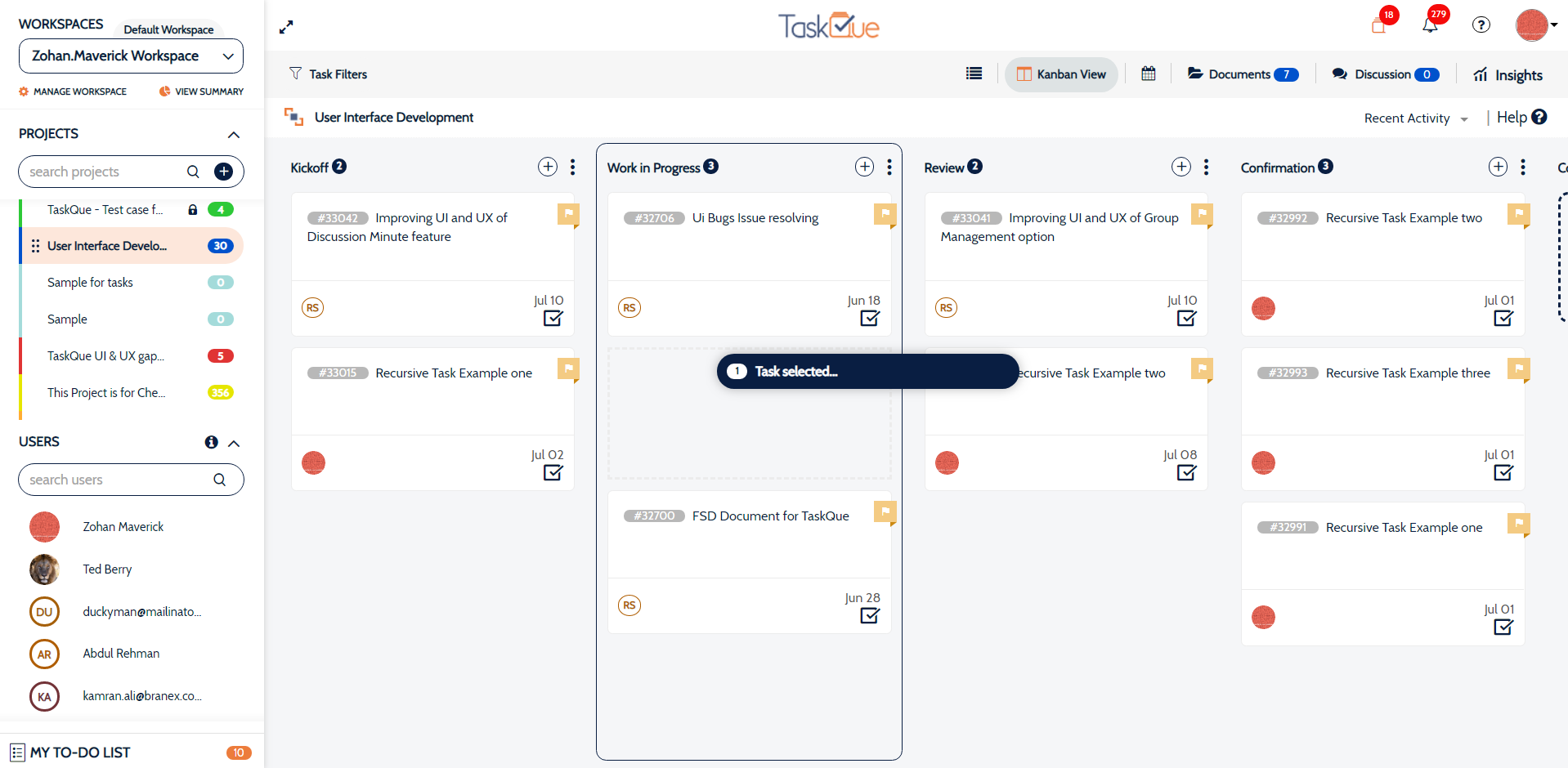
    TaskQue Screenshots

    Product screenshotProduct screenshotProduct screenshotProduct screenshot