FogBugz vs. GForge

Overview
ProductRatingMost Used ByProduct SummaryStarting Price
FogBugz
Score 7.0 out of 10
N/A
A software project management system used to plan, track and release great software with this lightweight and customizable system that integrates into any project management workflow. FogBugz is designed for software development teams and includes all the project management tools developers need straight out of the box. Users can: Track projects from start to finish - With tasks and subtasks for each case with required details and track them to ensure…
$62
per month
GForge
Score 0.0 out of 10
Enterprise companies (1,001+ employees)
GForge is a DevOps and project management platform offering tools for tickets, code, documentation, and collaboration. Available as both cloud-hosted SaaS and on-premise installation, GForge supports air-gapped networks and offline deployment - making it a fit for defense contractors, aerospace companies, and other organizations with strict security or compliance requirements. Core Capabilities Project Management: Customizable trackers…
$6
per month per user
Pricing
FogBugzGForge
Editions & Modules
3 Years
$62
per month
2 years
$64
per month
1 Year
$68
per month
Monthly
$75
per month
Standard
$6
per month per user
Offerings
Pricing Offerings
FogBugzGForge
Free Trial
YesYes
Free/Freemium Version
NoYes
Premium Consulting/Integration Services
NoNo
Entry-level Setup FeeNo setup fee$2,000 one-time fee per installation
Additional DetailsAll features are included at every pricing level - there are no add-on modules or tiered feature gates. The first 5 users are free on both SaaS and on-premise deployments. Enterprise licensing is available for organizations that need to deploy multiple on-premise instances without separate procurement for each installation. Contact GForge Group for enterprise pricing.
More Pricing Information
Community Pulse
FogBugzGForge
Considered Both Products
FogBugz
Chose FogBugz
FogBugz is made for the Developers who actually use it every day, while JIRA is made for the C-Suite who oversees them but has little idea of the finer points of daily dev tasks. In reality, most don't fit into the mold of JIRA tickets, and the summarized information that …
Chose FogBugz
I like Fogbugz a LOT because of the compressed list view. This was essential to me when my team and I were working on anywhere between 100 -1000 cases. I can't imagine having 1000 Jira tickets to manage the processes that we were managing. It's much easier to work with a …
Chose FogBugz
Bugzilla is probably the closest to Fogbugz and is a bit more refined. Bugzilla however is very much geared towards programmers where FogBugz has a broader audience. Jira is much more invovled and also geared towards programmers. Workfront is a heavy system if you are looking …
GForge

No answer on this topic

Best Alternatives
FogBugzGForge
Small Businesses
GitLab
GitLab
Score 8.8 out of 10
Polarion ALM
Polarion ALM
Score 9.9 out of 10
Medium-sized Companies
GitLab
GitLab
Score 8.8 out of 10
Polarion ALM
Polarion ALM
Score 9.9 out of 10
Enterprises
GitLab
GitLab
Score 8.8 out of 10
Polarion ALM
Polarion ALM
Score 9.9 out of 10
All AlternativesView all alternativesView all alternatives
User Ratings
FogBugzGForge
Likelihood to Recommend
7.0
(0 ratings)
-
(0 ratings)
User Testimonials
FogBugzGForge
Likelihood to Recommend
Fogbugz is great for case-and-task based businesses. If your business has hundreds of weekly anticipated tasks that exist, such as processes to get files converted, Fogbugz can manage these processes very well. For our team, we knew each week that we would have about 500 tasks or orders to get processed. Fogbugz helped us break down these projects, get them assigned evenly throughout the team, and easily see who is working on what task. FogBugz is also good for tracking unanticipated tasks like bugs, making notes, flowcharts, and categorizing if the problem is a bug, feature request, etc. For us, it was just the best at nailing down those anticipated tasks.
Read full review
No answers on this topic
Pros
  • Good for documenting
  • Good for attaching things
Read full review
No answers on this topic
Cons
  • Workflow capability is very limited to the original implementation, could use a refresh and extension of the capabilities
  • UI/UX needs improvement. This was in the works prior to purchase by DevFactory, and has taken a back seat to backend improvements that rightfully needed to be fixed first.
  • Pricing model doesn't fit our usage very well, so we're paying for full-featured users for everyone even though the majority of Users only need to submit Cases and modify the Wikis, and our small percentage of Users are in Dev and need all features.
Read full review
No answers on this topic
Alternatives Considered
FogBugz is made for the Developers who actually use it every day, while JIRA is made for the C-Suite who oversees them but has little idea of the finer points of daily dev tasks. In reality, most don't fit into the mold of JIRA tickets, and the summarized information that C-Suite is reviewing is incomplete or skewed. There is also an outstanding issue since 2004 that JIRA refuses to implement despite wide user support, the merging of tickets. You can see the open ticket with the JIRA team here: https://jira.atlassian.com/browse/JRACLOUD-3592
Read full review
No answers on this topic
Return on Investment
  • Less downtime of jobs. It is each person's responsibility to check their list to see if they have any pending work.
  • When people are out sick or busy, a supervisor can easily shift work from one person to another who many have time to cover work.
  • Management has a quick view into seeing what is happening with a job and can use it as a tool to request addiional resources as needed.
Read full review
No answers on this topic
ScreenShots

GForge Screenshots

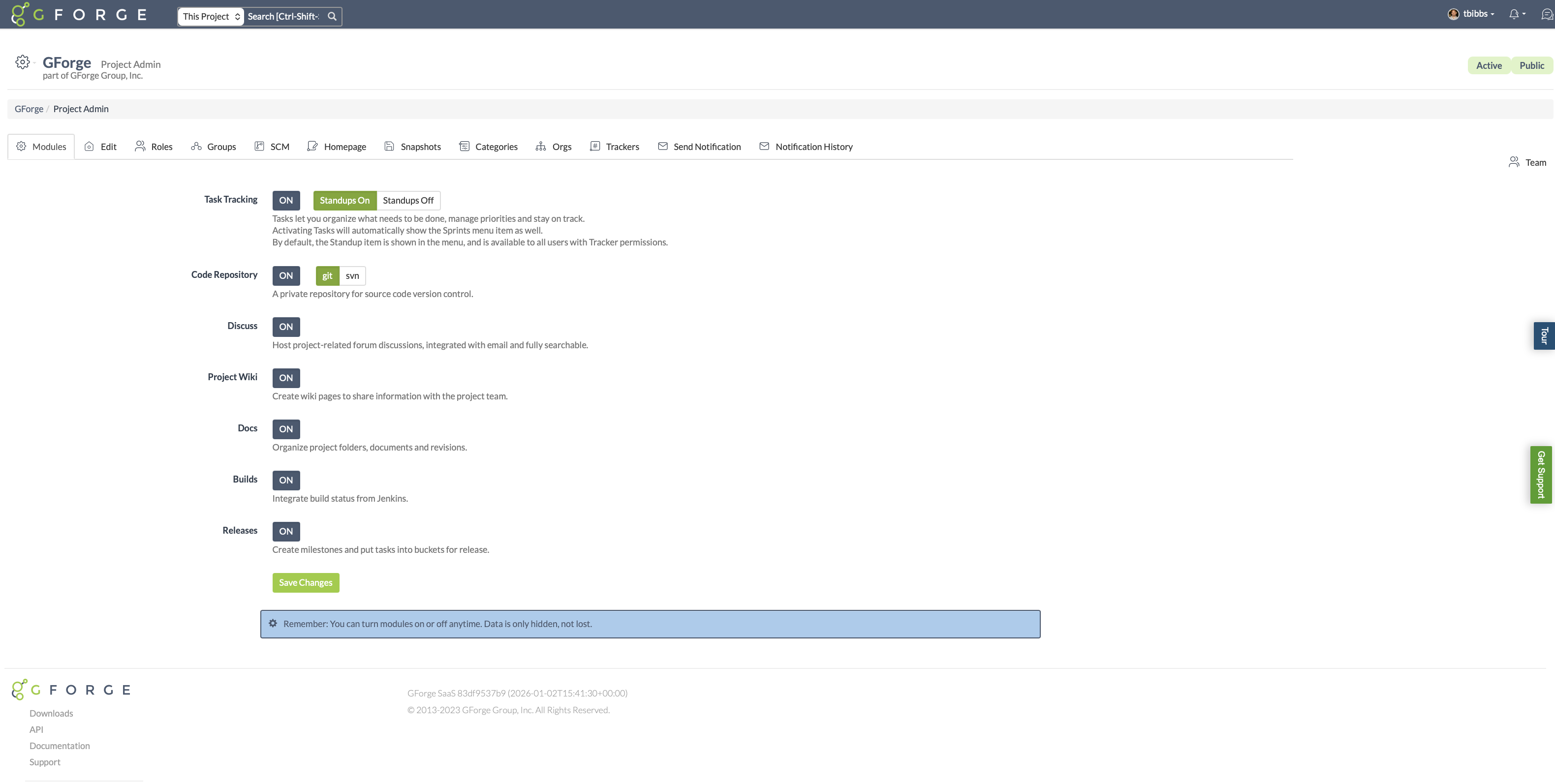
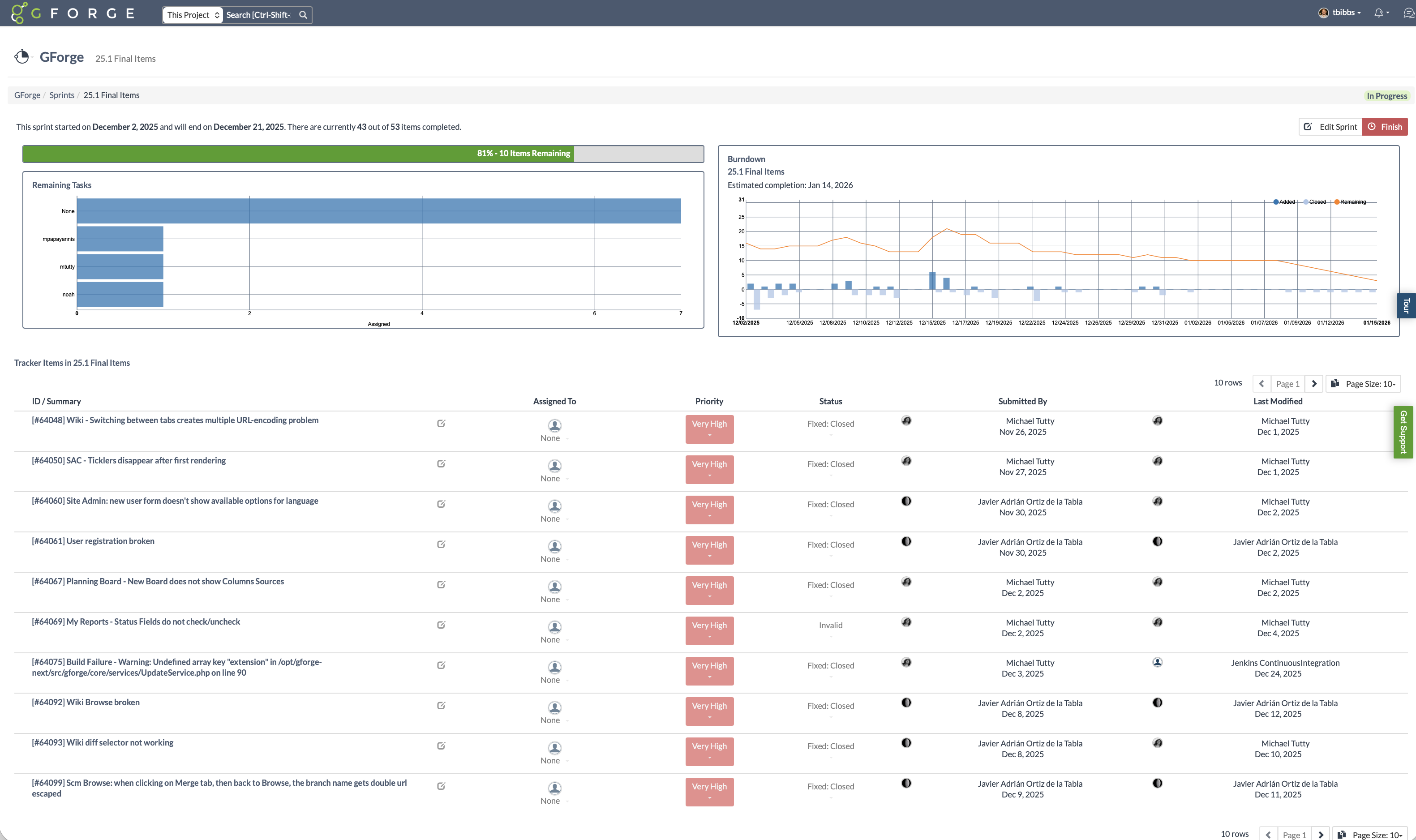
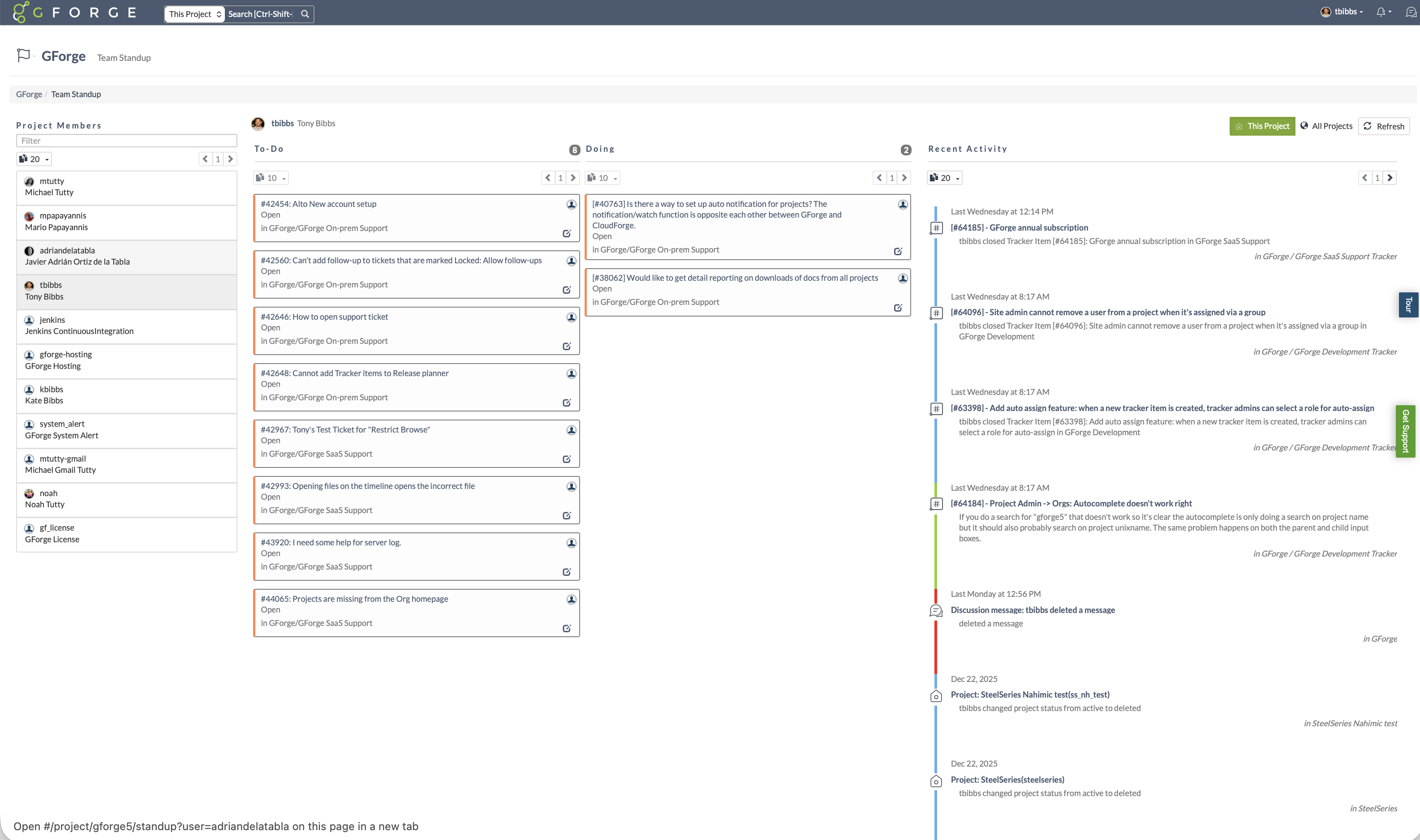
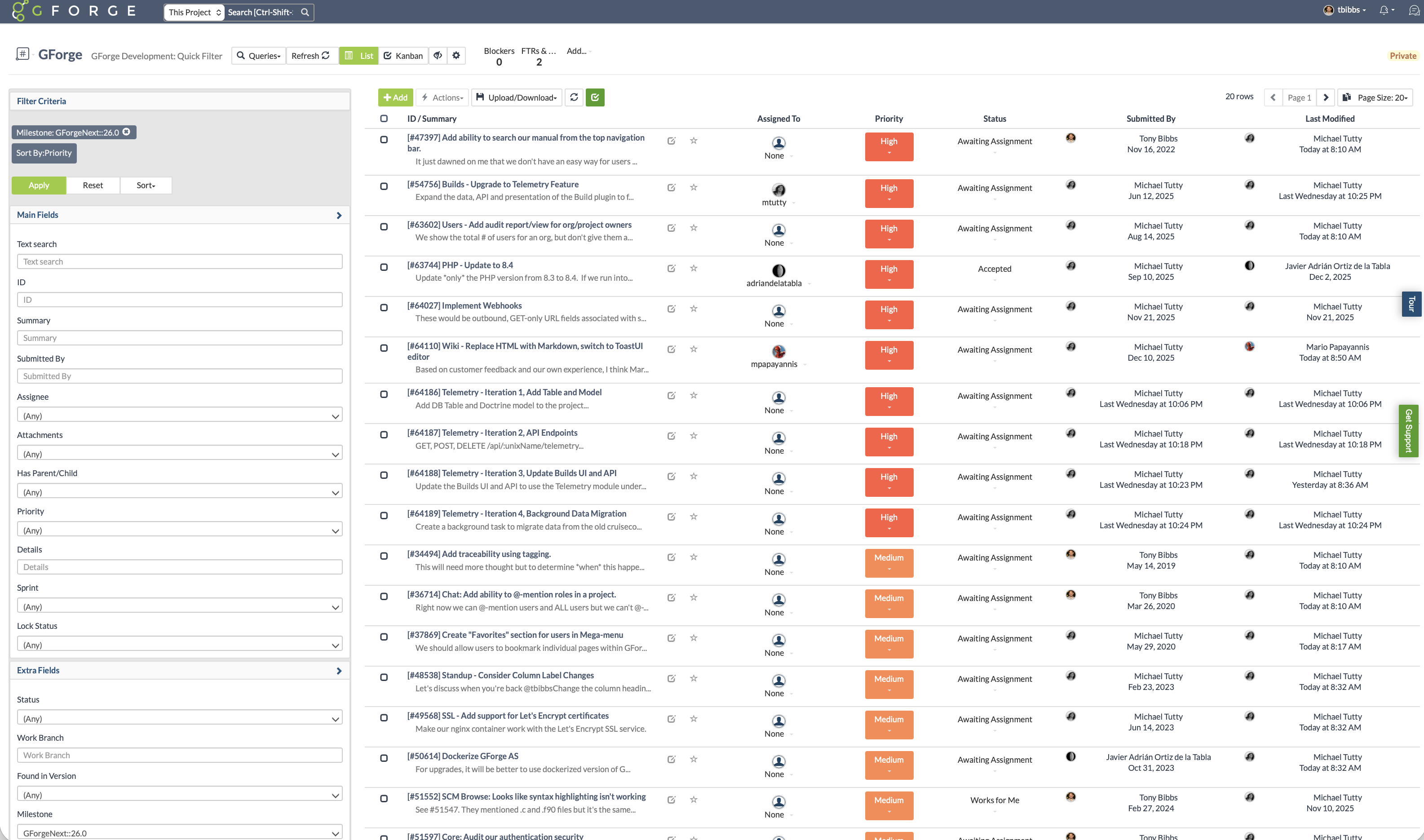
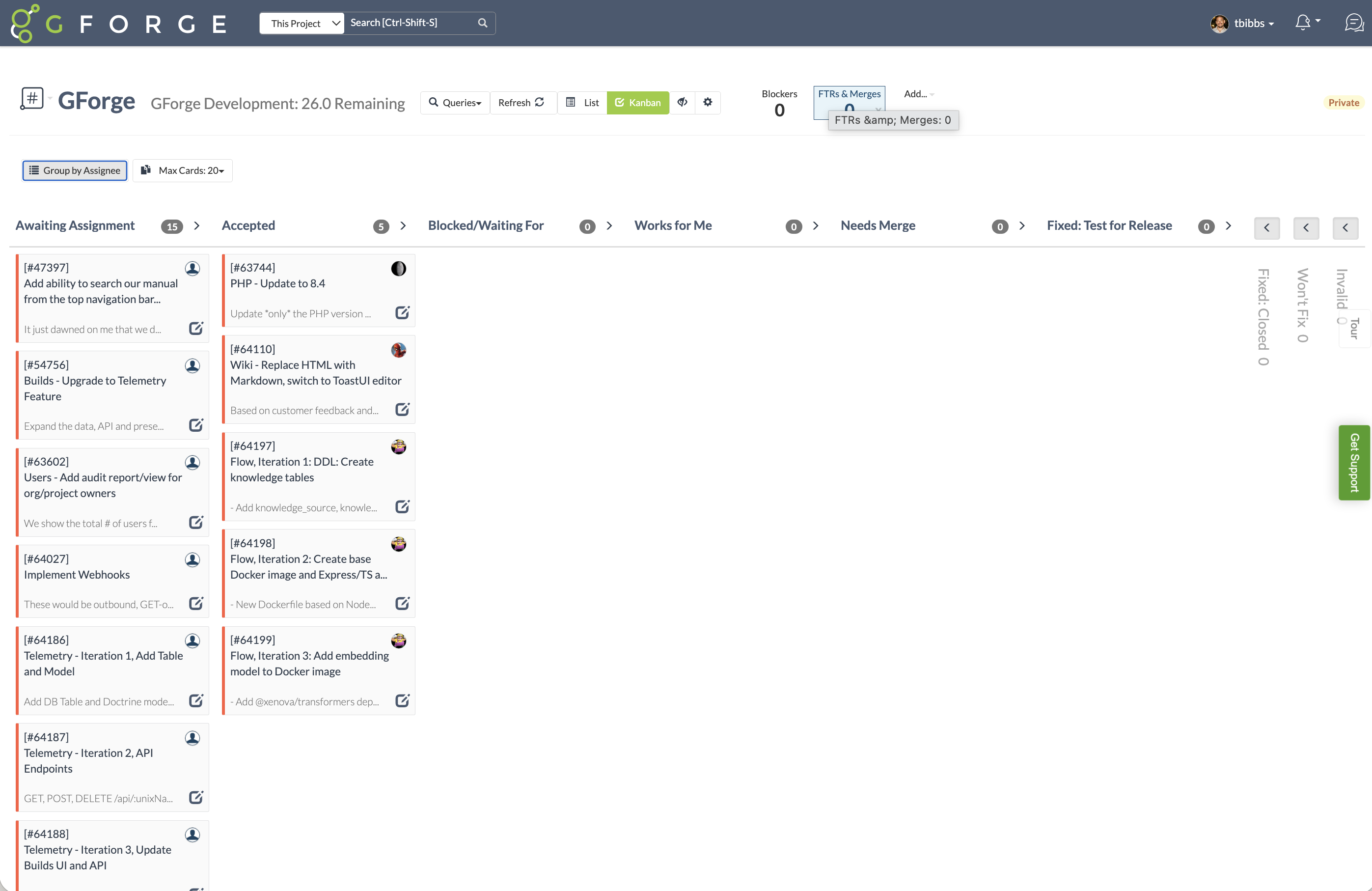
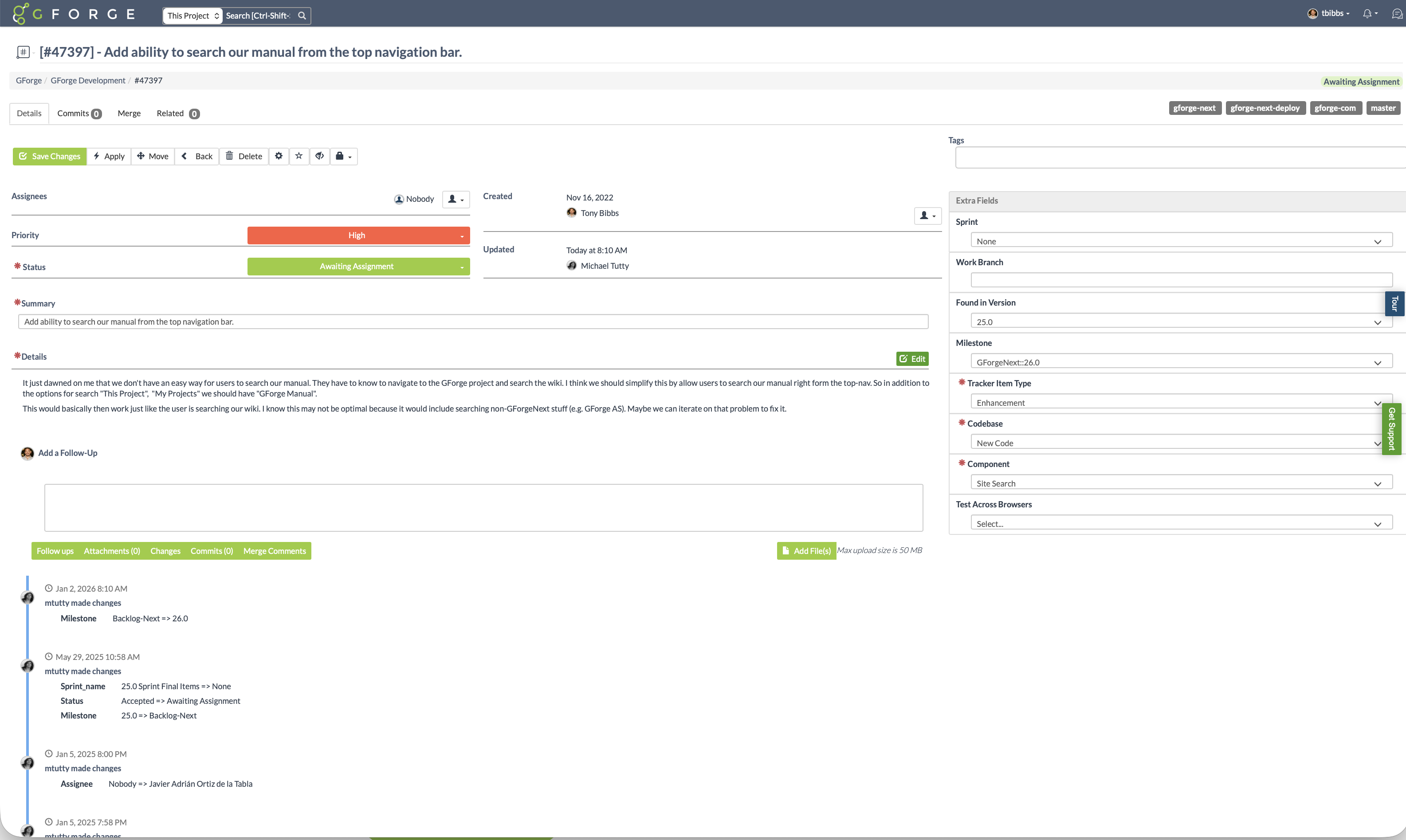
Screenshot of Use only the features you need. GForge lets project administrators enable or disable task tracking, source control (Git or SVN), wiki, documents, builds, and releases at any time. GForge scales up or down with your project - without losing data.Screenshot of Track sprint progress with visual burndown charts and estimated completion dates. See remaining tasks by assignee, monitor velocity, and keep releases on track - all integrated with your trackers and milestones.Screenshot of See what everyone is working on at a glance. The standup view shows each team member's to-do and in-progress items alongside a real-time activity stream - replacing the need for daily status meetings or separate standup tools.Screenshot of Filter and sort issues by milestone, priority, status, assignee, or any custom field. Save filtered views for quick access to the tasks that matter most - whether that's your current sprint backlog, high-priority bugs, or items awaiting assignment.Screenshot of Visualize workflow with drag-and-drop Kanban boards. Cards move through customizable status columns as work progresses - switch between Kanban and list views with one click.Screenshot of Every issue captures the full picture: priority, status, custom fields, file attachments, and linked commits. A complete change history shows who changed what and when - providing full traceability from request to release.