Galaxy vs. Toad Database Developer Tools

Overview
ProductRatingMost Used ByProduct SummaryStarting Price
Galaxy
Score 0.0 out of 10
Small Businesses (1-50 employees)
Galaxy is presented as Cursor for software engineers and data practitioners, and as a modern SQL editor with features like an AI copilot, sharing and collaboration, as well as access control and security. Galaxy’s base product is a fast SQL editor with reworked parameterization, auto-complete, and table metadata to make data discovery and analysis more reliable and convenient for developers. Galaxy’s AI copilot is context-aware - meaning…N/A
Toad Database Developer Tools
Score 9.1 out of 10
N/A
Toad by Quest is a database management toolset that database developers, administrators and data analysts use to simplify workflows, create code free from defects, automate frequent or repetitive processes, and minimize risks. Editions include Toad for Oracle, which automates administration tasks and helps proactively manage databases while embracing performance optimization and risk mitigation. Similar editions exist for IBM DB2, SQL Server, SAP, or MySQL and Postgres environments (Toad Edge).
$229
per year
Pricing
GalaxyToad Database Developer Tools
Editions & Modules
No answers on this topic
Toad Edge For MySQL
$229
per year
Toad Edge For Postgres
$229
per year
Toad for SQL - Pro Edition
$437
per year
Toad for Oracle - Base Edition
$550
per year
Toad for DB2 z/OS - Base Edition
$636
per year
Toad for SAP - Base Edition
$636
per year
Toad for SQL - Xpert Edition
$763
per year
Toad for Oracle - Professional Edition
$829
per year
Toad for SQL - Dev Edition
$930
per year
Toad for DB2 z/OS - Pro Edition
$996
per year
Toad for Oracle - Professional DB Admin Edition
$1,370
per year
Toad for DB2 z/OS - Xpert Edition
$1,529
per year
Toad for SAP - Xpert Edition
$1530
per year
Toad for Oracle - Xpert Plus Edition
$1,753
per year
Toad for DB2 z/OS - Dev Edition
$1,861
per year
Toad for SAP - Dev Edition
$1863
per year
Toad for SAP - Xpert+ Edition
$2099
per year
Toad for SAP - DBA Edition
$3661
per year
Offerings
Pricing Offerings
GalaxyToad Database Developer Tools
Free Trial
NoYes
Free/Freemium Version
YesNo
Premium Consulting/Integration Services
NoNo
Entry-level Setup FeeNo setup feeNo setup fee
Additional Details
More Pricing Information
Community Pulse
GalaxyToad Database Developer Tools
Considered Both Products
Galaxy

No answer on this topic

Toad Database Developer Tools
Chose Toad Database Developer Tools
Toad Database Developer Tools was recommended to me by my outside programming team, I thought it was ideal for my needs and I have been using it for many years. Point being, I have not had the need to use or evaluate other tools.
Chose Toad Database Developer Tools
SQL Developer is perfect for non-Oracle developers. It's lean and powerful. Except that Toad is even more powerful. Especially navigating through package definitions, packages body's, schema's and scripts is as if you're driving a Porsche in the fast lane with Toad, whereas SQL …
Chose Toad Database Developer Tools
Toad for Oracle is a better product, but the other products are free, so they do have that going for them.
Chose Toad Database Developer Tools
Toad for Oracle is a better tool in that it has more advanced features. With Toad, altering tables is very user friendly. You can also see specific sql scripts for the table modifications you have made. Also, with Toad for Oracle, you can monitor packages running in specific …
Chose Toad Database Developer Tools
Toad is much better than Tableau query writer. Tableau is not intuitive and requires knowledge of proprietary database language to fully implement. Tableau does not perform as quickly and accurately as Toad. Toad is very easy and slim to install. Additional hardware is often …
Chose Toad Database Developer Tools
Toad for Oracle has an excellent user interface with excellent features for development and also to query, execute and identify performance or issues with database syntax. It also does auto-correction on the database query syntax. It is far better than SQL navigator or other DB …
Chose Toad Database Developer Tools
SQL Developer has been used significantly by the development team for their sql designing and development.
RedGate is primarily used for ms sql and for CICD pipeline. We also use liquibase for our change deployment to automate the cicd. Toad is better to compared the both these …
Chose Toad Database Developer Tools
Toad for Oracle compares favorably to Oracle SQL Developer. I think it is mostly a matter of preference between our user base. I see some using Toad and others using SQL Developer. The one thing that Toad does which SQL Developer doesn't is running more than one query against …
Chose Toad Database Developer Tools
It has a lot more functionality and is easier to use for end-users. But overall, it is quite pricey
Chose Toad Database Developer Tools
Toad for Oracle outperforms other programs like SQL Plus in almost every category. The only downside is the price, which makes it less appealing for smaller businesses. Their customer service is fantastic and they offer a very extensive knowledge base for most common issues …
Chose Toad Database Developer Tools
Many other products can be used for query development like sql workbench, squirrel sql or even the good old notepad++ in sql mode. But toad being an enterprise product , specially the toad for oracle is very fast and does not have many bugs unlike other ides which tend to …
Chose Toad Database Developer Tools
Microsoft access has a disadvantage of local databases. Everyone has their different databases which becomes a real problem for the decisions. Toad plays an important role by making sure everyone is on the same page.
Chose Toad Database Developer Tools
Toad definitely had a lot of customization and functionality, unfortunately it is also where it falls short on user interface and usability for beginner and intermediate users.
Chose Toad Database Developer Tools
We didn't make a decision of choosing one and dropping the other. Our database guys have their own preference of tools. Since SQL developer is a free-to-use tool and light weighted tool, we used it for education materials. For those who need advanced functions, database …
Chose Toad Database Developer Tools
Compare to SSMS toad has more options on the interface for developers.
Chose Toad Database Developer Tools
Toad is a robust tool that can perform many database functions. It stacks up well to the competition. I have previously interacted with databases via command line and Toad's graphical interface is a major advantage.
Chose Toad Database Developer Tools
This is much easier to get directly at the data whereas with Tableau and Hyperion you have to have a report created. For my specific team we do not have the ability to create reports so we have to rely on another team to create the reports with takes time and money.
Chose Toad Database Developer Tools
I have used SQL developer and XML spy. Both tools have their strengths but do not have as many options for interacting with data. I have also used SQL*Plus but it is not as user friendly for quick interaction with the data. I have not utilized any other tools to interact …
Chose Toad Database Developer Tools
Toad has a very user-friendly GUI and perfectly compliments supporting the Oracle application. With the built in functionality and levels of security we can confidently use this software for our daily needs, which far more outweighed other comparable products for us.
Chose Toad Database Developer Tools
SQL Developer is a good product but seems more difficult to use.
Chose Toad Database Developer Tools
I was introduced to Toad for Oracle when I started to work with Oracle databases at the start of my career and was lucky enough to work at a company that allowed us to use them. So I have never used anything else. I would not want to spend the time to learn a new program.
Chose Toad Database Developer Tools
Toad has far more templates than SQL Developer. You can customize Toad. Toad is far more flexible with its options and setup features. Toad is much better at SQL Performance Tuning than what is available in SQL Developer. SQL Developer is free and is a good tool …
Chose Toad Database Developer Tools
I have used some SQL clients like Squirrel SQL or Dbeever before and they are good but do not have all the options and flexibility Toad offers: help on code, data tables browsing, errors reporting, filters, different visualization modes for data, optimization, etc.
Best Alternatives
GalaxyToad Database Developer Tools
Small Businesses
DBeaver
DBeaver
Score 8.5 out of 10

No answers on this topic

Medium-sized Companies
DBeaver
DBeaver
Score 8.5 out of 10
Redgate SQL Toolbelt Essentials
Score 9.6 out of 10
Enterprises
DBeaver
DBeaver
Score 8.5 out of 10
Redgate SQL Toolbelt Essentials
Score 9.6 out of 10
All AlternativesView all alternativesView all alternatives
User Ratings
GalaxyToad Database Developer Tools
Likelihood to Recommend
-
(0 ratings)
9.5
(0 ratings)
Likelihood to Renew
-
(0 ratings)
9.0
(0 ratings)
Usability
-
(0 ratings)
9.0
(0 ratings)
Support Rating
-
(0 ratings)
8.2
(0 ratings)
User Testimonials
GalaxyToad Database Developer Tools
Likelihood to Recommend
No answers on this topic
Well suited for development of stored procedures, packages, running scripts, and each and every DBA operation. Not very well suited for quick and simple querying. Toad seems to be overkill for simple things. Also, it's not very well suited for non-Oracle developers, who might be scared of by the endless amounts of options, tools and windows that Toad offers.
Read full review
Pros
No answers on this topic
  • I appreciate the library feature that enables me to label and store previously created statements. These are saved off to a network share for future use.
  • I also really like the describe function that lists all fields in a table. This helps as I build new queries.
  • I wish I was better at using the tuning function. I have seen others use it and am very impressed with the graphical depiction of query costing.
Read full review
Cons
No answers on this topic
  • The date/time settings in Toad are kind of difficult to figure out. I have to use an ALTER SESSION command to format the dates so I can actually query date/time fields.
  • It seems to be updated too often. I get notifications very frequently about new versions being available.
  • The export function is difficult to use.
Read full review
Likelihood to Renew
No answers on this topic
It is the preferred tool for our organization.
Read full review
Usability
No answers on this topic
I give is an 8 because nothing is a 10 and there is always room for improvement. I believe the user who is not as technologically inclined would be better suited with an easier way to identify the options for setting the layout up for Toad's GUI. To some it is very cumbersome and confusing.
Read full review
Support Rating
No answers on this topic
I give the overall support for Toad for Oracle a 10/10. This is because whenever there has been an issue with this software, our team has got an immediate response. The same can not be said for similar software. The most recent example of this is when we needed to renew our licenses. Some employees were unable to log in to code with the given license key. Support was able to resolve the issue quickly.
Read full review
Alternatives Considered
No answers on this topic
We didn't make a decision of choosing one and dropping the other. Our database guys have their own preference of tools. Since SQL Developer is a free-to-use tool and light weighted tool, we used it for education materials. For those who need advanced functions, database administrators for example, we bought an enterprise license of Toad and distributed them to developers. For enterprise level of analytics running Oracle based databases, I believe SQL Developer and Toad are two basics and safe choice to start with, unless one has very particular need (or preference).
Read full review
Return on Investment
No answers on this topic
  • Quick and easy query development helps reduce man-hours in a project which converts to real dollars.
  • Query analysis and tuning result in low database overhead and low latency, thus translating into real dollars because a system can thus handle more requests from customers.
  • Ease of use makes it easy to deploy greenhorns in projects with minimal training, thus helping save money. Otherwise menial and simple jobs would have required experienced DBAs.
Read full review
ScreenShots

Galaxy Screenshots

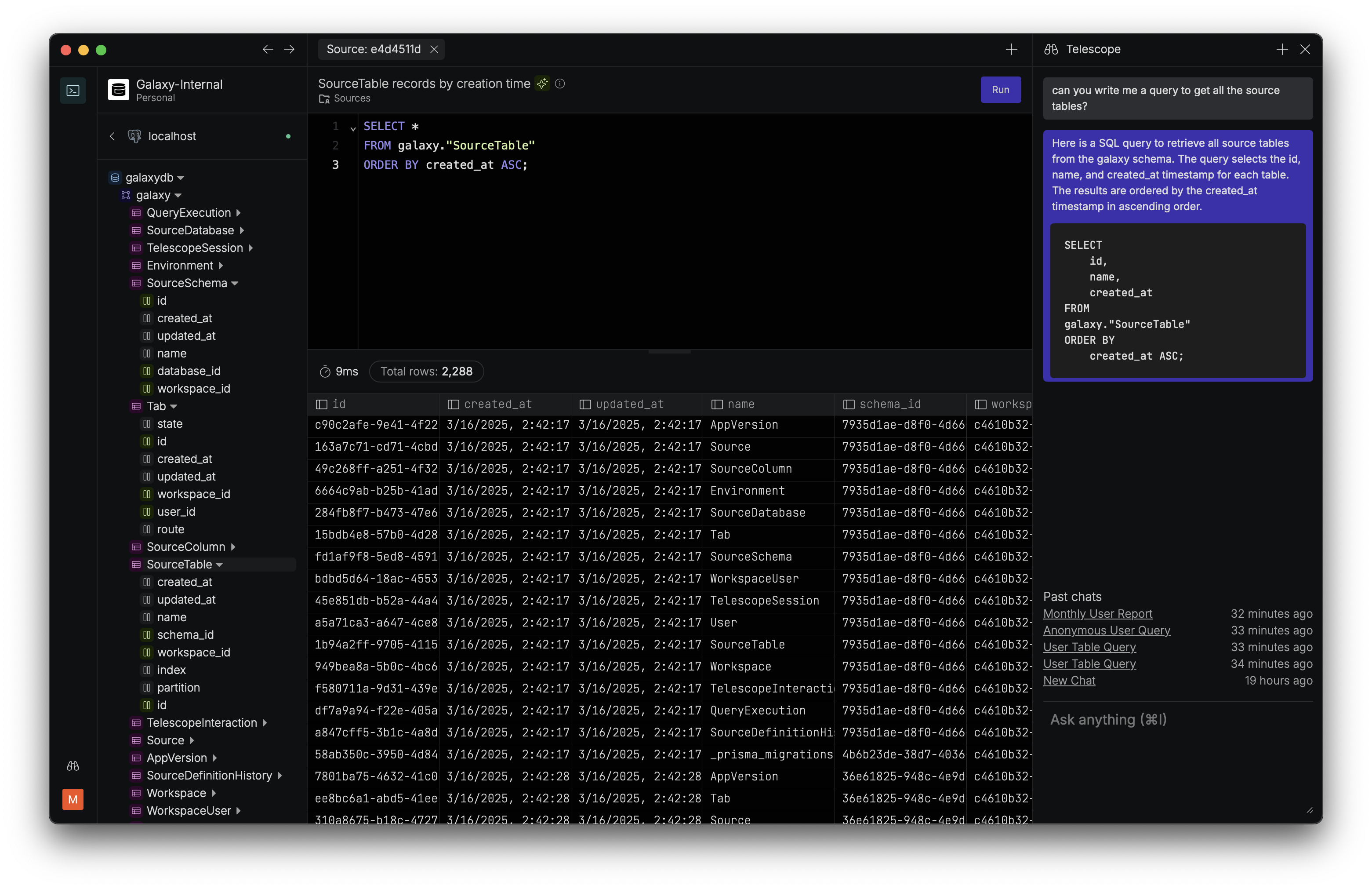
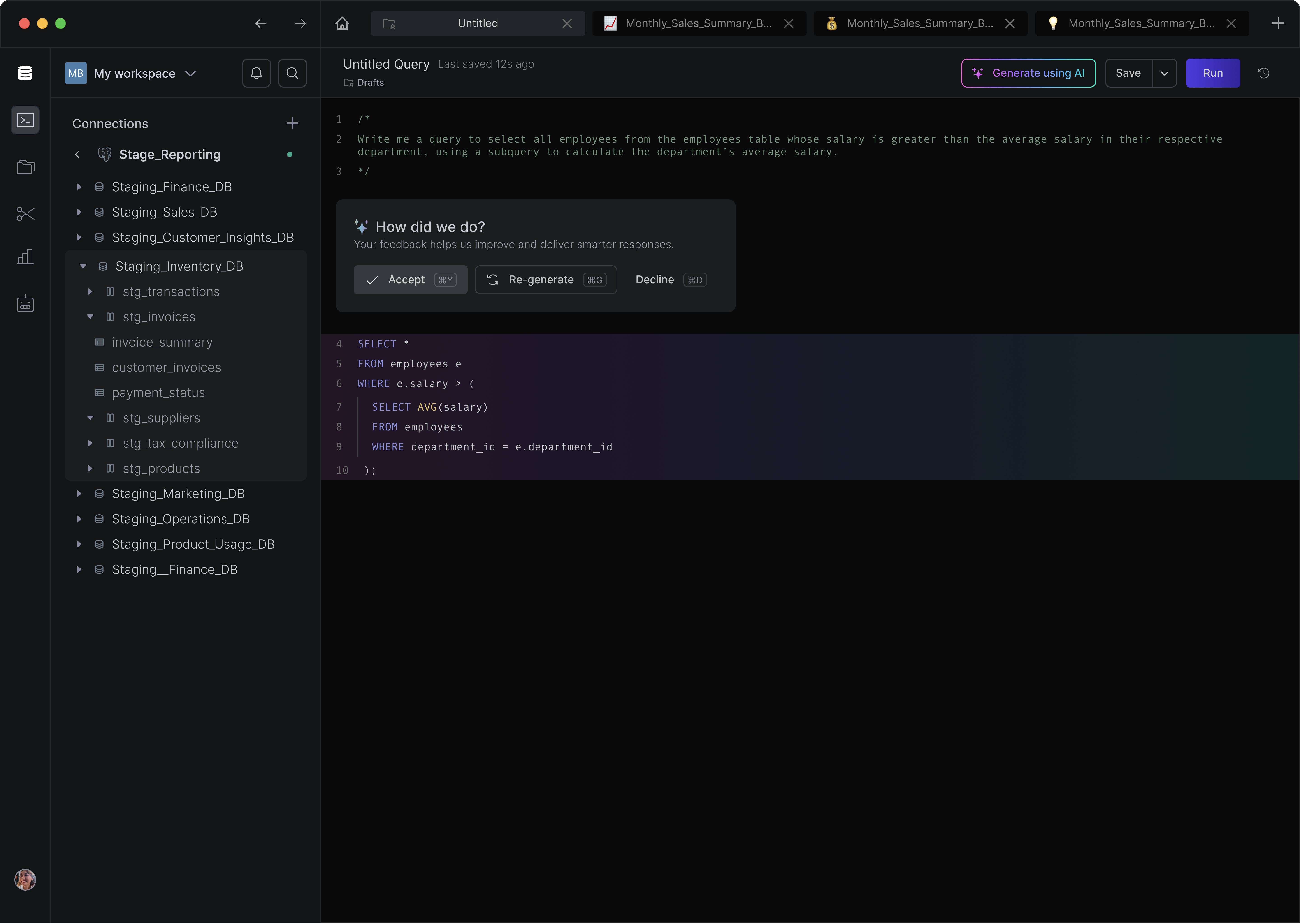
Screenshot of Galaxy's SQL Editor. The editor is reimagined to be modern, fast, and slick.Screenshot of AI Copilot - a context aware LLM copilot to generate and edit SQL, as well as optimize queries and chat with the database.