TrustRadius: an HG Insights company

Fortra's Globalscape Enhanced File Transfer (EFT) vs. Kiteworks

Save this comparison

Save this comparison

Add Product

Recommended Comparisons

    Overview
    ProductRatingMost Used ByProduct SummaryStarting Price

    Fortra's Globalscape Enhanced File Transfer (EFT)

    Score8 out of 10
    N/AWith operational efficiency in mind, Globalscape’s Enhanced File Transfer™ (EFT™) Enterprise boasts quick and intuitive setup, advanced automation capabilities, and real-time visibility into data transfers. Globalscape was acquired by Fortra in August 2020. It is now a Fortra company.N/A

    Kiteworks

    Score6 out of 10
    N/AKiteworks empowers organizations to manage risk in every send, share, receive, and save of sensitive content over numerous communications channels: email, file sharing, managed file transfer, APIs, and web forms. The Kiteworks platform unifies, tracks, controls, and secures sensitive content moving within, into, and out of an organization, significantly improving risk management and ensuring regulatory compliance. With on-premise, private cloud, hybrid and FedRAMP deployment…

    $15

    per year

    Pricing
    Fortra's Globalscape Enhanced File Transfer (EFT)Kiteworks
    Editions & Modules
    No answers on this topic
    Business
    $15
    per user/month
    Enterprise
    Custom Pricing
    Offerings
    Pricing Offerings
    Fortra's Globalscape Enhanced File Transfer (EFT)Kiteworks
    Free Trial
    YesYes
    Free/Freemium Version
    NoNo
    Premium Consulting/Integration Services
    NoNo
    Entry-level Setup FeeOptionalNo setup fee
    Additional Details——
    More Pricing Information
    Best Alternatives
    Fortra's Globalscape Enhanced File Transfer (EFT)Kiteworks
    Small Businesses
    FileZilla
    Score9.2 out of 10
    Dropbox DocSend
    Score8.3 out of 10
    Medium-sized Companies
    FileZilla
    Score9.2 out of 10
    Dropbox DocSend
    Score8.3 out of 10
    Enterprises
    Fortra's GoAnywhere MFT
    Score7.6 out of 10
    No answers on this topic
    All AlternativesView all alternativesView all alternatives
    User Ratings
    Fortra's Globalscape Enhanced File Transfer (EFT)Kiteworks
    Likelihood to Recommend
    8.1
    (2 ratings)
    9.5
    (2 ratings)
    User Testimonials
    Fortra's Globalscape Enhanced File Transfer (EFT)Kiteworks
    Likelihood to Recommend
    Fortra
    Globalscape EFT is well suited for file transmissions. It is very intuitive and easy to create file transmission rules. We transmit many files back and forth between vendors and software applications. File transmissions are fast and reliable. Globalscape allows us to specify certain file naming conventions, contain only certain data, format the data to be a specific way, etc.
    Incentivized
    Read full review
    Kiteworks
    Kiteworks is very good for securely sharing files external to your company and doing so without your customers knowing who each other are. The interface is simple and relatively intuitive. We have had some issues in getting timely support from Accellion this past year, but they seem to be doing better lately.
    Incentivized
    Read full review
    Pros
    Fortra
    • PGP & SSH Key Ring Retainer
    • Reporting
    • Event Rule Create - No Code development
    • Easy account set up for SFTP site directory creation
    Read full review
    Kiteworks
    • Microsoft Office Plugins
    • Desktop Synchronization
    • Mobile Ability
    • Group chat
    • File Filtering
    Read full review
    Cons
    Fortra
    • Would like to see the ability for a rule in EFT to link the the Advanced Workflow that it is called (rather than having to manually locate the Advanced Workflow)
    • Would like the ability to disable just a part of an Event Rule
    • Would like to see more template creation functionality
    Incentivized
    Read full review
    Kiteworks
    • Encrypting our files appears to be less than 100% complete
    • Software updates cannot be scheduled to take place automatically like their old product
    • Detailed activity logging is not available to administrators. You must submit the logs to Accellion for analysis.
    Incentivized
    Read full review
    Alternatives Considered
    Fortra
    Globalscape and Automate are similar. However, with Automate, you do not have PGP or SSH keyring functionality within the application. You would need to purchase and install them separately. So as far as organization I like Globalscape for key retainment. Globalscape's transmission reporting is a lot better as well. Although it could be enhanced a little more, I use it to report any transmission issues with the Vendors. But the Event Rule functionality that Globalscape has in building simple action logic is where you save a lot of time instead of coding transmissions. Automate does not have active-active replication within their application. Meaning they do not have the ability to have two servers active for off loading transmission in case of bottlenecks. However, if one server goes down, the secondary server will be active. We have both products and don't mind working in either one of them, but Globalscape seems to be the more comprehensive and scalable application
    Read full review
    Kiteworks
    The main reason for selecting Kiteworks is that when sharing files with multiple customers, each customer has no idea who the other customers are. To do that in Teams would require users to create a private team for each customer, which would be very [time-consuming].
    Incentivized
    Read full review
    Return on Investment
    Fortra
    • Globalscape EFT is very reliable
    • Allows us to easily transmit files with customers
    • Allows us to easily meet file requirements of vendors/other software applications
    Incentivized
    Read full review
    Kiteworks
    • Before then kitework we used 3 different products. It was expensive and difficult manage.
    Read full review
    ScreenShots

    Kiteworks Screenshots

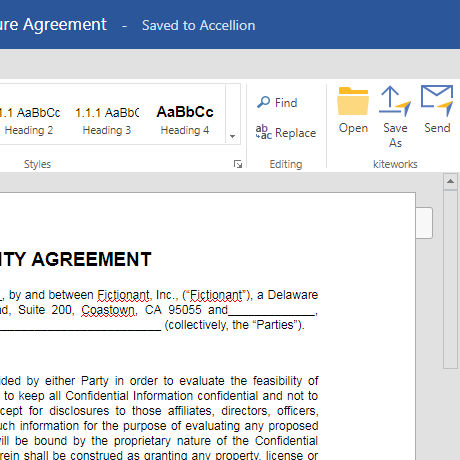
    Screenshot of The CISO Dashboard: See All Sensitive Content Entering or Leaving the EnterpriseScreenshot of Send Secure Email with Ease from MS Outlook, Web or MobileScreenshot of Share Documents Securely from Word, Excel, PowerPoint and Outlook