TrustRadius: an HG Insights company

Save this comparison

Save this comparison

Add Product

Recommended Comparisons

    Overview
    ProductRatingMost Used ByProduct SummaryStarting Price

    Google Mobile-Friendly Test

    Score9 out of 10
    N/AGoogle Mobile-Friendly Test is a search engine optimization software solution offered by Google.N/A

    Moz Local

    Score8.9 out of 10
    N/AMoz Local is a Listing Management & Distribution software solution that enables users to actively manage location data to optimize local search performance. The solution also enables users to respond to reviews and analyze review sentiment on the most popular sites without having to visit them individually, delete duplicate listings, and engage with consumers to share news, offers, and updates across Google, Facebook and other directories.

    $20

    per month

    Pricing
    Google Mobile-Friendly TestMoz Local
    Editions & Modules
    No answers on this topic
    Lite
    $20
    per month
    Preferred
    $30
    per month
    Elite
    $40
    per month
    Offerings
    Pricing Offerings
    Google Mobile-Friendly TestMoz Local
    Free Trial
    NoNo
    Free/Freemium Version
    NoNo
    Premium Consulting/Integration Services
    NoNo
    Entry-level Setup FeeNo setup feeNo setup fee
    Additional Details—Discounts are available for annual billing. Add-ons like Reviews AI and Listings AI are available on certain plans. A discount of up to 20% is available for annual billing.
    More Pricing Information
    Features
    Google Mobile-Friendly TestMoz Local
    SEO
    Comparison of SEO features of Google Mobile-Friendly Test and Moz Local
    Feature
    Google Mobile-Friendly Test
    8.5
    6 Ratings
    10% above category average
    Moz Local
    -
    Ratings
    Keyword analysis8.02 Ratings00 Ratings
    Backlink management8.02 Ratings00 Ratings
    SERP ranking tracking9.02 Ratings00 Ratings
    Page grader8.75 Ratings00 Ratings
    Competitive analysis7.02 Ratings00 Ratings
    Site audit / diagnostics9.66 Ratings00 Ratings
    Site recommendations8.95 Ratings00 Ratings
    Task management9.02 Ratings00 Ratings
    SEO Channels
    Comparison of SEO Channels features of Google Mobile-Friendly Test and Moz Local
    Feature
    Google Mobile-Friendly Test
    8.5
    5 Ratings
    11% above category average
    Moz Local
    -
    Ratings
    Local SEO8.02 Ratings00 Ratings
    Social SEO9.02 Ratings00 Ratings
    Mobile SEO10.05 Ratings00 Ratings
    Global SEO7.02 Ratings00 Ratings
    SEO Platform & Account Management
    Comparison of SEO Platform & Account Management features of Google Mobile-Friendly Test and Moz Local
    Feature
    Google Mobile-Friendly Test
    9.2
    4 Ratings
    9% above category average
    Moz Local
    -
    Ratings
    Multi-domain support8.94 Ratings00 Ratings
    Integration with web analytics tools9.53 Ratings00 Ratings
    Best Alternatives
    Google Mobile-Friendly TestMoz Local
    Small Businesses
    Serpstat
    Score10 out of 10
    No answers on this topic
    Medium-sized Companies
    Yoast
    Score8.5 out of 10
    No answers on this topic
    Enterprises
    Google Trends
    Score8.6 out of 10
    No answers on this topic
    All AlternativesView all alternativesView all alternatives
    User Ratings
    Google Mobile-Friendly TestMoz Local
    Likelihood to Recommend
    9.2
    (7 ratings)
    10.0
    (1 ratings)
    Likelihood to Renew
    10.0
    (1 ratings)
    -
    (0 ratings)
    User Testimonials
    Google Mobile-Friendly TestMoz Local
    Likelihood to Recommend
    Google
    I mean, it is a simple, no-frill test that gives your OK or NOT OK and highlights where it is. It is just a temperature check, this has to be used in conjunction with other tools for it to be useful. Since it is free I recommend running it as a check always.
    Incentivized
    Read full review
    iContact
    Moz Local is a great alternative as well as a compliment to Yext. The service has a smaller network but is just as powerful. The dashboard is super easy to load your location information into and allows the product to do the work by distributing the data across platforms. Issues are easily identifiable and can easily be corrected. Depending on your service level package, you also can have access to reviews and be able to monitor those as you see fit. I would strongly recommend this service to anyone who has a local business they are looking to get seen across the web. For a larger business, I'd consider a larger company with a bigger network.
    Incentivized
    Read full review
    Pros
    Google
    • Google Mobile-Friendly Test is easy to use and works very fast.
    • Google also has its own search engine results in mind when using the tool. This is important, as Google has most of the online search market share.
    • Most modern devices are accounted for.
    Incentivized
    Read full review
    iContact
    • Distribution of location data.
    • Dashboard super easy to use.
    • Low cost option that gets the job done.
    Incentivized
    Read full review
    Cons
    Google
    • Google's suggestions are sometimes vague or unhelpful.
    • The test doesn't offer multiple screen sizes or shapes. Though this isn't a huge issue, it would be nice to make sure a site using media queries stays mobile friendly throughout size changes
    Incentivized
    Read full review
    iContact
    • Expansion of network.
    • Needs to be easier to access, too many clicks within Moz suite.
    • Generally speaking, they are solid.
    Incentivized
    Read full review
    Likelihood to Renew
    Google
    It is free, so I woule likely renew it.
    Incentivized
    Read full review
    iContact
    No answers on this topic
    Alternatives Considered
    Google
    I think this is a great addition to other search tools and a really quick and easy way to check how your pages work on mobile to ensure your users have the best experience.
    Incentivized
    Read full review
    iContact
    Moz is just as good as Yext, the only major difference is the size of the network.
    Incentivized
    Read full review
    Return on Investment
    Google
    • Our websites pages are a hundred percent mobile friendly.
    • Detects almost all mobile usability issues.
    • Robust test tools extending up to detectors for incompatible plugins.
    Incentivized
    Read full review
    iContact
    • Information has been published which has helped ensure we are trusted amongst our customers.
    Incentivized
    Read full review
    ScreenShots

    Moz Local Screenshots

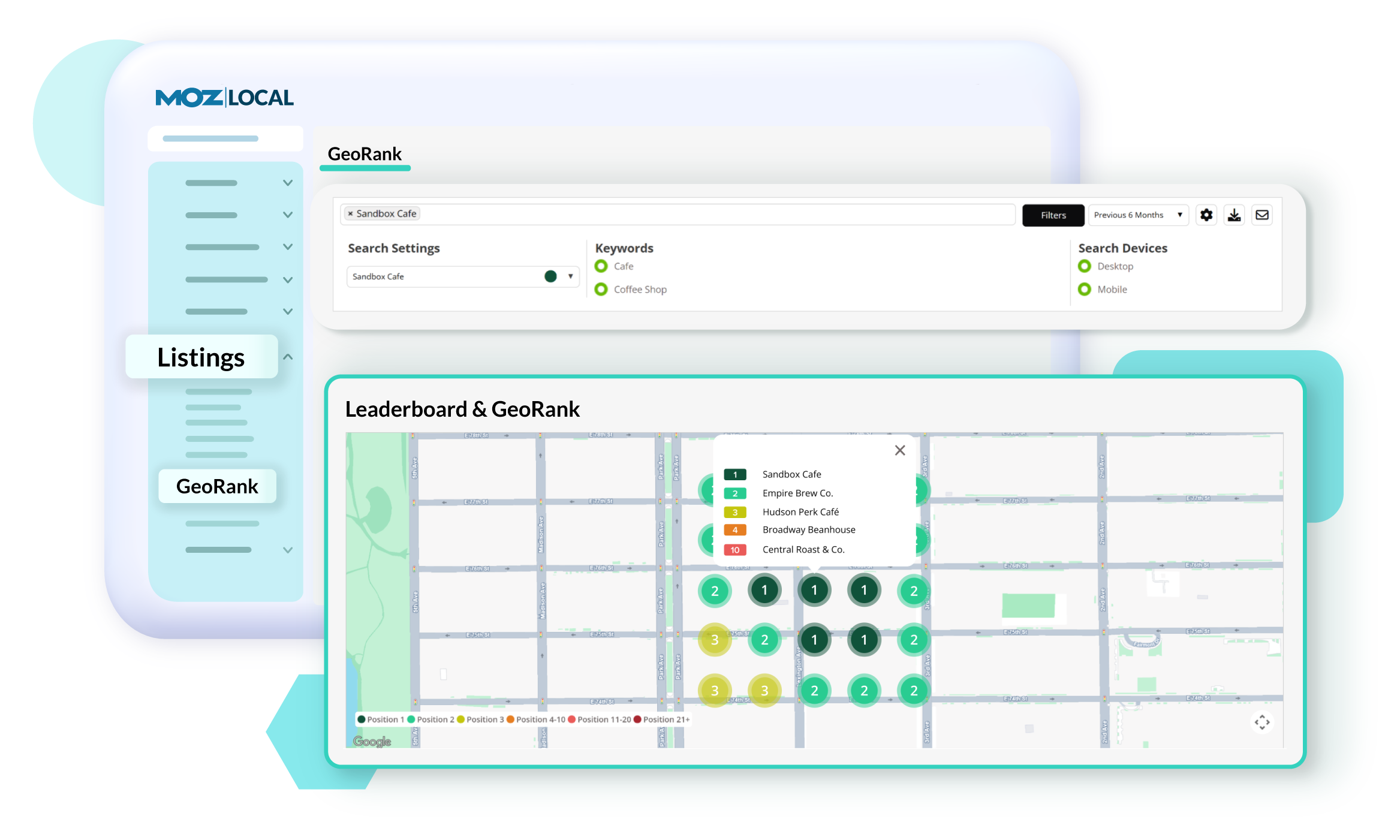
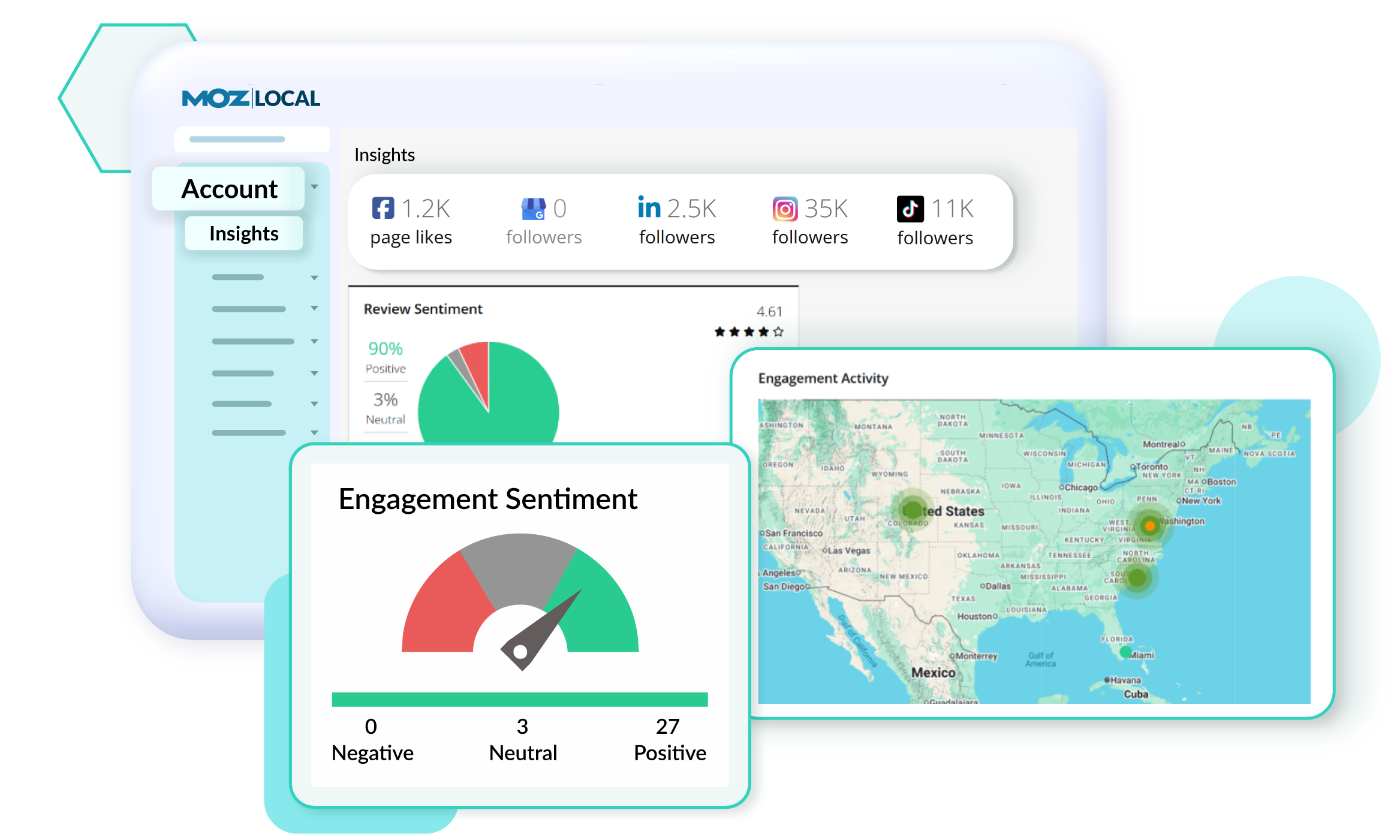
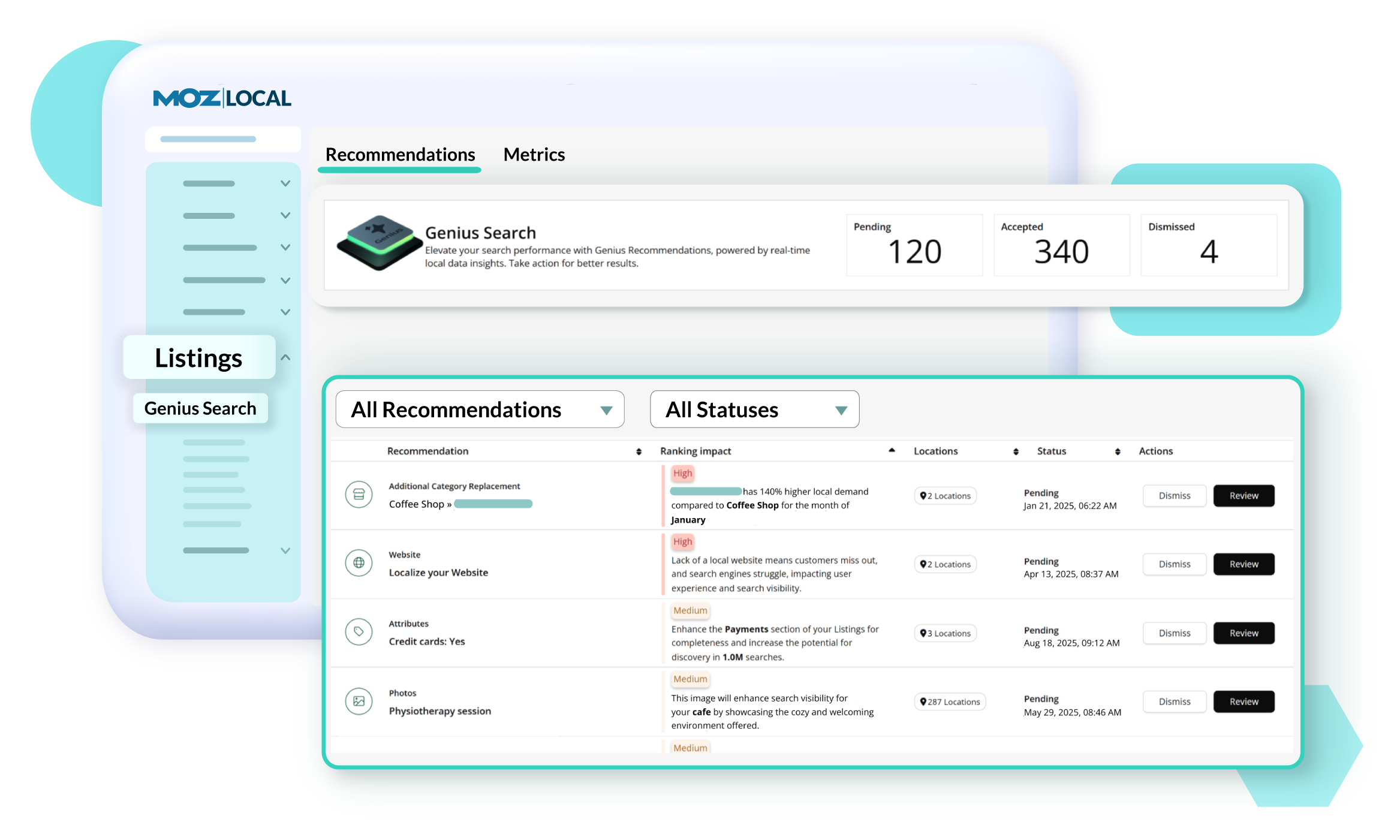
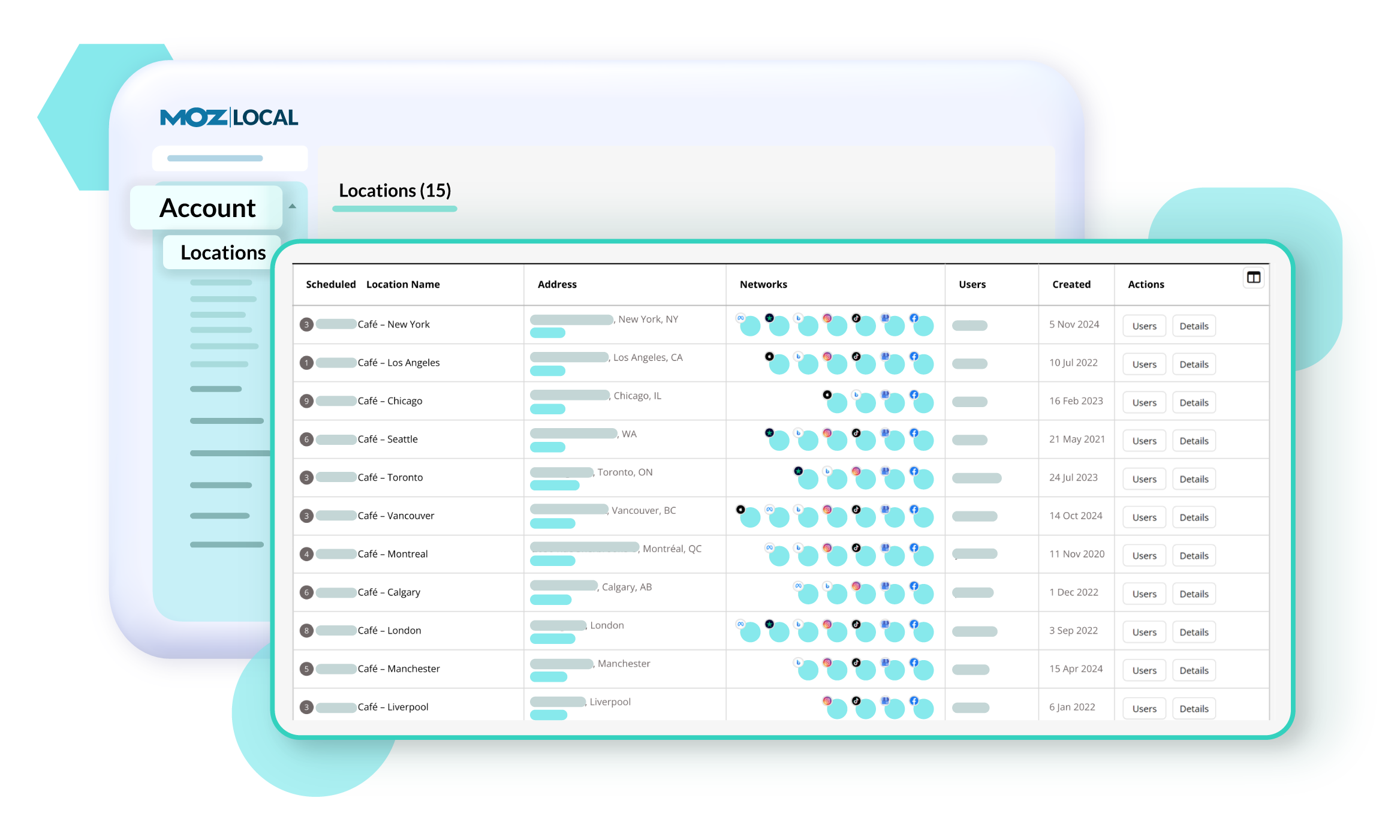
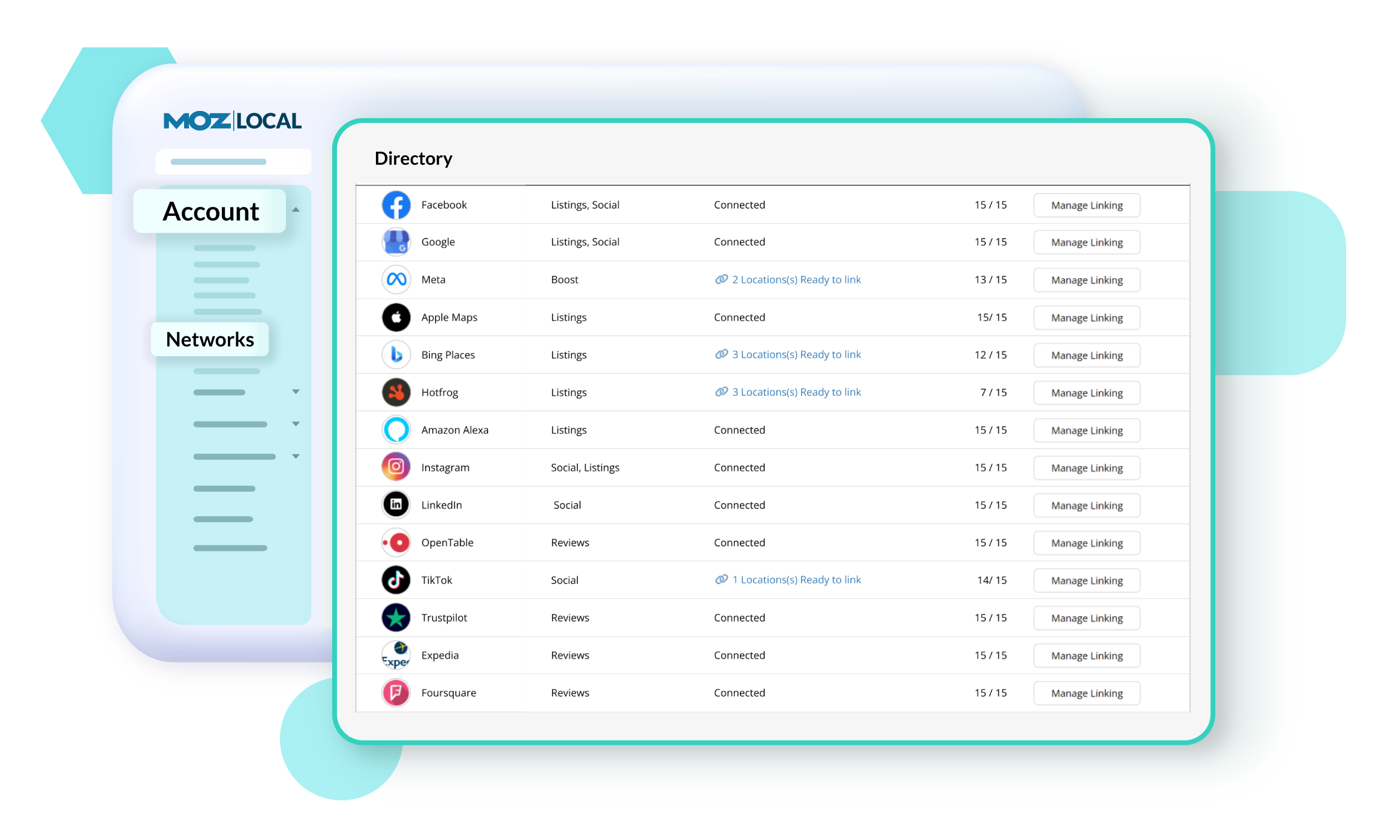
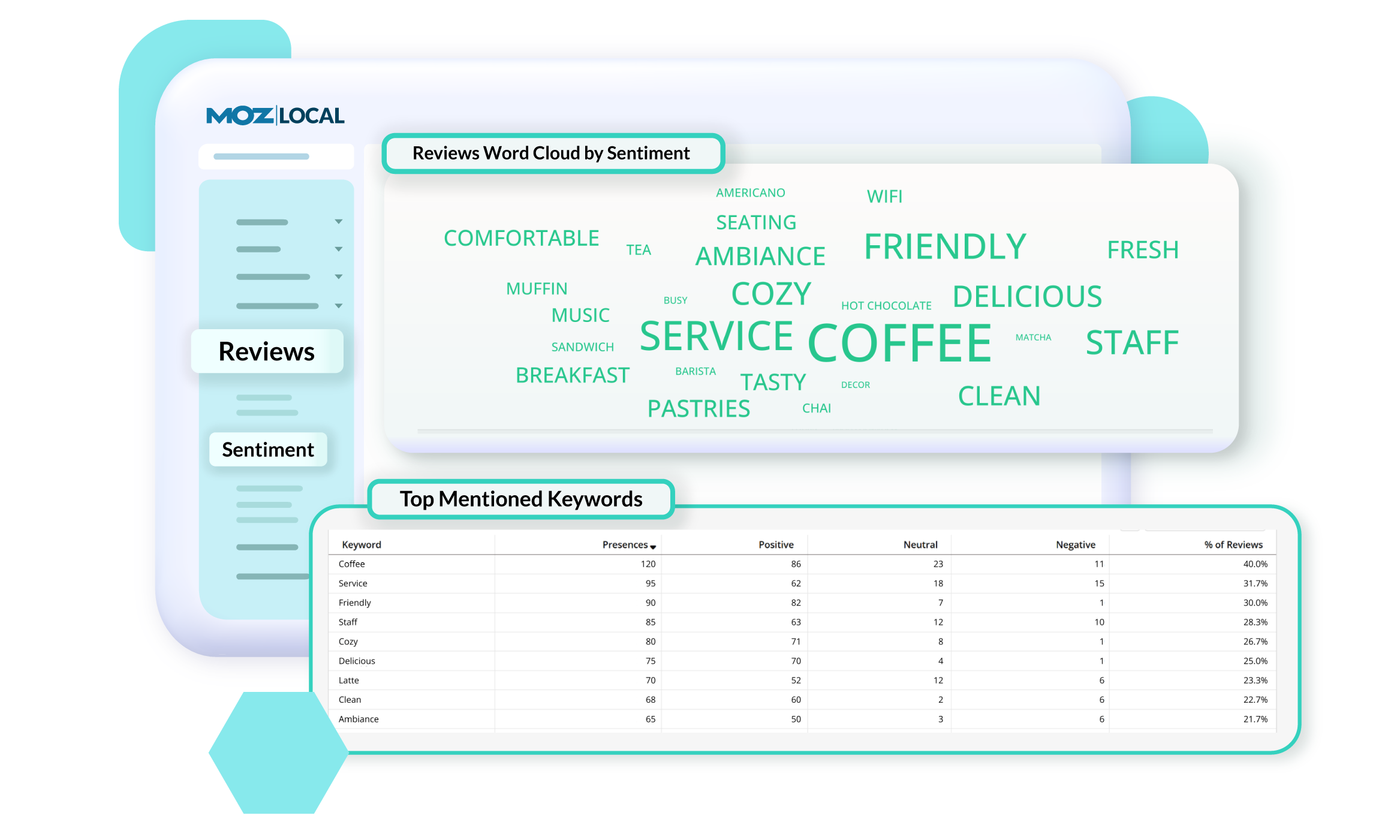
    Screenshot of GeoRank, which offers a precise view of how a business and competitors rank in Google’s local search results across different neighborhoods. Because search results change based on a person’s location, traditional rank tracking doesn’t show the full picture. With GeoRank, you can set grids around your service area, track keyword rankings at multiple points, and visualize performance on interactive maps. See where you’re winning, where competitors outrank you, and how your visibility changes over time. GeoRank helps uncover opportunities to strengthen local SEO and expand a brand's reach.Screenshot of Insights in Moz Local, which connect directly with a Google Business Profile to show how customers are finding and engaging with a business. Track key actions like website clicks, direction requests, and phone calls to understand how listing drives leads over time. See which search keywords bring people to a profile, spot trends, and uncover opportunities to improve visibility. Insights offer a deeper look at customer behavior.Screenshot of Listings AI, which helps to keep a business's listings optimized as markets, competitors, and customer behaviors change. By analyzing reviews, engagement signals, keywords, and competitor data, it generates tailored recommendations that follow SEO best practices and align with local search trends. You’ll see suggestions for categories, services, and attributes—each with clear impact metrics—so you know which updates will boost visibility. It is available with Elite plans (or as an add-on for Lite and Preferred).Screenshot of Locations in Moz Local, where users manage and update business details to keep listings accurate and consistent across the web. From one dashboard, you can edit core information like name, address, hours, services, categories, and attributes, as well as upload images and add custom fields. Auto-sync ensures changes are pushed to directories automatically, saving you time and preventing errors. You can also view edit history, set warnings to avoid duplicate content, and group locations for easier management.Screenshot of Networks in Moz Local. which offers a centralized view of all the directories, social platforms, and review sites a business can connect to. From here, you can see which locations are linked, ready to link, or need updates, and quickly manage connections across platforms like Google, Facebook, and Yelp. The Networks table shows linking status and highlights any missing data or issues.Screenshot of Reviews Sentiment in Moz Local, which helps understand how customers feel about a business by analyzing the language used in their reviews. Track sentiment trends over time, see top keywords driving positive or negative feedback, and explore interactive word clouds to quickly spot themes. With color-coded insights and keyword-level detail, you can identify what customers love, uncover areas for improvement, and take action to strengthen your reputation. Sentiment reports can be filtered, shared, or exported, so marketing teams stay aligned on customer feedback and business impact.