Google Tasks vs. OFFLIGHT

Overview
ProductRatingMost Used ByProduct SummaryStarting Price
Google Tasks
Score 8.2 out of 10
N/A
Google Tasks, also available via a mobile app, aims to allow users to manage, capture, and edit tasks from anywhere, at anytime, with to-dos that sync across all devices. Integrates with Gmail and Google Calendar.N/A
OFFLIGHT
Score 0.0 out of 10
N/A
OFFLIGHT is a productivity software designed to centralize task management, facilitate goal setting and tracking, assist in daily planning, and enhance focus during work sessions. Key Features: Unified Task Management: Consolidates tasks from various tools and platforms into one centralized location. Goal Setting and Tracking: Allows users to set, manage, and track their goals. Daily Planning: Provides a time-blocking…
$6.99
per month per user
Pricing
Google TasksOFFLIGHT
Editions & Modules
No answers on this topic
Offerings
Pricing Offerings
Google TasksOFFLIGHT
Free Trial
NoYes
Free/Freemium Version
NoYes
Premium Consulting/Integration Services
NoNo
Entry-level Setup FeeNo setup feeNo setup fee
Additional DetailsOFFLIGHT are currently in open beta testing. OFFLIGHT offer only the Believer Plan for pricing, but the service can be used for free without any plan purchase. However, those who purchase the Believer Plan can maintain the price for a lifetime.
More Pricing Information
Community Pulse
Google TasksOFFLIGHT
Best Alternatives
Google TasksOFFLIGHT
Small Businesses
7shifts
7shifts
Score 9.8 out of 10
7shifts
7shifts
Score 9.8 out of 10
Medium-sized Companies
Todoist
Todoist
Score 9.1 out of 10
Todoist
Todoist
Score 9.1 out of 10
Enterprises
Whimsical
Whimsical
Score 9.2 out of 10
Whimsical
Whimsical
Score 9.2 out of 10
All AlternativesView all alternativesView all alternatives
User Ratings
Google TasksOFFLIGHT
Likelihood to Recommend
7.5
(23 ratings)
-
(0 ratings)
Usability
8.7
(4 ratings)
-
(0 ratings)
Support Rating
2.0
(1 ratings)
-
(0 ratings)
User Testimonials
Google TasksOFFLIGHT
Likelihood to Recommend
Google
If other google products are already in use, it is very easy to get into Google Tasks as well and everybody probably has a google account, hence, does not need another account as well. It is helpful for simple to do lists, we would not recommend for larger project planning.
Read full review
OFFLIGHT Inc.
No answers on this topic
Pros
Google
  • The best part, Google Tasks is FREE. No paywall, no ads. Just pure productivity. I was looking for some task-management app which is free, since it was difficult to get a paid one. I found that this was the perfect solution for me.
  • It's deeply integrated with other Google services like Gmail and Calendar. It can pick tasks with Gmail from emails, in the form of suggestions. It's up to you, completely. The tasks will appear in your calendar automatically, if it's time or date specific.
  • It's simple and hassle free to insert tasks and complete them. The app loads fast and hardly faces any crash. I encountered no such crashes.
  • It is present in multiple platforms. I would create a task in my phone, and would check it off on my laptop.
  • It's hassle free to add and check off tasks. It was very helpful for me in college.
Read full review
OFFLIGHT Inc.
No answers on this topic
Cons
Google
  • It may take some time & adjustments to build a workflow that covers your specific needs.
  • Need a feature to hide tasks that are weeks or even months ahead into the future.
  • Missing a full tab view where you can see all your different lists of tasks.
Read full review
OFFLIGHT Inc.
No answers on this topic
Usability
Google
Google is simple to use and easy to understand. Having a one-click to add tasks via Google Calendar is a must for any busy business that manages multiple accounts and/or projects. Compliance and business standards are at the forefront, with notification reminders so you don't forget any of those annual certifications, for example.
Read full review
OFFLIGHT Inc.
No answers on this topic
Support Rating
Google
Since the app is free, we can't expect to get a great support. 1. The app does not even have a dedicated forum where other members can help each other. 2. The app only has a feedback option, which I rarely think visits the team. 3. Even after sending many feedbacks, you can't expect a reply. 4. In a nutshell, if you face any problem, you can just wait. Nothing more than that.
Read full review
OFFLIGHT Inc.
No answers on this topic
Alternatives Considered
Google
Google Tasks is not necessarily better than its competitors and certainly not as robust or complex as most to-do applications and platforms available in the market, but because it is automatically integrated into G Suite services--our primary technology interface--this free option has precluded us from needing to explore other tools that are often "better" but not as intuitive when so much time and focus is already spent within the Google ecosystem.
Read full review
OFFLIGHT Inc.
No answers on this topic
Return on Investment
Google
  • Personally, has managed over 1280 tasks for me in the past couple of years that I have been able to check off thanks to the app
  • Has accurately allowed me personally to schedule out tasks into the future that I want to get done but don't have the mental space currently to be trying to remember or do
Read full review
OFFLIGHT Inc.
No answers on this topic
ScreenShots

OFFLIGHT Screenshots

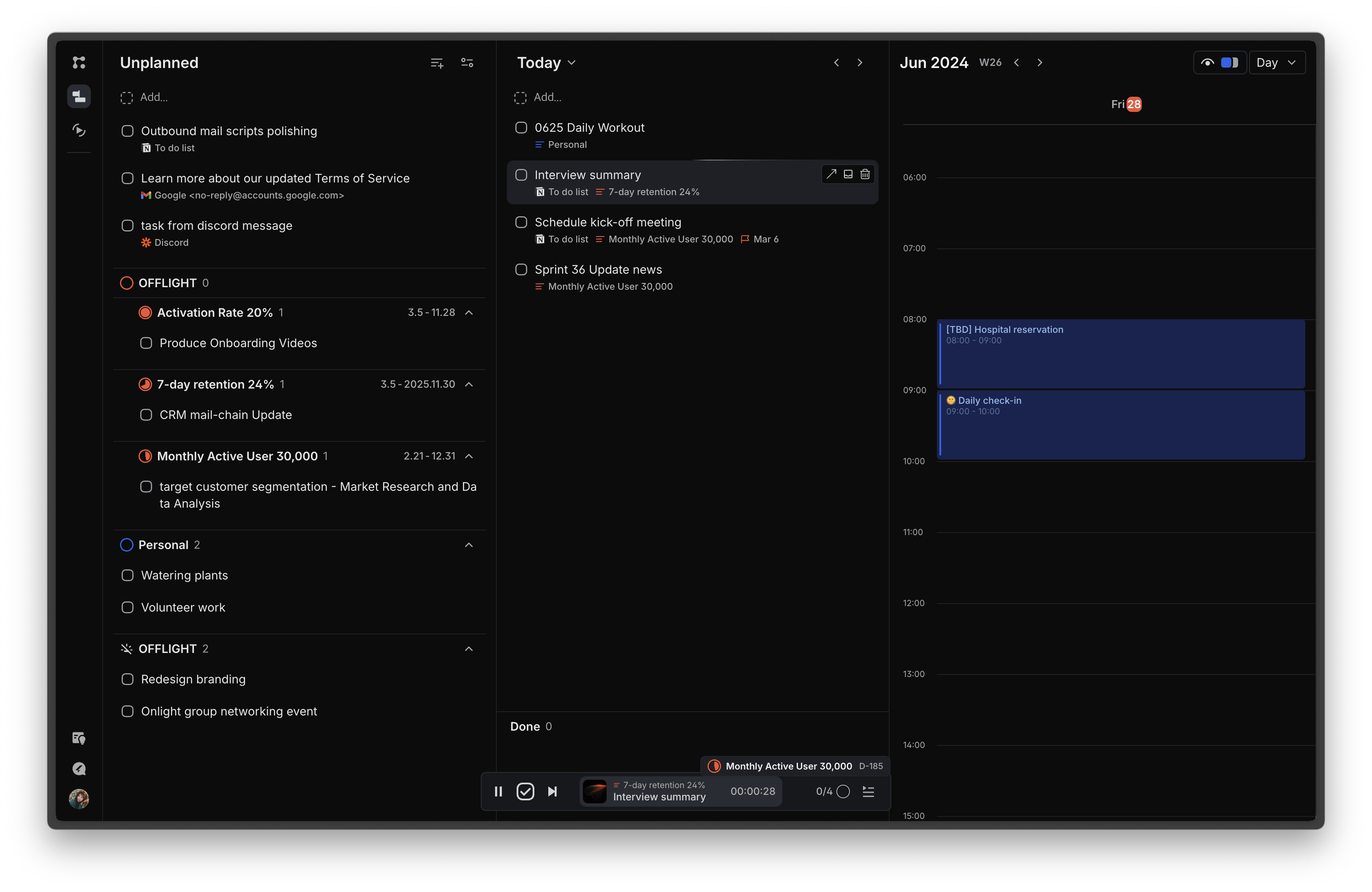
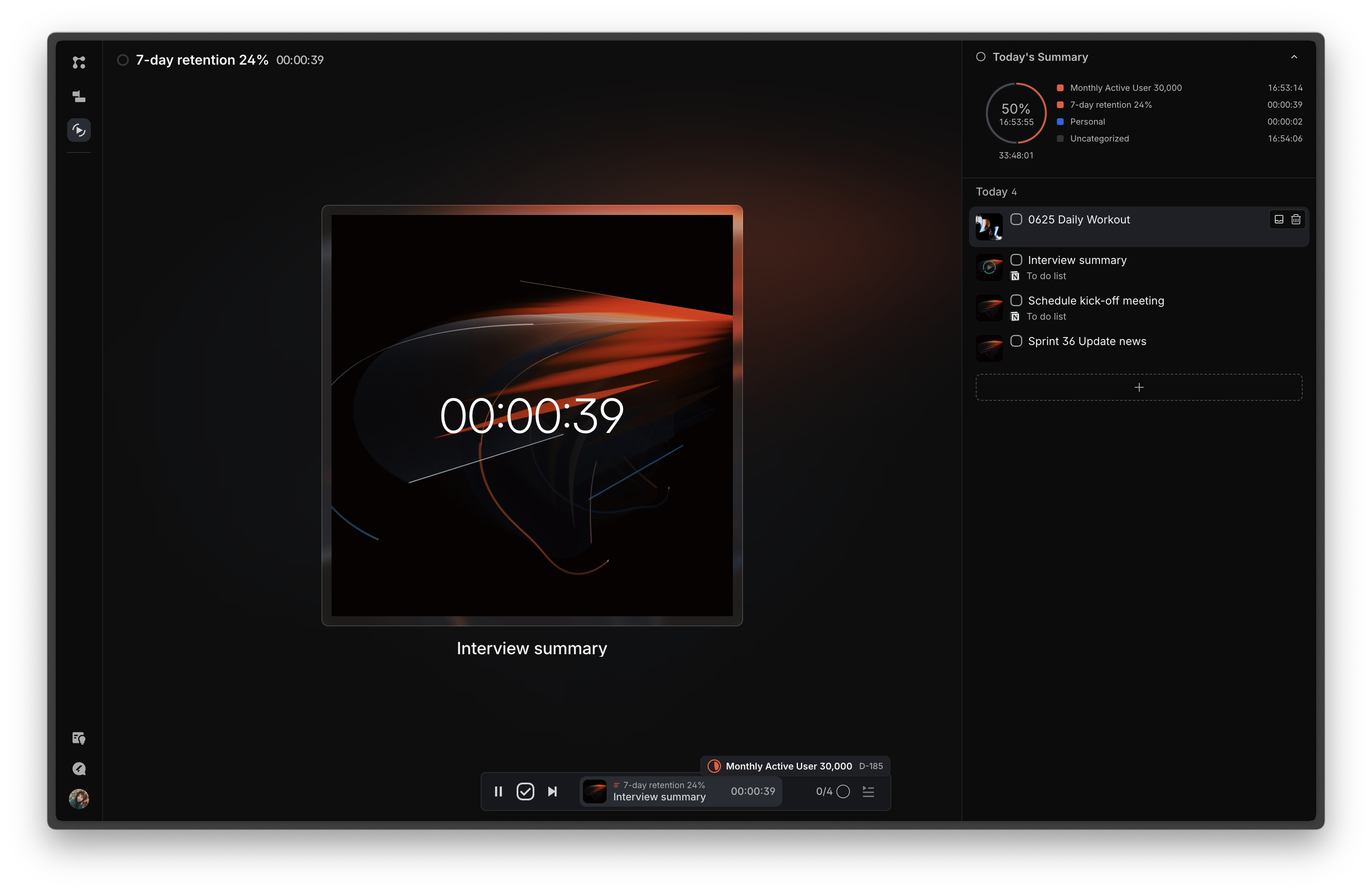
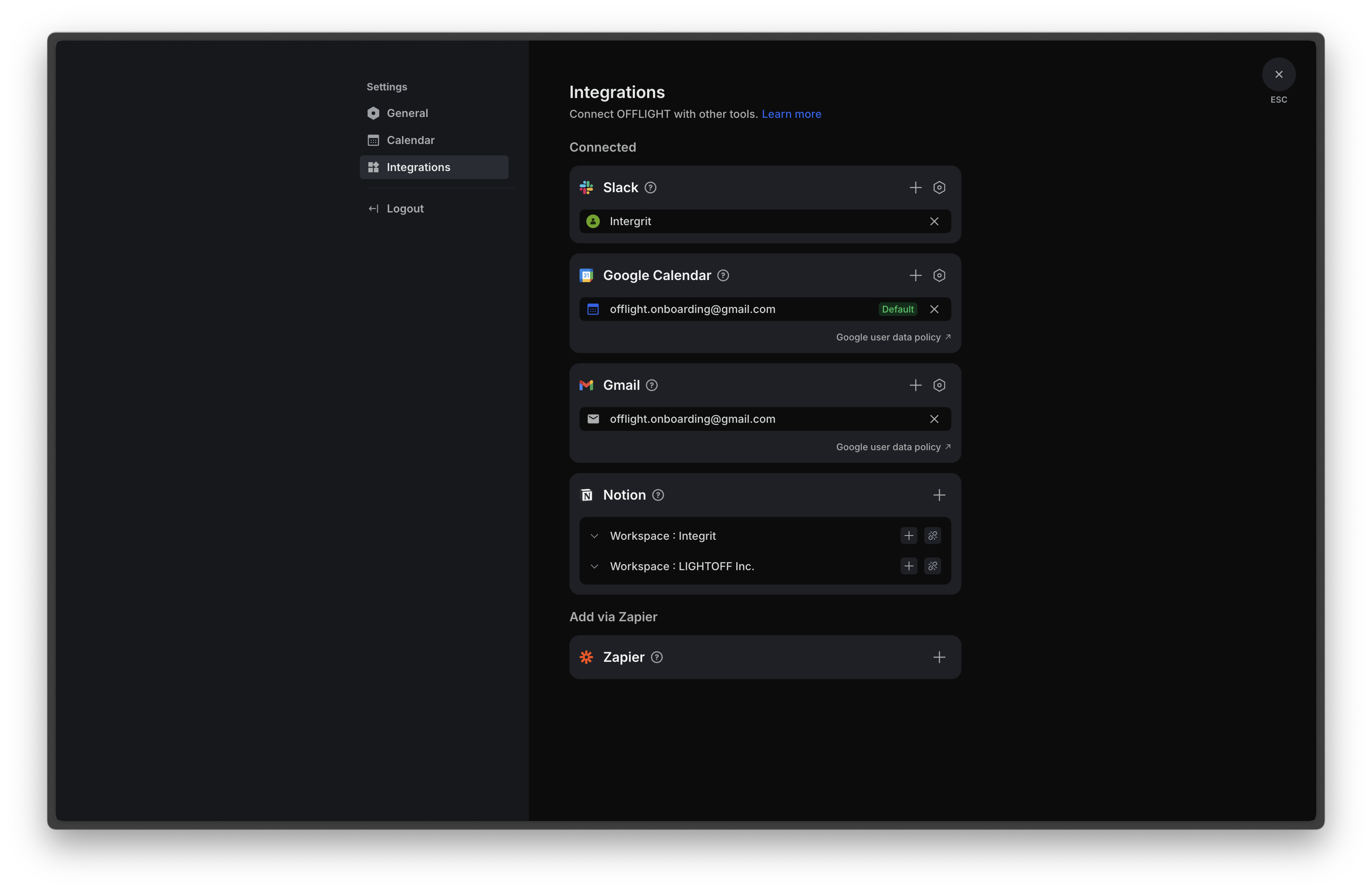
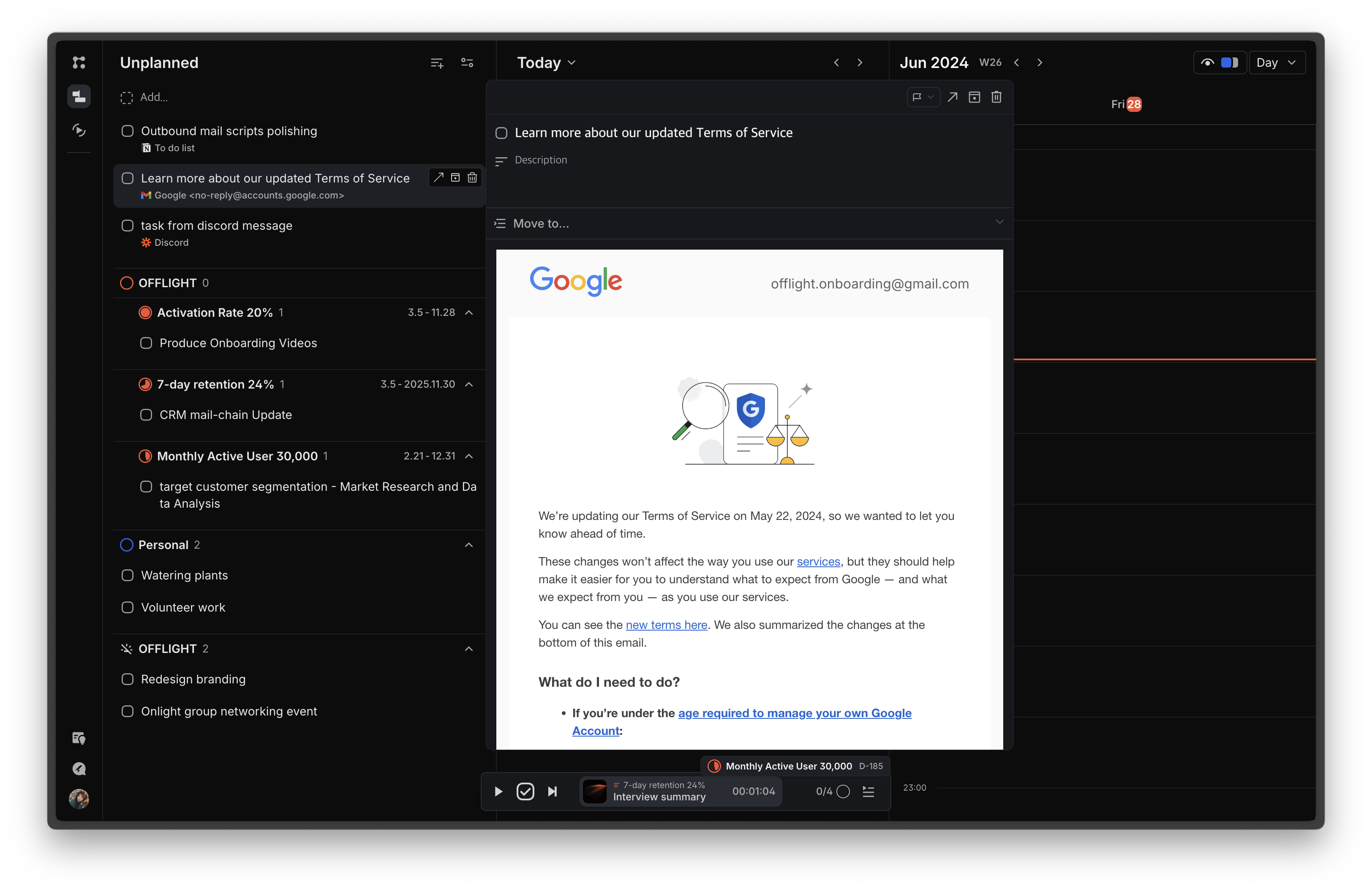
Screenshot of the page that features an inbox for incoming tasks and a planning board for task scheduling. The schedule can be viewed through the integrated Google Calendar and register events on the calendar using time blocks.Screenshot of the Focus page, where today's tasks are displayed to minimize information exposure and increase immersion. Time can be tracked for each task, with statistics on how time today was spent on different goals or lists based on the time tracking information.Screenshot of Screenshot of the Gmail integration that allows users to import emails based on their preferences: all emails, emails with specific labels, or starred emails. Additionally, if a previously imported email receives a reply, a task is automatically created. Users can view email content within the service, and completing tasks in OFFLIGHT will archive the corresponding emails in Gmail, supporting two-way synchronization.