TrustRadius: an HG Insights company

Save this comparison

Save this comparison

Add Product

Recommended Comparisons

    Overview
    ProductRatingMost Used ByProduct SummaryStarting Price

    Google Workspace for Education

    Score9.1 out of 10
    N/AGoogle Workspace for Education includes Google products like Classroom, Meet, Gmail, Calendar, Drive, Docs, Sheets, and Slides, to create an online ecosystem for learning. The Google Workspace for Education Fundamentals edition is available at no per student cost to available institutions.

    $3

    per month

    Pencil Spaces

    N/AN/APencil Spaces is a cloud-based virtual classroom designed specifically for teaching and learning. Unlike video conferencing platforms that are retrofitted for education, Pencil Spaces is purpose-built to support the way students and educators interact in academic environments. It brings together live video, real-time chat, collaborative whiteboards, file sharing, breakout rooms, and an embedded web viewer—in one browser-based platform. No downloads or installations are required, and users…

    $39

    per month

    Pricing
    Google Workspace for EducationPencil Spaces
    Editions & Modules
    Google Workspace for Education Standard
    $3.00
    per student, per year
    Teaching and Learning Upgrade
    $4
    per month per license
    Google Workspace for Education Plus
    $5.00
    per student, per year
    Basic
    $0
    Enterprise
    $0
    Contact
    Pro
    $39
    per month
    Enterprise
    Contact
    Contact
    Offerings
    Pricing Offerings
    Google Workspace for EducationPencil Spaces
    Free Trial
    NoNo
    Free/Freemium Version
    YesYes
    Premium Consulting/Integration Services
    NoYes
    Entry-level Setup FeeNo setup feeNo setup fee
    Additional Details——
    More Pricing Information
    Community Pulse
    Google Workspace for EducationPencil Spaces
    Considered Both Products
    Google
    No answer on this topic
    Pencil Spaces
    No answer on this topic
    Key User Insights
    Would buy again
    100%
    Would buy again
    6 Answers
    No answers on this topic
    Delivers good value for the price
    100%
    Delivers good value for the price
    6 Answers
    No answers on this topic
    Happy with the feature set
    100%
    Happy with the feature set
    6 Answers
    No answers on this topic
    Lived up to sales and marketing promises
    No answers on this topic
    No answers on this topic
    Implementation went as expected
    100%
    Implementation went as expected
    5 Answers
    No answers on this topic
    Best Alternatives
    Google Workspace for EducationPencil Spaces
    Small Businesses
    No answers on this topic
    No answers on this topic
    Medium-sized Companies
    Class for Web
    Score8.1 out of 10
    Class for Web
    Score8.1 out of 10
    Enterprises
    Class for Web
    Score8.1 out of 10
    Class for Web
    Score8.1 out of 10
    All AlternativesView all alternativesView all alternatives
    User Ratings
    Google Workspace for EducationPencil Spaces
    Likelihood to Recommend
    9.5
    (6 ratings)
    -
    (0 ratings)
    Usability
    9.0
    (4 ratings)
    -
    (0 ratings)
    User Testimonials
    Google Workspace for EducationPencil Spaces
    Likelihood to Recommend
    Google
    Google [Workspace for Education (formerly G Suite for Education)] is pretty darn good [at] meeting the needs for educators and students. It is not designed to run your business office, transportation group, or lunch services. It doesn't need to be good at those. Focus on teachers and students. They do that really, really well. The Google folks continue to add features that help serve teacher and students. For example, they have really done a good job of adding Google Meet features such as polling and breakout rooms. Those features required a paid subscription to Workspace, but it makes sense since those features compete with Zoom, which requires a subscription for those services.
    Incentivized
    Read full review
    Pencil Spaces
    No answers on this topic
    Pros
    Google
    • Email: The best email experience, period. It's fast, has the best mobile apps and tons of addons that extend it.
    • Office suite: The Google editors might not have all the features of their MS Office counterparts, but they have most of them and the apps are surprisingly performant.
    • Domain management: The Google Admin Console, coupled with the GAM command line tool, is very powerful, easy to use and simplifies any admin's work.
    Incentivized
    Read full review
    Pencil Spaces
    No answers on this topic
    Cons
    Google
    • The admin console regularly feel sluggish
    • Require third party tools to make changes to bulk devices
    • Support could be a little better
    Incentivized
    Read full review
    Pencil Spaces
    No answers on this topic
    Usability
    Google
    Always up, never down. Compatible with so many different platforms, OSes, and tools. For instance, someone can be on a phone, tablet, laptop, and all of those tools are compatible with Google apps like Meet, Docs, Slides, and anything else Google based. It's flexiblity is fantastic and meets our changing hardware and software requirements
    Incentivized
    Read full review
    Pencil Spaces
    No answers on this topic
    Alternatives Considered
    Google
    Google has a simpler approach to its apps. With all applications being online, things like auto-save being a default have been helpful for many staff in our organisation. Compare this to Microsoft where much of the admin has to be managed by the ICT Team, Google allows for a portion of control to the user to manage permissions of areas. This type of user empowerment helps people see how important ICT is to a business.
    Incentivized
    Read full review
    Pencil Spaces
    No answers on this topic
    Return on Investment
    Google
    • There has been a steady evolution of new features coming out that reduced the need for third party tools
    • We have been able to sign agreements to lock in annual renewal costs for up to 5 years
    • It's a ubiquitous platform, finding support is generally pretty easy
    Incentivized
    Read full review
    Pencil Spaces
    No answers on this topic
    ScreenShots

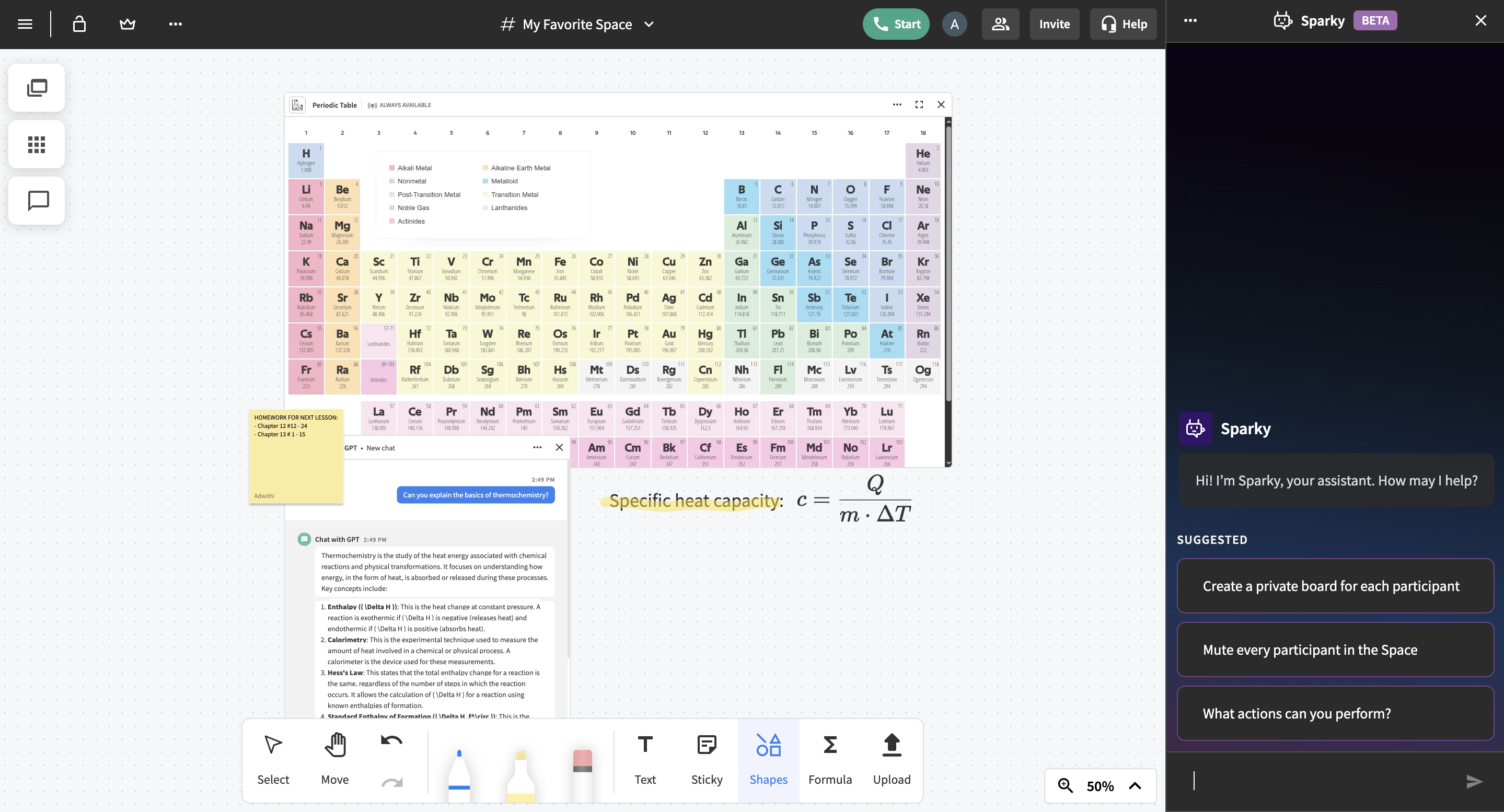
    Pencil Spaces Screenshots

    Screenshot of an algebra lesson in Pencil Spaces with a graphing calculator, handwritten math notes, and live collaboration among a tutor and students.Screenshot of a Pencil Spaces board with a periodic table, thermochemistry notes, a specific heat capacity formula, a GPT-powered assistant explaining key concepts, and Sparky, Pencil's built-in AI assistant.Screenshot of a Pencil Spaces board with an uploaded practice exam document with annotations, text showing a study reminder, and a built-in timer tool.