
HCL DataConnect vs. Microsoft BI (MSBI)
HCL DataConnect vs. Microsoft BI (MSBI)
| Product | Rating | Most Used By | Product Summary | Starting Price |
|---|---|---|---|---|
 HCL DataConnect | Mid-Size Companies (51-1,000 employees) | HCL DataConnect (formerly Actian DataConnect) is a hybrid integration solution that enables users to integrate anything, anywhere, anytime. It can be deployed in on-premise, cloud, and/or hybrid environments and offers quick onboarding. With its emphasis data quality, data reuse, adaptability and self-service integration, DataConnect is designed to support rapid onboarding and deliver the fast time to value. | N/A | |
 Microsoft BI (MSBI) | N/A | Microsoft BI is a business intelligence product used for data analysis and generating reports on server-based data. It features unlimited data analysis capacity with its reporting engine, SQL Server Reporting Services alongside ETL, master data management, and data cleansing. | $14 per month per user |
| HCL DataConnect | Microsoft BI (MSBI) | |||||||||||||||
|---|---|---|---|---|---|---|---|---|---|---|---|---|---|---|---|---|
| Editions & Modules | No answers on this topic |
| ||||||||||||||
| Offerings |
| |||||||||||||||
| Entry-level Setup Fee | Optional | No setup fee | ||||||||||||||
| Additional Details | — | — | ||||||||||||||
| More Pricing Information | ||||||||||||||||
| HCL DataConnect | Microsoft BI (MSBI) |
|---|
| HCL DataConnect | Microsoft BI (MSBI) | |||||||||||||||||||||
|---|---|---|---|---|---|---|---|---|---|---|---|---|---|---|---|---|---|---|---|---|---|---|
| Data Source Connection |
| |||||||||||||||||||||
| Data Transformations |
| |||||||||||||||||||||
| Data Modeling |
| |||||||||||||||||||||
| Data Governance |
| |||||||||||||||||||||
| BI Standard Reporting |
| |||||||||||||||||||||
| Ad-hoc Reporting |
| |||||||||||||||||||||
| Report Output and Scheduling |
| |||||||||||||||||||||
| Data Discovery and Visualization |
| |||||||||||||||||||||
| Access Control and Security |
| |||||||||||||||||||||
| Mobile Capabilities |
| |||||||||||||||||||||
| Application Program Interfaces (APIs) / Embedding |
|
| HCL DataConnect | Microsoft BI (MSBI) | |
|---|---|---|
| Small Businesses |  Skyvia Score 10.0 out of 10 |  Yellowfin Score 8.7 out of 10 |
| Medium-sized Companies |  IBM InfoSphere Information Server Score 8.0 out of 10 |  Reveal Score 10.0 out of 10 |
| Enterprises | IBM InfoSphere Information Server Score 8.0 out of 10 |  Kyvos Semantic Layer Score 9.5 out of 10 |
| All Alternatives | View all alternatives | View all alternatives |
| HCL DataConnect | Microsoft BI (MSBI) | |
|---|---|---|
| Likelihood to Recommend | 8.9 (2 ratings) | 10.0 (73 ratings) |
| Likelihood to Renew | - (0 ratings) | 8.0 (25 ratings) |
| Usability | - (0 ratings) | 10.0 (15 ratings) |
| Availability | - (0 ratings) | 9.5 (2 ratings) |
| Performance | - (0 ratings) | 7.0 (2 ratings) |
| Support Rating | - (0 ratings) | 8.9 (15 ratings) |
| In-Person Training | - (0 ratings) | 6.9 (3 ratings) |
| Online Training | - (0 ratings) | 8.5 (2 ratings) |
| Implementation Rating | - (0 ratings) | 9.6 (7 ratings) |
| Configurability | - (0 ratings) | 10.0 (2 ratings) |
| HCL DataConnect | Microsoft BI (MSBI) | |
|---|---|---|
| Likelihood to Recommend |  HCL Technologies
 David Byrd Sr Integration Engineer - Dual Certified in Dell Boomi Developer 1 & 2, and Actian DataConnect |  Microsoft
|
| Pros | HCL Technologies
 Justin Duperre Data Management Support Specialist | Microsoft
 Nilufa Hossain IT Specialist |
| Cons | HCL Technologies
David Byrd Sr Integration Engineer - Dual Certified in Dell Boomi Developer 1 & 2, and Actian DataConnect | Microsoft
|
| Likelihood to Renew | HCL Technologies No answers on this topic | Microsoft
 Lee Cullom President |
| Usability | HCL Technologies No answers on this topic | Microsoft
|
| Reliability and Availability | HCL Technologies No answers on this topic | Microsoft
 Robert Goodman Director, Business Intelligence & Analytics |
| Performance | HCL Technologies No answers on this topic | Microsoft
Robert Goodman Director, Business Intelligence & Analytics |
| Support Rating | HCL Technologies No answers on this topic | Microsoft
 Jacob Saunders National Practice Director - Business Intelligence |
| In-Person Training | HCL Technologies No answers on this topic | Microsoft
 Stephanie Grice Business Intelligence Analyst |
| Online Training | HCL Technologies No answers on this topic | Microsoft
 Sean Brady Business Intelligence Architect |
| Implementation Rating | HCL Technologies No answers on this topic | Microsoft
Jacob Saunders National Practice Director - Business Intelligence |
| Alternatives Considered | HCL Technologies
Justin Duperre Data Management Support Specialist | Microsoft
|
| Return on Investment | HCL Technologies
David Byrd Sr Integration Engineer - Dual Certified in Dell Boomi Developer 1 & 2, and Actian DataConnect | Microsoft
 Haibo Yang BI Reporting Specialist |
| ScreenShots | HCL DataConnect Screenshots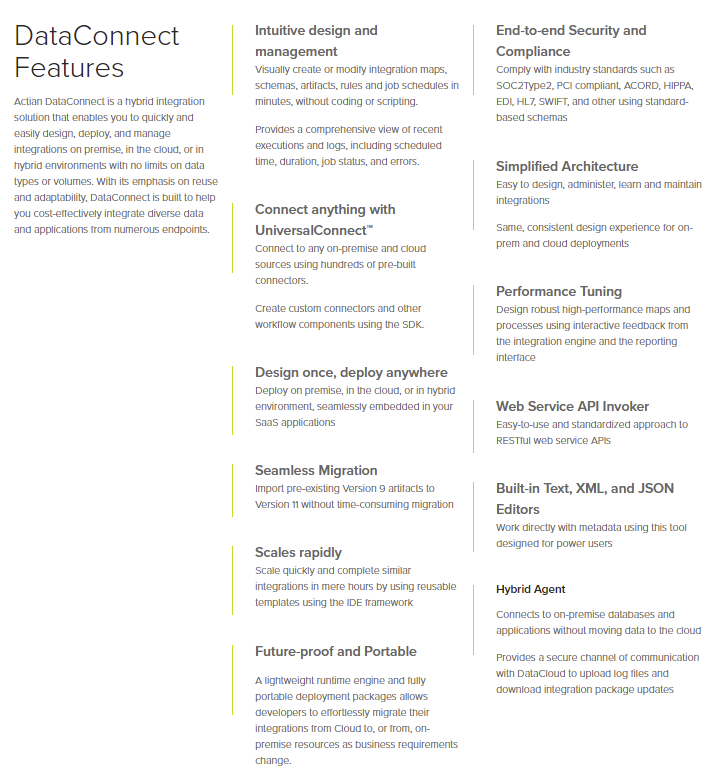     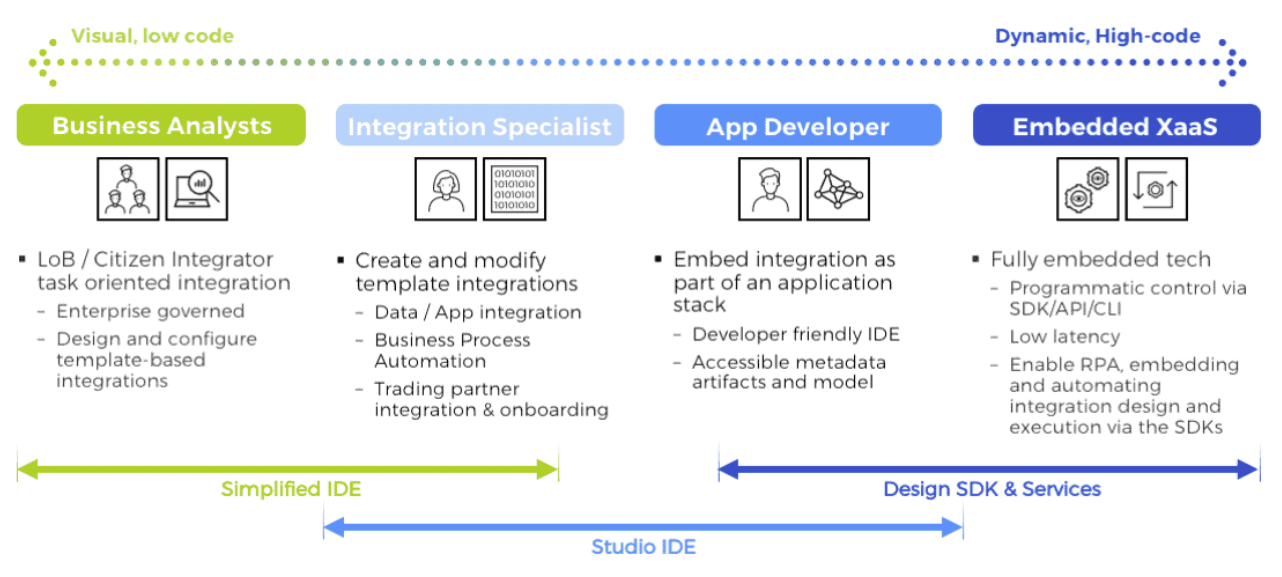 |