HotGloo vs. Verint Knowledge Management

Overview
ProductRatingMost Used ByProduct SummaryStarting Price
HotGloo
Score 8.0 out of 10
Small Businesses (1-50 employees)
HotGloo is an online wireframing and prototyping tool. This solution has been designed for all those engaged in the concept, design and development of web or app projects: project managers, information architects, usability experts, freelancers, concept people, digital agencies, web companies, publishers, web designers, web developers and many more. The vendor’s value proposition is that this solution makes it easy to wireframe web and mobile sites and to collaborate with others due to the…
$13
up to 4 users, 2 active projects, unlimited reviewers
Verint Knowledge Management
Score 8.7 out of 10
N/A
Verint Knowledge Management aim to help agents find and share the information needed to answer both customer inquiries and questions they may have themselves. The solution helps ensure the answers agents access are consistent, up to date, and easily accessible.N/A
Pricing
HotGlooVerint Knowledge Management
Editions & Modules
Group
$13
up to 4 users, 2 active projects, unlimited reviewers
Team
$27
up to 10 users / 6 active projects / unlimited reviewers
Agency
$54
up to 20 users / 15 active projects / unlimited reviewers
Enterprise
150 +
More users and projects, priority support. Get in touch for an individual quote.
KM Professional
Contact Sales
per year Per Interaction
KM Enterprise
Contact Sales
KM Enterprise
Contact Sales
per year Per Interaction
Offerings
Pricing Offerings
HotGlooVerint Knowledge Management
Free Trial
YesNo
Free/Freemium Version
NoNo
Premium Consulting/Integration Services
YesYes
Entry-level Setup FeeNo setup feeOptional
Additional DetailsThe billing period starts on the day you upgrade from the free trial to a paying plan. If you pay by credit card the service is billed in advance on a monthly basis and is non-refundable. There will be no refunds or credits for partial months of service, upgrade/downgrade refunds, or refunds for months unused with an open account. If you do choose to cancel your account in the future, you will never be charged again, but you are responsible for charges already incurred up until your cancellation. For monthly recurring payments we accept Visa, MasterCard and American Express through our online payment system. You can also prepay any account for 12 months with credit card. In certain cases we also take money transfers – please contact us beforehand if you want to use this option.
More Pricing Information
Community Pulse
HotGlooVerint Knowledge Management
Best Alternatives
HotGlooVerint Knowledge Management
Small Businesses
OmniGraffle
OmniGraffle
Score 9.7 out of 10
Front
Front
Score 9.1 out of 10
Medium-sized Companies
OmniGraffle
OmniGraffle
Score 9.7 out of 10
RWS Tridion Sites
RWS Tridion Sites
Score 9.0 out of 10
Enterprises
OmniGraffle
OmniGraffle
Score 9.7 out of 10
RWS Tridion Sites
RWS Tridion Sites
Score 9.0 out of 10
All AlternativesView all alternativesView all alternatives
User Ratings
HotGlooVerint Knowledge Management
Likelihood to Recommend
7.8
(3 ratings)
8.5
(26 ratings)
Likelihood to Renew
-
(0 ratings)
7.8
(2 ratings)
Usability
-
(0 ratings)
8.0
(7 ratings)
Support Rating
-
(0 ratings)
9.1
(1 ratings)
Implementation Rating
-
(0 ratings)
9.1
(1 ratings)
User Testimonials
HotGlooVerint Knowledge Management
Likelihood to Recommend
HotGloo
Overall, I am happy with HotGloo. It supports and fits well into my workflow. Here, I use HotGloo mainly during the prototyping scale. More preciously for wireframing. Eventhough, there are other tools - which I also use in subsequent steps - that would support wireframing as well, I like HotGloo and will keep using it during this stage. This is mainly because I think the elements and symbol library has just the right depth and detail for wireframing. It is important in wireframing to not include to much detail yet. Otherwise, testers get distracted by design aspects. Therefore, I like HotGloo and us it for different Product and Service design projects.
Read full review
Verint
Verint KMS is great for organizing content by categories for different teams and by different topics. It is easy to search and the Related Content makes moving from one piece of content to the next relevant piece quite easy. On the authoring side, the ability to schedule publishing or expiration is very handy. It is also really easy to make edits and have content ready and published for readers quickly. Verint's KMS isn't well suited if your users wish to be able to organize their favourited content or if you need a wide-range of options on the authoring end of things.
Read full review
Pros
HotGloo
  • Prototyping.
  • Collaboration.
  • Widget library.
Read full review
Verint
  • The tools to submit and manage user feedback are very effective - they help us respond quickly and interconnect the feedback to the applicable content.
  • The end user experience is clean and feels familiar, making it optimal to support a group of people who generally have never experienced a KM application before.
  • Our audience responds well to our ability to insert images, GIFs, videos, PDFs, and more into our content.
Read full review
Cons
HotGloo
  • logical structure of interface objects
  • preview view does not scale frame on small screens
  • Tool ribbon
Read full review
Verint
  • The authoring side could be improved with additional options for fonts and easier formatting for table content. I have issues with trying to add colour to one portion of a table and not the other, so I have to resort to creating in Word first and then copying over to Verint. There is also no option to create steps in one row and the next step in the next row. I end up just adding 1., 2., etc. manually.
  • Many users would like to be able to organize their bookmarks into folders and the system doesn't allow this. Many have taken to creating bookmark folders in Microsoft Edge instead.
  • There were a few bugs that went on for a few months that made the initial launch of the KMS more difficult for the users and on the authoring side. The issues were with how the search results came up and what displayed for related content. It wasn't the best first impression for our agents using the system while on calls and made it more difficult. The issues were fixed after a few months of use.
Read full review
Likelihood to Renew
HotGloo
No answers on this topic
Verint
Knowledge is an exceptional tool that has solved a gap to reduce the training time of new associates and promote knowledge retention
Read full review
Usability
HotGloo
No answers on this topic
Verint
Verint KM has many features that - when used the 'right way' can expedite search, content usage, and maintenance. Unfortunately, not all end users want to be bothered with 'the right way' and are looking for simplistic and predictive options (which any KM solution would be hard-pressed to deliver).
Read full review
Support Rating
HotGloo
No answers on this topic
Verint
The support and development teams for Knowledge are exceptional. They are attentive and truly care about the experience of their customers and their goals
Read full review
Implementation Rating
HotGloo
No answers on this topic
Verint
This was the simplest integration of software I've ever experienced.
Read full review
Alternatives Considered
HotGloo
Being able to export the finished wireframe to HTML was a huge time saver for me and my team. Getting to that next step quickly and seamlessly was a massive help. Not only that, but other tools that do this, we have not as much luck. HotGloo's functionality was a step above the others.
Read full review
Verint
All of these tools were very useful and practical. For our decision, it came down to understanding our core audience - we determined our average associate was largely unfamiliar with call center and office work in their prior work experience, and as such they would not have previously worked in a KM application before. To help adoption, we sought the solution with the simplest and most familiar interface, and based on internal focus group feedback, that was Verint KM Pro.
Read full review
Return on Investment
HotGloo
  • Quicker lead time in testing interactions with latest designs.
  • Shorter build time through use of standard branding.
Read full review
Verint
  • Content is easier to keep up to date and publish on an urgent basis.
  • Some users love the system, while others still find it difficult to find the information they need and miss the former guides we used. I think this is a result of the system issues that persisted for a few months after launch and will hopefully improve with time.
  • Users love being able to submit feedback and it makes it easier for errors, missing information and out of date information to be caught and fixed.
Read full review
ScreenShots

HotGloo Screenshots

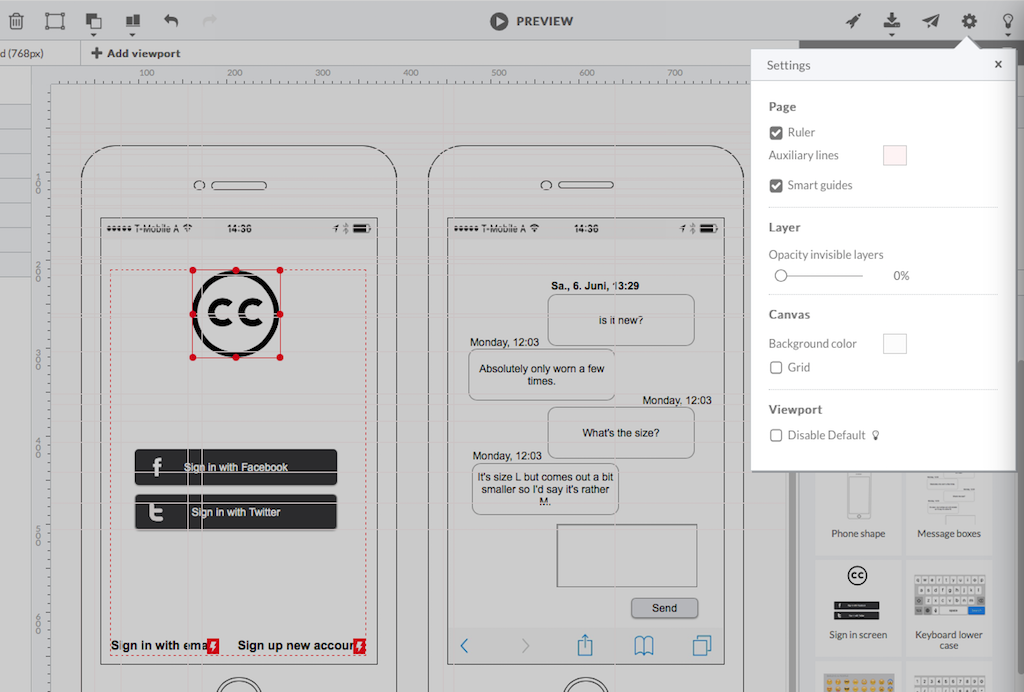
Screenshot of HotGloo 24/7 run & test anywhere.Screenshot of Responsive wireframing with different viewports.Screenshot of Create mobile app wireframesScreenshot of From desktop over tablet to mobile.

Verint Knowledge Management Screenshots

Screenshot of Knowledge Management Professional: Segments content and searches by when the user selects a region.Screenshot of Knowledge Management Professional: Provides quick feedback for each article.Screenshot of Knowledge Management Professional: The editor can review feedback and open the article for editing.Screenshot of Knowledge Management Professional: Decision-tree creation is a visual exercise.Screenshot of Knowledge Management Professional: The dashboard is designed to help agents navigate quickly.Screenshot of Knowledge Management Professional: Editing and previewing an article.