TrustRadius: an HG Insights company

IBM DevOps Test UI vs. Progress Test Studio

Save this comparison

Save this comparison

Add Product

Recommended Comparisons

    Overview
    ProductRatingMost Used ByProduct SummaryStarting Price

    IBM DevOps Test UI

    Score7 out of 10
    N/AAutomated testing capabilities for functional, regression, GUI and data-driven testing. IBM DevOps Test UI is an automated functional and regression testing tool for GUI and data-driven testing. It supports a range of applications, including web-based, .Net, Java, Siebel, SAP, terminal emulator-based applications, and PowerBuilder.N/A

    Progress Test Studio

    Score9 out of 10
    N/AProgress Test Studio aims to be the easiest to use Web Automation tool on the market, widely used by Enterprise QA’s for testing, but easy enough for anyone. The product automates testing for WPF, Silverlight, Web, HTML, Angular, React, KUIB, iOS, Android, Mobile Web, and API’s. Test Studio is ideal for a no-code or low-code approach for: QA Test Automation, Application Monitoring, Performance and Load Testing, Web/Marketing Process Automation, and Mobile App Automation.N/A
    Pricing
    IBM DevOps Test UIProgress Test Studio
    Editions & Modules
    No answers on this topic
    No answers on this topic
    Offerings
    Pricing Offerings
    IBM DevOps Test UIProgress Test Studio
    Free Trial
    NoYes
    Free/Freemium Version
    NoNo
    Premium Consulting/Integration Services
    NoYes
    Entry-level Setup FeeNo setup feeOptional
    Additional Details——
    More Pricing Information
    Best Alternatives
    IBM DevOps Test UIProgress Test Studio
    Small Businesses
    TestComplete
    Score8 out of 10
    TestComplete
    Score8 out of 10
    Medium-sized Companies
    OpenText UFT One
    Score8 out of 10
    OpenText UFT One
    Score8 out of 10
    Enterprises
    SoapUI Open Source
    Score8.3 out of 10
    SoapUI Open Source
    Score8.3 out of 10
    All AlternativesView all alternativesView all alternatives
    User Ratings
    IBM DevOps Test UIProgress Test Studio
    Likelihood to Recommend
    7.0
    (1 ratings)
    9.0
    (6 ratings)
    User Testimonials
    IBM DevOps Test UIProgress Test Studio
    Likelihood to Recommend
    IBM
    IBM Rational Functional Tester is good for automating thick applications.
    Incentivized
    Read full review
    Progress Software
    It is very good for testers who have little coding experience but are willing to learn. It is very good for regression testing and really helps us identify issues that could have been a detriment to our end users. It is also great to keep track of the performance of pages across time.
    Incentivized
    Read full review
    Pros
    IBM
    • An execution log in html format provides detailed information of the actions, verifications, and screenshots with timestamps.
    • Quick response and good support. IBM releases frequent updates to handle customer needs and fix issues.
    • A solid object inspector, extensive functional library and playback monitor.
    Incentivized
    Read full review
    Progress Software
    • Easy to configure.
    • Plugins can be integrated easily with visual studio.
    • Takes less time to run all the test scenarios, [and] also generates graphics report for all the tests.
    • Keeps bugs [out of] the production.
    Incentivized
    Read full review
    Cons
    IBM
    • Installation or updates were not always perfect. Would have to clean previous installations or reinstall Java if there were errors.
    • No or very limited support of browsers outside of Internet Explorer.
    • Uses a lot of memory, can have memory issues on large tests.
    Incentivized
    Read full review
    Progress Software
    • Client start-up time is a bit slow. Application is a bit sluggish, when there is a lot of tests open.
    • Automated scheduling environment is a bit challenging to maintain.
    Incentivized
    Read full review
    Alternatives Considered
    IBM
    Selenium is similar to IBM Rational Functional Tester but is not as user friendly and does not support thick applications. Visual Studio Coded UI is newer so not as refined; the object inspector/management and execution log results is poor compared to IBM Rational Functional Tester.
    Incentivized
    Read full review
    Progress Software
    Test Studios had a smaller foot print and allowed us to ease into deploying it in the company. The online help was a great benefit to getting started and the evaluation period allowed us to fully run though the product before purchasing it. Cost difference between the products was a big decision factor as well for the type of deployment we were looking for.
    Incentivized
    Read full review
    Return on Investment
    IBM
    • Speeds up and broadens the testing cycle by using machine time for regression testing.
    • Frees up time for testers to focus on critical items outside the automated suite.
    Incentivized
    Read full review
    Progress Software
    • Excellent results, workloads for continuous regresssion testing has been decreased by more than 50 percent.
    • Time window needed for regression tests has decreased more than 50 percent.
    Incentivized
    Read full review
    ScreenShots

    Progress Test Studio Screenshots

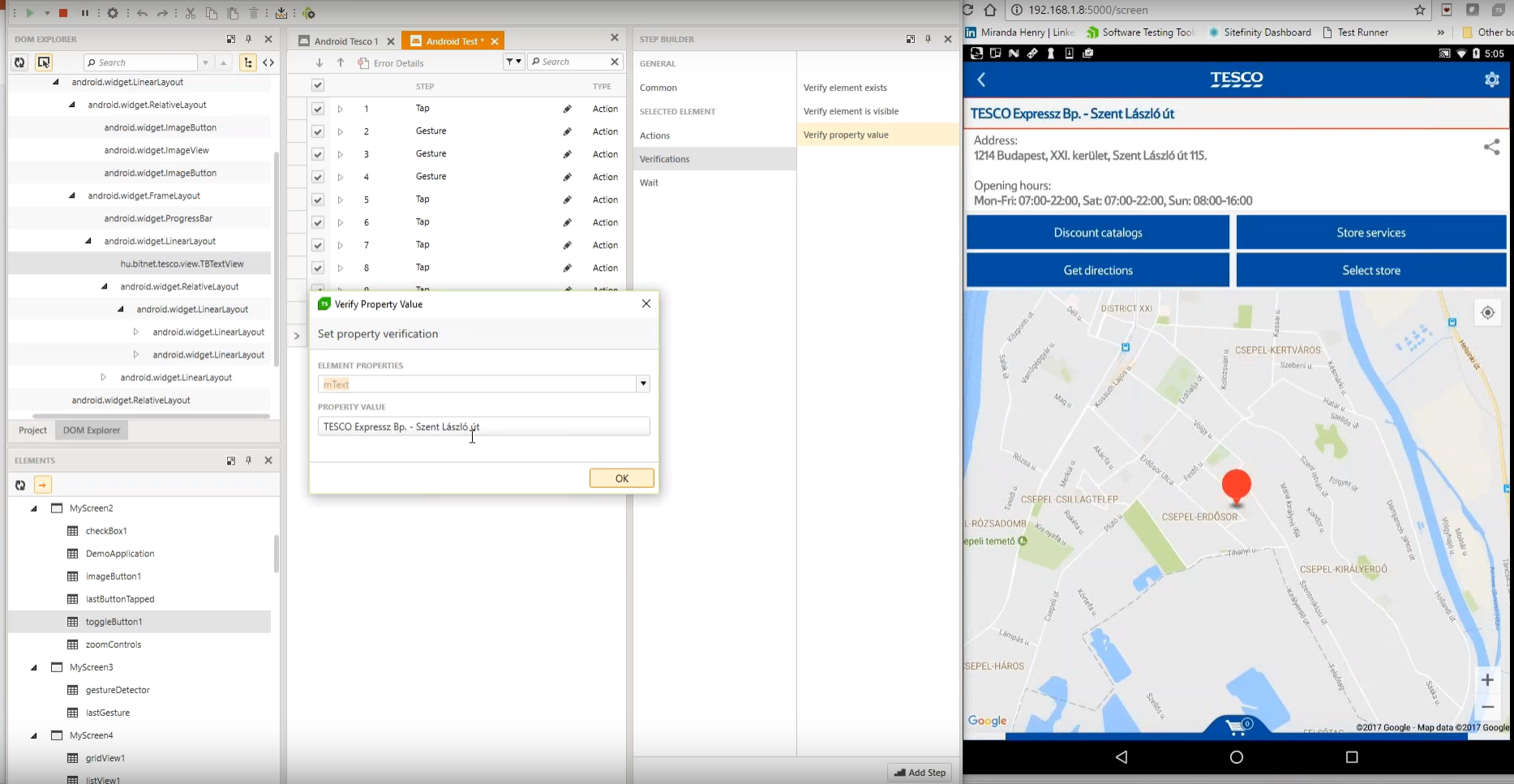
    Screenshot of Test Studio Mobile – Codeless Test Automation for iOS and Android: Native, Hybrid, and Mobile Web applications. Including sophisticated find logic for test re-use across multiple devices. The Android Instrumentation Wizard will get you testing in no time.  And codeless maintenance will empower your QA’s.Screenshot of Test Studio Ultimate - makes it easy to reuse your functional tests as Performance tests, and in Load tests. This saves you many hours of extra maintenance. The Test Studio Runtime and Full License include the Profiler for tracking windows performance counter data. Combined this data will help you pinpoint the bottlenecks in your application.Screenshot of Test Studio allows you to customize the element find logic to custom fit each application. With a focus on ease-of-use a tester can quickly record their manual test and execute it back as automation. The Test Studio Element Highlighter will help you quickly add Verifications on-the-fly as you record your test. There are 4 different ways to automate applications with Test Studio, and only 1 way requires code.Screenshot of Test Studio for API’s – Codelessly capture and assemble your api calls into intricate tests with GoTo conditional operations and verifications, and of course it integrates with Fiddler. You can easily integrate Test Studio into your Continuous Integration process as well.