Kaspersky Small Office Security (formerly Kaspersky Work Space Security) is antivirus / endpoint security software from Russian company Kaspersky.
$29.99
per month
Microsoft Defender for Cloud
Score8.7 out of 10
N/A
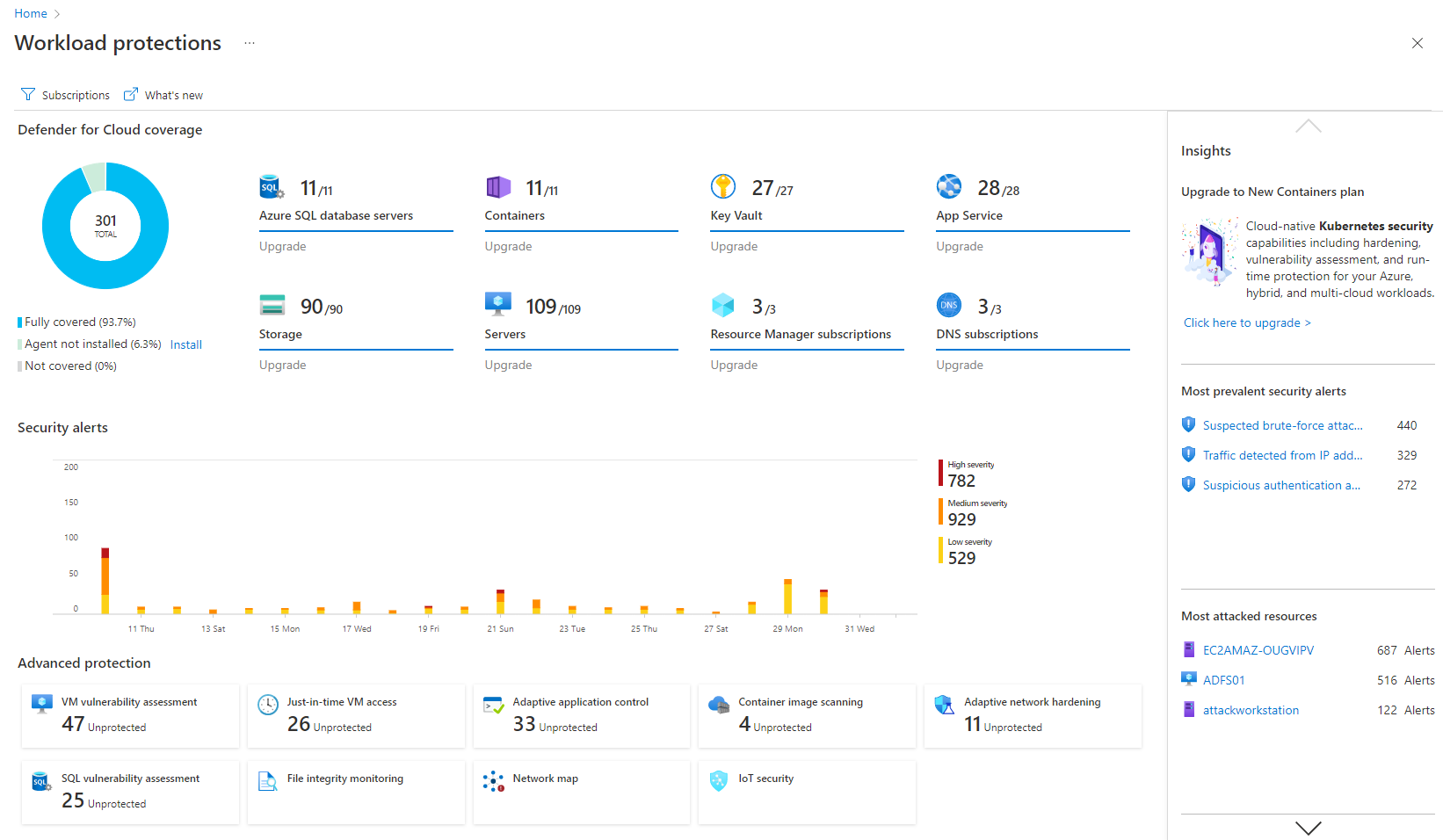
Microsoft Defender for Cloud is a Cloud Security Posture Management (CSPM) and Cloud Workload Protection Platform (CWPP) for Azure, on-premises, and multicloud (Amazon AWS and Google GCP) resources.
I think Kaspersky is well suited for large and small companies. Larger companies can take advantage of the KSC (Kaspersky Security Center) servers to help manage a large network. The KSC has many good features to help monitor the health of the organization. It does a good job with updating and deploying remotely. It has inventory features, and can even deploy non-Kaspersky software packages uploaded to the center. KSC can become a source of good information about [your] network that can be seen at a glance. IT departments are normally smaller than they need to be. KSC helps with larger and smaller companies because of this. A small company would appreciate the amount of information and management that can be done through KSC without needing extra help. If the company is small enough that they don't have servers on-site, there is a cloud version. I have not used that to know how it differs from the local KSC.
A de minimis incentive was given to thank the reviewer for their time. The incentive was not used to bias or drive a particular response, nor was the incentive contingent on a positive endorsement. More Info
I think it's good for cloud-native companies. A company that, from day zero, they're like, "We're going cloud, and this is how we're going to do it." They get it. It works well for them. Smaller organizations that are under X amount of resources- I don't know what that X might mean- but I feel like it plays well in smaller, more nimble organizations. If you're an older organization or if you're extremely large, it starts becoming a little difficult to manage at scale. And you have to sometimes throw bodies at the problem. Maybe not the most eloquent way of saying it, but that's what it feels like.
A de minimis incentive was given to thank the reviewer for their time. The incentive was not used to bias or drive a particular response, nor was the incentive contingent on a positive endorsement. More Info
The Security Center is laid out very well and makes it easy to install and manage the client endpoint protection on servers and workstations.
The way security policies are defined and managed is very easy to understand.
The client programs seem to be lighter and smaller on the client systems than others I have used in the past. Using fewer resources is always an advantage.
A de minimis incentive was given to thank the reviewer for their time. The incentive was not used to bias or drive a particular response, nor was the incentive contingent on a positive endorsement. More Info
It's really well laid out, with an easy-to-use, accessible UI.
With Microsoft Defender for Cloud, it has everything you need with the Safelink attachment, the Safelink emails for URL, the way it scans those URLs and attachments within the product, and you're seeing the results. And that adds an extra layer of security for the user, so you feel comfortable knowing the product monitors those. That's something I really like about that product.
A de minimis incentive was given to thank the reviewer for their time. The incentive was not used to bias or drive a particular response, nor was the incentive contingent on a positive endorsement. More Info
A de minimis incentive was given to thank the reviewer for their time. The incentive was not used to bias or drive a particular response, nor was the incentive contingent on a positive endorsement. More Info
Integrations with on-premise workloads can sometimes be challenging. Needs improvement and well standardised integration points
Vulnerability categories can be difficult to understand. It should allow teams to focus on critical findings and help them keep aside low-severity or suppressed vulnerabilities
Pricing can be improved as it can be over-priced for smaller businesses and would potentially affect their ROI due to the small scale
A de minimis incentive was given to thank the reviewer for their time. The incentive was not used to bias or drive a particular response, nor was the incentive contingent on a positive endorsement. More Info
The product is stable and accurate in detecting security threats. There are very few or no false positives in detecting security threats or unusual behavior and has very sharp heuristics. The product does the job very well including saving us money in getting 3rd party patch management tools as the business is already using Microsoft System Center Configuration Manager which is Microsoft product specific and the product patches these third party products e.g Adobe Flash Player
A de minimis incentive was given to thank the reviewer for their time. The incentive was not used to bias or drive a particular response, nor was the incentive contingent on a positive endorsement. More Info
It is a great product that integrates nicely when running an Azure platform and even multi-cloud environment. Not looking for point-solutions but a suite that answers most requirements. It is very comfortable being able to use KQL, workbooks and automation that is native to the azure platform
I will give Kaspersky a score of 9 out of 10 for scalability, as it allows businesses to easily expand their security infrastructure. This means it won't cost them a lot to add further protection and security. It won't also require them to purchase other hardware and services for their required protection.
My visibility is limited because I'm only doing very small pieces of what the overall org does. And also, we have limitations on what we're allowed to use. It's not like we get a new product as users or leadership level users, and everything is on, and we can just do whatever we want. We're very restricted in what we can use any tooling within the org because of the different levels of regulatory constraints we have, because of just the nature of who we are inherently. So that's why. I don't think it's necessarily the product. I think it's more or less of what we're able to do with the product.
A de minimis incentive was given to thank the reviewer for their time. The incentive was not used to bias or drive a particular response, nor was the incentive contingent on a positive endorsement. More Info
I've used the on-premise server. I've only experienced one time that we couldn't open the console, and that was a server issue. It seems to be a dependable solution. It's there, and it's stable.
A de minimis incentive was given to thank the reviewer for their time. The incentive was not used to bias or drive a particular response, nor was the incentive contingent on a positive endorsement. More Info
Users don't notice any slowdown with the antivirus running on their systems. There have been issues when the systems have missed a scheduled scan, and it was checked to run at [a] first available time, they will start a full scan at startup. This has caused some lag. Normally there are also some issues with the workstation, but it is something to note.
A de minimis incentive was given to thank the reviewer for their time. The incentive was not used to bias or drive a particular response, nor was the incentive contingent on a positive endorsement. More Info
I give the maximum grade because we have no complaints; we never had any failure, serious error, and serious threat to the company. All of its features work very well. The great advantage of having a product supported by an industry-leading security company is that regularly updated security protocols will protect the system against all emerging threats.
A de minimis incentive was given to thank the reviewer for their time. The incentive was not used to bias or drive a particular response, nor was the incentive contingent on a positive endorsement. More Info
Make sure to provide awareness campaigns on changes that will be implemented and WHY the business is doing it and the benefits reaped. Benefits reaped is very important for the justification of why things have to change and emphasizing the importance of security. This will reduce user disgruntlement and total bitterness on use of their workstation or laptop
A de minimis incentive was given to thank the reviewer for their time. The incentive was not used to bias or drive a particular response, nor was the incentive contingent on a positive endorsement. More Info
Kaspersky is a leader in endpoint protection, but its ties to potential adversaries are unsettling. Kaspersky has a great threat research team and quickly identifies malicious software and its signature. Its web-based protection is also top notch. This is a great product but as with everything has its place.
A de minimis incentive was given to thank the reviewer for their time. The incentive was not used to bias or drive a particular response, nor was the incentive contingent on a positive endorsement. More Info
I believe Microsoft Defender for Cloud stacks up well against the other tools we looked at. It is native to the Azure platform and provides the same insights as the other tools. We selected Microsoft Defender for Cloud because it integrates well with the Azure resources and gives the needed insight, security alerts and recommendations.
A de minimis incentive was given to thank the reviewer for their time. The incentive was not used to bias or drive a particular response, nor was the incentive contingent on a positive endorsement. TR verified that a representative sample of customers was invited. More Info
You can create groups and create different policies for each group. You can customize many parts of the software before it is deployed. You can create different tasks and schedules based on the groups. It is customizable.
A de minimis incentive was given to thank the reviewer for their time. The incentive was not used to bias or drive a particular response, nor was the incentive contingent on a positive endorsement. More Info
A de minimis incentive was given to thank the reviewer for their time. The incentive was not used to bias or drive a particular response, nor was the incentive contingent on a positive endorsement. More Info
A de minimis incentive was given to thank the reviewer for their time. The incentive was not used to bias or drive a particular response, nor was the incentive contingent on a positive endorsement. More Info