TrustRadius: an HG Insights company

Save this comparison

Save this comparison

Add Product

Recommended Comparisons

    Overview
    ProductRatingMost Used ByProduct SummaryStarting Price

    LibreOffice

    Score9 out of 10
    N/ALibreOffice is a free and open-source Office Suite from The Document Foundation, presented as the successor to OpenOffice.org. The suite includes Writer (word processing), Calc (spreadsheets), Impress (presentations), Draw (vector graphics and flowcharts), Base (databases), and Math (formula editing).

    $0

    free and open source under the Mozilla Public License v2.0

    Lightning Tools Data Viewer

    Score9.1 out of 10
    Mid-Size Companies (51-1,000 employees)
    The Data Viewer provides data visualization in the form of reports or charts that can be created and customized to suit a business's needs. Silos of data exist in most organizations and yet contain valuable insights into how well the organization is performing and where action is needed. Those silos often include Microsoft Excel workbooks, Microsoft SQL Azure databases, On-Premises data sources accessible through OData or Business Connectivity Services and even SharePoint Lists. These data…

    $2,200

    per year per installation

    Pricing
    LibreOfficeLightning Tools Data Viewer
    Editions & Modules
    No answers on this topic
    Data Viewer OnPrem
    $1,000
    per year Per installation, 1 x WFE
    Data Viewer Online
    $2,200
    per year per installation
    Data Viewer OnPrem Enterprise Edition
    POA
    per year Per installation, 4+ WFE
    Data Viewer Online Enterprise Edition
    POA
    per year per installation
    Offerings
    Pricing Offerings
    LibreOfficeLightning Tools Data Viewer
    Free Trial
    NoYes
    Free/Freemium Version
    YesNo
    Premium Consulting/Integration Services
    NoYes
    Entry-level Setup FeeNo setup feeNo setup fee
    Additional Details—Prices stated are minimum per installation for "stock" products. $2.20 per user / year on top of base price. Enterprise editions can be amended to suit business needs if deemed necessary, additional costs incurred and TBD. All packages include free technical support. Free upgrades available to latest versions of tool as they are released. (online version)
    More Pricing Information
    Community Pulse
    LibreOfficeLightning Tools Data Viewer
    Considered Both Products
    The Document Foundation
    No answer on this topic
    Lightning Tools
    No answer on this topic
    Key User Insights
    Would buy again
    92%
    Would buy again
    12 Answers
    No answers on this topic
    Delivers good value for the price
    100%
    Delivers good value for the price
    12 Answers
    No answers on this topic
    Happy with the feature set
    92%
    Happy with the feature set
    12 Answers
    No answers on this topic
    Lived up to sales and marketing promises
    100%
    Lived up to sales and marketing promises
    10 Answers
    No answers on this topic
    Implementation went as expected
    92%
    Implementation went as expected
    12 Answers
    No answers on this topic
    Features
    LibreOfficeLightning Tools Data Viewer
    BI Standard Reporting
    Comparison of BI Standard Reporting features of LibreOffice and Lightning Tools Data Viewer
    Feature
    LibreOffice
    -
    Ratings
    Lightning Tools Data Viewer
    9.1
    1 Ratings
    12% above category average
    Customizable dashboards00 Ratings9.11 Ratings
    Report Formatting Templates00 Ratings9.11 Ratings
    Ad-hoc Reporting
    Comparison of Ad-hoc Reporting features of LibreOffice and Lightning Tools Data Viewer
    Feature
    LibreOffice
    -
    Ratings
    Lightning Tools Data Viewer
    8.2
    1 Ratings
    5% above category average
    Drill-down analysis00 Ratings6.41 Ratings
    Formatting capabilities00 Ratings9.11 Ratings
    Report sharing and collaboration00 Ratings9.11 Ratings
    Data Discovery and Visualization
    Comparison of Data Discovery and Visualization features of LibreOffice and Lightning Tools Data Viewer
    Feature
    LibreOffice
    -
    Ratings
    Lightning Tools Data Viewer
    3.6
    1 Ratings
    73% below category average
    Pre-built visualization formats (heatmaps, scatter plots etc.)00 Ratings3.61 Ratings
    Best Alternatives
    LibreOfficeLightning Tools Data Viewer
    Small Businesses
    Google Workspace
    Score9.1 out of 10
    Chartio (discontinued)
    Score7.5 out of 10
    Medium-sized Companies
    Google Workspace
    Score9.1 out of 10
    Jet Reports
    Score9.5 out of 10
    Enterprises
    Microsoft 365 Business Premium
    Score9 out of 10
    Kibana
    Score8.4 out of 10
    All AlternativesView all alternativesView all alternatives
    User Ratings
    LibreOfficeLightning Tools Data Viewer
    Likelihood to Recommend
    9.0
    (33 ratings)
    9.1
    (1 ratings)
    Likelihood to Renew
    9.0
    (1 ratings)
    -
    (0 ratings)
    Usability
    9.0
    (6 ratings)
    -
    (0 ratings)
    Availability
    10.0
    (1 ratings)
    -
    (0 ratings)
    Performance
    6.0
    (1 ratings)
    -
    (0 ratings)
    Support Rating
    7.3
    (6 ratings)
    -
    (0 ratings)
    Implementation Rating
    9.0
    (1 ratings)
    -
    (0 ratings)
    Ease of integration
    5.0
    (1 ratings)
    -
    (0 ratings)
    Product Scalability
    7.0
    (1 ratings)
    -
    (0 ratings)
    User Testimonials
    LibreOfficeLightning Tools Data Viewer
    Likelihood to Recommend
    The Document Foundation
    If you're working with numbers, LibreOffice doesn't get in your way and try to make changes as it sees fit, forcing you to repeatedly go back and undo processes you didn't want, didn't ask for, and that have no place in the document you are trying to produce. All I want to do is assemble the data, process it for the task at hand, and then print it for distribution. LibreOffice allows me to do that.
    Read full review
    Lightning Tools
    Lightning Tools Data Viewer is well suited for re-surfacing data and customizing its look and feel.
    Read full review
    Pros
    The Document Foundation
    • Tools like speeling, grammar, and thesaurus are super fast and intuitive
    • Read-only content can be created by adding a section and password
    • The right-click menus are very intuitive and change on the fly with what is needed depending on the content and situation
    • Documents can be saved natively as *.docx or *.xlsx
    Incentivized
    Read full review
    Lightning Tools
    • Shows Lists created on different sites to be seen and controlled on another site in a Tenant
    • Allows selection of layouts and coloring way beyond what other programs do.
    • Easy to learn and very functional.
    Read full review
    Cons
    The Document Foundation
    • It doesn't provide all the functions it should with a paid subscription.
    • There are features that are only available with Premium and I have premium and they are still not available.
    • Paying for the premium version doesn't provide additional services than free version
    • Customer service is nonresponsive and has been nonresponsive for years even prior to COVID.
    Read full review
    Lightning Tools
    • Data Viewer has a graph feature that is old school flat design. We loved the In House real 3D graph Lightning Tools program.
    Read full review
    Likelihood to Renew
    The Document Foundation
    We use it consistently and have a lot of documents in the OpenDocument format so it will be necessary to use LibreOffice or a compatible product such as Openoffice in the future to be able to open these files. Because the license fee for Libreoffice is zero it is not very costly to keep using it - the costs are mostly for keeping it installed on the office PCs and regularly updated, and solving employee issues with the user support.
    Incentivized
    Read full review
    Lightning Tools
    No answers on this topic
    Usability
    The Document Foundation
    For all of the reasons in the foregoing evaluation. Its menus are clean, intuitive and straightforward. Any function I need to use can be accessed via keystrokes, without having to stop, move my hand to the mouse, deal with it, and then get back to the keyboard to proceed. It helps me keep my mind on my work and not worry about dealing with the mouse all the time.
    Read full review
    Lightning Tools
    No answers on this topic
    Reliability and Availability
    The Document Foundation
    Libreoffice is a desktop app not requiring any server part so it is always available when the PC is working normally. Installing it on another machine if one PC fails is very quick and easy. This is a non-issue.
    Incentivized
    Read full review
    Lightning Tools
    No answers on this topic
    Performance
    The Document Foundation
    For big/imported tables or text documents with images loaded from the internet it is sometimes getting very slow, RAM and CPU intensive, and sometimes even hangs due to some memory leaks or other bugs. This is a long-term problem and is still not resolved perfectly.
    Incentivized
    Read full review
    Lightning Tools
    No answers on this topic
    Support Rating
    The Document Foundation
    Support is not officially offered. However, you can find answers to any usage questions or trouble-shooting online easily, typically starting with a Google search. (I believe that all forums / tips for OpenOffice apply equally to LibreOffice, and vice versa.) While Microsoft Office, for example, officially includes support, I find that typically you end up going to a Google search in any case. So, this is not really a downside. However, in all these cases, you end up doing a lot of figuring things out for yourself.
    Incentivized
    Read full review
    Lightning Tools
    No answers on this topic
    Implementation Rating
    The Document Foundation
    Generally easy to perform, issues are how to ensure regular automatic updates on Mac OS X. Fortunatly we have only a few machines with OS X run by management and we can do these updates manually occasionally. Windows updates are quite easy with the support of third party software such as Ninite or Chocolatey, and Linux updates are super-easy thanks to the package manager (apt-get).
    Incentivized
    Read full review
    Lightning Tools
    No answers on this topic
    Alternatives Considered
    The Document Foundation
    I think it is fair to say this:
    • If you are looking for a well-rounded, GNU-licensed product that will encompass word processing, spreadsheets, presentations, and database then LibreOffice is probably all you need.
    • For online collaboration, links with cloud storage, and more robust support, Microsoft Office 365 and Google Docs are probably what you or your organization needs.
    • LibreOffice is at its best for regular document creation and spreadsheet management. It is more cumbersome when it comes to fonts but also when it comes to linkages with cloud-based services. It is there, but you need some more computer knowledge to make it work.
    • There are other free alternatives, most notably Apache Open Office, which is also a very good alternative if you do not like LibreOffice.
    Having said that, I honestly think off-line computers or laptops used off-site can certainly benefit from having LibreOffice installed.
    Incentivized
    Read full review
    Lightning Tools
    Lightning Tools Data Viewer is much easier and more powerful than Infowise similar viewer in their lineup. In this case, we use Data Viewer over the one offered by Infowise.
    Read full review
    Scalability
    The Document Foundation
    With more users using it in the company there are more cases when a simultaneous editing of the same document is needed and this feature is lacking in Libreoffice even though the files concerned are shared and synced by some solution (we use ownCloud). Google Docs or MS Office365 via Sharepoint/Onedrive offer a better function for this.
    Incentivized
    Read full review
    Lightning Tools
    No answers on this topic
    Return on Investment
    The Document Foundation
    • I am able to quickly create and edit word processing documents and spreadsheets which are for all intents and purposes equivalent to documents I could create and edit in other tools such as Microsoft Office and Google Docs/Sheets.
    • Lack of an online portal for sharing documents necessitates the use of Google Sheets for automation/integration. Ideal would be an all-in-one solution.
    • Having open-source software that provides common functionality eliminates the need for expensive licenses.
    • Lack of dedicated support is negligible. Most issues can be resolved using online search.
    Incentivized
    Read full review
    Lightning Tools
    • It allows us to do things that would take a great deal more time to duplicate in SharePoint
    • It cuts down on ugly looking built in SP list layouts
    • Users find it easy to access, thus this product is more productive
    Read full review
    ScreenShots

    Lightning Tools Data Viewer Screenshots
    Screenshot of DISPLAYING EXTERNAL DATA WITHIN SHAREPOINT OR MICROSOFT TEAMS
The Data Viewer Client Side Web Part can be configured by Business Users within a few minutes to display Line of Business Data from Data Sources such as Excel,  SQL Azure, Business Connectivity Services, OData and SharePoint Lists.  Connections to an organizations data such as Customer Relationship Management Systems, Accounting Systems, or Custom Databases can be connected, giving business users a live up-to-date view of business information within the context of their SharePoint Team Sites or Microsoft Teams Tabs.Screenshot of HIGHLIGHTING KEY BUSINESS DATA (NO CODE)
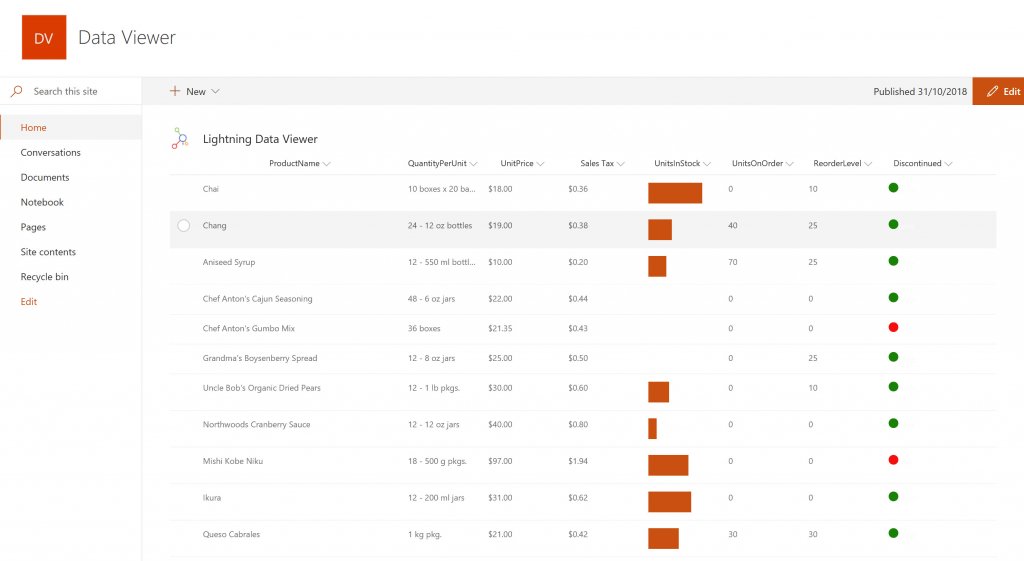
Conditional formatting can be used to highlight key business data. Overdue Tasks, Low Stock, Currency Exchange Rates, Sales Revenue are examples of data to highlight visually allowing for a quick reaction time. Key Financial Indicators and Key Performance Indicators can be configured with a simple dialog and no need to write any code. Choose colours, icons or data bars to highlight key data.Screenshot of SELECTING AND STYLING ICONS
Icons can be chosen as part of the conditional formatting to make data stand out. The Office 365 Fabric icons can be selected and styled and applied to cell values. Pepper pots, Smileys, Envelopes and more icons are available. There are hundreds of options to choose from to highlight data that needs to be acted upon.Screenshot of DATA VIEWER CAN BE A GRID OF DATA OR A CHART IN SHAREPOINT OR MICROSOFT TEAMS
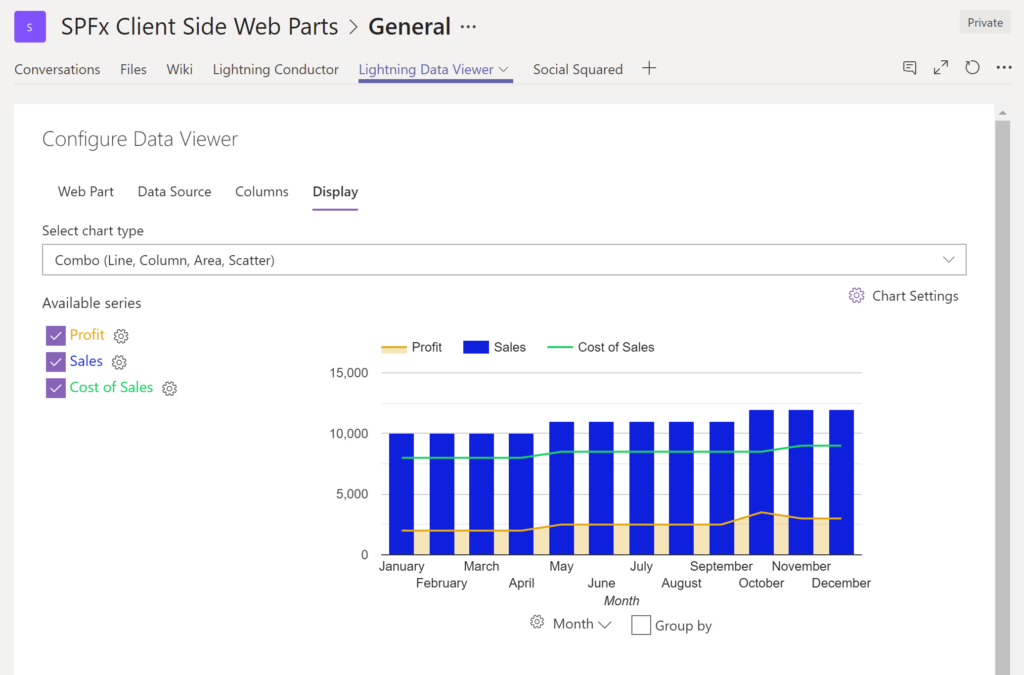
The Data Viewer can be used within Microsoft SharePoint Modern Sites or Microsoft Teams Tabs as a Grid of Data with styling or as a Chart which can be configured. The Charting Feature allows for Pie, Donut, Column, Line, Area, and Scatter Charts which can all be configured and displayed in 2D or 3D.Screenshot of TREEMAPS
summary information can be displayed within a TreeMap next to the detail. Users will be able to see trends, and how the business is performing  using the TreeMap view of data.Screenshot of CHARTS AND GAUGES
The Data Viewer is used to represent data in multiple ways using Gauges, TreeMaps, Multiple Series Charts, and Pie Charts.