Logitech GROUP vs. Pulseway

Overview
ProductRatingMost Used ByProduct SummaryStarting Price
Logitech GROUP
Score 4.0 out of 10
N/A
Logitech GROUP is an HD video conferencing solution designed for meetings of up to 14 people, with optional expansion mics to extend to meetings of up to 20 people. Components include the camera, speakerphone, hub, remote, wall/table mount, and expansion microphones. The system plugs into the user's computer via USB to provide the audio and video components for meetings run on the user's web conferencing software.N/A
Pulseway
Score 7.1 out of 10
Mid-Size Companies (51-1,000 employees)
Pulseway is an IT monitoring and management solution that enables users to monitor, manage and control all systems and servers from a smartphone, tablet or browser. For system administrators, Pulseway sends a notification, so they can see an issue and sort it in seconds. Pulseway features: Automation: Auto-remediation workflows, so that IT issues are fixed before users even notice them. Mobile Access: Customers can monitor, manage, connect with…
$0.80
per month per installation
Pricing
Logitech GROUPPulseway
Editions & Modules
No answers on this topic
Enterprise
$0.80
per month per installation
Offerings
Pricing Offerings
Logitech GROUPPulseway
Free Trial
NoYes
Free/Freemium Version
NoYes
Premium Consulting/Integration Services
NoYes
Entry-level Setup FeeNo setup feeNo setup fee
Additional DetailsNo hidden fees or contracts. Term-based discounts.
More Pricing Information
Community Pulse
Logitech GROUPPulseway
Best Alternatives
Logitech GROUPPulseway
Small Businesses
Lifesize Video Conferencing
Score 9.0 out of 10
NinjaOne
NinjaOne
Score 9.1 out of 10
Medium-sized Companies
Cisco Desk Series
Cisco Desk Series
Score 9.1 out of 10
Intermapper
Intermapper
Score 8.4 out of 10
Enterprises
Cisco Desk Series
Cisco Desk Series
Score 9.1 out of 10
Cisco Meraki Dashboard
Score 9.0 out of 10
All AlternativesView all alternativesView all alternatives
User Ratings
Logitech GROUPPulseway
Likelihood to Recommend
9.0
(1 ratings)
6.1
(13 ratings)
Usability
-
(0 ratings)
7.6
(4 ratings)
Support Rating
9.0
(1 ratings)
9.6
(2 ratings)
User Testimonials
Logitech GROUPPulseway
Likelihood to Recommend
Logitech
When you don´t have enough budget to have a robust conference system, this solution can help you to have good quality video conferences with excellent audio quality and video quality, and the prices of these products are not so high comparing with other brands, I think is a perfect solution for mid enterprises
Read full review
Pulseway
If you have to manage a large number of computers, especially spread over multiple clients or a large physical area. This is one of the main products that allows us to act as a Managed Service Provider (MSP) and actually manage our clients devices and not just react to issues as clients call them in. Clients really love the proactive approach it allows us to take. Sadly as we became more familiar with options out there we found this area lacking and what was actually holding us back.
Read full review
Pros
Logitech
  • High Audio Quality
  • High Video Quality
Read full review
Pulseway
  • It monitors computers and notifies us of any issues with any computer.
  • It allows remote control of computers, such as requesting a computer to reboot itself.
  • It is very highly configurable to monitor exactly what we need to monitor. For example, on server, we can have it notify us any time the server is shutdown or rebooted. On the other hand, for a desktop computer, we don't have to be bothered with notifications when a user decides to reboot his computer.
Read full review
Cons
Logitech
  • Design of the devices
  • To many cables for conference systems
Read full review
Pulseway
  • It would be nice if they increased their scope of supported third-party apps.
  • It would be great if they would create an ios app for their ticket system.
  • If they could possibly build in a location service for tracking devices, that would be helpful.
  • If they had two-factor authentication, it would be nice.
Read full review
Usability
Logitech
No answers on this topic
Pulseway
The tool is easy to use however it is can be daunting with the amount of features available in it. Last I checked, their knowledge base was not very expansive and they relied a lot on the changelog for how to do some stuff. This can make it hard to learn how to do some more advanced things like the automation.
Read full review
Support Rating
Logitech
I think the technical support of Logitech GROUP is well when you have an issue you can call them. They answer you quickly, we only use this support a couple of times, because we don´t have many problems with these devices, the performance of these devices is outstanding.
Read full review
Pulseway
I have never had to use the support for Pulseway. However, when initially starting out, we would receive emails every so often asking how we are doing and if there is any support that they can provide. I would imagine that any request would be supplied with the same great support!
Read full review
Alternatives Considered
Logitech
We selected Logitech GROUP because the balance cost-benefit was excellent comparing with other vendors. We tried some devices before the purchase, and we discovered that the quality of these devices is excellent, the solutions are easy to handle for end users that don´t have technical skills in general terms is a good cheap solution.
Read full review
Pulseway
Pulseway has the most features, the best looking app with the best design and better usability than any others we evaluated. We liked the uniformity of the app design across all platforms (Windows, Android, Apple) and the notifications displayed on each platform. The price was a major contributor to our selection of Pulseway compared to the competition.
Read full review
Return on Investment
Logitech
  • The balance cost-benefit is very good with these devices.
  • You can have 3 Logitech GROUP devices at the same price of 1 robust conference system.
Read full review
Pulseway
  • Problems can be dealt with more rapidly because I have access to systems from anywhere. I don't have to carry a computer with me nor do I have to find a location with potentially non-secure wifi to gain access to my systems.
  • I can handle 99% of my system admin tasks using Pulseway and never have to touch a system or connect to the console.
  • Pulseway gives so much control over a system that I don't need to spend extra money on other software to perform management tasks.
Read full review
ScreenShots

Pulseway Screenshots

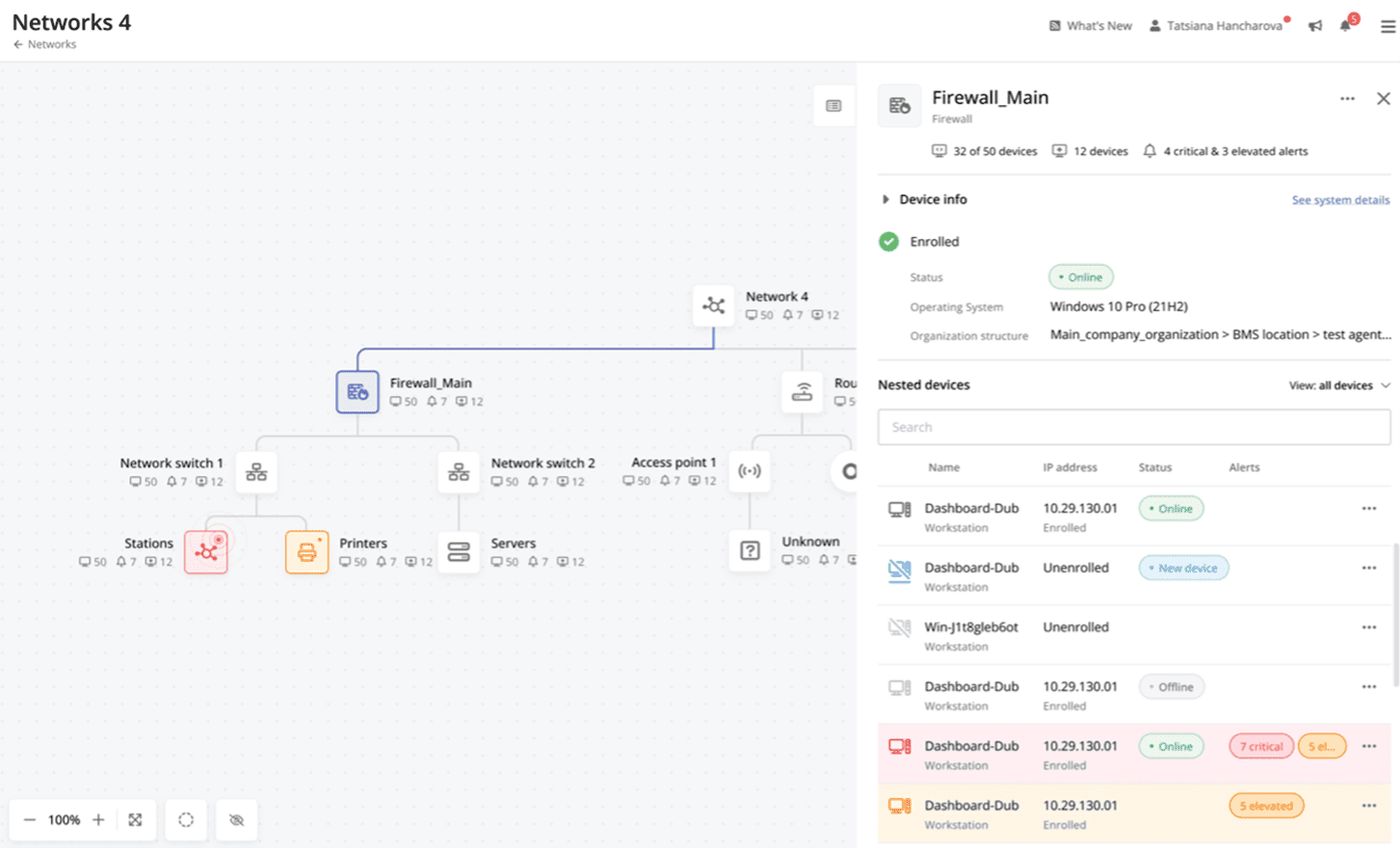
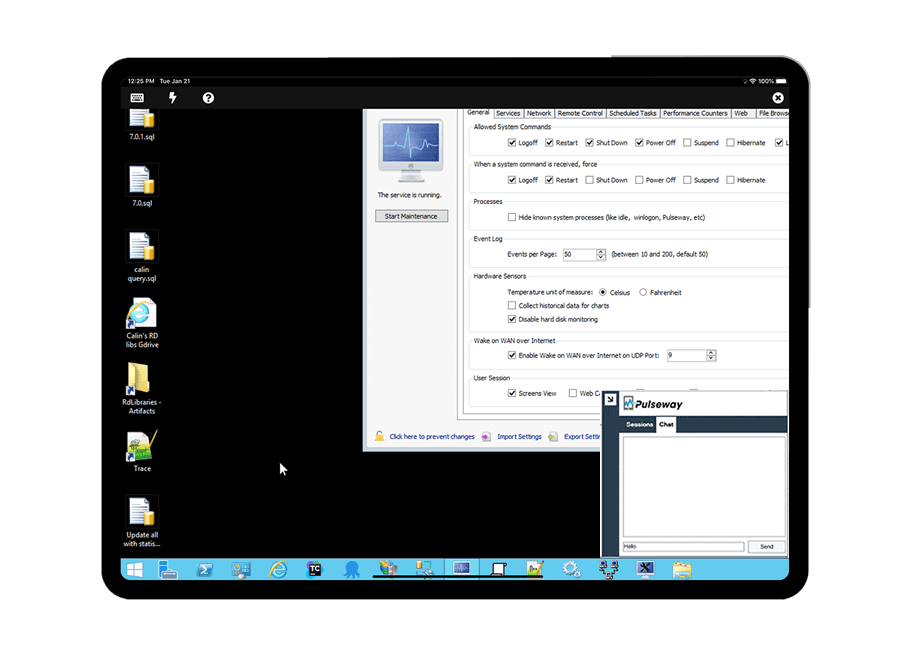
Screenshot of Cross-device functionalityScreenshot of Auto-Remediate IT IssuesScreenshot of Visibility Across the Entire NetworkScreenshot of Remote Control to Any SystemScreenshot of Systems and Application patchingScreenshot of Detailed Custom Report