Caliber by Micro Focus (formerly Borland Caliber), is an application requirement management offering. It has been discontinued, but similar capabilities are supplied by Micro Focus by Dimensions RM.
N/A
PractiTest
Score8 out of 10
N/A
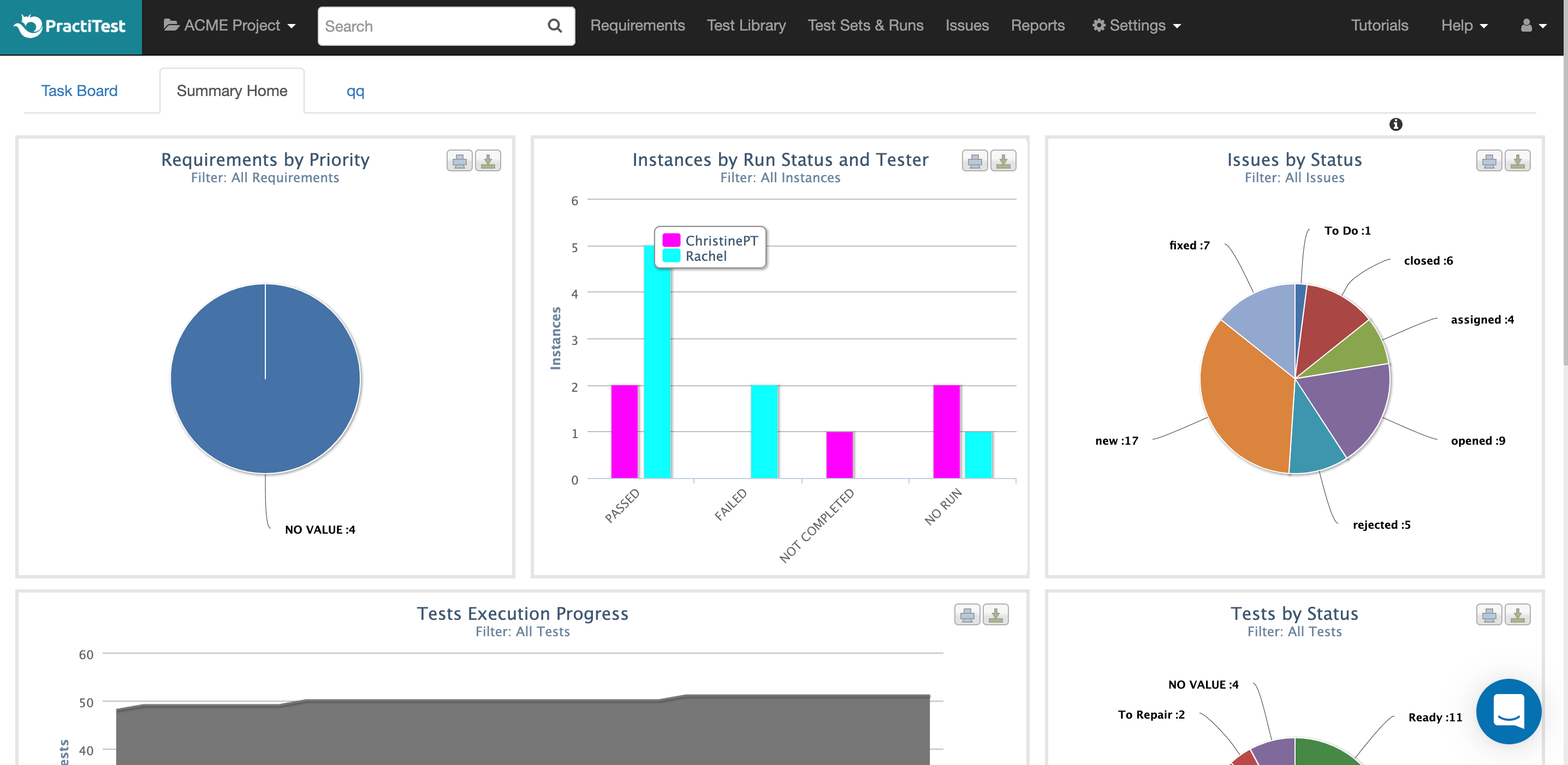
PractiTest is presented as a cloud-based test management tool that provides its customers with an end-to-end system to meet testing and QA needs. It is described by the vendor as flexible but methodological, enabling organizations to ensure visibility and communication at all levels. The solution aims to help users and project development teams streamline and manage their testing processes, while providing management with a clear and simple view of their project status at all times.
$39
user
Pricing
Micro Focus Caliber (discontinued)
PractiTest
Editions & Modules
No answers on this topic
Professional
$39.00
user
Enterprise
$49.00
user
Offerings
Pricing Offerings
Micro Focus Caliber (discontinued)
PractiTest
Free Trial
No
Yes
Free/Freemium Version
No
No
Premium Consulting/Integration Services
No
No
Entry-level Setup Fee
No setup fee
Optional
Additional Details
—
—
More Pricing Information
Features
Micro Focus Caliber (discontinued)
PractiTest
Test Management
Comparison of Test Management features of Micro Focus Caliber (discontinued) and PractiTest
I personally would prefer other products on the market right now such as Microsoft Team Foundation Server and Test Manager. I think having a product like Caliber that can only do requirements without integrating with a another system makes things a little more time consuming.
A de minimis incentive was given to thank the reviewer for their time. The incentive was not used to bias or drive a particular response, nor was the incentive contingent on a positive endorsement. More Info
PractiTest works GREAT as a test case repository. It is very easy to gather metrics, filter, and sort based on custom fields. We were able to work with the API to pull our automation results in as well. The support team is always very quick with their responses and monitors the "in-app chat." They are very open to answering questions, providing best practice materials, and looking for additional feedback. If you already have a central location for all of your test cases and testing needs, then I guess you probably wouldn't need to add another. However, PractiTest has high capability and potential, so if it's set up properly you can easily save time managing your tests.
A de minimis incentive was given to thank the reviewer for their time. The incentive was not used to bias or drive a particular response, nor was the incentive contingent on a positive endorsement. More Info
Borland Caliber tracks functional and non-functional requirements pretty easily. You can easily add a requirement and attach a spreadsheet or a picture if needed.
Moving the hierarchy of requirements is fairly easy by just dragging and dropping.
Assigning users to approve requirements is simple by the fields included when adding a requirement and then submitting for review.
A de minimis incentive was given to thank the reviewer for their time. The incentive was not used to bias or drive a particular response, nor was the incentive contingent on a positive endorsement. More Info
A de minimis incentive was given to thank the reviewer for their time. The incentive was not used to bias or drive a particular response, nor was the incentive contingent on a positive endorsement. More Info
I think Borland Caliber visually needs to be updated. It looks very out of date compared to other products on the market. The text box has a notepad feel to it and it's hard to make it visually catching.
Borland Caliber needs to be easier to integrate with other testing and development products on the market.
Having fields more related to URS and FRS would be helpful to auto-link to a document. So enter in a URS or FRS document ID at the beginning of a project in Caliber and then auto-assigning requirement IDs to link to pieces of code or test cases and having the user be able to decide a naming convention.
Borland Caliber needs a specific table for linking to a document ID and then each requirement could auto-generate a sub ID for each requirement to make the process of filling in User Requirements and Functional Requirements more efficient. Then the user should be able to modify the sub ID if the naming convention needed to be different.
A de minimis incentive was given to thank the reviewer for their time. The incentive was not used to bias or drive a particular response, nor was the incentive contingent on a positive endorsement. More Info
A de minimis incentive was given to thank the reviewer for their time. The incentive was not used to bias or drive a particular response, nor was the incentive contingent on a positive endorsement. More Info
The chat button is available to anyone who logs into PractiTest. In my experience, the support has always been very quick, very friendly, and very thorough. They make sure that your question is answered in a way that you understand it. They also provide documentation of best practices so you are never left hanging on what to do next.
A de minimis incentive was given to thank the reviewer for their time. The incentive was not used to bias or drive a particular response, nor was the incentive contingent on a positive endorsement. More Info
I think Borland Caliber is better than Atlassian Confluence and has way more options for ease of use and reporting. Team Foundation Server is my personal choice as it comes as a package for developers to link to requirements easily and link to test cases. Borland Caliber is visually the least attractive of the three systems I have used. If you need just a requirement manager for tracking and reporting then Borland Caliber is a great choice.
A de minimis incentive was given to thank the reviewer for their time. The incentive was not used to bias or drive a particular response, nor was the incentive contingent on a positive endorsement. More Info
I've used many different Test Case Repository tools, and while each of them has its perks, I like the capabilities of PractiTest best. When creating a test in qTest for example, you can only input information into the fields provided, and you have everything set up in a folder tree structure. With PractiTest, we are able to create custom fields and filter our tests based on those fields to provide more accurate information in a readily available format while quickly searching for the filter instead of through a folder tree. TestRail did not appear to meet our needs as a company. It just didn't have the potential that we found with PractiTest. Zephyr for example worked seamlessly with Jira, which is really nice since that is what we use for the most part. However since we cater to many different clients, we needed an external Test Case repository so we could use something that wasn't tied to 1 Jira instance.
A de minimis incentive was given to thank the reviewer for their time. The incentive was not used to bias or drive a particular response, nor was the incentive contingent on a positive endorsement. More Info
A de minimis incentive was given to thank the reviewer for their time. The incentive was not used to bias or drive a particular response, nor was the incentive contingent on a positive endorsement. More Info
A de minimis incentive was given to thank the reviewer for their time. The incentive was not used to bias or drive a particular response, nor was the incentive contingent on a positive endorsement. More Info