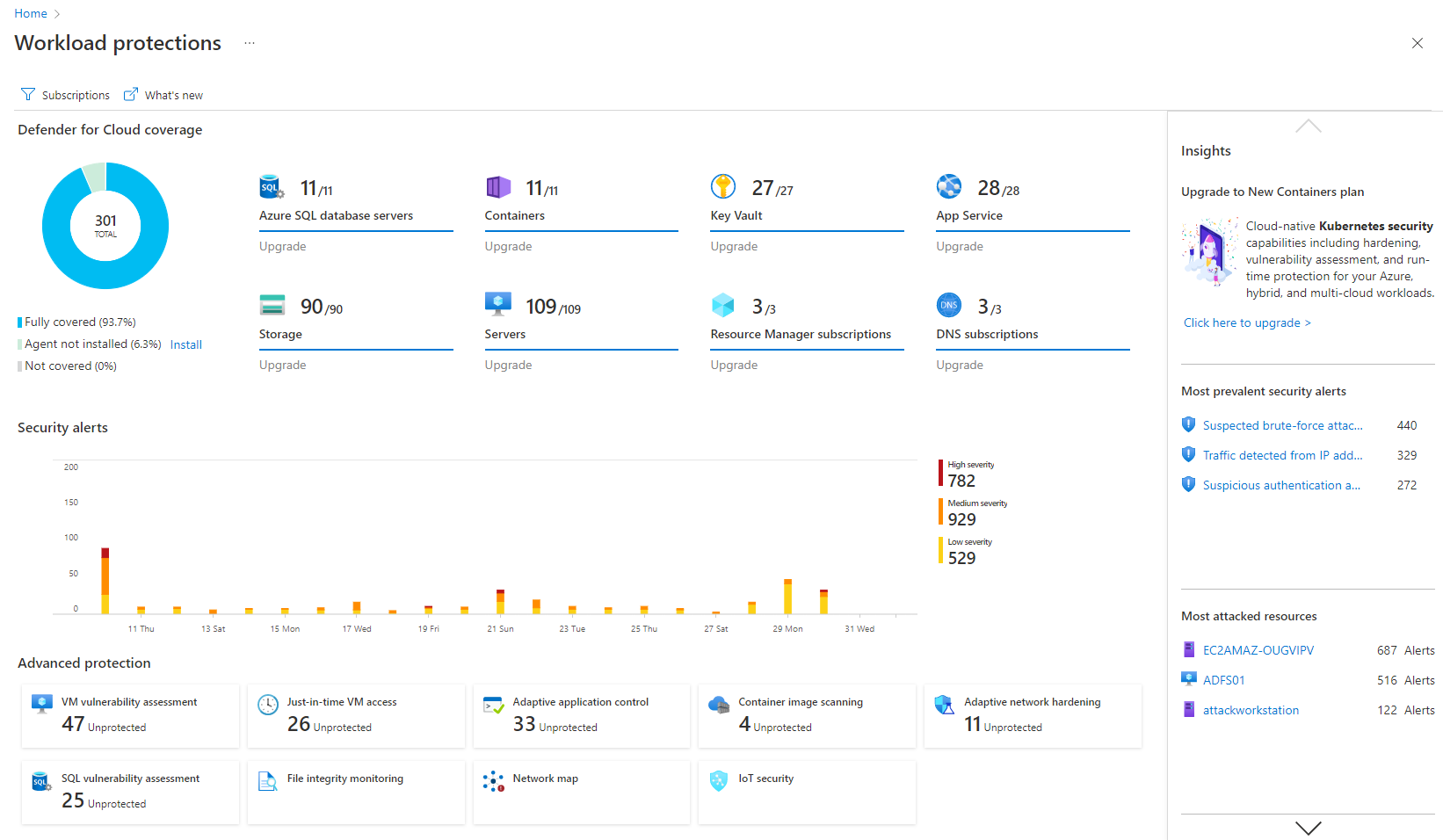
Microsoft Defender for Cloud is a Cloud Security Posture Management (CSPM) and Cloud Workload Protection Platform (CWPP) for Azure, on-premises, and multicloud (Amazon AWS and Google GCP) resources.
N/A
Microsoft Defender for Endpoint
Score8.8 out of 10
N/A
Microsoft Defender for Endpoint (formerly Microsoft Defender ATP) is a holistic, cloud delivered endpoint security solution that includes risk-based vulnerability management and assessment, attack surface reduction, behavioral based and cloud-powered next generation protection, endpoint detection and response (EDR), automatic investigation and remediation, managed hunting services, rich APIs, and unified security management.
A de minimis incentive was given to thank the reviewer for their time. The incentive was not used to bias or drive a particular response, nor was the incentive contingent on a positive endorsement. More Info
Microsoft
Verified User
Chose Microsoft Defender for Endpoint
SentinelOne, I want to say they're pretty equal. Some features in SentinelOne might have a little more superiority than Microsoft Defender for Endpoint, but then Microsoft Defender for Endpoint has features that overshadow SentinelOne. So they both have things that they do …
A de minimis incentive was given to thank the reviewer for their time. The incentive was not used to bias or drive a particular response, nor was the incentive contingent on a positive endorsement. TR verified that a representative sample of customers was invited. More Info
Cybersecurity Senior Engineer in Information Technology at Maureen Data Systems (MDS) (Information Technology & Services, 201-500 employees)
Chose Microsoft Defender for Endpoint
I have been working with customers that they are transitioning from Sentinel One, CrowdStrike to Defender for Endpoint, right? So I think it's because they see the value in the product and also they see how much they can save in terms of the cost for companies because they …
A de minimis incentive was given to thank the reviewer for their time. The incentive was not used to bias or drive a particular response, nor was the incentive contingent on a positive endorsement. TR verified that a representative sample of customers was invited. More Info
Verified User
Chose Microsoft Defender for Endpoint
Microsoft Defender for Endpoint stacks up well against it competitors. It detects malicious files faster than other tools like CrowdStrike.
A de minimis incentive was given to thank the reviewer for their time. The incentive was not used to bias or drive a particular response, nor was the incentive contingent on a positive endorsement. TR verified that a representative sample of customers was invited. More Info
Computer Technician Specialist in Information Technology at Utility (Program Development, 51-200 employees)
Chose Microsoft Defender for Endpoint
Tenable Security Center was a fantastic exposure detection tool but there was always a lag and servers would hang alot when being scanned causing resource traffic. Microsoft Defender for Endpoint on the other hand does not use up most resources soo there is usually noo lag …
A de minimis incentive was given to thank the reviewer for their time. The incentive was not used to bias or drive a particular response, nor was the incentive contingent on a positive endorsement. TR verified that a representative sample of customers was invited. More Info
Verified User
Chose Microsoft Defender for Endpoint
It excels in detecting unusual behavior on endpoints, offering valuable insights into potential attack paths, and it operates with remarkable speed and responsiveness.
A de minimis incentive was given to thank the reviewer for their time. The incentive was not used to bias or drive a particular response, nor was the incentive contingent on a positive endorsement. TR verified that a representative sample of customers was invited. More Info
Verified User
Chose Microsoft Defender for Endpoint
At the time, Microsoft Defender for Endpoint was a comparable selection with SentinelOne, but won on one important consideration for Educational Use, cost. Microsoft Defender for Endpoint was including in our Microsoft Enterprise agreement meaning that there was no additional …
A de minimis incentive was given to thank the reviewer for their time. The incentive was not used to bias or drive a particular response, nor was the incentive contingent on a positive endorsement. TR verified that a representative sample of customers was invited. More Info
I think it's good for cloud-native companies. A company that, from day zero, they're like, "We're going cloud, and this is how we're going to do it." They get it. It works well for them. Smaller organizations that are under X amount of resources- I don't know what that X might mean- but I feel like it plays well in smaller, more nimble organizations. If you're an older organization or if you're extremely large, it starts becoming a little difficult to manage at scale. And you have to sometimes throw bodies at the problem. Maybe not the most eloquent way of saying it, but that's what it feels like.
A de minimis incentive was given to thank the reviewer for their time. The incentive was not used to bias or drive a particular response, nor was the incentive contingent on a positive endorsement. More Info
If you have multiple endpoints in your environment, if you're looking to understand what your environment looks like, if you're trying to identify the health of your environment, or identify any risks or vulnerabilities in your environment pertaining to your endpoints and devices.
A de minimis incentive was given to thank the reviewer for their time. The incentive was not used to bias or drive a particular response, nor was the incentive contingent on a positive endorsement. TR verified that a representative sample of customers was invited. More Info
It's really well laid out, with an easy-to-use, accessible UI.
With Microsoft Defender for Cloud, it has everything you need with the Safelink attachment, the Safelink emails for URL, the way it scans those URLs and attachments within the product, and you're seeing the results. And that adds an extra layer of security for the user, so you feel comfortable knowing the product monitors those. That's something I really like about that product.
A de minimis incentive was given to thank the reviewer for their time. The incentive was not used to bias or drive a particular response, nor was the incentive contingent on a positive endorsement. More Info
The big thing for us is on endpoint, it kind of integrates with everything else that we already have because we use Microsoft completely. And so that helps us with being able to integrate, and send things over to Azure Sentinel as we need to as well.
A de minimis incentive was given to thank the reviewer for their time. The incentive was not used to bias or drive a particular response, nor was the incentive contingent on a positive endorsement. More Info
Integrations with on-premise workloads can sometimes be challenging. Needs improvement and well standardised integration points
Vulnerability categories can be difficult to understand. It should allow teams to focus on critical findings and help them keep aside low-severity or suppressed vulnerabilities
Pricing can be improved as it can be over-priced for smaller businesses and would potentially affect their ROI due to the small scale
A de minimis incentive was given to thank the reviewer for their time. The incentive was not used to bias or drive a particular response, nor was the incentive contingent on a positive endorsement. More Info
I'd say building out summaries and log reviews for analysts reviewing incidents. So, pivoting from the alerts themselves to actually getting the detail underneath. Trying to understand what caused an alert, where they went from there, et cetera, et cetera. And then trying to get into deeper log review to take that investigation further can be a pain point.
A de minimis incentive was given to thank the reviewer for their time. The incentive was not used to bias or drive a particular response, nor was the incentive contingent on a positive endorsement. More Info
It is a great product that integrates nicely when running an Azure platform and even multi-cloud environment. Not looking for point-solutions but a suite that answers most requirements. It is very comfortable being able to use KQL, workbooks and automation that is native to the azure platform
Cost add-ons for Security features is nickel and diming the process to keep pace with cybercrime. Limited Education budgets require us to be more pro-active in finding cost-effective measures to protect our devices, staff and students. Defender is a strong, well-featured product that is pricing itself out of the education market
A de minimis incentive was given to thank the reviewer for their time. The incentive was not used to bias or drive a particular response, nor was the incentive contingent on a positive endorsement. TR verified that a representative sample of customers was invited. More Info
My visibility is limited because I'm only doing very small pieces of what the overall org does. And also, we have limitations on what we're allowed to use. It's not like we get a new product as users or leadership level users, and everything is on, and we can just do whatever we want. We're very restricted in what we can use any tooling within the org because of the different levels of regulatory constraints we have, because of just the nature of who we are inherently. So that's why. I don't think it's necessarily the product. I think it's more or less of what we're able to do with the product.
A de minimis incentive was given to thank the reviewer for their time. The incentive was not used to bias or drive a particular response, nor was the incentive contingent on a positive endorsement. More Info
Because it's hard to find things sometimes. I can find things now because I know where they are. But you have to work with it a little while to figure out how. I'd basically say it was a security tool designed by developers. So you have to get that mindset to find things. So a new hire, a new person in the SOC would have a difficult time. I know that's sitting in here, or that screen is in here somewhere. So it's gotten better.
A de minimis incentive was given to thank the reviewer for their time. The incentive was not used to bias or drive a particular response, nor was the incentive contingent on a positive endorsement. More Info
Microsoft Defender for Endpoint chugs along just fine no matter what we throw at it and what systems it's running on. It doesn't take up a lot of resources either, so that's welcomed.
A de minimis incentive was given to thank the reviewer for their time. The incentive was not used to bias or drive a particular response, nor was the incentive contingent on a positive endorsement. More Info
A de minimis incentive was given to thank the reviewer for their time. The incentive was not used to bias or drive a particular response, nor was the incentive contingent on a positive endorsement. More Info
The first time I tried to onboard my macOS endpoints to MDE I struggled for quite a bit. I had to reach out to Microsoft's MDE support team. The tech was very helpful in walking me through the steps during a screen share session
A de minimis incentive was given to thank the reviewer for their time. The incentive was not used to bias or drive a particular response, nor was the incentive contingent on a positive endorsement. More Info
Deployment was handled by our team here and everything went pretty smoothly. We did have a few hiccups in our test group, but that only took a bit to get ironed out.
A de minimis incentive was given to thank the reviewer for their time. The incentive was not used to bias or drive a particular response, nor was the incentive contingent on a positive endorsement. More Info
I believe Microsoft Defender for Cloud stacks up well against the other tools we looked at. It is native to the Azure platform and provides the same insights as the other tools. We selected Microsoft Defender for Cloud because it integrates well with the Azure resources and gives the needed insight, security alerts and recommendations.
A de minimis incentive was given to thank the reviewer for their time. The incentive was not used to bias or drive a particular response, nor was the incentive contingent on a positive endorsement. TR verified that a representative sample of customers was invited. More Info
Particularly, we're evaluating Symantec Endpoint Protection, the commercial version. We've looked at eSet, a couple of the others, and it's much too heavy or difficult to manage, things like that. Ease of use, ease of integration. It's already there. It's super easy to update it with the regular OS updates and everything. So we can manage it whether we're using SCCM or Intune or Dato, it's very easy to deploy updates and manage things.
A de minimis incentive was given to thank the reviewer for their time. The incentive was not used to bias or drive a particular response, nor was the incentive contingent on a positive endorsement. More Info
A de minimis incentive was given to thank the reviewer for their time. The incentive was not used to bias or drive a particular response, nor was the incentive contingent on a positive endorsement. More Info
A de minimis incentive was given to thank the reviewer for their time. The incentive was not used to bias or drive a particular response, nor was the incentive contingent on a positive endorsement. More Info
I think the positive impact overall is that we do a lot of sitting in front of assessors- federal assessors, government assessors. And it really comes down to when the assessor has to think about another product that you're bringing in that's not Microsoft, it creates a lot of confusion, more paperwork, more explanation. But the positive impact is that they know it, everybody kind of knows Microsoft. And so when you tell them you have this endpoint for Microsoft Defender for Endpoint, they're like, okay. The questions go away, and it makes the overhead a lot less during an assessment.
A de minimis incentive was given to thank the reviewer for their time. The incentive was not used to bias or drive a particular response, nor was the incentive contingent on a positive endorsement. More Info