TrustRadius: an HG Insights company

Microsoft Entra External ID vs. MuleSoft Anypoint Platform

Save this comparison

Save this comparison

Add Product

Recommended Comparisons

    Overview
    ProductRatingMost Used ByProduct SummaryStarting Price

    Microsoft Entra External ID

    Score9.3 out of 10
    N/AMicrosoft Entra External ID (formerly Azure Active Directory B2C, or alternately, Azure Active Directory External Identities) provides business-to-customer identity as a service. Customers can use their preferred social, enterprise, or local account identities to get single sign-on access to applications and APIs.

    $0

    per month per active users

    Anypoint Platform

    Score8.1 out of 10
    N/AThe Anypoint Platform developed by MuleSoft and acquired by Salesforce in early 2018 is designed to connect apps, data, and devices anywhere, on-premises or in the cloud. This platform was built to offer out-of-the-box connectors as well as tools that architects and developers can adopt quickly to design, build and manage the entire lifecycle of their APIs, applications, and products.N/A
    Pricing
    Microsoft Entra External IDAnypoint Platform
    Editions & Modules
    Premium P1 (for More than 50,000 MAU)
    $0.00325
    per month per active users
    Premium P2 (for More than 50,000 MAU)
    $0.01625
    per month per active users
    No answers on this topic
    Offerings
    Pricing Offerings
    Microsoft Entra External IDAnypoint Platform
    Free Trial
    YesYes
    Free/Freemium Version
    YesYes
    Premium Consulting/Integration Services
    NoNo
    Entry-level Setup FeeNo setup feeNo setup fee
    Additional DetailsA flat fee of $0.03 is billed for each SMS/Phone-based multi-factor authentication attempt.—
    More Pricing Information
    Community Pulse
    Microsoft Entra External IDAnypoint Platform
    Considered Both Products
    Microsoft
    No answer on this topic
    Salesforce
    No answer on this topic
    Key User Insights
    Would buy again
    100%
    Would buy again
    9 Answers
    93%
    Would buy again
    14 Answers
    Delivers good value for the price
    100%
    Delivers good value for the price
    8 Answers
    92%
    Delivers good value for the price
    12 Answers
    Happy with the feature set
    100%
    Happy with the feature set
    9 Answers
    100%
    Happy with the feature set
    15 Answers
    Lived up to sales and marketing promises
    No answers on this topic
    92%
    Lived up to sales and marketing promises
    11 Answers
    Implementation went as expected
    100%
    Implementation went as expected
    7 Answers
    100%
    Implementation went as expected
    13 Answers
    Features
    Microsoft Entra External IDAnypoint Platform
    Identity Management
    Comparison of Identity Management features of Microsoft Entra External ID and MuleSoft Anypoint Platform
    Feature
    Microsoft Entra External ID
    9.4
    3 Ratings
    14% above category average
    MuleSoft Anypoint Platform
    -
    Ratings
    ID-Management Access Control9.33 Ratings00 Ratings
    ID Management Single-Sign On (SSO)9.33 Ratings00 Ratings
    Multi-Factor Authentication9.03 Ratings00 Ratings
    Password Management10.03 Ratings00 Ratings
    Account Provisioning and De-provisioning10.03 Ratings00 Ratings
    ID Management Workflow Automation8.73 Ratings00 Ratings
    ID Risk Management9.33 Ratings00 Ratings
    Cloud Data Integration
    Comparison of Cloud Data Integration features of Microsoft Entra External ID and MuleSoft Anypoint Platform
    Feature
    Microsoft Entra External ID
    -
    Ratings
    MuleSoft Anypoint Platform
    9.7
    13 Ratings
    19% above category average
    Pre-built connectors00 Ratings9.814 Ratings
    Connector modification00 Ratings9.714 Ratings
    Support for real-time and batch integration00 Ratings9.714 Ratings
    Data quality services00 Ratings9.614 Ratings
    Data security features00 Ratings9.714 Ratings
    Monitoring console00 Ratings9.714 Ratings
    Best Alternatives
    Microsoft Entra External IDAnypoint Platform
    Small Businesses
    JumpCloud
    Score9.3 out of 10
    Make
    Score9.3 out of 10
    Medium-sized Companies
    OneLogin by One Identity
    Score9.4 out of 10
    IBM App Connect
    Score9 out of 10
    Enterprises
    RSA Access Manager (Discontinued)
    Score10 out of 10
    Workato
    Score9.3 out of 10
    All AlternativesView all alternativesView all alternatives
    User Ratings
    Microsoft Entra External IDAnypoint Platform
    Likelihood to Recommend
    9.3
    (9 ratings)
    9.0
    (26 ratings)
    Likelihood to Renew
    -
    (0 ratings)
    9.0
    (1 ratings)
    Usability
    9.3
    (3 ratings)
    8.7
    (6 ratings)
    Support Rating
    -
    (0 ratings)
    10.0
    (6 ratings)
    Online Training
    -
    (0 ratings)
    10.0
    (2 ratings)
    User Testimonials
    Microsoft Entra External IDAnypoint Platform
    Likelihood to Recommend
    Microsoft
    In our organisation we use Microsoft Entra External ID primarily to enable non-attenders to remotely login to our tenant and access pre-prepared educational resources. As well as access to tutors, pupils can also communicate with centralised staff who can support them to gain an education. Utilising our external tenant configuration we can develop and deploy our own in house apps to unpin this support intervention.
    Incentivized
    Read full review
    Salesforce
    MuleSoft Anypoint Platform is best tool in the market for developing APIs with complex structures communicating with various different types of applications including web applications as well as legacy applications. Also applications including database connectivity for fetching and updating data in the DB tables. I cant think of any scenario which MuleSoft Anypoint Platform could not be used for developing the integrations.
    Incentivized
    Read full review
    Pros
    Microsoft
    • One of the things that Microsoft Entra External ID does really well is creating user logins, accounts and profile. It is very easy to create them, manage them and delete them. It is fast and reliant.
    • Limit access or authorization feature. We can allow different levels of authorization and access. So that not all the employees would have access to all the data. Only some relaible employees would have access and power to change anything.
    • Mutli factor authentication feature is also a really good feature to secure data. Even overseas vendors need MFS to login which gives double protection to our data.
    Incentivized
    Read full review
    Salesforce
    • API Manager provides easy API Policy Governance. You do not have to manage multiple platforms for managing the policies.
    • Supports hybrid Mule EBS environments. You can configure both CouldHub-based and on-premise-based API using Mulesoft API manager in a similar manner.
    • It's very easy to implement API proxy.
    • User friendly UI.
    • Single platform to manage all.
    Incentivized
    Read full review
    Cons
    Microsoft
    • Troubleshooting diagnostic logs effectively requires VS Code
    • Group and role management requires additional effort
    • The programming model (XML) could use some developer experience love
    Incentivized
    Read full review
    Salesforce
    • Has more features than what we really need so we're paying for more than we use. Sort of like paying for an Abrams tank when all we really need is a Toyota Corolla.
    • Not a value product, tends to be expensive.
    • Takes a while for developers to learn to use Mulesoft Anypoint.
    Incentivized
    Read full review
    Usability
    Microsoft
    Microsoft Entra External ID is an all round solid product, and certainly delivers the solution to our needs well. Through use we found that Pupil's become 'experts in avoidance', if they can forget their login details or indeed their device used for MFA, they will and then use that as the excuse for not accessing/completing their assignments. If more MFA options were available (such as delegated MFA) this would really help iron out our entire end user experiences
    Incentivized
    Read full review
    Salesforce
    We have migrated our existing over 100+ APIs from legacy to MuleSoft Anypoint Platform and the processing has seen over 40% improvement and saved huge amount in overall annual billing. From development perspective, MuleSoft Vibe has made developers life so easy and reduced development time. Extensive logging, and build-in connectors for other integration tools, logging and repo is providing kind of one place solutions. Any point Platform is providing various options like runtime, API manager, Access management, segregation of Business groups and so many other option which is helping us to monitor, configure and manage all our APIs in one place
    Read full review
    Support Rating
    Microsoft
    No answers on this topic
    Salesforce
    Anypoint Platform support is very responsive. There is also a huge knowledge base and an active online forum where answers to most questions can be found. When needed support engages the engineering group so adequate solutions or workarounds are always provided.
    Incentivized
    Read full review
    Online Training
    Microsoft
    No answers on this topic
    Salesforce
    I have started with MuleSoft Fundamentals course provided by MuleSoft training at start. This was sufficient to do initial learning and get onboarded. The online documentation with different Runtime versions/deprecated functions and keywords are well documented. The automated solution provided by MuleSoft Anypoint Platform to upgrade 3.0 to 4.0 gave a good head start while learning MuleSoft Anypoint Platform and working altogether with Online training and documentations
    Read full review
    Alternatives Considered
    Microsoft
    I really enjoy how simple it is to connect this Active Directory with other Microsoft Products to collaborate with colleagues and clients.
    Incentivized
    Read full review
    Salesforce
    Once we have moved all of our system integration APIs to the MuleSoft Anypoint Platform, we will need to communicate with a wide variety of external systems. All of our business and service logic is stored in the aforementioned core systems. Anypoint Platform (and all of our APIs) makes it easy to connect to various other platforms. In order to link to these many other systems, connectors and/or components are utilized, and they are simple to configure and integrate.
    Incentivized
    Read full review
    Return on Investment
    Microsoft
    • Having monthly active users billing was cost-effective.
    • Helped with the IT support that was already managing the Azure platform of the company; this helped to manage the costs better and optimize them.
    Incentivized
    Read full review
    Salesforce
    • Mulesoft can be used to provide an integration platform to a large number of systems like Salesforce, ODBC, JDBC, SAP, Mongo DB, etc.
    • An excellent option to develop microservices and real-time integrations.
    • Not as robust in handling large data volumes, Informatica is better in that respect.
    Incentivized
    Read full review
    ScreenShots

    Anypoint Platform Screenshots

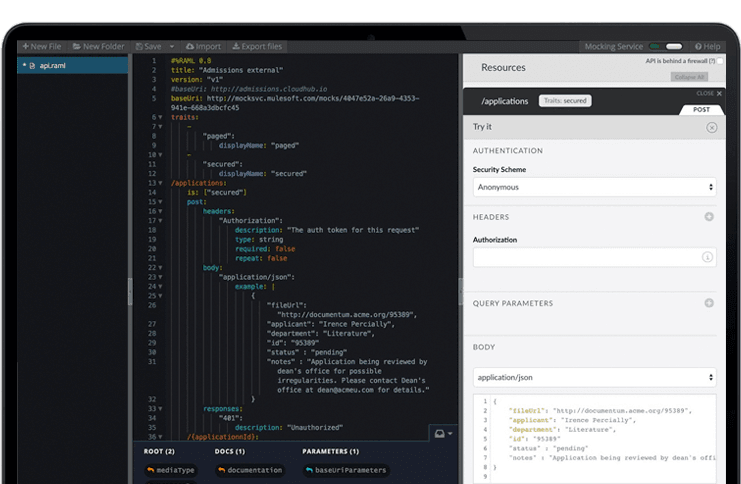
    Screenshot of Connect any endpoints using out-of-the-box connectors, dynamic connectivity to API specifications, or by building reusable connectors with Anypoint DevKit™.Screenshot of A reporting suite that provides a real-time view of API consumption trends and operational performance. Analytics provides insight into how your API is being used and informs forward-looking design decisions.Screenshot of A platform to engage with API developers and drive adoption. Share documentation, examples and manage developer access from a single platform.