Microsoft Project Server is a project portfolio management option.
N/A
Planview ProjectAdvantage
Score8.9 out of 10
N/A
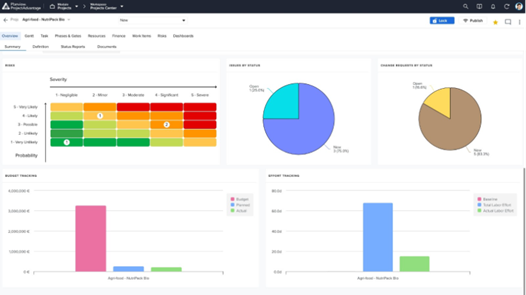
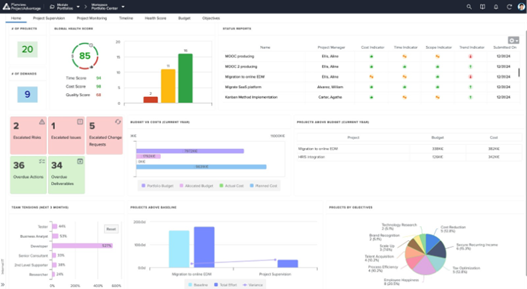
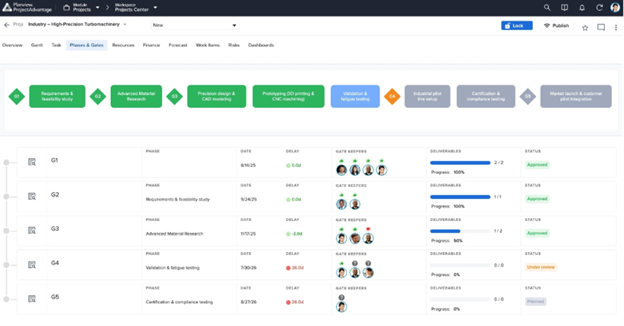
Planview ProjectAdvantage is a project and portfolio management (PPM) platform for mid-sized organizations and developing project management offices (PMOs). The platform centralizes project, program, resource, financial, and performance data through configurable workflows, dashboards, and AI-assisted planning tools. The vendor reports that organizations across IT, research and development, and product development use ProjectAdvantage to plan work, allocate resources, monitor portfolios,…
Microsoft Project Server I believe is best for any organization from small to large. As I mentioned, it is a little pricey so I would do research into alternative software and depending on your needs maybe look at all options, competing software. This is a tool with a learning curve and some may not be able to easily navigate this software. There isn't really great training, resources available for this tool however there are some free YouTube tutorial videos. This is great for cross company, department project management, sharing, managing of projects and timelines.
A de minimis incentive was given to thank the reviewer for their time. The incentive was not used to bias or drive a particular response, nor was the incentive contingent on a positive endorsement. More Info
KeyedIn is well suited for a number of projects from IT, Sales, Development and Marketing. It is pretty flexible so implementing it into any number of workflows seems fairly easy due to it's customizability.
A de minimis incentive was given to thank the reviewer for their time. The incentive was not used to bias or drive a particular response, nor was the incentive contingent on a positive endorsement. More Info
Project planning: tasks assignments, resources allocation, progress and cost tracking. The Server version is the natural extension of the Microsoft Project standalone.
Provides one place to manage all projects, accessible by everyone in the team. This opens the plan updates to team members as well(on their tasks), as opposed to being done only by the project manager.
Reporting and visualization - resources utilization, timeline etc
The integration with the Microsoft Project standalone: if you don't like the web version, you can download the latest and work locally. When done just sync it back to the server.
A de minimis incentive was given to thank the reviewer for their time. The incentive was not used to bias or drive a particular response, nor was the incentive contingent on a positive endorsement. More Info
Flexible: I believe it is the best part. The software is completely and especially designed for our needs.
Easy to use: any configuration can be done either by us or Sciforma. At first, we would only use the project extension. After a year, we decided to add more users and roll-out time tracking. We did the configuration by ourselves and didn’t need Sciforma’s help. It was pretty easy, even without having a dedicated developer.
They have a lot of features: you can start as small as you want and always get more features . This was our case and we haven’t been limited so far.
They are methodology agnostic: We use both Agile and Waterfall and it’s great to see it all rolls up to the portfolio level.
A de minimis incentive was given to thank the reviewer for their time. The incentive was not used to bias or drive a particular response, nor was the incentive contingent on a positive endorsement. More Info
A de minimis incentive was given to thank the reviewer for their time. The incentive was not used to bias or drive a particular response, nor was the incentive contingent on a positive endorsement. TR verified that a representative sample of customers was invited. More Info
This software allows project and portfolio managers to analyze and prioritize projects based on resource allocation and available effort. It helps you compare the sorecast effort with resource availability. You can email, call or tweet them if you have concerns.
A de minimis incentive was given to thank the reviewer for their time. The incentive was not used to bias or drive a particular response, nor was the incentive contingent on a positive endorsement. TR verified that a representative sample of customers was invited. More Info
One of the key advantages of Microsoft Project Server (MSPS) is its ecosystem. It gels very well with SharePoint, Office, Office 365. The support from Microsoft is also a key driver and they are very experienced and many ways to resolve issues. Also, Microsoft has bridged the gap of cloud offering from other competitors by providing Project Online. It is an offering through Office 365 which is very lean and low maintenance.
A de minimis incentive was given to thank the reviewer for their time. The incentive was not used to bias or drive a particular response, nor was the incentive contingent on a positive endorsement. More Info
It is used to fully automate every stage in the project lifecycle and forecast on resources required to successfully complete projects. It empowers managers to complete projects in time and within the allocated budget. One of the many features that make this platform unique and suitable to many modern businesses is the portfolio management feature.
A de minimis incentive was given to thank the reviewer for their time. The incentive was not used to bias or drive a particular response, nor was the incentive contingent on a positive endorsement. More Info
A de minimis incentive was given to thank the reviewer for their time. The incentive was not used to bias or drive a particular response, nor was the incentive contingent on a positive endorsement. More Info
A de minimis incentive was given to thank the reviewer for their time. The incentive was not used to bias or drive a particular response, nor was the incentive contingent on a positive endorsement. More Info