TrustRadius: an HG Insights company

Save this comparison

Save this comparison

Add Product

Recommended Comparisons

    Overview
    ProductRatingMost Used ByProduct SummaryStarting Price

    NetBrain Technologies

    Score8.8 out of 10
    N/ANetBrain, founded in 2004, provides a no-code automation platform for hybrid network observability, allowing organizations to enhance their operational efficiency through automated workflows. The platform applies automation across three key workflows: troubleshooting, change management, and assessment.N/A

    PingPlotter

    Score9 out of 10
    N/APingPlotter is a graphical traceroute and ping tool that visualizes network performance in a way that makes identifying the source of problems quicker and easier for everyone from online gamers and video streamers to VoIP admins and IT pros. Features for remote deployment, network monitoring, scripting, and a web interface are included along with several additional capabilities.

    $0

    per user

    Pricing
    NetBrain TechnologiesPingPlotter
    Editions & Modules
    No answers on this topic
    PingPlotter Free
    $0.00
    per user
    PingPlotter Free
    $0.00
    per user
    PingPlotter Standard
    $6.99
    per user per month
    PingPlotter Professional
    $29.00
    per user per month
    PingPlotter Standard
    $39.99
    per user
    PingPlotter Professional
    $349.00
    per user
    Offerings
    Pricing Offerings
    NetBrain TechnologiesPingPlotter
    Free Trial
    YesYes
    Free/Freemium Version
    NoYes
    Premium Consulting/Integration Services
    YesNo
    Entry-level Setup FeeNo setup feeNo setup fee
    Additional Details——
    More Pricing Information
    Community Pulse
    NetBrain TechnologiesPingPlotter
    Considered Both Products
    NetBrain Technologies
    No answer on this topic
    Pingman Tools
    No answer on this topic
    Key User Insights
    Would buy again
    No answers on this topic
    100%
    Would buy again
    33 Answers
    Delivers good value for the price
    No answers on this topic
    96%
    Delivers good value for the price
    24 Answers
    Happy with the feature set
    No answers on this topic
    100%
    Happy with the feature set
    33 Answers
    Lived up to sales and marketing promises
    No answers on this topic
    100%
    Lived up to sales and marketing promises
    21 Answers
    Implementation went as expected
    No answers on this topic
    100%
    Implementation went as expected
    31 Answers
    Features
    NetBrain TechnologiesPingPlotter
    Network Performance Monitoring
    Comparison of Network Performance Monitoring features of NetBrain Technologies and PingPlotter
    Feature
    NetBrain Technologies
    -
    Ratings
    PingPlotter
    8.5
    34 Ratings
    7% above category average
    Automated network device discovery00 Ratings8.724 Ratings
    Network monitoring00 Ratings9.434 Ratings
    Baseline threshold calculation00 Ratings9.624 Ratings
    Alerts00 Ratings6.919 Ratings
    Customizable reports00 Ratings8.018 Ratings
    Best Alternatives
    NetBrain TechnologiesPingPlotter
    Small Businesses
    No answers on this topic
    Auvik
    Score8.8 out of 10
    Medium-sized Companies
    Logz.io
    Score8.3 out of 10
    Paessler PRTG
    Score8.4 out of 10
    Enterprises
    Apica
    Score7 out of 10
    Nmap
    Score8.7 out of 10
    All AlternativesView all alternativesView all alternatives
    User Ratings
    NetBrain TechnologiesPingPlotter
    Likelihood to Recommend
    9.6
    (5 ratings)
    9.1
    (34 ratings)
    Usability
    10.0
    (1 ratings)
    9.3
    (14 ratings)
    Support Rating
    -
    (0 ratings)
    9.0
    (1 ratings)
    User Testimonials
    NetBrain TechnologiesPingPlotter
    Likelihood to Recommend
    NetBrain Technologies
    Great for our large global environment. Works well with our legacy and newer equipment. Ease of install was exciting compared to other products we POC'd. Less of a learning curve when training Teams on how to monitor and troubleshoot while in production. Service desk were able to capture the logs and load into our ticketing system with ease.
    Incentivized
    Read full review
    Pingman Tools
    This tool is best suited to get a quick read on basic network access across multiple hops. It provides immediate, very valuable feedback. If you know your stuff, there are other tools that handle the rest you need: packet capture, port scans, etc. We are all looking for that multi-tool, but this is perfect for the basic need of knowing where in the network a problem might be.
    Read full review
    Pros
    NetBrain Technologies
    • Network Issues Troubleshooting
    • Visualizing the root cause using color coding
    • out of the box runbooks available
    Incentivized
    Read full review
    Pingman Tools
    • Monitor traffic in network
    • Measure stops when contacting network locations such as websites
    • Measures the lag and latency it takes to contact network locations
    • Gives you both induvidual measurements as well as good oversight
    • identifies when network lag or disconnect occurs
    Read full review
    Cons
    NetBrain Technologies
    • Not all devices are integrated with the same quality.
    • Not all steps are self-explaining.
    • The updates were difficult (but thanks to the help of support no real problem).
    Incentivized
    Read full review
    Pingman Tools
    • Being able to export data would have been helpful for a larger analysis.
    • It is a robust program and probably more than we needed for a small business; some options that were better aligned with our budget would have been good.
    • As a non-technical person in the networking space, I found the data helpful for communicating, but not always easy to understand.
    Read full review
    Usability
    NetBrain Technologies
    This is a easly tool that i've worked.
    Incentivized
    Read full review
    Pingman Tools
    I installed it and it just started working. I realized I could then tweak it to show what I needed but didn't have to spend a long time configuring it before use, editing YAML files etc. Maybe that's fine for a network professional, but I only need this software if something goes wrong, and then need it to work quickly out of the box.
    Incentivized
    Read full review
    Support Rating
    NetBrain Technologies
    No answers on this topic
    Pingman Tools
    I have not had much contact with the PingPlotter support, only one time have I went to them and it was a positive experience. The questions I had were answered quickly and professionally. I have no issue with the experience I had with the Support team. This was from before and after the purchase of the product.
    Incentivized
    Read full review
    Alternatives Considered
    NetBrain Technologies
    Best part of NetBrain is that it is customisable ,you can create apps based on your requirement and run them in your environment. Lot of flexibility
    Incentivized
    Read full review
    Pingman Tools
    I used Ping.app and UptimeLog.app on the Mac. These both provided different aspects. These two had a menubar to show me green or red for multiple connections. UptimeLog showed me very clearly when my connectivity was on or off and for exactly how long
    Read full review
    Return on Investment
    NetBrain Technologies
    • Time it takes for Service Desk to identify issues has been cut into 1/2
    • Able to present maps to management for circuit throughput issues and why we need a larger circuit
    • The logs are clear and easy to understand
    Incentivized
    Read full review
    Pingman Tools
    • Great ROI, troubleshooting time has been reduced by 90%
    • Network Discoveries used to take 2 to 3 hours and were inconsistent - now it is a matter of minutes
    • lacks integration into our MSP toolkit, and we now use it as a stand alone product
    Incentivized
    Read full review
    ScreenShots

    NetBrain Technologies Screenshots

    Screenshot of how NetBrain defines what can be assessed in a network, how often it can be assessed, and how it scales through no-code automation.Screenshot of what a Golden Path through a hybrid cloud looks likeScreenshot of how using no-code network automation can cover all aspects of a network.

    PingPlotter Screenshots

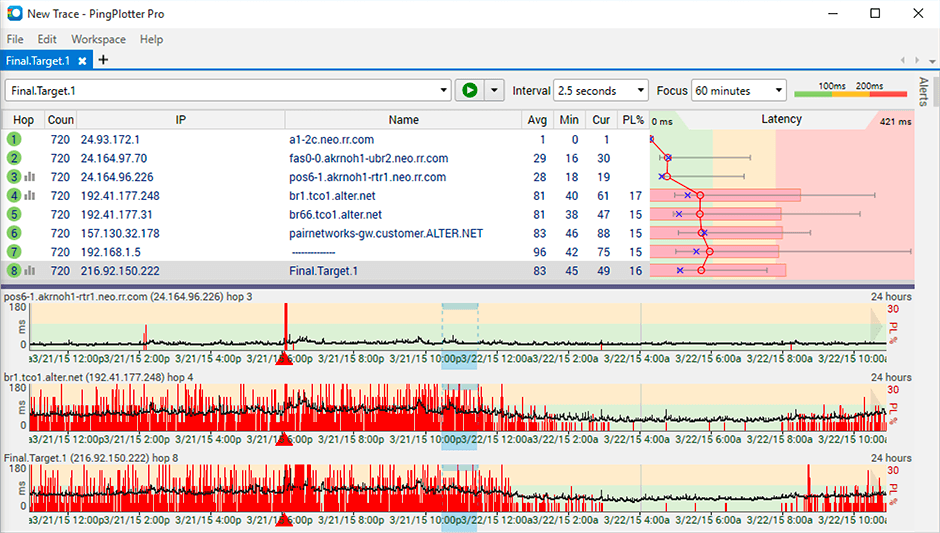
    Product screenshotProduct screenshotProduct screenshot