TrustRadius: an HG Insights company

Microsoft Dynamics 365 Customer Service vs. Next4biz

Save this comparison

Save this comparison

Add Product

Recommended Comparisons

    Overview
    ProductRatingMost Used ByProduct SummaryStarting Price

    Microsoft Dynamics 365 Customer Service

    Score8 out of 10
    N/AMicrosoft Dynamics 365 Customer Service is designed to create positive experiences through any channel and on any device to exceed customer expectations.

    $50

    per month per user

    Next4biz

    N/AN/ANext4biz is a cloud based digital marketing, customer service and business process management solution, that helps enterprises through their digital transformations. Next4biz's states that with their products, their mission is to change the way companies manage their customer relations and processes is, where the most significant areas of growth are in the industry.

    $19

    per month per user

    Pricing
    Microsoft Dynamics 365 Customer ServiceNext4biz
    Editions & Modules
    Dynamics 365 Customer Service Professional
    $50
    per month per user
    Add-In - Chat
    $60
    per month per user
    Dynamics 365 Customer Service Enterprise
    $105
    per month per user
    Dynamics 365 Customer Service Premium
    $195
    per month per user
    Customer Service
    19* starting at
    per month per user
    Digital Channels
    $90
    per month per profile
    AI Bots & Agents
    $1,200
    per month *Includes 20,000 sessions per month.
    Offerings
    Pricing Offerings
    Microsoft Dynamics 365 Customer ServiceNext4biz
    Free Trial
    NoYes
    Free/Freemium Version
    NoNo
    Premium Consulting/Integration Services
    NoYes
    Entry-level Setup FeeNo setup feeOptional
    Additional Details——
    More Pricing Information
    Features
    Microsoft Dynamics 365 Customer ServiceNext4biz
    Incident and problem management
    Comparison of Incident and problem management features of Microsoft Dynamics 365 Customer Service and Next4biz
    Feature
    Microsoft Dynamics 365 Customer Service
    7.4
    3 Ratings
    10% below category average
    Next4biz
    -
    Ratings
    Organize and prioritize service tickets9.03 Ratings00 Ratings
    Expert directory1.33 Ratings00 Ratings
    Subscription-based notifications7.02 Ratings00 Ratings
    ITSM collaboration and documentation6.83 Ratings00 Ratings
    Ticket creation and submission10.03 Ratings00 Ratings
    Ticket response10.03 Ratings00 Ratings
    Self Help Community
    Comparison of Self Help Community features of Microsoft Dynamics 365 Customer Service and Next4biz
    Feature
    Microsoft Dynamics 365 Customer Service
    4.5
    3 Ratings
    56% below category average
    Next4biz
    -
    Ratings
    External knowledge base4.93 Ratings00 Ratings
    Internal knowledge base4.23 Ratings00 Ratings
    Multi-Channel Help
    Comparison of Multi-Channel Help features of Microsoft Dynamics 365 Customer Service and Next4biz
    Feature
    Microsoft Dynamics 365 Customer Service
    8.0
    3 Ratings
    0% below category average
    Next4biz
    -
    Ratings
    Customer portal9.93 Ratings00 Ratings
    IVR5.02 Ratings00 Ratings
    Social integration5.13 Ratings00 Ratings
    Email support10.03 Ratings00 Ratings
    Help Desk CRM integration9.93 Ratings00 Ratings
    Best Alternatives
    Microsoft Dynamics 365 Customer ServiceNext4biz
    Small Businesses
    Help Scout
    Score9.3 out of 10
    Help Scout
    Score9.3 out of 10
    Medium-sized Companies
    LiveAgent
    Score8.8 out of 10
    LiveAgent
    Score8.8 out of 10
    Enterprises
    Front
    Score9.2 out of 10
    Front
    Score9.2 out of 10
    All AlternativesView all alternativesView all alternatives
    User Ratings
    Microsoft Dynamics 365 Customer ServiceNext4biz
    Likelihood to Recommend
    9.0
    (3 ratings)
    -
    (0 ratings)
    Usability
    9.0
    (2 ratings)
    -
    (0 ratings)
    User Testimonials
    Microsoft Dynamics 365 Customer ServiceNext4biz
    Likelihood to Recommend
    Microsoft
    Suitable for ticketing that might also require routing to 'queues' and capturing communication timelines. Not as suitable for heavily credentials-management-type organizations or organizations that are not on the Microsoft stack. Also, not as suitable for organizations that have very high needs for knowledge base management or organizations that do not have resources or a partner to help extend the capabilities.
    Incentivized
    Read full review
    next4biz
    No answers on this topic
    Pros
    Microsoft
    • Routing
    • Different Channel Support
    • Intuitive user interface
    • Continues improvement in the product
    • Integration with other Microsoft services and products
    Read full review
    next4biz
    No answers on this topic
    Cons
    Microsoft
    • It occasionally crashes or slow down, but it usually works great.
    • Costly.
    Incentivized
    Read full review
    next4biz
    No answers on this topic
    Usability
    Microsoft
    It's not as simple as some of the other offerings, but it is fairly intuitive. The design philosophy is a little more bloated, but it can be streamlined by customizing views and forms (pages) to be organized for end users. Once it is set up, though, assuming your UI choices and design are intuitive, it is simple for end users to use.
    Incentivized
    Read full review
    next4biz
    No answers on this topic
    Alternatives Considered
    Microsoft
    I have worked with Oracle CRM On Demand earlier, mainly for case management and basic customer support workflows. Oracle CRM was stable and worked fine for standard use cases, but customization was limited and changes usually required more effort and time. Integrations with other systems were also not very flexible.
    Microsoft Dynamics 365 Customer Service is much stronger in terms of flexibility and scalability. The biggest advantage is tight integration with the Microsoft ecosystem like Outlook, Teams, Power Automate, and Power Apps, which makes automation and productivity much better. Case management, SLAs, queues, and omnichannel features are more advanced and easier to configure.
    Read full review
    next4biz
    No answers on this topic
    Return on Investment
    Microsoft
    • Creativity way.
    • Foster increase in revenue.
    • Improving decision-making.
    • Culture of good relationship/service.
    Incentivized
    Read full review
    next4biz
    No answers on this topic
    ScreenShots

    Next4biz Screenshots

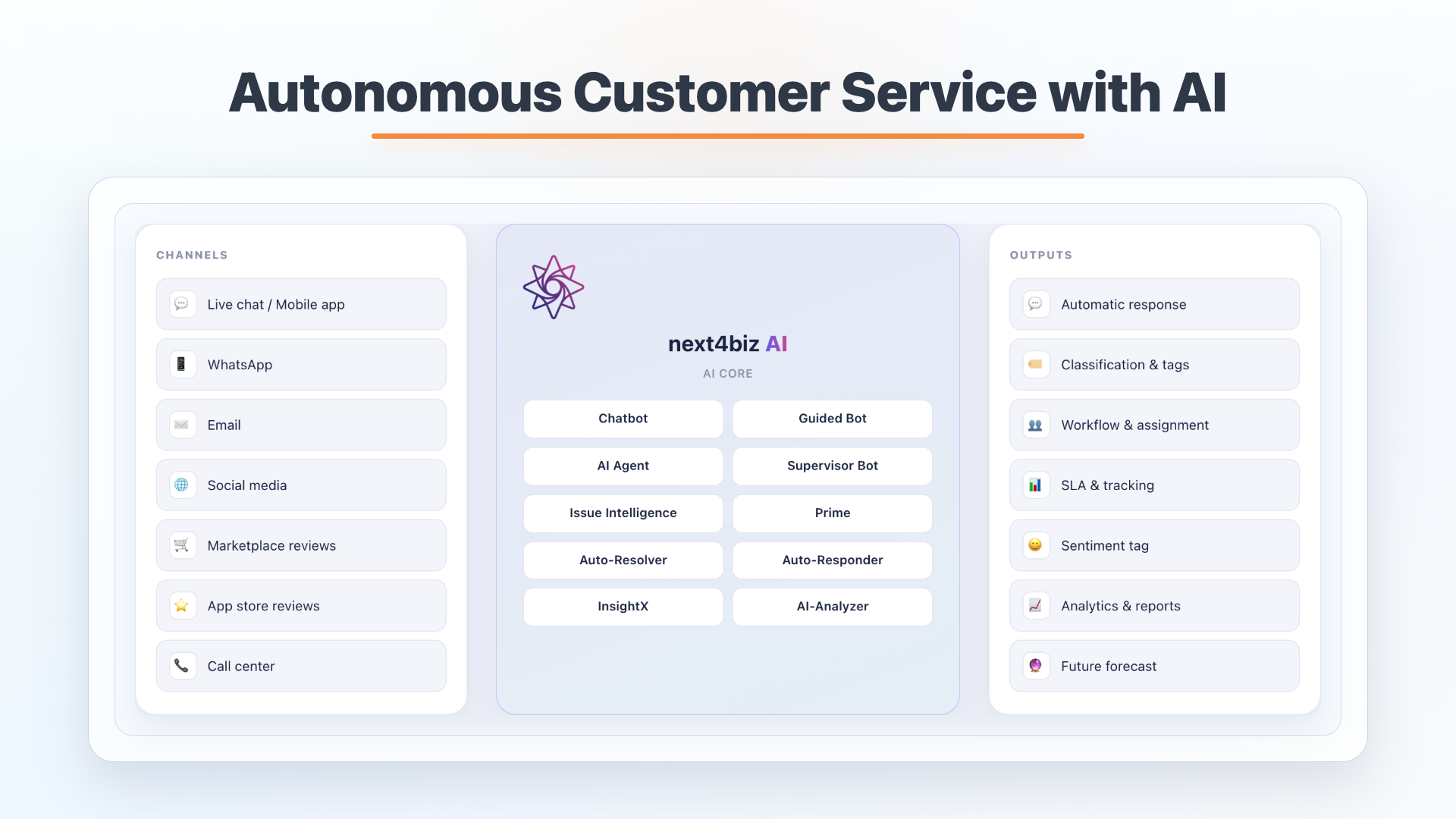
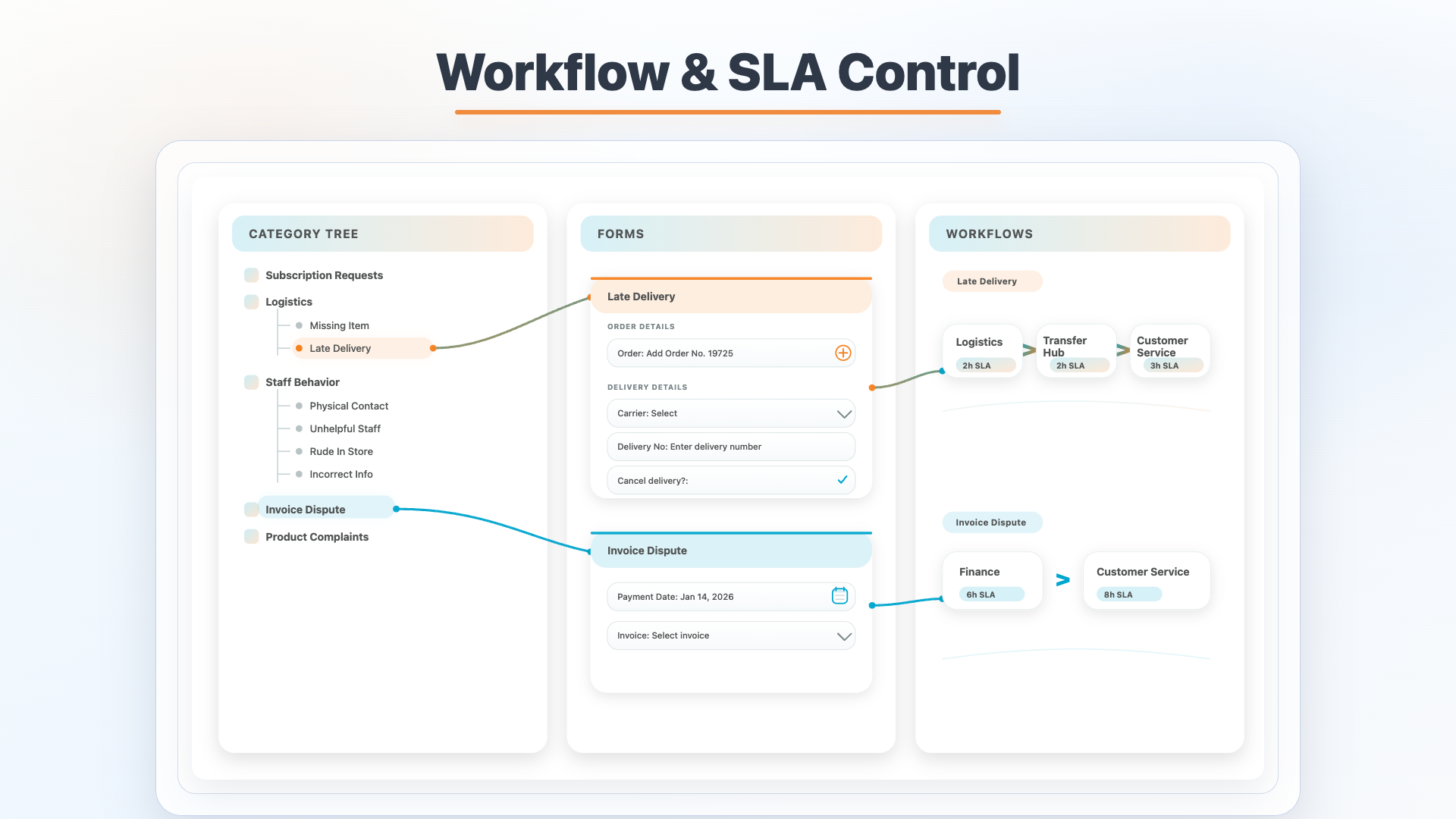
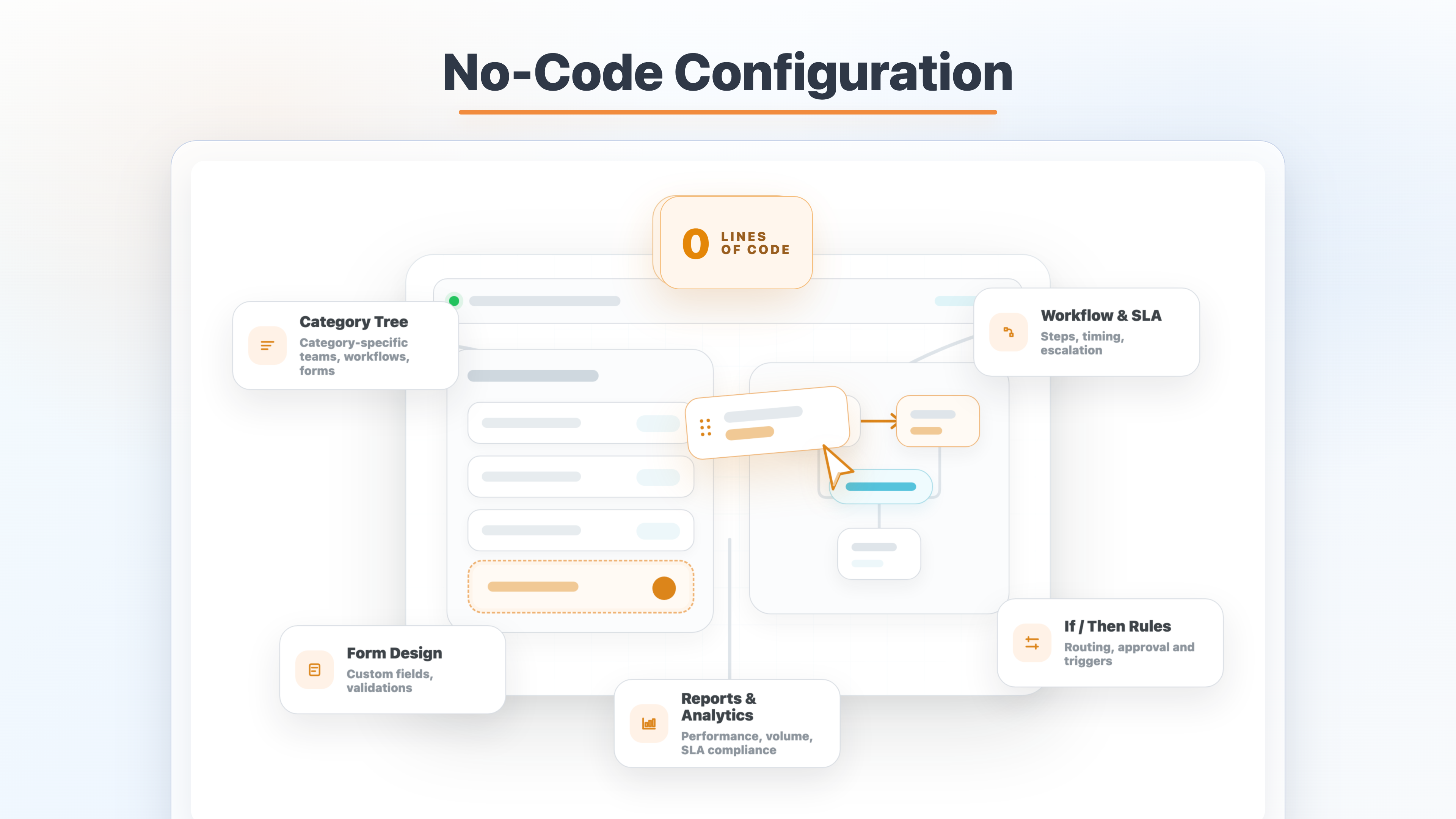
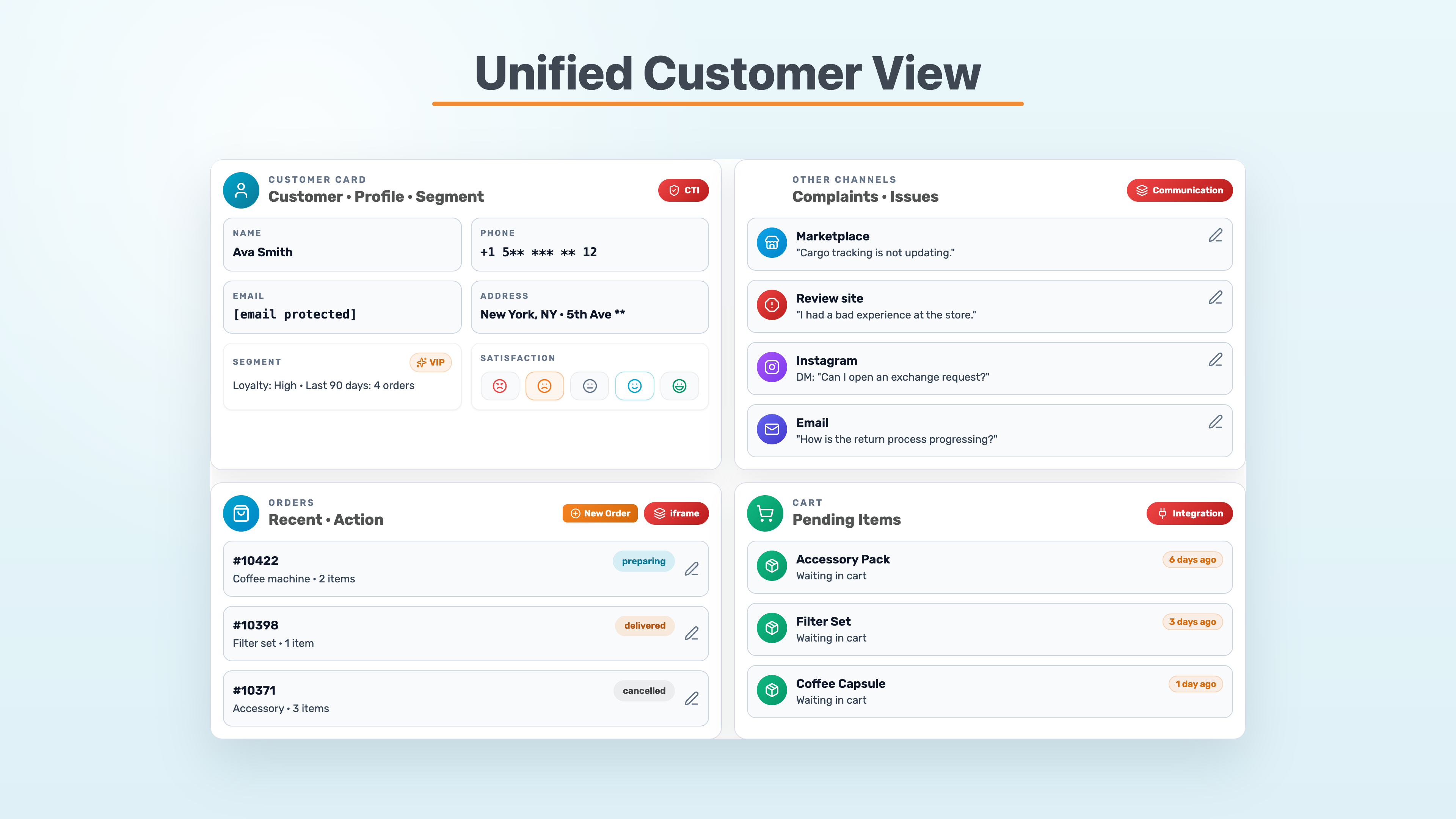
    Screenshot of Next4biz brings every customer touchpoint into an AI-supported service flow, where incoming interactions can be understood, prioritized, routed, and followed through without losing context. Teams can automate routine steps, keep SLA and workflow control, and focus human effort on the cases that require judgment.Screenshot of Each request follows a category-based process with the right form, responsible team, SLA timer, and escalation path. This gives service operations a clear structure from intake to resolution, instead of stopping at ticket capture.Screenshot of High-volume written-channel traffic is filtered before it becomes backlog. PRIME separates noise from valid customer issues, identifies urgency, adds confidence scoring, and passes cleaner tickets into the next service step.Screenshot of Incoming requests from different service channels are checked before routing: real issues are separated from noise, categorized by topic and priority, then sent to the right workflow with sentiment and churn signals attached.Screenshot of Service processes can be configured without writing code, from category trees and custom forms to workflow steps, SLA rules, routing logic, and reporting views. This gives operations more room to adapt customer service processes as needs change.Screenshot of Interactions across phone, email, social media, marketplaces, review sites, orders, and cart activity come together in one omnichannel customer view. Agents can understand the full history and act without switching between disconnected channel screens.