
Nextqore AI Data Preprocessor vs. Toad Data Point
Nextqore AI Data Preprocessor vs. Toad Data Point
| Product | Rating | Most Used By | Product Summary | Starting Price |
|---|---|---|---|---|
 Nextqore AI Data Preprocessor | Small Businesses (1-50 employees) | Nextqore is an AI Data Preprocessor designed to get enterprise data ready for AI before it reaches any model. What It Does The platform is built on two standalone products. AnySource Data Combiner ingests and unifies data from disparate enterprise systems into a single, clean feed. Data Context Builder adds semantic and relational context, ontology, and full data lineage to that combined data. Each product solves a distinct problem and can be deployed on… | $1,200 per month per installation | |
 Toad Data Point | N/A | Toad Data Point is a cross-platform, self-service, data-integration tool that simplifies data access, preparation and provisioning. It provides data connectivity and desktop data integration, and with the Workbook interface for business users, it provides simple-to-use visual query building and workflow automation. | $365 |
| Nextqore AI Data Preprocessor | Toad Data Point | |||||||||||||||
|---|---|---|---|---|---|---|---|---|---|---|---|---|---|---|---|---|
| Editions & Modules | No answers on this topic |
| ||||||||||||||
| Offerings |
| |||||||||||||||
| Entry-level Setup Fee | $1,200 undefined | No setup fee | ||||||||||||||
| Additional Details | Nextqore uses a consumption-based pricing model with three subscription tiers, priced by monthly data volume therein aligning with an enterprises consumption growth. Standard is $1,200/month for up to 10,000 unique rows processed; Professional is $2,800/month for up to 30,000 rows; Enterprise is $10,000/month for up to 100,000 rows. All three tiers include both core products (AnySource Data Combiner and Data Context Builder) plus Analytics, Visualization, Notifications, and the Enterprise AI Connector — the tiers differ only in volume limits and author/role counts, minimally by feature access. There is no minimum commitment period. Usage beyond the included volume is billed per additional 1,000 rows, at a rate that decreases by tier ($120 on Standard, $100 on Professional, $80 on Enterprise), so unit costs fall as consumption grows. Add-ons include a knowledge-graph-based Ontology/Business Schema layer ($500/month on Standard and Professional, included on Enterprise) and Machine Learning model add-ons priced per model per year ($1,300–$4,500 depending on tier). Organizations with non-standard volume, deployment, or SLA requirements can request a custom configuration directly from Nextqore. | — | ||||||||||||||
| More Pricing Information | ||||||||||||||||
| Nextqore AI Data Preprocessor | Toad Data Point |
|---|
| Nextqore AI Data Preprocessor | Toad Data Point | |
|---|---|---|
| Small Businesses |  IBM SPSS Modeler Score 9.5 out of 10 | IBM SPSS Modeler Score 9.5 out of 10 |
| Medium-sized Companies |  IBM InfoSphere Information Server Score 8.0 out of 10 | IBM InfoSphere Information Server Score 8.0 out of 10 |
| Enterprises | IBM InfoSphere Information Server Score 8.0 out of 10 | IBM InfoSphere Information Server Score 8.0 out of 10 |
| All Alternatives | View all alternatives | View all alternatives |
| Nextqore AI Data Preprocessor | Toad Data Point | |
|---|---|---|
| Likelihood to Recommend | - (0 ratings) | 7.0 (10 ratings) |
| Usability | - (0 ratings) | 10.0 (2 ratings) |
| Nextqore AI Data Preprocessor | Toad Data Point | |
|---|---|---|
| Likelihood to Recommend | Nextqore No answers on this topic | Quest Software
|
| Pros | Nextqore No answers on this topic | Quest Software
 Yoni Dvorkis Lead Data Scientist |
| Cons | Nextqore No answers on this topic | Quest Software
|
| Usability | Nextqore No answers on this topic | Quest Software
|
| Alternatives Considered | Nextqore No answers on this topic | Quest Software
|
| Return on Investment | Nextqore No answers on this topic | Quest Software
|
| ScreenShots | Nextqore AI Data Preprocessor Screenshots 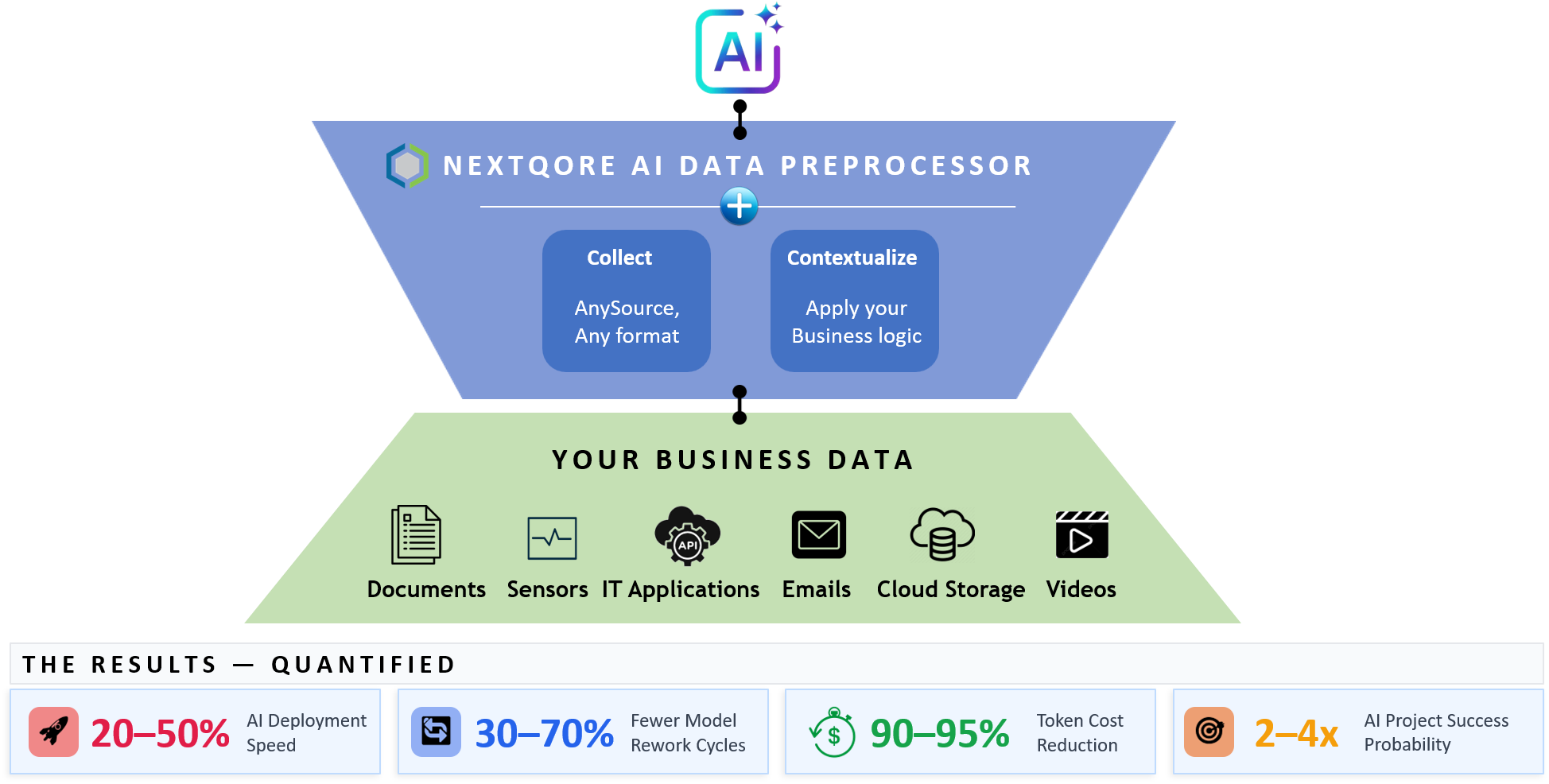 |