
OBS Studio vs. Vmaker AI
| Product | Rating | Most Used By | Product Summary | Starting Price |
|---|---|---|---|---|
 OBS Studio | Score9.2 out of 10 | N/A | OBS Studio is free and open source software for video recording and live streaming, featuring real time video/audio capturing and mixing. Users can create scenes made up of multiple sources including window captures, images, text, browser windows, webcams, and capture cards. | $0 |
 Vmaker AI | Score8.3 out of 10 | N/A | Vmaker AI is a video editing platform that helps creators, marketers, and teams transform long-form videos into short, shareable content. From podcasts and webinars to tutorials, interviews, and product videos, Vmaker AI helps users to create short-form clips, add captions, and prepare videos for platforms like YouTube Shorts, Instagram Reels, and TikTok. | $24 per month |
| OBS Studio | Vmaker AI | |||||||||||||||
|---|---|---|---|---|---|---|---|---|---|---|---|---|---|---|---|---|
| Editions & Modules | No answers on this topic |
| ||||||||||||||
| Offerings |
| |||||||||||||||
| Entry-level Setup Fee | No setup fee | No setup fee | ||||||||||||||
| Additional Details | — | Discount available for annual pricing. | ||||||||||||||
| More Pricing Information | ||||||||||||||||
| OBS Studio | Vmaker AI | |
|---|---|---|
| Considered Both Products | No answer on this topic | No answer on this topic |
| Key User Insights | ||
| Would buy again | ||
100% Would buy again 11 Answers | No answers on this topic | |
| Delivers good value for the price | ||
100% Delivers good value for the price 10 Answers | No answers on this topic | |
| Happy with the feature set | ||
100% Happy with the feature set 11 Answers | No answers on this topic | |
| Lived up to sales and marketing promises | ||
100% Lived up to sales and marketing promises 9 Answers | No answers on this topic | |
| Implementation went as expected | ||
100% Implementation went as expected 10 Answers | No answers on this topic | |
| OBS Studio | Vmaker AI | |
|---|---|---|
| Small Businesses | No answers on this topic |  iMovie Score10 out of 10 |
| Medium-sized Companies | No answers on this topic | iMovie Score10 out of 10 |
| Enterprises | No answers on this topic |  Adobe Premiere Pro Score9.2 out of 10 |
| All Alternatives | View all alternatives | View all alternatives |
| OBS Studio | Vmaker AI | |
|---|---|---|
| Likelihood to Recommend | 9.0 | 8.3 |
| Usability | 7.9 | - |
| Support Rating | 9.0 | - |
| OBS Studio | Vmaker AI | |
|---|---|---|
| Likelihood to Recommend |
|
|
| Pros |
|
|
| Cons |
|
|
| Usability |
| No answers on this topic |
| Support Rating |
| No answers on this topic |
| Alternatives Considered |
|
|
| Return on Investment |
|
|
| ScreenShots | Vmaker AI Screenshots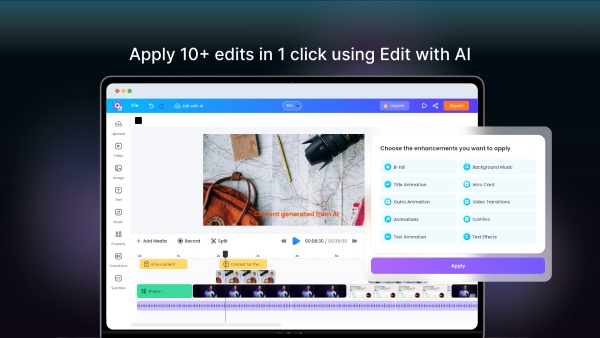    |



