OneTrust Privacy Automation vs. Rencore Code (SPCAF)

Overview
ProductRatingMost Used ByProduct SummaryStarting Price
OneTrust Privacy Automation
Score 8.2 out of 10
N/A
The OneTrust Privacy Automation solution is used to simplify compliance, improve operational efficiency, and enable risk-informed decisions.N/A
Rencore Code (SPCAF)
Score 8.8 out of 10
Enterprise companies (1,001+ employees)
Many organizations that use Office 365 are exposed to security risks that they are unaware of. As they extend SharePoint to meet their business needs, they build applications using technologies that range from end-user Microsoft Flow to developer-focused SharePoint Framework. Unfortunately, all of these custom applications are capable of circumventing the security measures organizations have in place exposing the organization and its data to security…N/A
Pricing
OneTrust Privacy AutomationRencore Code (SPCAF)
Editions & Modules
No answers on this topic
Offerings
Pricing Offerings
OneTrust Privacy AutomationRencore Code (SPCAF)
Free Trial
NoYes
Free/Freemium Version
NoNo
Premium Consulting/Integration Services
NoYes
Entry-level Setup FeeNo setup feeOptional
Additional Details
More Pricing Information
Community Pulse
OneTrust Privacy AutomationRencore Code (SPCAF)
Best Alternatives
OneTrust Privacy AutomationRencore Code (SPCAF)
Small Businesses
Egnyte
Egnyte
Score 9.4 out of 10
GitLab
GitLab
Score 8.7 out of 10
Medium-sized Companies
IBM InfoSphere Information Server
Score 8.0 out of 10
Veracode
Veracode
Score 8.7 out of 10
Enterprises
IBM InfoSphere Information Server
Score 8.0 out of 10
Veracode
Veracode
Score 8.7 out of 10
All AlternativesView all alternativesView all alternatives
User Ratings
OneTrust Privacy AutomationRencore Code (SPCAF)
Likelihood to Recommend
9.0
(7 ratings)
8.8
(11 ratings)
Availability
9.0
(1 ratings)
-
(0 ratings)
Performance
4.0
(1 ratings)
-
(0 ratings)
Support Rating
9.0
(2 ratings)
9.1
(2 ratings)
Online Training
7.0
(1 ratings)
-
(0 ratings)
Product Scalability
9.0
(1 ratings)
-
(0 ratings)
User Testimonials
OneTrust Privacy AutomationRencore Code (SPCAF)
Likelihood to Recommend
OneTrust
I strongly recommend it for general management of personal data privacy programs and risk and contract management, it complies with all major world legislation in addition to being easy and fast. Not recommended for data discovery still requires refinement.
Read full review
Rencore
For Microsoft shops that are doing custom development on the Microsoft cloud platform in Office 365 and Azure, the Rencore toolset is an absolute must, especially if you are involved in converting farm solutions to cloud, or just moving into cloud development for the first time.
Read full review
Pros
OneTrust
  • Reputable website scanner, which verify and screen the traffic.
  • The data mapping from OneTrust is another merit, very articulate.
  • OneTrust offers the required assessment automation, very outstanding.
  • Finally, OneTrust has the breach scan, and incident response.
Read full review
Rencore
  • Unique expert knowledge of their target platforms. Not many companies have such a unique position in their target market. Their employees have a deep understanding of SharePoint, Office 365 and Azure and also regularly advise Microsoft on these matters.
  • Community involvement and contribution to open source projects. Key employees at Rencore are considered thought leaders in their area of expertise and contribute to high profile Microsoft open source initiatives.
  • Rencore's unique position when it comes to code quality analysis in the SharePoint space sets it apart. There's really no alternative.
  • Platform governance is another Rencore strength. No other product provides the insights into your SharePoint Online environment with full auditing of not only configuration changes but also who changed which code where and when. Again no alternatives exist.
Read full review
Cons
OneTrust
  • There are irritating inconsistencies in the user interface between the various modules
  • Reporting capabilities are limited
  • The platform does not reveal its secrets easily. You will be rewarded if you can allocate a team member to specialize on the platform.
Read full review
Rencore
  • Rencore's product line is of course still a bit of a niche: SharePoint code quality is not something every organization on the planet is concerned with - although Rencore does much more than that.
  • We feel Rencore's marketing efforts are mainly targeted at technologists. There's a lot of other potential, especially for their platform governance product.
Read full review
Reliability and Availability
OneTrust
We have used a shared hosted tenant managed by OneTrust for over three years with only one instance of a lengthy (4+ hours) unexpected outage which happened years ago.
Read full review
Rencore
No answers on this topic
Performance
OneTrust
We selected a European hosting location based on our initial use case, however, our usage of the OneTrust platform has expanded globally to where the majority of users sit in the Americas or Asia-Pacific regions. There is a noticeable lag when navigating the platform for users located far away from the hosting location.
As a user, you can mitigate any sluggish response time by the aggressive use of multiple browser tabs. I commonly have one tab open on an Inventory detail screen, another tab on an Assessment window, and maybe another tab on a customized inventory list screen. If one tab is slow I hop to another tab and work on that tab while the first tab responds.
Read full review
Rencore
No answers on this topic
Support Rating
OneTrust
Both our customer rights access and cookie consent advisors were responsive and helpful in getting us trained on using the platform and the various assets implemented on our website. We had multiple training sessions that were more than enough in getting all of the users on our team familiar with what we needed to do.
Read full review
Rencore
Rencore support is unbeatable
Read full review
Online Training
OneTrust
An implementation specialist worked with us remotely during our initial deployment. Due to the diverse geographic locations of my organization's participants, the implementation and training had to be done remotely (this was before COVID-driven remote work).
The implementation specialist was knowledgeable and helpful but to really get full benefit from the platform I encourage organizations to dedicate a specialist within your company to really study and learn the platform.
Read full review
Rencore
No answers on this topic
Alternatives Considered
OneTrust
First, when we compare OneTrust Privacy and Data Governance Cloud to the software I mentioned above, OneTrust Privacy and Data Governance Cloud software was way more affordable than the other 2. Also, along with the other 2 software, OnTrust was one of the most user friendly tool/software we've ever used.
Read full review
Rencore
I don't know of any products that compete in the space and if there were any, they would not stand a chance against Rencore. Behind any good product is a team of highly skilled individuals, who all have the same goal, who are passionate what they do and lastly, are in it for the betterment of where they started; As Developers themselves. You can't buy that
Read full review
Scalability
OneTrust
The platform has exceptional capabilities to customize the user interface, reports, and recorded information. In most cases, the customization can be compartmentalized so that if the customization performed for Department A is determined to not impact Department B, the customization can be hidden from Department B.
We have four different departments using the IT Risk Management module. Three departments share their work in what we call the 'shared data risk management zone'. Another department is using IT Risk Management for a bespoke portfolio risk management task, and the customization for this department is largely hidden from the other departments.
Read full review
Rencore
No answers on this topic
Return on Investment
OneTrust
  • Populates metadata into a centralized and easily searchable data catalog.
  • Ensures data regulatory requirements are understood.
  • Orchestrates data governance activities.
  • Monitors and flag violations across our data ecosystem.
Read full review
Rencore
  • The clear impact was the amount of time saved code reviewing or going through lines of code marked off by other tools that are not relevant. We cannot put a number on it since the project started off with the tool in place but based on the rules applied it could be as high as 20% of the project time.
Read full review
ScreenShots

Rencore Code (SPCAF) Screenshots

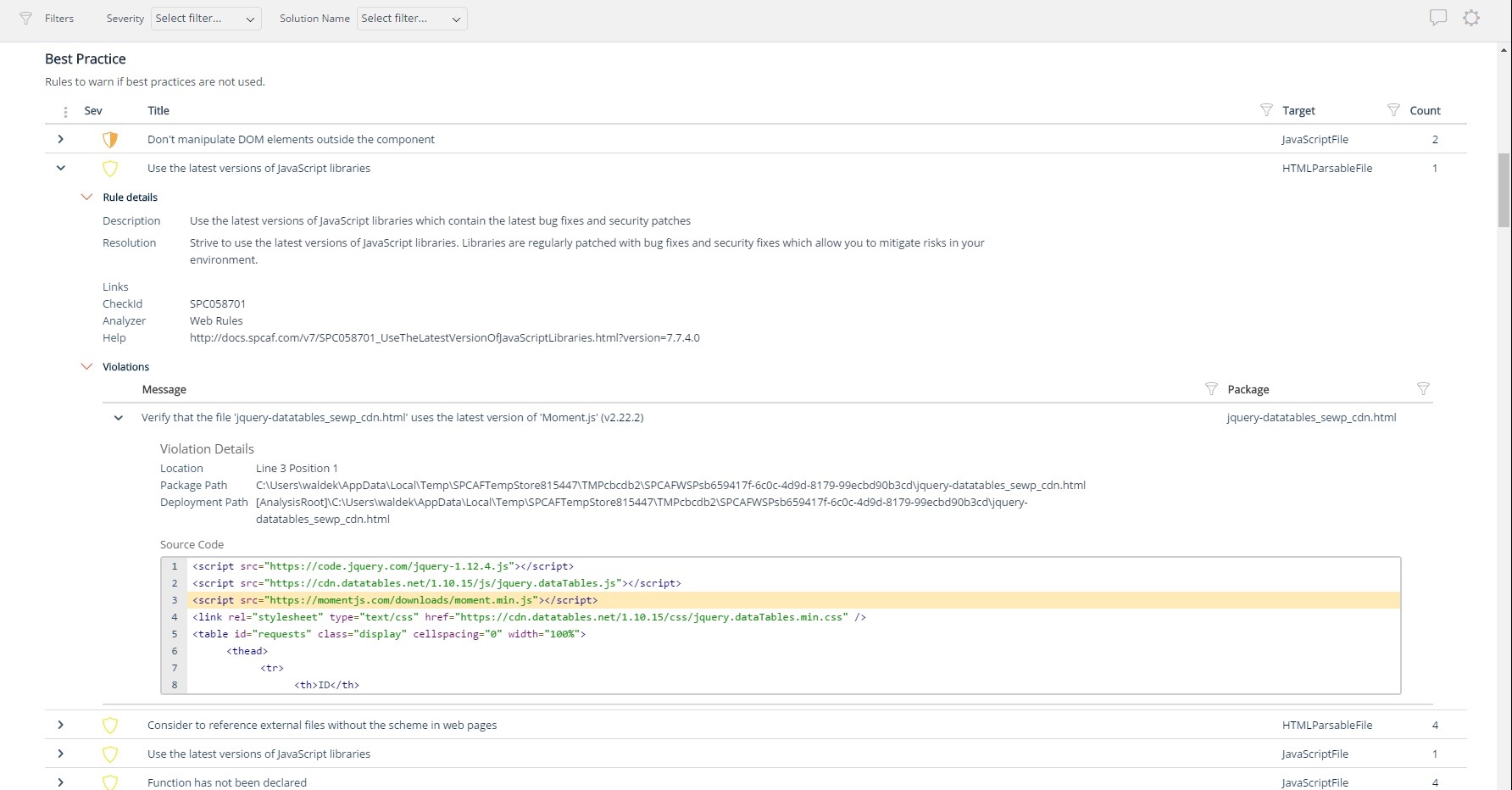
Screenshot of Using third party libraries allows you to build your SharePoint and Office 365 applications faster and focus on functionality specific for your organization. But regularly, security vulnerabilities are discovered in these external dependencies. If left unpatched, they become a security risk for your organization and its data. Rencore automatically warns you when any of the third-party libraries used in your applications has known vulnerabilities that could be exploited to hack your environment.Screenshot of Third-party libraries are regularly updated to improve performance and stability. Many organizations however don’t know when a new version of the library they use in their SharePoint and Office 365 applications is released and they keep using the old versions which exposes them not only to bugs but also to security risks. Rencore automatically warns you when a new version of a library that you use is available allowing you to verify the contents and the impact of the upgrade.Screenshot of Without proper tooling, it’s impossible to successfully enforce an application governance plan in SharePoint and Office 365. The number of ways in which users could possibly extend SharePoint combined with the thousands of pages and hundreds of settings that can be configured, make it impossible to continuously monitor for alignment with the organizational policies. 

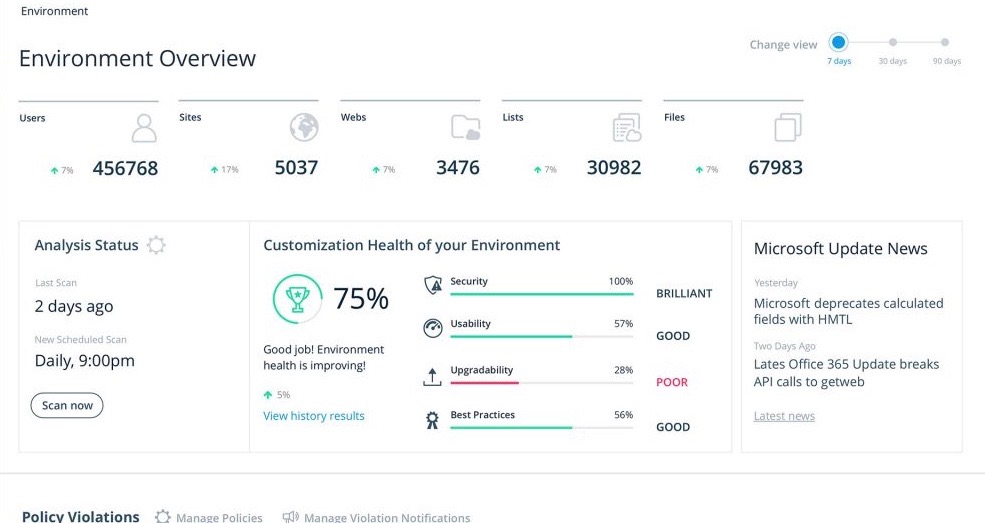
Rencore helps you understand the configuration of your tenant as well as discover the different SharePoint and Office 365 applications used in your organization. With Rencore you will easily understand how these applications are built, which dependencies they have and which possible risks they expose your organization to.Screenshot of Your organization tailors SharePoint and Office 365 to its specific needs to get more value of its investment in the platform. But each organization has different needs and is subject to different laws and regulations. 

Rencore allows you to configure what policies you want to enforce in your tenant. Each violation gets reported so that you can take corrective action and successfully enforce your organization’s application governance plan.Screenshot of As you start discovering issues in your SharePoint and Office 365 environment, you will be taking corrective actions to mitigate the risks. Rencore helps you track these issues and the related tasks so that you can easily follow up on the status of each issue and control that your organization is improving over time.Screenshot of It’s not enough to have your SharePoint and Office 365 applications verified for compliancy with your organization’s policies before using them in production. As your applications evolve, they will require changes and each change exposes you to a number of risks. Rencore helps you track how your applications change over time, even if these applications don’t follow centralized deployment and are managed by power-users. Each change is assessed for potential risks that it could expose your organization to.