TrustRadius: an HG Insights company

Save this comparison

Save this comparison

Add Product

Recommended Comparisons

    Overview
    ProductRatingMost Used ByProduct SummaryStarting Price

    PDF Sign&Seal

    Score8.2 out of 10
    N/APDF Sign&Seal is a desktop application that is designed to make it easy to apply PDF digital signatures, time-stamps and strong PDF security to business documents. The vendor says it has been carefully designed for busy managers that have ease of use as a priority. The vendor’s value proposition is that by using PDF Sign&Seal anyone can easily create, sign or protect business documents. The vendor says the PDF Sign&Seal application makes PDF signing simple, efficient and easy to…N/A

    RSign

    Score9 out of 10
    N/ARSign, from RPost headquartered in Los Angeles, is presented as an E-Signature solution that the vendor describes as simple but feature-rich, elegantly easy, and affordable.

    $7

    per month per user

    Pricing
    PDF Sign&SealRSign
    Editions & Modules
    No answers on this topic
    RSign Personal
    $7.00
    per month per user
    RSign Standard
    $15.00
    per month per user
    Offerings
    Pricing Offerings
    PDF Sign&SealRSign
    Free Trial
    YesYes
    Free/Freemium Version
    YesNo
    Premium Consulting/Integration Services
    YesYes
    Entry-level Setup Fee$95 per userNo setup fee
    Additional DetailsPDF Sign&Seal is registered on a per user basis with a node-locked license. We offer discounts for volume purchases of 5 or more seats.Contact Sales for API & Custom Integrations.
    More Pricing Information
    Community Pulse
    PDF Sign&SealRSign
    Considered Both Products
    Ascertia
    No answer on this topic
    RPost
    No answer on this topic
    Key User Insights
    Would buy again
    No answers on this topic
    100%
    Would buy again
    7 Answers
    Delivers good value for the price
    No answers on this topic
    100%
    Delivers good value for the price
    7 Answers
    Happy with the feature set
    No answers on this topic
    100%
    Happy with the feature set
    7 Answers
    Lived up to sales and marketing promises
    No answers on this topic
    100%
    Lived up to sales and marketing promises
    7 Answers
    Implementation went as expected
    No answers on this topic
    100%
    Implementation went as expected
    7 Answers
    Best Alternatives
    PDF Sign&SealRSign
    Small Businesses
    BoldSign, by Syncfusion
    Score10 out of 10
    BoldSign, by Syncfusion
    Score10 out of 10
    Medium-sized Companies
    OneSpan Sign
    Score9.6 out of 10
    OneSpan Sign
    Score9.6 out of 10
    Enterprises
    DocuSign
    Score8.7 out of 10
    DocuSign
    Score8.7 out of 10
    All AlternativesView all alternativesView all alternatives
    User Ratings
    PDF Sign&SealRSign
    Likelihood to Recommend
    8.0
    (1 ratings)
    10.0
    (7 ratings)
    User Testimonials
    PDF Sign&SealRSign
    Likelihood to Recommend
    Ascertia
    PDF Sign&Seal is perfect if you have documents that need to be signed electronically. It may not be an excellent choice if you work off a mobile device or are on the road a majority of the time as there are better app alternatives that do a similar job signing docs electronically for you.
    Incentivized
    Read full review
    RPost
    RSign is really useful in organizations where many different kinds of forms and applications for signature have to be sent to customers. In the industry where signature time stamp is important.
    Incentivized
    Read full review
    Pros
    Ascertia
    • Easy to use
    • Very intuitive interface
    • Signature looks real and authentic
    Incentivized
    Read full review
    RPost
    • Making documents that we require use as templates and reuse them with rules.
    • Streamlined the process of esigning when multiple people are involved.
    • Pre-fill, back-fill removed manual work & human error
    Read full review
    Cons
    Ascertia
    • I'd like to see a stronger mobile interface or app
    • Collaboration type of sharing would be welcome
    • Integration with a Wacom bamboo type of tablet for signing
    Incentivized
    Read full review
    RPost
    • The most useful feature would be if we were able to type within the forms/applications that we upload to RSign to be sent for signature.
    Incentivized
    Read full review
    Alternatives Considered
    Ascertia
    PDF Sign&Seal is very intuitive and does not have a crazy high learning curve. Even a high-level exec who isn't computer savvy can use it without much difficulty. This is why we chose this software ultimately to help expedite getting signatures needed for vendor contracts passed through the right hands in quicker.
    Incentivized
    Read full review
    RPost
    Honestly I thought DocuSign would have more advantages because I usually think "Most expensive" equals "The best", but DocuSign was very hard to adopt for my business, the interface was packed and messy, full of stuff that not intuitive to learn. And I couldn't get ANY support at all. So we ended up looking for another software and my colleagues recommended RSign. I didn't personally try any other softwares, but my colleagues switched from HelloSign and from PandaDoc to RSign because of similar reasons.
    Read full review
    Return on Investment
    Ascertia
    • Saved time reducing extra work, scanning, and emailing
    • Reduces time needed to get signatures from other parties
    • Cost of software was recuperated in a short amount of time
    Incentivized
    Read full review
    RPost
    • RSign has had tremendous ROI for us. We don't have to print the forms to be sent to customer for signature.
    • Huge time savings
    • No paper printing. Very environment friendly application
    Incentivized
    Read full review
    ScreenShots

    PDF Sign&Seal Screenshots

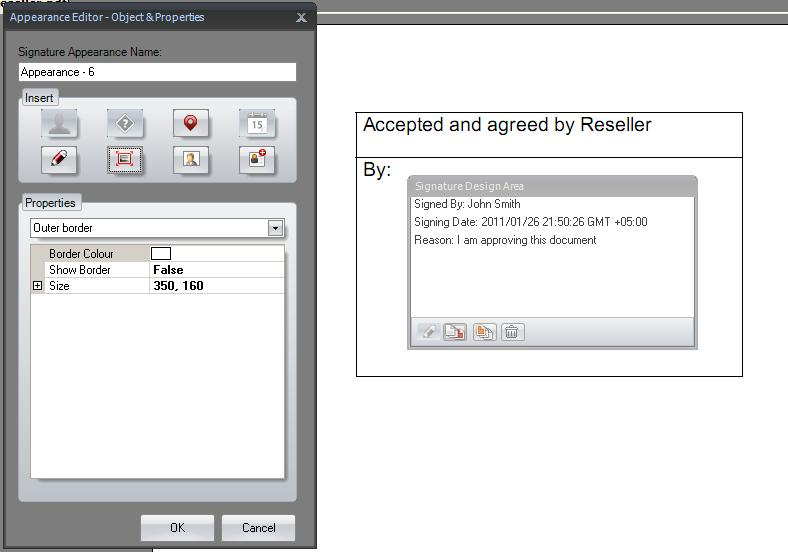
    Screenshot of Signature PaneScreenshot of Digitally Sign Multiple Signature FieldsScreenshot of Designing Signature AppearancesScreenshot of Language ConfigurationsScreenshot of Shell-Integrated

    RSign Screenshots

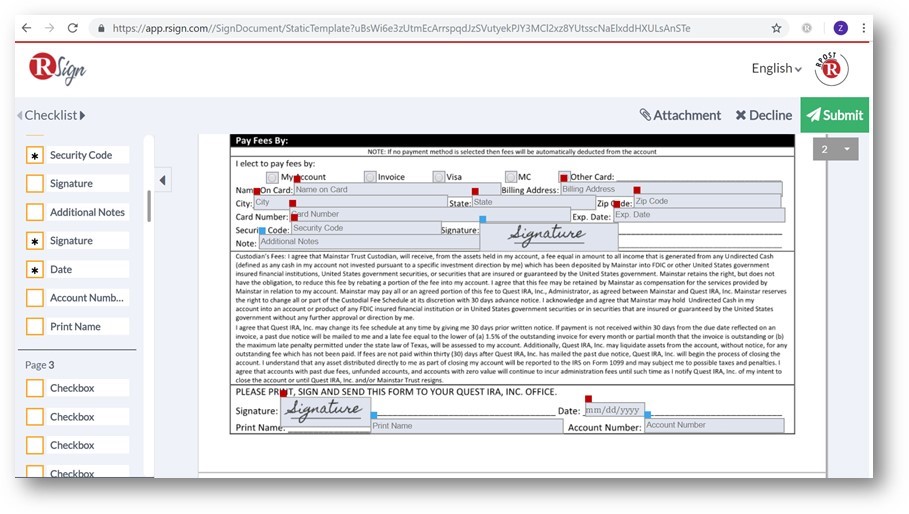
    Screenshot of RSign EnvelopeScreenshot of RSign eSignatures requestScreenshot of RSign eSignatures PrepareScreenshot of RSign Prepare & SendScreenshot of RSign Sending SettingsScreenshot of RSign Sign Document