Planview AgilePlace vs. Worksection

Overview
ProductRatingMost Used ByProduct SummaryStarting Price
Planview AgilePlace
Score 9.1 out of 10
N/A
AgilePlace is a project management solution built around flexibility, data-driven analytics, and workflow automation. The software was acquired by Planview in December 2017 to expand that company's capabilities.
$19
per user, per month
Worksection
Score 10.0 out of 10
N/A
Worksection is a project management solution with capabilities such as team organization, calendar, and Gantt chart control.
$199
per month per user
Pricing
Planview AgilePlaceWorksection
Editions & Modules
Teams
$19
per user, per month
Scaled Teams
$29
per user, per month
Custom
Contact Sales for Quote
per user, per month
Free
$0
Basic
$49
per month
Business
$99
per month
Premium
$199
per month
Offerings
Pricing Offerings
Planview AgilePlaceWorksection
Free Trial
YesNo
Free/Freemium Version
NoYes
Premium Consulting/Integration Services
NoNo
Entry-level Setup FeeNo setup feeNo setup fee
Additional DetailsAll editions include unlimited boards.
More Pricing Information
Community Pulse
Planview AgilePlaceWorksection
Features
Planview AgilePlaceWorksection
Project Management
Comparison of Project Management features of Product A and Product B
Planview AgilePlace
7.4
25 Ratings
1% below category average
Worksection
7.7
1 Ratings
0% below category average
Task Management10.025 Ratings7.01 Ratings
Resource Management9.921 Ratings6.01 Ratings
Gantt Charts10.014 Ratings8.01 Ratings
Scheduling9.919 Ratings9.01 Ratings
Support for Agile Methodology9.120 Ratings00 Ratings
Support for Waterfall Methodology4.014 Ratings8.01 Ratings
Document Management6.57 Ratings8.01 Ratings
Email integration7.419 Ratings00 Ratings
Mobile Access2.114 Ratings8.01 Ratings
Timesheet Tracking6.44 Ratings8.01 Ratings
Change request and Case Management7.19 Ratings8.01 Ratings
Visual planning tools7.39 Ratings00 Ratings
Workflow Automation00 Ratings8.01 Ratings
Team Collaboration00 Ratings7.01 Ratings
Budget and Expense Management00 Ratings7.01 Ratings
Agile Development
Comparison of Agile Development features of Product A and Product B
Planview AgilePlace
8.8
8 Ratings
10% above category average
Worksection
-
Ratings
DevOps Tool Integrations8.05 Ratings00 Ratings
Dependencies and Blockers9.58 Ratings00 Ratings
Professional Services Automation
Comparison of Professional Services Automation features of Product A and Product B
Planview AgilePlace
-
Ratings
Worksection
7.3
1 Ratings
6% below category average
Quotes/estimates00 Ratings8.01 Ratings
Invoicing00 Ratings7.01 Ratings
Project & financial reporting00 Ratings7.01 Ratings
Best Alternatives
Planview AgilePlaceWorksection
Small Businesses
GitLab
GitLab
Score 8.6 out of 10
Stackby
Stackby
Score 9.0 out of 10
Medium-sized Companies
GitLab
GitLab
Score 8.6 out of 10
InEight
InEight
Score 9.5 out of 10
Enterprises
GitLab
GitLab
Score 8.6 out of 10
InEight
InEight
Score 9.5 out of 10
All AlternativesView all alternativesView all alternatives
User Ratings
Planview AgilePlaceWorksection
Likelihood to Recommend
10.0
(31 ratings)
6.0
(1 ratings)
Likelihood to Renew
8.6
(5 ratings)
-
(0 ratings)
Usability
8.2
(5 ratings)
-
(0 ratings)
Availability
8.3
(2 ratings)
-
(0 ratings)
Performance
8.0
(2 ratings)
-
(0 ratings)
Support Rating
10.0
(2 ratings)
-
(0 ratings)
Implementation Rating
7.7
(3 ratings)
-
(0 ratings)
Configurability
7.0
(2 ratings)
-
(0 ratings)
Ease of integration
8.0
(1 ratings)
-
(0 ratings)
Product Scalability
8.0
(2 ratings)
-
(0 ratings)
Vendor post-sale
9.3
(2 ratings)
-
(0 ratings)
Vendor pre-sale
9.3
(2 ratings)
-
(0 ratings)
User Testimonials
Planview AgilePlaceWorksection
Likelihood to Recommend
Planview
This tool enables the visual management needed in many offshore teams to easily and quickly see the pending work, work in progress and completed work.For teams that work with a waterfall methodology and do not have AGILE internalized, I believe there are other solutions from Planview or other providers.
Read full review
Worksection
I can prescribe Worksection for computerized offices, for organizations that consider the season of their representatives and who pitch time to their clients
Read full review
Pros
Planview
  • Visual kanban board that is easy to customize as the team's needs change
  • Real time collaboration allowing teams working remotely to stay up to date on current status
  • Allows versatility for how a team needs to capture details on the work at hand by utilizing card icons, card types and custom data points
  • Card scoring is easy to setup and provides the team the ability to set values to better prioritize their backlog
  • Ability to add card automation to take out some of the repetitive manual actions
Read full review
Worksection
  • I like adaptable assignments and subtasks, extended security for errands and remarks (since we are working with our customers inside Worksection) and inherent clock with hourly rates.
  • Worksection encourages us to break down complex undertaking into assignments and subtasks, set due dates and control time spent.
  • We additionally share reports from Worksection to our customers, it encourages us to assemble straightforward relations with our customers. What's more, we figure pay for our representative in view of these reports.
Read full review
Cons
Planview
  • Ability to add more than 1 visual cue to the card. We use custom icons and sometimes more than 1 is appropriate but you have to choose which is most important since only 1 can be applied.
  • Better visibility to board access from the user administration screens. Currently have to run 1-2 reports to see this information. Would like to be able to click on a user within Configure Users and see what boards they have access to quickly.
Read full review
Worksection
  • Issues with composing editorial - must reload page to write
  • Old style design
  • Unfortunately there is no work area customer, it would be exceptionally valuable. Continually fixing to the Internet, extremely awkward when it isn't. I have this happens all the time. I'm sitting tight for new forms and I trust that I won't be disillusioned.
Read full review
Likelihood to Renew
Planview
we are happy with the tool and the service and continuos improvement of the tool so there is no need yet to change to another one.
Read full review
Worksection
No answers on this topic
Usability
Planview
LeanKit isn't the best designed Kanban system I've seen, but overall it's pretty usable. The boards I've used are pretty complex, so it can be difficult to find things. I found that searching and filtering for specific cards was somewhat of a challenge. Dragging a card from one lane to another is kind of a fun way to get things done though.
Read full review
Worksection
No answers on this topic
Reliability and Availability
Planview
Not experienced any outage
Read full review
Worksection
No answers on this topic
Performance
Planview
Larger boards take longer to load
Read full review
Worksection
No answers on this topic
Support Rating
Planview
Every time I have reached out to the AgilePlace support team I have received a timely response in addition to professional & personal feedback. Their consultants are knowledgeable and the management team is happy to jump in and help when needed.
Read full review
Worksection
No answers on this topic
Implementation Rating
Planview
Very easy.
Read full review
Worksection
No answers on this topic
Alternatives Considered
Planview
Originally, we had evaluated two other tools next to Planview LeanKit: Kanbantool and Kanbanflow. The latter was a close contestant for productive use, as it was also very customizable and a joy to work with and look at. It also had lower user fees and a mobile integration. In the end, we picked Planview LeanKit because of several reasons: Aesthetics: The look was much more clean and professional. Reporting: It was obvious from the start that we could use Planview LeanKit as a tool for improvement. API: We needed to integrate the Kanban into our central systems and Planview LeanKit API was (and still is) a way to do it. Card Headers: This sounds like a simple thing, but the headers above the titles fit our work perfectly and looked perfect, which helped the decision.
Read full review
Worksection
I like flexible tasks and subtasks, expanded privacy for tasks & comments (because we are working with our clients inside Worksection) and built-in timer with hourly rates. Worksection helps us to decompose complex project into tasks and subtasks, set deadlines and control time spent.
Read full review
Scalability
Planview
Good use cases for small/large teams
Read full review
Worksection
No answers on this topic
Return on Investment
Planview
  • LeanKit has made it easier for new employees to understand other employees' roles in the company by seeing their workload.
  • It makes it clear who is responsible for what project so that there is more accountability at our company.
  • It helps our project manager schedule new projects in a way that we all can see.
Read full review
Worksection
  • With this application, we have essentially enhanced the nature of our work, because everything is organized and reasonable. It is exceptionally advantageous that we can interface the customer to Worksection, which streamlines activities.
  • Incredible cost. The greatest arrangement of 250 GB and a boundless number of "ventures", "organizations" and "individuals" on the record, makes this program the most beneficial - now it is $120 every month, considering the markdown when paying yearly. This is finished opportunity and trustworthiness - lead somewhere around 10 distinct organizations and 1000 individuals.
Read full review
ScreenShots

Planview AgilePlace Screenshots

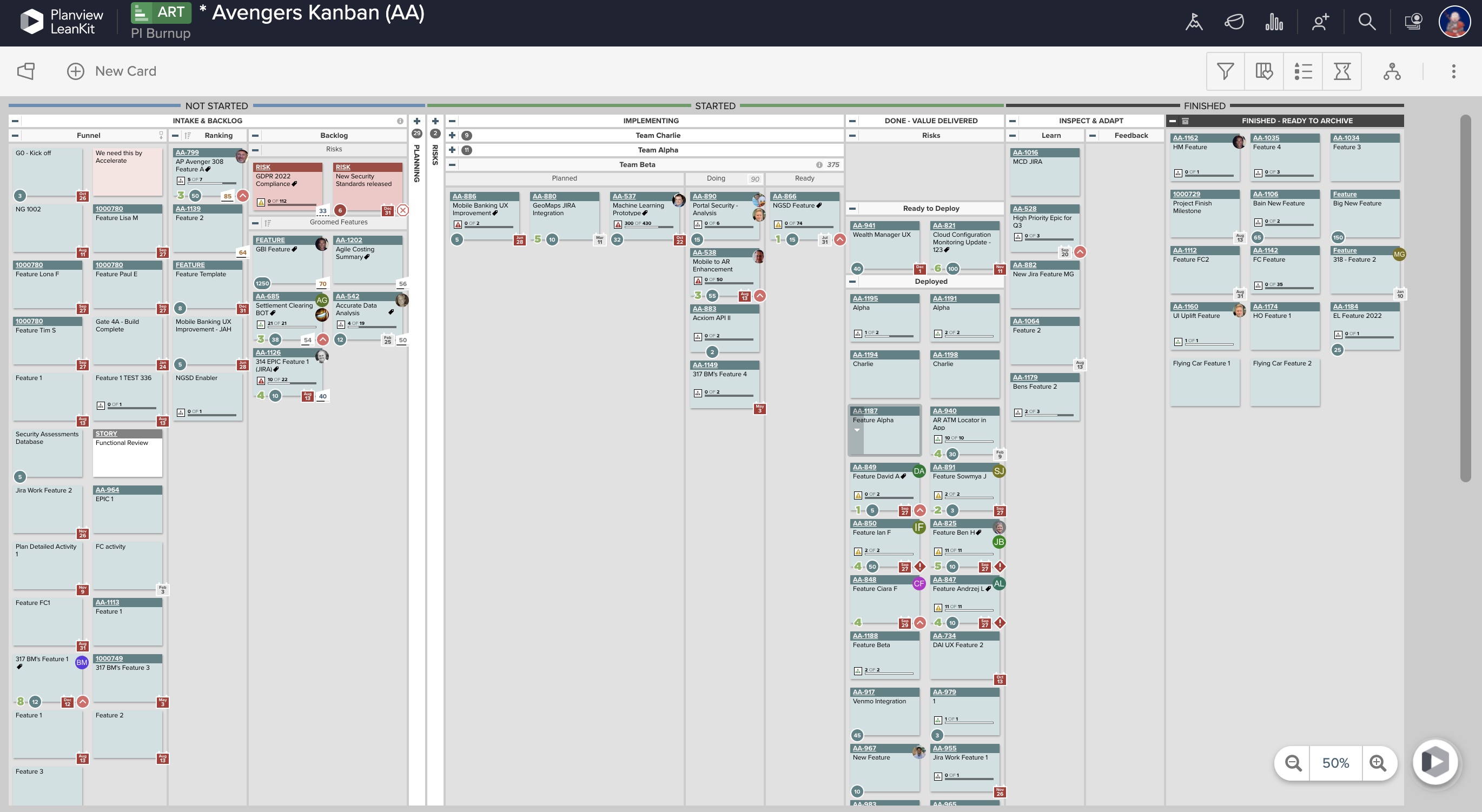
Screenshot of Real-Time Analytics: Utilize board health metrics involving bottlenecks, WIP, and throughput to guide the optimization of workflows, improve velocity, and better prioritize efforts for more predictable delivery. Lean and Agile metrics can be used to assess team performance and promote continuous improvement.Screenshot of PI Planning: Offers enterprise Kanban boards to visualize the work of teams regardless of the methodologies they apply or workflows they follow, and insights into progress and create opportunities for better alignment.Screenshot of Dependency Visualization and Management: Surfaces risks to plans resulting from cross-team dependency conflicts, blockers, and capacity constraints, and helps drive proactive measures to enable teams to deliver on time.Screenshot of Team Planning and Coordination: Boards can be used to breakdown work, build and manage plans, and execute against strategy to deliver more value to customers, faster.