TrustRadius: an HG Insights company

Save this comparison

Save this comparison

Add Product

Recommended Comparisons

    Overview
    ProductRatingMost Used ByProduct SummaryStarting Price

    Prism PPM

    Score9.1 out of 10
    Mid-Size Companies (51-1,000 employees)
    Prism PPM (formerly WorkOtter) is a Project Portfolio Management platform for IT PMOs, enterprise project management offices, and transformation offices. The software manages work from idea intake through planning, execution, lessons learned, and project closeout; it groups projects into programs and portfolios for prioritization and scenario planning. Key Capabilities Project delivery: Project Management capabilities include Gantt,…

    $240

    per year per user

    Xmind

    Score8.8 out of 10
    N/AHong Kong based Xmind offers their diagramming tool featuring a range of templates, alternate brainstorming and presentation modes, a clip art library, and export to a wide variety of file types (e.g. PDF, JPG, Word or Excel, etc.).

    $5.99

    per month

    Pricing
    Prism PPMXmind
    Editions & Modules
    Standard
    $240
    per year per user
    Business
    $360
    per year per user
    Enterprise
    Contact Sales
    No answers on this topic
    Offerings
    Pricing Offerings
    Prism PPMXmind
    Free Trial
    NoYes
    Free/Freemium Version
    NoYes
    Premium Consulting/Integration Services
    YesNo
    Entry-level Setup FeeRequiredNo setup fee
    Additional Details——
    More Pricing Information
    Features
    Prism PPMXmind
    Mind Mapping
    Comparison of Mind Mapping features of Prism PPM and Xmind
    Feature
    Prism PPM
    -
    Ratings
    Xmind
    7.5
    2 Ratings
    0% above category average
    Cross-Platform Compatibility00 Ratings7.52 Ratings
    Customizable Templates00 Ratings8.02 Ratings
    Import and Export Options00 Ratings9.72 Ratings
    Real-time Collaboration Tools00 Ratings8.72 Ratings
    Drag-and-Drop Capabilities00 Ratings9.22 Ratings
    Notes and Attachments00 Ratings7.72 Ratings
    Color and Style Customization00 Ratings5.82 Ratings
    Presentation Mode00 Ratings7.52 Ratings
    Integration with Task Management00 Ratings6.72 Ratings
    Mind Map Revision History00 Ratings4.01 Ratings
    Best Alternatives
    Prism PPMXmind
    Small Businesses
    No answers on this topic
    MindManager
    Score7.8 out of 10
    Medium-sized Companies
    Microsoft Project Server
    Score5.1 out of 10
    MindManager
    Score7.8 out of 10
    Enterprises
    Planview PPM Pro
    Score8.9 out of 10
    MindManager
    Score7.8 out of 10
    All AlternativesView all alternativesView all alternatives
    User Ratings
    Prism PPMXmind
    Likelihood to Recommend
    10.0
    (2 ratings)
    8.2
    (4 ratings)
    Usability
    -
    (0 ratings)
    10.0
    (1 ratings)
    Support Rating
    -
    (0 ratings)
    5.0
    (1 ratings)
    User Testimonials
    Prism PPMXmind
    Likelihood to Recommend
    Prism PPM
    I know it works well for IT but not sure how it would work for construction. I think construction has a different set of needs.
    Read full review
    Xmind
    Definitely well suited to generate our total client profiles clearly presenting and displaying insights into particular clients.
    Incentivized
    Read full review
    Pros
    Prism PPM
    • Users find it easy to use which is important if you have a large number of users who don't have time for a lot of training or when new hires come on-board.
    • WorkOtter has a lot of advanced features that we don't use but when we do need one, it is nice to know the feature is waiting for us. We have used several of these features for special projects.
    • It does a good job with resource management.
    Read full review
    Xmind
    • Hierarchical breakdown of information.
    • Visually pleasing diagrams.
    • Fast and responsive UI.
    • Generating Markdown (.md) files for the mindmaps.
    Incentivized
    Read full review
    Cons
    Prism PPM
    • Nothing significant. Maybe could be faster at times but I'm not sure if that is our own internet connection.
    Read full review
    Xmind
    • A few steps are needed to mark a label for each customized branch.
    • Branch customization, such as line width and style, could be improved.
    • Customization, such as a different shape of nodes, would be good.
    Incentivized
    Read full review
    Usability
    Prism PPM
    No answers on this topic
    Xmind
    Commands and controls extremely easy to navigate and use. Ability to import mindmaps and collaborate also contribute to a very pleasant usability experience
    Incentivized
    Read full review
    Support Rating
    Prism PPM
    No answers on this topic
    Xmind
    The support around a bug in the tool which prevented the correct printing of diagrams. Support came back after a few days, and there was no workaround. Eventually, the bug was fixed in a future release. The company does not pay much attention to user forums. With better support and plugin mechanism for user contributions, the product would be more convincing.
    Incentivized
    Read full review
    Alternatives Considered
    Prism PPM
    No answers on this topic
    Xmind
    This is the first tool of its kind that I have used, however it's simple UI and low learning curve make it very beginner friendly
    Incentivized
    Read full review
    Return on Investment
    Prism PPM
    • I think it has really helped us make sure we are using resources effectively but I think it is hard to prove. Although we don't have hard ROI numbers, I believe the general feeling is that you really need a good PPM tool or will waste a lot of time and money.
    • It helps with communication since we have a standard process.
    Read full review
    Xmind
    • Increased productivity of employees.
    • Provided structure and clear thought processes.
    • Reusable content.
    Incentivized
    Read full review
    ScreenShots

    Prism PPM Screenshots

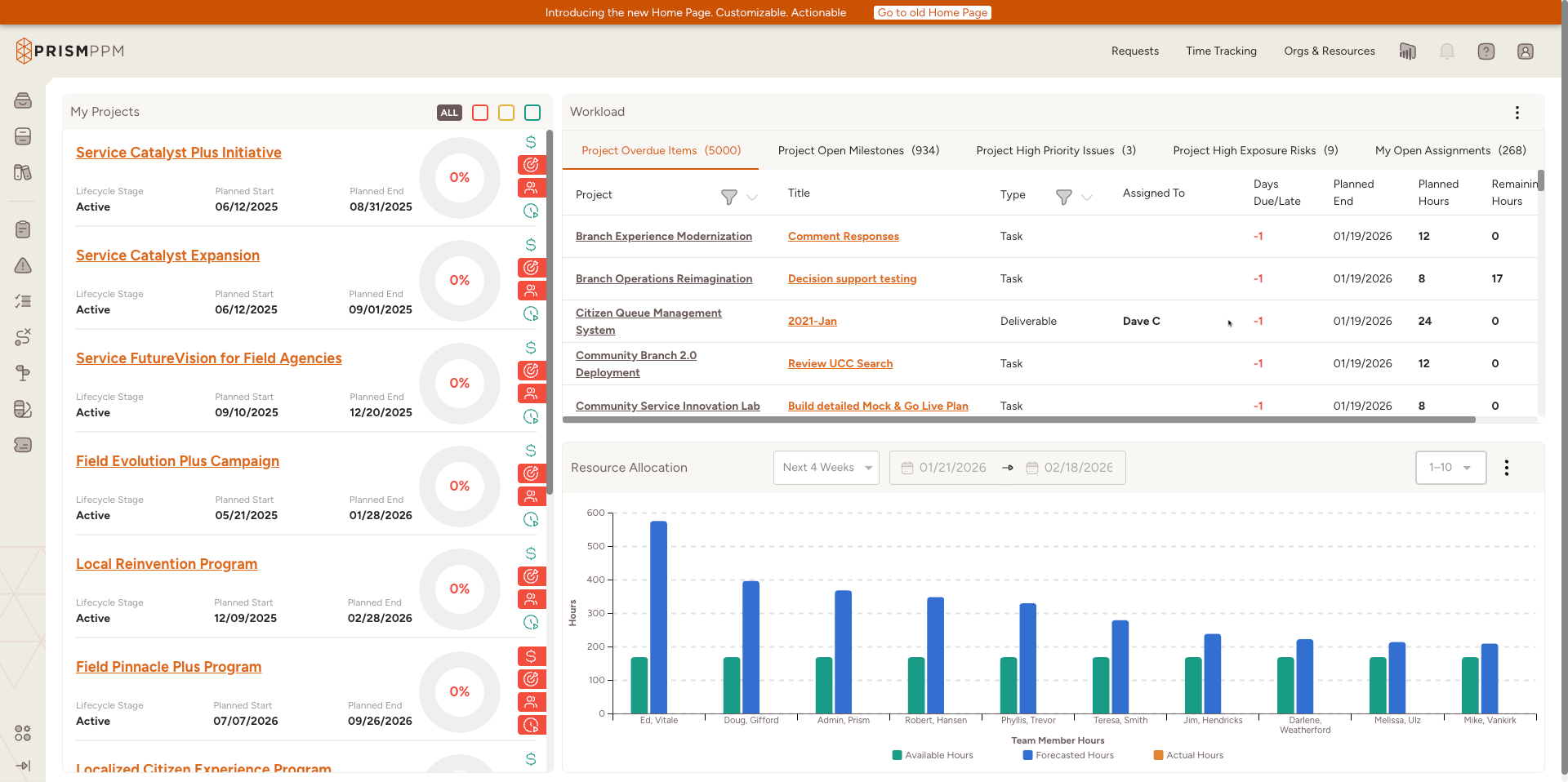
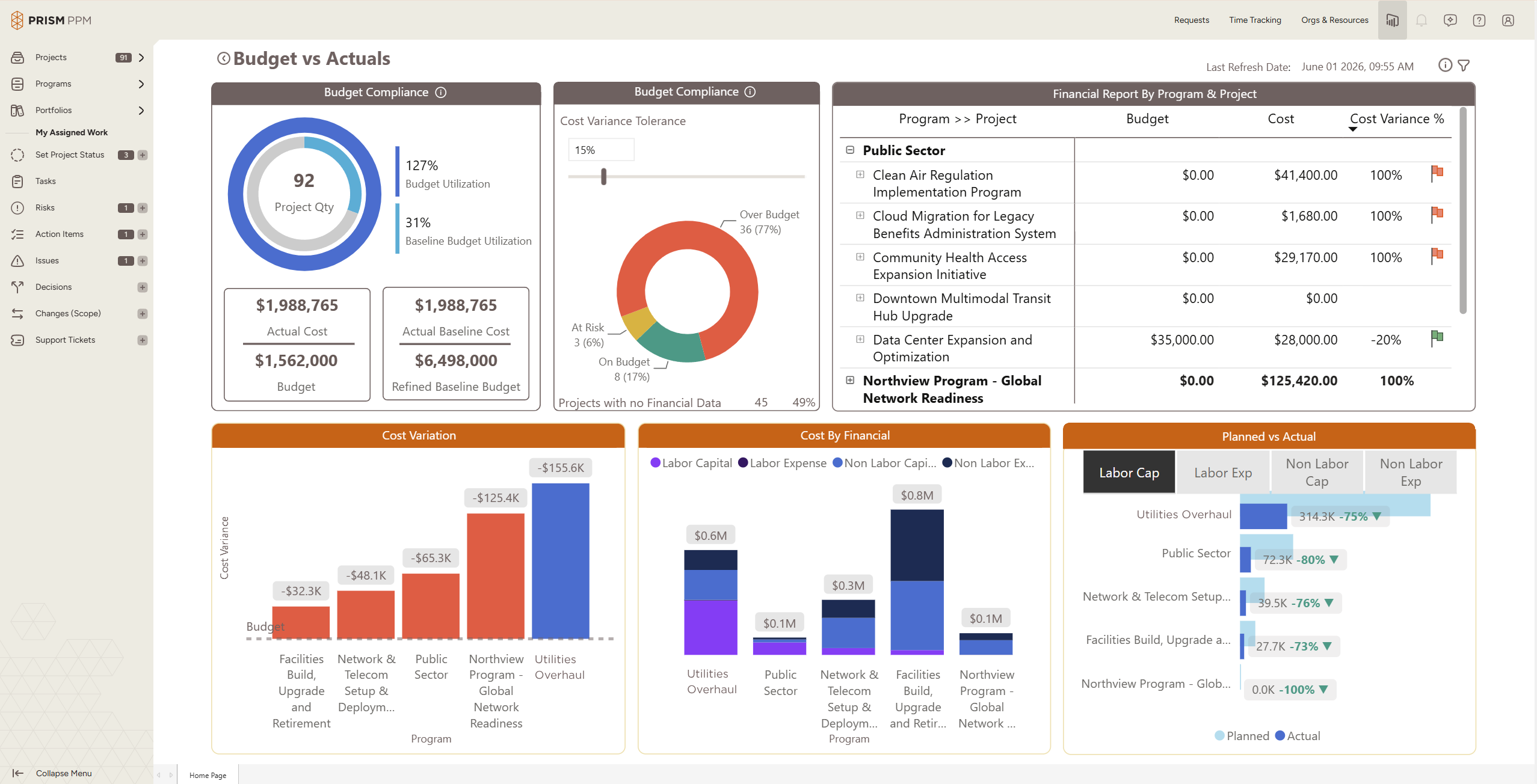
    Screenshot of Role-based My Home page shows active projects, status and health scoresScreenshot of Program health dashboard with the ability to drill into individual projects and detailsScreenshot of Data hygiene dashboard identifies missing or stale data, ensuring reporting is accurate and completeScreenshot of Track actual and forecast resource utilization to understand capacity and contraintsScreenshot of Understand budget implications and get ahead of overages at a project, program or whole portfolio levelScreenshot of Use AI Chat to quickly create projects, populate risk registries, and determine initial staffing needs