TrustRadius: an HG Insights company

Projectworks vs. Workday Professional Services Automation

Save this comparison

Save this comparison

Add Product

Recommended Comparisons

    Overview
    ProductRatingMost Used ByProduct SummaryStarting Price

    Projectworks

    Score9 out of 10
    N/AProjectworks is Professional Services Automation (PSA) software suite designed for consulting and professional services organizations. The platform consolidates resource scheduling, time tracking, expense management, project accounting, and financial forecasting to streamline the service delivery lifecycle. Key Capabilities Resource Management: Provides real-time visibility into staff Availability, Resource Utilization, and Capacity Planning to coordinate project…

    $190

    per month for 10 users (minimum)

    Workday Professional Services Automation

    Score8.2 out of 10
    N/AWorkday Professional Services Automation automates the Opportunity to Cash process, connecting HCM and ERP data to match the right talent to projects, reducing manual errors and revenue leakage.N/A
    Pricing
    ProjectworksWorkday Professional Services Automation
    Editions & Modules
    Build
    $19
    per month per user
    No answers on this topic
    Offerings
    Pricing Offerings
    ProjectworksWorkday Professional Services Automation
    Free Trial
    YesNo
    Free/Freemium Version
    NoNo
    Premium Consulting/Integration Services
    YesNo
    Entry-level Setup Fee$1,000 one-time fee (starting cost for implementation)No setup fee
    Additional DetailsThe minimum number of users is 10. There is a 10% discount for annual pricing.
    More Pricing Information
    Community Pulse
    ProjectworksWorkday Professional Services Automation
    Considered Both Products
    Spiderworks
    No answer on this topic
    Workday
    No answer on this topic
    Key User Insights
    Would buy again
    No answers on this topic
    96%
    Would buy again
    23 Answers
    Delivers good value for the price
    No answers on this topic
    100%
    Delivers good value for the price
    16 Answers
    Happy with the feature set
    No answers on this topic
    100%
    Happy with the feature set
    24 Answers
    Lived up to sales and marketing promises
    No answers on this topic
    100%
    Lived up to sales and marketing promises
    6 Answers
    Implementation went as expected
    No answers on this topic
    91%
    Implementation went as expected
    10 Answers
    Best Alternatives
    ProjectworksWorkday Professional Services Automation
    Small Businesses
    Autotask PSA
    Score7.7 out of 10
    Autotask PSA
    Score7.7 out of 10
    Medium-sized Companies
    Workday Professional Services Automation
    Score8.2 out of 10
    Planview AdaptiveWork
    Score8.7 out of 10
    Enterprises
    Planview AdaptiveWork
    Score8.7 out of 10
    Planview AdaptiveWork
    Score8.7 out of 10
    All AlternativesView all alternativesView all alternatives
    User Ratings
    ProjectworksWorkday Professional Services Automation
    Likelihood to Recommend
    -
    (0 ratings)
    8.1
    (24 ratings)
    Usability
    -
    (0 ratings)
    6.0
    (1 ratings)
    Support Rating
    -
    (0 ratings)
    5.0
    (1 ratings)
    User Testimonials
    ProjectworksWorkday Professional Services Automation
    Likelihood to Recommend
    Spiderworks
    No answers on this topic
    Workday
    If you are a company with very little administrative or IT staff that can be dedicated to run, train, and launch - this is the perfect tool for you because it requires very little on the set up end and training. It looks like a social network so a platform many are already used to seeing. Its definitely a very powerful product with an easy interface, providing a stellar customer experience
    Incentivized
    Read full review
    Pros
    Spiderworks
    No answers on this topic
    Workday
    • Very fast authentication
    • Page uploads are reliably compete with pre filled and carried forward data elements.
    • Easy to employees to navigate from one app to the other so they can be efficient in achieving success an ls completing imp tasks.
    • Screen organization and menu choices flow intuitively and the processing behind the scenes follows the logic users expect.
    Read full review
    Cons
    Spiderworks
    No answers on this topic
    Workday
    • Would like to be able to use it for clocking in and out
    • The dashboard user interface could be improved to include more pertinent information
    • Would be nice to hide features that we use other applications for (i.e. org chart, pay, expenses)
    Incentivized
    Read full review
    Usability
    Spiderworks
    No answers on this topic
    Workday
    As noted, good tools that allow faster development. Dev teams find it is easy to test things out and demo for business users
    Read full review
    Support Rating
    Spiderworks
    No answers on this topic
    Workday
    With workday support options, I would like to see a more immediately responsive response option. Possibly a chat or a responsive email response team would be helpful.
    Incentivized
    Read full review
    Alternatives Considered
    Spiderworks
    No answers on this topic
    Workday
    I was not on the selection team for Workday Profession Services Automation; it was the HR system used by our parent company. However, I have had several opportunities to work with Workday in other HR roles, and have also worked extensively with Oracle products. Workday Professional Services Automation seems more dynamic than the Oracle Suite I've utilized in the past.
    Incentivized
    Read full review
    Return on Investment
    Spiderworks
    No answers on this topic
    Workday
    • While I don't use the program at a high-level I can see the time-saving effectiveness for administrators.
    • By giving a self-serve interface I feel in control of my pay/benefit management.
    • Less time spent on HR administration frees up bandwidth for helping colleagues.
    Incentivized
    Read full review
    ScreenShots

    Projectworks Screenshots

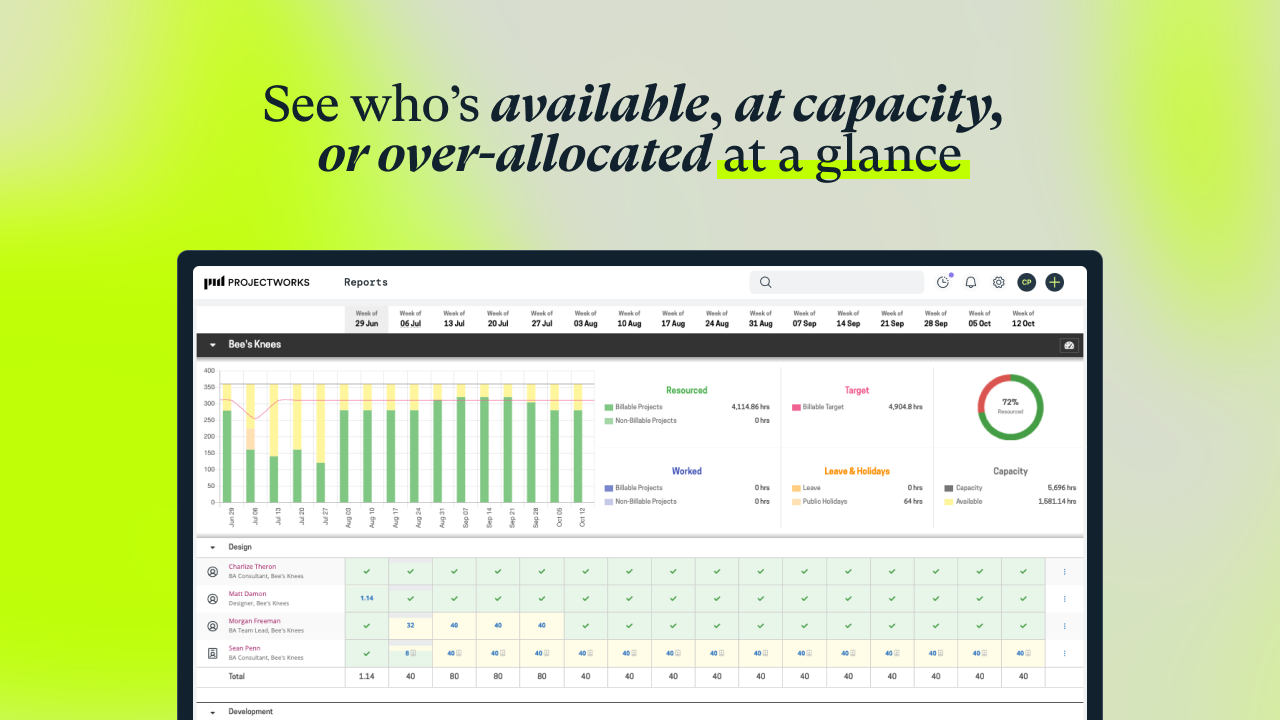
    Screenshot of visualization that helps to understand capacity, who is available, and when more staff will be needed for work coming down the pipeline. Tag and filter staff by skills and certifications to help make the right staffing decisions.Screenshot of workforce utilization metrics.Screenshot of an example timesheet built for professional services firms. The timecode setup is flexible, to enable users to track how time is spent on projects at any level of detail.Screenshot of a display showing how much of the budget has been burned through actual time spent, as well as what is planned. This lets users know when a project is going over budget. These forecasts can be used to set a billing schedule for fixed-price projects, and a percentage mode to support percentage-based billing. Invoicing runs can be started from the forecasts screen.Screenshot of where to track actuals and see where a project will land against the project budget.Screenshot of an example invoice, which can be based on a timesheet (time and material / T&M), fixed price engagements, or percentage-based billing. It integrates with accounting systems.

    Workday Professional Services Automation Screenshots

    Screenshot of Workday Professional Services Automation Create QuoteScreenshot of Workday Professional Services Automation CRM DashboardScreenshot of Workday Professional Services Automation Opportunity DashboardScreenshot of Workday Professional Services Automation Services Catalog