Qlik Replicate enables organizations to accelerate data real-time replication, ingestion and streaming via change data capture, across a wide range of heterogeneous databases, data warehouses and data lake platforms.
N/A
Redgate SQL Toolbelt Essentials
Score 9.5 out of 10
N/A
Redgate's SQL Toolbelt Essentials includes industry-standard tools for SQL Server development & deployment, enabling users to include SQL Server databases in agile processes and enabilng developers to embed robust and scalable development practices.
Qlik Replicate works very well with relational data platforms, both on premise and in the cloud, for example Oracle, SQL Server, PostgreSQL, MySQL and others, it also works very well with DB2. If the data source is MongoDB, it is more complicated and currently there is no possibility of sending data to MongoDB.
We use SQL Compare to troubleshoot performance problems quite a bit since our data model is more like a template and not everything is 100% in sync and customization occurs between different client databases. We continually get pulled into performance issues and the developers will say Client A is performing different than Client B, why? Using SQL Compare, we usually find that one client was tuned and had indexes altered or added that weren't deployed to all clients or other objects weren't deployed correctly during the release. On the other hand, since our data model practices allow client databases to drift I tried to create a new golden image by trying to compare multiple databases based on the same data model and found it to be a very difficult process to complete using SQL Compare. SQL Compare gave me too much information and doesn't allow enough filtering to eliminate a lot of the noise.
Replicate is extremely stable and does not generate a lot of alerts/failures/issues that take up time to troubleshoot.
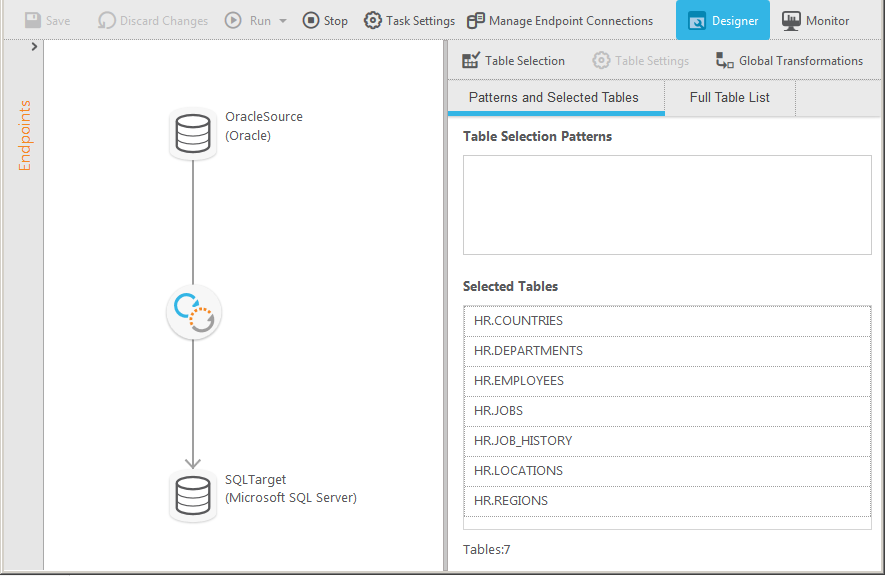
It is very easy to add new source tables to a Replicate task so that we're always in sync with new data available from the CRM.
It's nice that Qlik Replicate also allows you to create a job to stop and then restart your tasks during maintenance windows that occur on both the source and target systems.
Simple and easy comparison of database schemas and data. Differences can be copied or synced from one database to another with a click of a button.
You can save "projects" so that you can easily rerun a previous comparison whenever you need to.
It has a very simple, easy to learn interface. I've never needed to read any documentation or watch any tutorials in order to figure out how to do something.
The base Replicate web GUI is lacking. If you have dozens or more tasks, it's hard to get a sense of how they're performing. Enterprise Manager solves all of these problems but is a separate install.
The support portal is extremely difficult to navigate. It's hard to track down exactly what you're looking for.
It would be helpful to have better documentation and example queries for the tables in the Enterprise Manager analytics database.
Destination databases that don't support common DDL commands behave unpredictably. And the replication of schema changes isn't consistent.
Pricing.... I wish there was an inexpensive developer version I could buy for myself.
Portability.... I would like to use it from a flash drive so I can use it where ever I am asked to work.
Unbundled.... This may be available already but I dont' recall I can buy it cheaply as a stand-alone product. Its only part of the bundle - cost effectively.
The availability of the replicated data in disparate environments has is now crucial. Replacing a product like Qlik Replicate would require significant time, investments, and work. In addition, Qlik Replicate is reasonably reliable with few failures.
We now have greater business flexibility and scalability, and our big data integration projects have a quick rate of growth, which has been profitable for us. Independent of the sources involved, maintaining data consistency between sources is easy. One of my favorite features is the way it lets owners of the source system start and stop processes from updating their system windows.
The issue I've had is that Qlik does an awful job of keeping their customers informed when new versions of the software are available. We found that we were using a version that was no longer supported and could never get help. When it came time to get us upgraded so that we were on a current version, no one knew how to help get us to where we needed to be. We had to purchased professional services time and even then I was basically on my own to get everything built out and set up. Qlik needs to be more proactive with communicating about new releases and how to get your version upgraded in the most secure, safe way possible.
Follow the directions from the Qlik documentation. They are pretty straight forward and easy enough to follow. If you follow these, then you are not likely to have issues on implementation.
Great tool for data replication solution for Oracle/SQLServers/etc. Real easy to get it set up and start realizing business value. Getting the PoC accomplished in a short window. Product costing and easy to start small and scale as needed. It helped cover most of our ask compared to other solutions.
I've used Visual Studio Database Projects for this type of work in the past with some success, but Redgate SQL Compare is faster, more transparent, and simply easier to use. Faster is self explanatory. More transparent, means that it's much easier to set up your desired options for schema change deployment scripts. Easier to use, It's really dead simple. Start a project, connect your source, connect destination, click compare.
Prior to using Qlik Replicate, we used an ETL solution to copy data from the Oracle ERP system to the Microsoft SQL Server BI system at a 15-minute interval. It was very tedious to maintain. Qlik Replicate is much easier to use and we replicate data near real-time now.