An end-to-end platform for AI, data science, and analytics, used for modeling, as well as management and deployment of AI models.
N/A
SAS Visual Analytics
Score 7.7 out of 10
Enterprise companies (1,001+ employees)
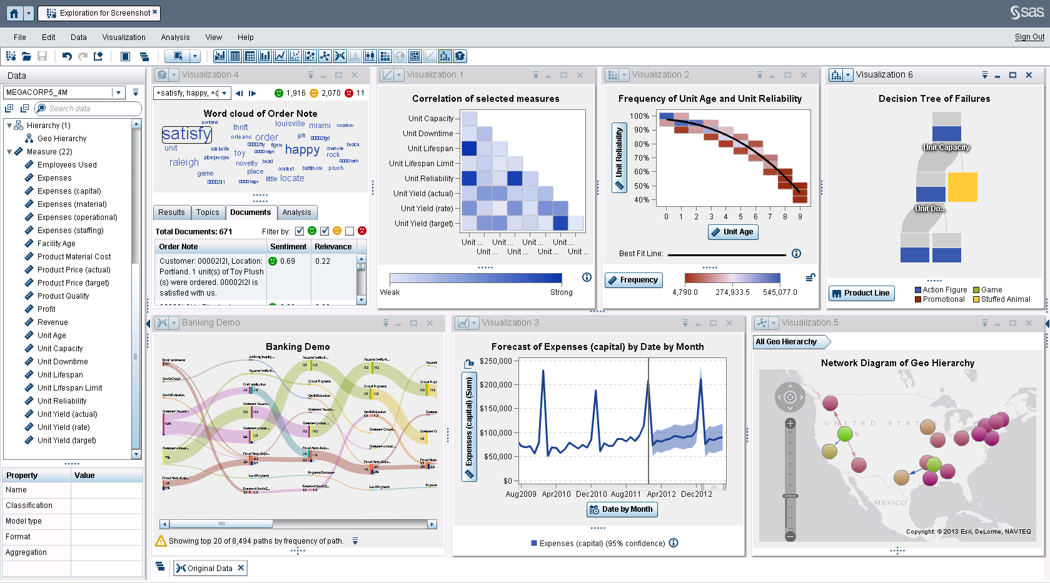
SAS Visual Analytics provides a complete platform for analytics visualization, enabling users to identify patterns and relationships in data that weren't initially evident. Interactive, self-service BI and reporting capabilities are combined with out-of-the-box advanced analytics so everyone can discover insights from any size and type of data, including text.
$0
Annual By Users: 5, 10, 20
Pricing
SAS Viya
SAS Visual Analytics
Editions & Modules
No answers on this topic
SAS Visual Analytics for SAS Cloud
Annual By Users: 5, 10, 20
Offerings
Pricing Offerings
SAS Viya
SAS Visual Analytics
Free Trial
Yes
Yes
Free/Freemium Version
No
No
Premium Consulting/Integration Services
No
Yes
Entry-level Setup Fee
No setup fee
No setup fee
Additional Details
—
SAS Visual Statistics and SAS Office Analytics are also available as add-ons.
More Pricing Information
Community Pulse
SAS Viya
SAS Visual Analytics
Considered Both Products
SAS Viya
No answer on this topic
SAS Visual Analytics
Verified User
Manager
Chose SAS Visual Analytics
I have used SAP Lumira as well. The reason for me to use both software is to see the user experience. With Lumira, it was easy for me to visualize data and data storytelling and with SAS it was easy for me to create an algorithm as I wanted them to be. SAS software allows me to …
SAS Advance Analytics is well suited for data that is visual. Data where you want to see multiple graphs and models are good for this software. However, if your data is more descriptive this may not be the best program. SAS is well suited for data where you need to make comparisons on the feasibility of two different programs. Data that can be compared is perfect for this software.
I was in a meeting with the client and there I have to show them some analytic data to them. But I was confused about how I will manage to show big data to clients with accuracy. But then the SAS Visual Analytics software helps me in presenting accurate data at the moment and it was very presentable and through that, I got the deal for that business.
Provides the flexibility to the end user to slice and dice the data.
Anyone can make predictive models with the help of in-built algorithms without the need to write a single line of code or knowledge of what's under the hood of algorithms.
The feature to simply ask a question related to data and getting a response in form of text, chart or graph is amazing.
SAS Analytics does not have very good graphic capabilities. Their advanced graphics packages are expensive, and still not very appealing or intuitive to customize.
SAS Analytics is not as up-to-date when it comes to advanced analytical techniques as R or other open-source analytics packages.
SAS is relatively expensive when compared to other BI tools and requires a large amount of upfront fee which becomes an issue for smaller organizations.
UI for the dashboards looks a little date in comparison to competitors like Tableau and Microstrategy.
Integration with other open source software like Python needs to be built in.
Not only does SAS become easier to use as the user gets more familiar with its capabilities, but the customer service is excellent. Any issues with SAS and their technical team is either contacting the user via email, chat, text, WebEx, or phone. They have power users that have years of experience with SAS there to help with any issue.
SAS really is the cutting edge in Business Intelligence. That is all they do! They are constantly coming out with new products, product upgrades, and their tech support is second to none. In addition, their support of Education has made our ability to acquire their product possible.
If SAS Enterprise Guide is utilized any beginning user will be able to shorten the learning curve. This is allow the user a plethora of basic capabilities until they can utilize coding to expand their needs in manipulating and presenting data. SAS is also dedicated to expanding this environment so it is ever growing.
SAS BI is good for creating reports and dashboards and then sharing it with the users. It also has ability to manage access to the reports and dashboards but somehow with most of the world moving to open source languages R, Python and Julia, SAS BI feels to be archaic in terms of feature set and integrations it allow[s]. Also, comparing it with other Business Intelligence tools like Tableau and Microsoft BI, the functionality of SAS BI is very limited and doesn't justify the pricing.
SAS probably has the most market saturation out of all of the analytics software worldwide. They are in every industry and they are knowledgable about every industry. They are always available to take questions, solve issues, and discuss a company's needs. A company that buys SAS software has a dedicated representative that is there for all of their needs.
Although nothing is perfect, SAS is almost there. The software can handle billions of rows of data without a glitch and runs at a quick pace regardless of what the user wants to perform. SAS products are made to handle data so performance is of their utmost important. The software is created to run things as efficiently as SAS software can to maximize performance.
SAS is generally known for good support that's one of the main reasons to justify the cost of having SAS licenses within our organization is knowing that customer support is just a quick phone call away. I've usually had good experiences with the SAS customer support team it's one of the ways in which the company stands out in my view.
When you call tech support, you are immediately routed to a person who can answer your question. Often they can answer on the spot. However, if they cannot, you are given a track number and then followed up with. There have been times when I have had multiple track numbers open and they will actually TRACK YOU DOWN to ensure that your problem has been resolved. Issues do not fall into black holes with SAS. They are also willing to do a WebEx with you to diagnose the problem by seeing your environment, which is always helpful.
SAS has regional and national conferences that are dedicated to expanding users' knowledge of the software and showing them what changes and additions they are making to the software. There are user groups in most of the major cities that also provide multi-day seminars that focus on specific topics for education. If online training isn't the best way for the user, there is ample in-person training available.
There are online videos, live classes, and resource material which makes training very easy to access. However, nothing is circumstantial so applying your training can get tricky if the user is performing complex tasks. When purchasing software, SAS will also allocate education credits so the user(s) can access classes and material online to help expand their knowledge.
Ask as many questions you can before the install to understand the process. Since a third party does the installation your company is sort of a passanger and it is easy to get lost in the process. It also helps to have all users and IT support involved in the install to help increase the knowledge as to how SAS runs and what it needs to perform correctly.
SAS was the incumbent tool, and what the team knew. We did look into using Revolution Analytics enterprise version of R, but the learning curve on that caused us to stick with SAS. In my current position, I've opted for WPS over SAS. I can still leverage my SAS experience, but the price is about 15% of what SAS charges, with extra functionality, such as direct database access. I can supplement WPS with free software, such R for anything that it might be missing.
I have used Crystal Reports, Jaspersoft and SQL Server Reporting Services (SSRS). I would recommended Business Intelligence over SSRS and Crystal Reports. SSRS is very SQL-centric and Crystal Reports is more of an end-user tool. I would recommend Jaspersoft over Business Intelligence for developing a seamless web-based reporting interface but I highly recommend Business Intelligence for end-user ad-hoc reporting.
It all depends on the type of SAS product the user has. Scaleability differs from product to product, and if the user has SAS Office Analytics the scaleability is quite robust. This software will satisfy the majority of the company's analytic needs for years to come. In addition, if SAS is not meeting the users needs the company can easily find SAS solutions that will.