TrustRadius: an HG Insights company

Save this comparison

Save this comparison

Add Product

Recommended Comparisons

    Overview
    ProductRatingMost Used ByProduct SummaryStarting Price

    StreamYard

    Score8.7 out of 10
    N/AStreamYard is a live streaming studio in a browser. Users can interview guests, share a screen, and simulcast to platforms like Facebook, YouTube, and LinkedIn.N/A

    Vmaker AI

    Score8.3 out of 10
    N/AVmaker AI is a video editing platform that helps creators, marketers, and teams transform long-form videos into short, shareable content. From podcasts and webinars to tutorials, interviews, and product videos, Vmaker AI helps users to create short-form clips, add captions, and prepare videos for platforms like YouTube Shorts, Instagram Reels, and TikTok.

    $24

    per month

    Pricing
    StreamYardVmaker AI
    Editions & Modules
    No answers on this topic
    Starter
    $24
    per month
    Teams
    $39
    per month
    Offerings
    Pricing Offerings
    StreamYardVmaker AI
    Free Trial
    NoNo
    Free/Freemium Version
    NoYes
    Premium Consulting/Integration Services
    NoNo
    Entry-level Setup FeeNo setup feeNo setup fee
    Additional Details—Discount available for annual pricing.
    More Pricing Information
    Best Alternatives
    StreamYardVmaker AI
    Small Businesses
    OBS Studio
    Score9.2 out of 10
    iMovie
    Score10 out of 10
    Medium-sized Companies
    No answers on this topic
    iMovie
    Score10 out of 10
    Enterprises
    No answers on this topic
    Adobe Premiere Pro
    Score9.2 out of 10
    All AlternativesView all alternativesView all alternatives
    User Ratings
    StreamYardVmaker AI
    Likelihood to Recommend
    8.0
    (4 ratings)
    8.3
    (3 ratings)
    Likelihood to Renew
    10.0
    (1 ratings)
    -
    (0 ratings)
    Usability
    8.0
    (2 ratings)
    -
    (0 ratings)
    User Testimonials
    StreamYardVmaker AI
    Likelihood to Recommend
    StreamYard
    Because it's browser-based, StreamYard is especially well-suited for a situation like mine, where I'm unlikely to have repeat podcast guests very often. It's great that guests don't have to download special software just for a one-time appearance! I haven't personally used StreamYard for livestreaming, but based on its name and reputation, I imagine it's especially well-suited for that use case
    Read full review
    Vmaker
    It's perfect for Vloggers, website reviews, short videos and screen captures of other recording platforms.
    Read full review
    Pros
    StreamYard
    • It has an easy and comfortable interface for participants and admins.
    • It provides the opportunity to add videos, banners, and slides to your session.
    • It provides the opportunity to show live comments and answer to them right from StreamYard.
    Incentivized
    Read full review
    Vmaker
    • Easy to highlight and annotate parts of my screen while recording
    • Records meetings including computer audio and mic simultaneously
    • easy to use video editor that allows you to edit videos to just include the necessary information
    Read full review
    Cons
    StreamYard
    • One big downside is that you can't download separate high quality video and audio files for each person in the stream.
    • The simplicity takes away from the "customization" that you could potentially have in other platforms.
    • A backroom where you could communicate with other people in the stream, without streaming it while live, would be very useful.
    Incentivized
    Read full review
    Vmaker
    • Wish they allowed virtual webcam backgrounds or blurred background on the Free plan.
    • Some of the messaging on the site is a bit inconsistent re pricing of the plans (some refer to annual pricing paid monthly vs monthly pricing)
    Read full review
    Usability
    StreamYard
    You don't need to be an expert and you don't have anything to install.
    Incentivized
    Read full review
    Vmaker
    No answers on this topic
    Alternatives Considered
    StreamYard
    I've already covered this in other responses. The key reasons I wound up using Descript for certain elements of my process was the better usability of its transcripts and the more-robust AI capabilities it offers. Its suggestions for strong clips seemed more on-point, and it offered functionality like chapter suggestions
    Read full review
    Vmaker
    More features, better ui/ux
    Read full review
    Return on Investment
    StreamYard
    • It has increased the reach rate and the number of followers on social media pages, for example, on our Youtube page, the number of followers increased by 2 times the original amount.
    • It has reduced the amount of time our communications team spends on editing videos.
    • More team members are able to use StreamYard by themselves, which has allowed us to reduce the time our communications team spends on managing live sessions before.
    Incentivized
    Read full review
    Vmaker
    • Makes recording video intros for my Podcast super easy
    • I can record from anywhere (eg my AirBnB while traveling and still look professional
    • Totally affordable for my relatively small business
    Read full review
    ScreenShots

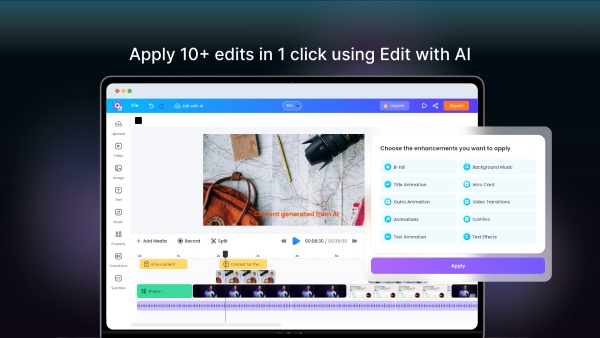
    Vmaker AI Screenshots

    Screenshot of AI Video Editor DashboardScreenshot of Long to Short Video AIScreenshot of AI Highlight Video MakerScreenshot of AI Subtitle Generator