TrustRadius: an HG Insights company

Save this comparison

Save this comparison

Add Product

Recommended Comparisons

    Overview
    ProductRatingMost Used ByProduct SummaryStarting Price

    Tricentis LiveCompare

    Score8.7 out of 10
    Enterprise companies (1,001+ employees)
    LiveCompare provides SAP teams with AI-powered analytics and insights to reduce the risk, time, and cost of delivering and supporting changes to SAP systems. LiveCompare continuously monitors SAP delivery pipelines and production systems for issues that put the user's business at risk. LiveCompare then gives developers, testers, release managers, and support teams real-time information with the goal of helping them to eliminate potential and existing defects quickly and efficiently. …N/A

    Zabbix

    Score8.5 out of 10
    N/AZabbix is an open-source network performance monitoring software. It includes prebuilt official and community-developed templates for integrating with networks, applications, and endpoints, and can automate some monitoring processes.N/A
    Pricing
    Tricentis LiveCompareZabbix
    Editions & Modules
    No answers on this topic
    No answers on this topic
    Offerings
    Pricing Offerings
    Tricentis LiveCompareZabbix
    Free Trial
    NoNo
    Free/Freemium Version
    YesNo
    Premium Consulting/Integration Services
    YesNo
    Entry-level Setup FeeNo setup feeNo setup fee
    Additional Details——
    More Pricing Information
    Community Pulse
    Tricentis LiveCompareZabbix
    Considered Both Products
    Tricentis
    No answer on this topic
    Zabbix
    No answer on this topic
    Key User Insights
    Would buy again
    No answers on this topic
    100%
    Would buy again
    15 Answers
    Delivers good value for the price
    No answers on this topic
    100%
    Delivers good value for the price
    15 Answers
    Happy with the feature set
    No answers on this topic
    93%
    Happy with the feature set
    14 Answers
    Lived up to sales and marketing promises
    No answers on this topic
    90%
    Lived up to sales and marketing promises
    9 Answers
    Implementation went as expected
    No answers on this topic
    100%
    Implementation went as expected
    13 Answers
    Best Alternatives
    Tricentis LiveCompareZabbix
    Small Businesses
    Polarion ALM
    Score10 out of 10
    No answers on this topic
    Medium-sized Companies
    PTC Windchill RV&S
    Score2 out of 10
    Icinga
    Score9 out of 10
    Enterprises
    IBM Engineering Lifecycle Management
    Score5 out of 10
    HPE OneView
    Score6 out of 10
    All AlternativesView all alternativesView all alternatives
    User Ratings
    Tricentis LiveCompareZabbix
    Likelihood to Recommend
    10.0
    (1 ratings)
    8.3
    (28 ratings)
    Likelihood to Renew
    -
    (0 ratings)
    9.0
    (3 ratings)
    Usability
    -
    (0 ratings)
    8.6
    (4 ratings)
    Support Rating
    -
    (0 ratings)
    5.0
    (5 ratings)
    Implementation Rating
    -
    (0 ratings)
    8.0
    (2 ratings)
    User Testimonials
    Tricentis LiveCompareZabbix
    Likelihood to Recommend
    Tricentis
    We detect potential areas where changes made may impact the business operations.
    Read full review
    Zabbix
    Zabbix is great for monitoring your servers and seeing alerts when the system uses too much CPU or memory. This allowed the system Engineer to be proactive and add resources to these systems to avoid interrupting the services. Especially servers running operations applications and services. This is one of the best usages for Zabbix.
    Incentivized
    Read full review
    Pros
    Tricentis
    No answers on this topic
    Zabbix
    • Collecting hardware data - CPU, Memory, Network, and Disk Metrics are collected and reported on.
    • Flexible design - It is very easy to build out even very large environments via the templating system. You can also start where you are - network monitoring, server monitoring, etc. and then build it out from there as time and resources permit.
    • Provides a "plugin architecture" (via XML templates) to allow end users to extend it to monitor all kinds of equipment, software, or other metrics that are not already added into the software already.
    • Very complete documentation. Almost every aspect of Zabbix has been documented and reported on.
    • Cost - Zabbix is FOSS software and always free. Support is reasonably priced and readily available.
    Incentivized
    Read full review
    Cons
    Tricentis
    No answers on this topic
    Zabbix
    • Creating an alert & its trigger can be made easier.
    • More VM-based data collection counters should be introduced to have better VM monitoring.
    • The raw counters collection agent in every node is relatively weak. It goes down often, which needs more stability.
    Incentivized
    Read full review
    Likelihood to Renew
    Tricentis
    No answers on this topic
    Zabbix
    It is free. It didn't cost anything to implement (other than my time and the cost incurred for it) and it is filling a badly needed gap in our IT infrastructure. Support is available if we have issues and can be done annually or paid for on a per incident basis as needed. Expansion, updates, and all other future lifecycle activities are likewise free of cost, so as long as someone is able to implement/maintain the software (and the OSS project is maintained) then I imagine the company will never leave it.
    Incentivized
    Read full review
    Usability
    Tricentis
    No answers on this topic
    Zabbix
    I think every organization, especially the IT department, needs a tool like this. I know of another product like Zabbix that gives a similar or the same solution, but its range makes it very useful. You can see almost all the device info in one place: disk usage, disk space, network usage, etc.
    Incentivized
    Read full review
    Support Rating
    Tricentis
    No answers on this topic
    Zabbix
    The setup is the most time-consuming portion of using zabbix. It takes a lot of effort to shape it into a usable format and even then it can get very messy. It's not exactly intuitive and as mentioned the UI seems a bit antiquated. If I was to roll out a monitoring solution from scratch, I'd probably look for alternatives which are easier to use and maintain.
    Incentivized
    Read full review
    Implementation Rating
    Tricentis
    No answers on this topic
    Zabbix
    We are a mainly Windows environment, so it would be useful if we could have used Active Directory to deploy agents. As of version 4.2, Zabbix has announced a new agent MSI file to allow exactly that. Unfortunately, we didn't have that option. Also, for Linux and MAC deployments, there is no simple way to deploy that. Using remote scripts you may be able to create something, but most places will opt for either SNMP (agentless) or manual installation of agents to add to Zabbix. A way of deploying agents via discovery would go a long way to helping in the adoption of the tool.
    Incentivized
    Read full review
    Alternatives Considered
    Tricentis
    We're using only LiveCompare and no other Tricentis products at the moment so we can't make a comparison with other products.
    Read full review
    Zabbix
    We're using the Solarwinds suite as our global monitoring standard, but it is very complex and its licensing model makes it difficult to monitor a wide range of technologies. So, we're using Zabbix as a complement on our monitoring process. Zabbix is a way more flexible and has free integrations to a wide range of technologies. It is also more 'user friendly' and easy to manage.
    Incentivized
    Read full review
    Return on Investment
    Tricentis
    No answers on this topic
    Zabbix
    • Good ROI when trying to get ahead of network related problems instead of waiting for users to complain
    • Good ROI when doing upgrades or exploratory work on a neglected network
    • Good ROI when showing usage trends to management showing higher actual usage versus what was thought to be happening
    Read full review
    ScreenShots

    Tricentis LiveCompare Screenshots

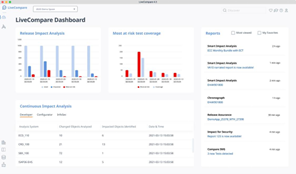
    Screenshot of LiveCompare provides SAP teams with AI-powered analytics and insights that significantly reduce the risk, time, and cost of delivering and supporting changes to SAP solutions.Screenshot of Tricentis LiveCompare continuously monitors SAP delivery pipelines and production systems for issues that put the business at risk. Boasting DevOps-friendly capabilities that improve quality and speed throughout the SAP practice, Tricentis LiveCompare enables users to: 

-Fast track releases 
-Optimize operations 
-Deliver transformation with confidenceScreenshot of LiveCompare takes all the guess work out test selection, telling you what needs to be tested before changes are deployed to production.  

-Avoid over-testing, cutting unnecessary time and complexity from SAP testing 
-Prevent under-testing, catching defects before they damage a system and reputation 
-Deliver higher-quality releases with zero defectsScreenshot of This screen shot illustrated the Select Projects feature with Rise with SAP selected. Tricentis helps accelerate Tasks within each Rise with SAP/Active Methodology phase. Each App has persona tags for Developers, Testers, & Operations.