TrustRadius: an HG Insights company

Atlassian Loom

Score9.5 out of 10

183 Reviews and Ratings

What is Atlassian Loom?

Loom is a screen recorder for Chrome, Mac, Windows, and iOS from Atlassian, presented as quick to install, easy to use, and boasting a functional free edition.

Media

Loom for Desktop
Chrome extension
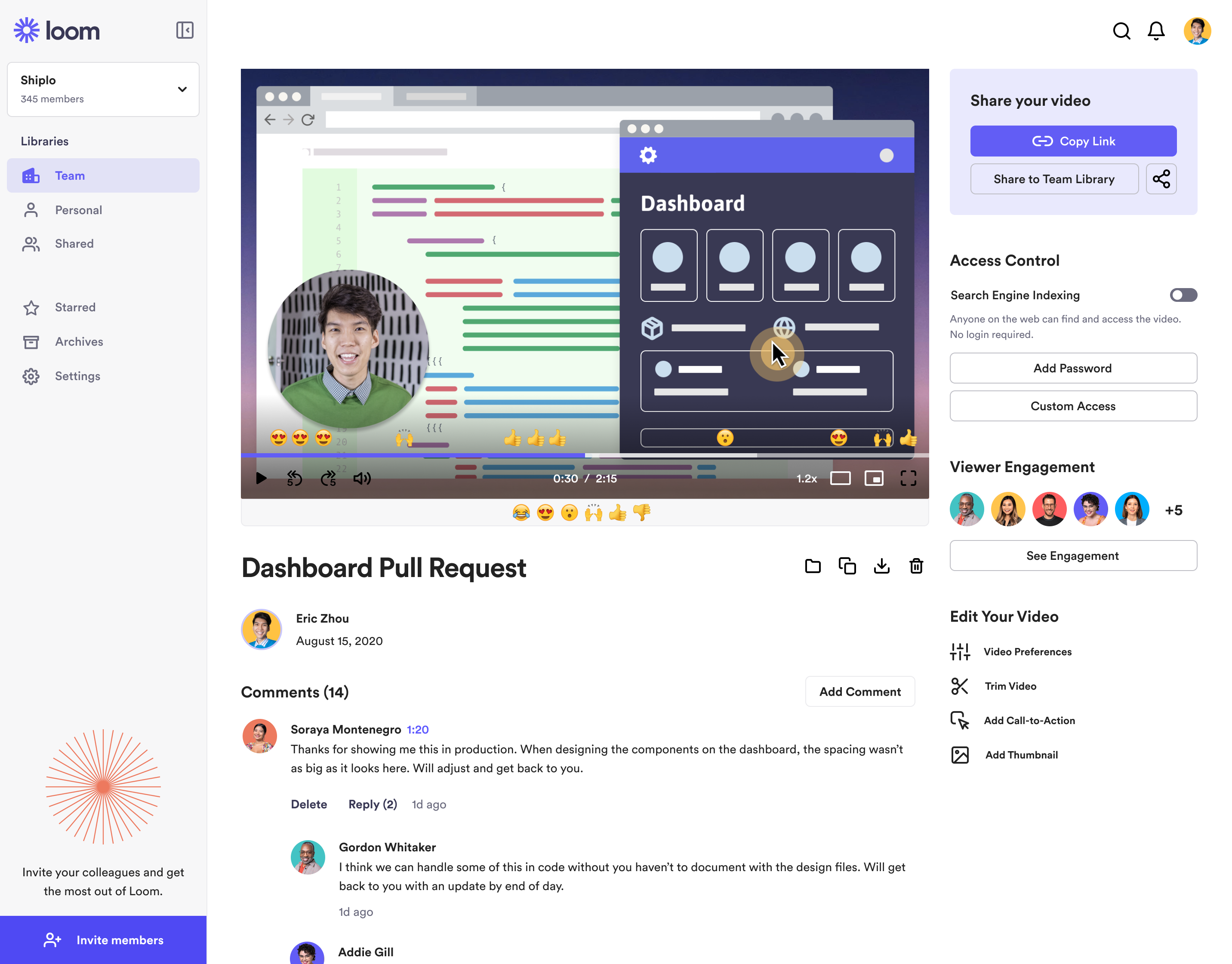
Loom videopage
Loom for iOS

1 / 4

Save time and use Atlassian Loom

Use Cases and Deployment Scope

I use Atlassian Loom ALL day to communicate with clients and employees, explaining processes, features, best practices etc.

I am able to address concerns and walk people through questions visually using Atlassian Loom. I am also able to cut down the number of meetings I have on a daily basis while still maintaining a personal touch with clients and my team.

Pros

  • Screen Recordings
  • AI
  • Editing
  • Background noise blocker

Cons

  • Logging in can sometimes be annoying, doesn't remember me
  • Will sometimes freeze
  • Would love to have files for my videos or attach them to clients

Return on Investment

  • Helps maintain client connection
  • Helps maintain employee connection
  • Allows for quick concise communication

Usability

Other Software Used

Calendly, Vitally, ClickUp, HubSpot CRM, Canva, Postal

Atlassian Loom allows me to provide detailed feedback without having to jump on a call

Use Cases and Deployment Scope

We use Atlassian Loom in order to record problems or issues we notice on our company website and/or app. It saves us time and helps us avoid unnecessary huddles or calls that could take longer than necessary. We also use it sometimes to discuss feedback on projects, tasks, or any other work responsibilities that require a more detailed discussion or explanation.

Pros

  • Record videos and screens to discuss issues or feedback
  • Provide 1.2x speed automatically to quicken the pace of the video
  • Edit recorded videos as needed

Cons

  • The background noise is always picked up even when wearing headphones
  • There's some delay whenever the recording button is clicked
  • A maximum of 5 minutes for free users feels a bit too limiting

Return on Investment

  • Saved at least 1-2 hours of work hours after recording a video
  • At least 15 mins were saved since issues were discussed more thoroughly through Atlassian Loom videos
  • Wasted about 10 minutes due to the background noises that Atlassian Loom picked up

Usability

Other Software Used

tl;dv

Atlassian Loom one of the key tools I use daily

Use Cases and Deployment Scope

We use it daily to share both solution news/updates that have an impact on our product, and also company news, from organizational changes to ask me anything events. It allows us to keep everyone informed in an async way. Personally, I use it a lot to share feedback on specific product features, or to explain complex situations in a simplified way.

Pros

  • Record what you need and only what you need
  • Give a title and a summary automatically
  • Provide with a transcript and call out actions

Cons

  • I sometimes find it difficult to change screens while recording
  • More options to make your "bubble" tinier/different
  • The editing functionality could be easier too, it takes some time to figure out how to use it properly

Return on Investment

  • Improved communication efficiency, reducing the need for meetings and allowing for faster knowledge sharing
  • Higher engagement and transparency (one of our values)

Usability

Other Software Used

Slack, Vivun, Notion

Loom is the best for remote teams!

Use Cases and Deployment Scope

Loom is a great tool to provide specifics in any communication while still keeping it asynchronous. We are a remote company and we believe time is valuable Loom is a great solution that falls in the middle of written vs live meetings. It allows us to provide details, share screens, and leave a record of the information so people can go back on their own time. Loom really became a key tool in our day to day

Pros

  • Asynchronous communications that work
  • Documenting processes
  • Providing details without the need to go on meetings.

Cons

  • Loom can definitely join the AI trend and evolve the system to do other things and support businesses.
  • Loom can improve service quality, it happens sometimes that we record videos and these do not work or don't move past the processing phase.
  • Better storage and user experience when navigating previous videos. we rarely use it and i think they can do more with it. Like building company spaces or something.

Most Important Features

  • Asynchronous communications
  • Video announcements
  • Video instructions

Return on Investment

  • It has improved how our international team collaborates.
  • It has made sending announcemnts easier.
  • It has integrated well with providing instructions in any given task or conversation.
  • It needs to be better at processing videos so we do not lose information.

Alternatives Considered

YouTube Live and Zoom

Other Software Used

Google Meet, Slack, Canva

Love love LOVE Loom.

Use Cases and Deployment Scope

I’m a web design educator and entrepreneur and use look literally every day. I use it to quickly share my screen and record educational videos for my students, content for social media, or how-to videos for my VA and team. It saves me so much time and keeps all my processes so organized. I have a separate Loom folder for each client or category, which means I can share a collection of videos with people quickly and easily. I also love the quick embedded gif-sharing feature, and the new AI title and description generation is awesome!

Pros

  • Records screen and uploads fast.
  • Generates captions, titles, and descriptions.
  • Easily embedded gif share feature.
  • Ability to trim and append videos.

Cons

  • Ability to cut out parts of videos.
  • Generate a different gif thumbnail.
  • Show mouse clicks.

Most Important Features

  • Instant upload.
  • One-click link share.
  • Embedded gif feature.

Return on Investment

  • It saves me hours each and every week.

Other Software Used

Whereby