

Conspecta
What is Conspecta?
Conspecta is a browser-based platform for life science research. Image analysis, flow cytometry, molecular biology, sample tracking, and publication-ready figures all live in one connected workspace.
Each result is linked to where it came from. A sample carries the images taken of it and the results that came out of them, and each figure panel links to the analysis that produced it. Those links are recorded as the work happens, so any number traces back to its source in one click, and a scientist's own AI assistant can read across an entire project.
Analyze data
Image analysis builds a pipeline from a few questions about what the images show and what is being measured, previews each setting live on one image, then runs across the whole set to count objects and measure area coverage and marker intensity. A size, brightness, or confidence filter trims debris out of a count, and each run writes its counts into a data table, one row per image. It reads LIF, TIFF, PNG, JPEG, and BMP, including multi-channel, z-stack, and time-series images.
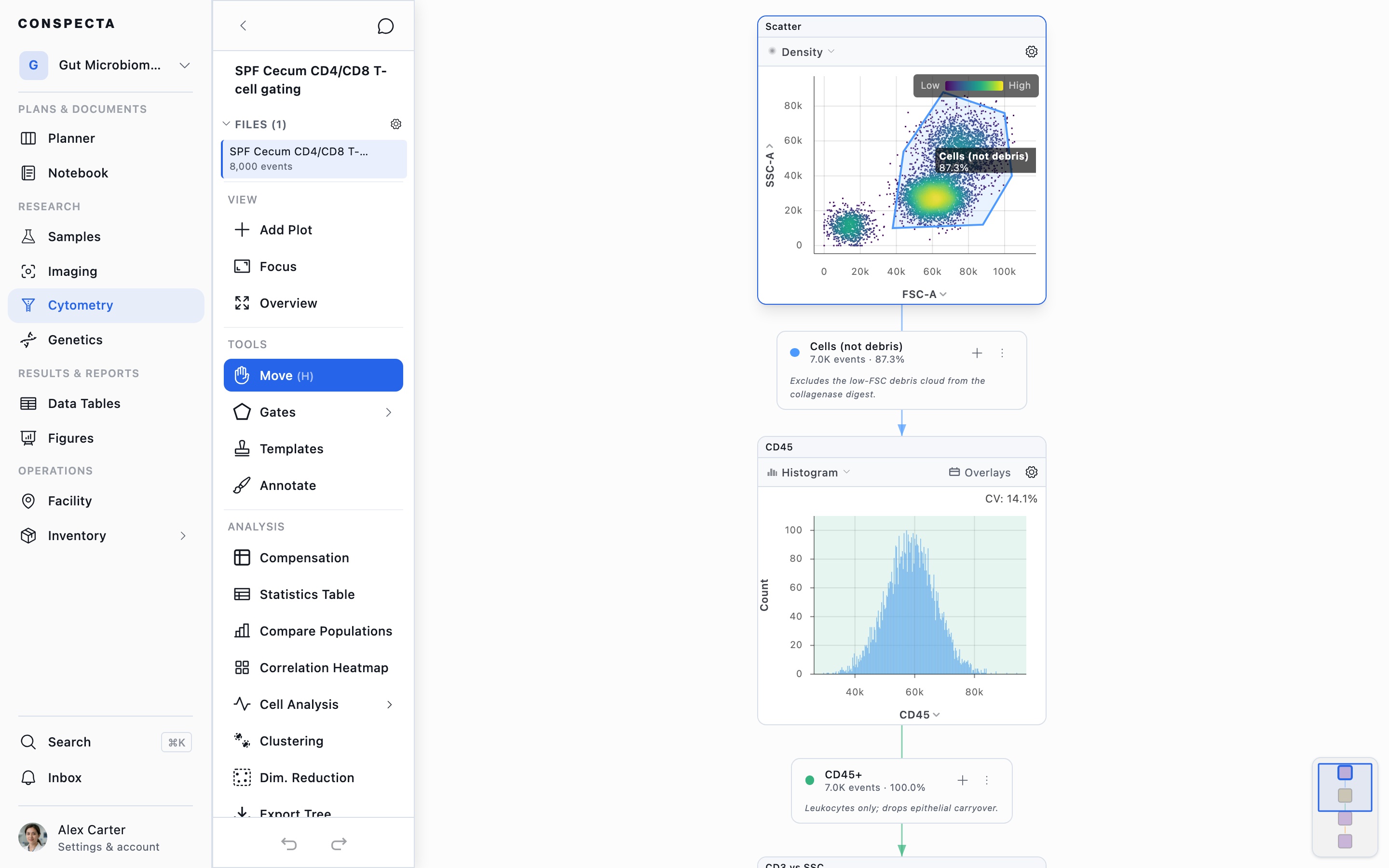
Flow cytometry covers gating and compensation on FCS files, UMAP, t-SNE, PCA, and clustering, with population statistics written to a data table and Welch's t-tests across conditions. Gating strategies save as shared templates and import from and export to FlowJo, and panels can be designed against the lasers and detectors of the lab's own cytometer.
The genetics workspace covers plasmid maps, BLAST, primer design, codon optimization, CRISPR edit checks, cloning plans, and Sanger alignment.
Run the lab
Samples carry their storage location, plate position, and parent specimens, and their QR labels open the record from a phone scan. The facility workspace maps freezers down to the box and handles instrument booking, downtime, and service records. Inventory tracks stock with lot numbers, expiry dates, and low-stock alerts. Orders run from request through approval to receipt, and Contacts keeps the lab's vendors, core facilities, and collaborators in one list.
Plan and run experiments
Projects are planned on a board with tasks, deadlines, and dependencies, and a task waiting on another is marked as blocked. A written protocol starts as a recorded run from a desktop or from a phone at the bench, with a named timer for each step. The run records what it consumed and produced and stays attached to its results.
Report results
The lab notebook links to the images, flow data, samples, and figures behind a page, and imports and exports Word, PDF, and Markdown. Data tables are a spreadsheet with formulas, where a cell can be a real sample. Figures are multi-panel, publication-ready layouts. When the data behind a panel changes, the panel is flagged and can be updated with the new numbers. Reports show where a project stands in live tiles, each number opens the records behind it, and every version saves as PDF, Word, or Markdown.
Work together
Notebook pages, planner boards, data tables, and figures support live co-editing. Results carry comment threads and sign-off, and every record keeps a history of who changed it and when. iOS and Android apps bring every workspace to the bench.
AI assistants
On paid plans, a lab can connect its AI assistant over MCP, the open standard for connecting assistants to tools. Claude, ChatGPT, Codex, and GitHub Copilot connect with an address and a sign-in, and Claude Science, Cursor, Gemini CLI, and Copilot Studio connect with an API key. The lab chooses what each assistant can reach. The assistant reads across workspaces and saves its work as ordinary pages, figures, and tables for the lab to review. A lab's agent can also be @mentioned in a comment on a record, and it replies in that thread.
REST API
Every paid plan includes the REST API, the same endpoints the app itself runs on. A lab's own code can upload files, create and update samples, write results into data tables, book instruments, and start an image analysis on the server. A script on an acquisition machine can upload each FCS file or image as the run finishes and attach it to its sample, and a Snakemake, Nextflow, Python, or R pipeline can post its numbers back into a data table beside the samples they were measured from. API keys can be read-only or read and write, limited to specific projects, and revoked at any time. A key never reaches more than its owner can, and it can draft a notebook page but never sign one off.
Switching from another system
Samples, inventory, and storage locations import from CSV or TSV files, and contacts and data tables also accept Excel. Notebook pages import from Word, PDF, or Markdown. Existing gating strategies import from a FlowJo 10 .wsp workspace or a Gating-ML 2.0 file, and export back to either format. Everything comes back out as CSV, Excel, FCS, PNG, SVG, PDF, or Word, so a lab can keep its current system running alongside Conspecta during the move. On paid plans, a lab's own scripts can load what an old ELN, LIMS, or booking system exports through the REST API, and a connected AI assistant can create the same records over MCP.
Who it fits
Academic and biotech labs where imaging and flow cytometry drive the work, whether they are moving off an existing system or setting up for the first time, and core facilities and CROs reporting results back to the groups they serve. A free plan gives one scientist and one collaborator every workspace, and paid plans open it to a whole lab.
Categories & Use Cases
Screenshots


1 / 6
Screenshot of Gate and compensate FCS files, gating tree beside every plot
Technical Details
| Deployment Types | SaaS |
|---|---|
| Mobile Application | Apple iOS, Android, Mobile Web |
| Supported Countries | Global |
| Supported Languages | English |