

GitKraken
32 Reviews and Ratings
What is GitKraken?
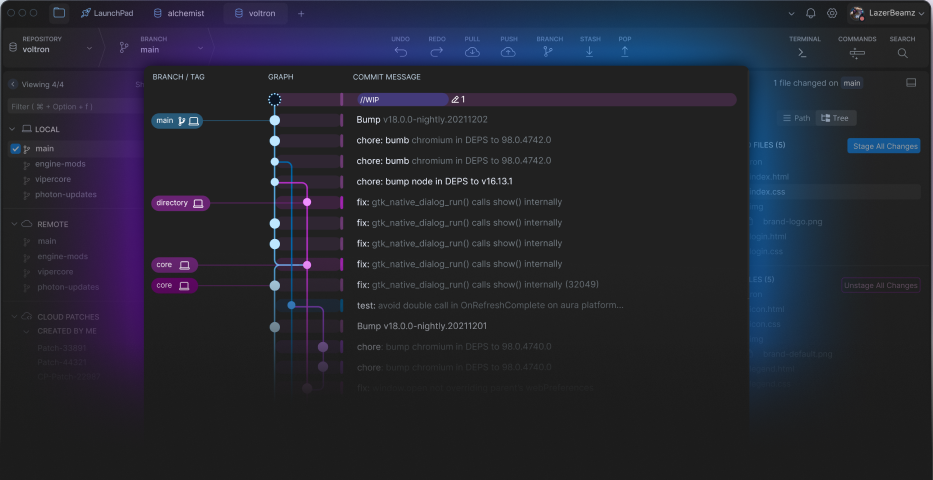
GitKraken Desktop aims to turn the complex web of Git commands into a clear, navigable map of a project’s history. This visual approach helps demystifies version control, and also makes tracking changes and understanding the impact of each commit easier.
The Commit Graph provides an interface to address common Git challenges designed to help developers feel more confident about managing version control, offering a clear view of who changed what and when.
Users can automate repetitive tasks and stay focused. GitKraken Desktop offers built-in AI capabilities to fast track workflows without switching interfaces.
The Commit Graph provides an interface to address common Git challenges designed to help developers feel more confident about managing version control, offering a clear view of who changed what and when.
Users can automate repetitive tasks and stay focused. GitKraken Desktop offers built-in AI capabilities to fast track workflows without switching interfaces.
The vendor states that developers worldwide use GitKraken Desktop for its GUI, terminal, and cross-platform support for Windows, Mac, and Linux.
Categories & Use Cases
Videos
Screenshots
Technical Details
| Deployment Types | On-Premise, SaaS |
|---|---|
| Operating Systems | Windows, Linux, Mac |
| Mobile Application | No |
| Supported Languages | english, spanish, french, japanese, korean, russian |
FAQs
What is GitKraken?
GitKraken's commit graph helps visualize branch structure and commit history. It helps verify recent Git actions on the repo, and also shows who made what code changes and when, so it’s easier to track down when a bug was introduced and revert back to a previous version. GitKraken Client is a Git GUI that detects and alerts users of potential conflicts so as to prevent them from happening. With itsuser Activity Status, the user can know who is online in the GitKraken Client.
How much does GitKraken cost?
GitKraken starts at $0.
What are GitKraken's top competitors?
Sourcetree, Tower, and Sublime Merge are common alternatives for GitKraken.