TrustRadius: an HG Insights company

Lightning Tools Lightning Conductor

Score9 out of 10

4 Reviews and Ratings

What is Lightning Tools Lightning Conductor?

The Lightning Conductor is a content aggregation tool for Microsoft SharePoint Online and Microsoft Teams. Users can build rich, modern content reports based upon SharePoint lists, SharePoint Search, Microsoft Graph or Microsoft 365 Groups. Content can be aggregated from lists and libraries, and other applications such as Planner, To Do, OneDrive, and Teams.

Categories & Use Cases

Videos

Screenshots

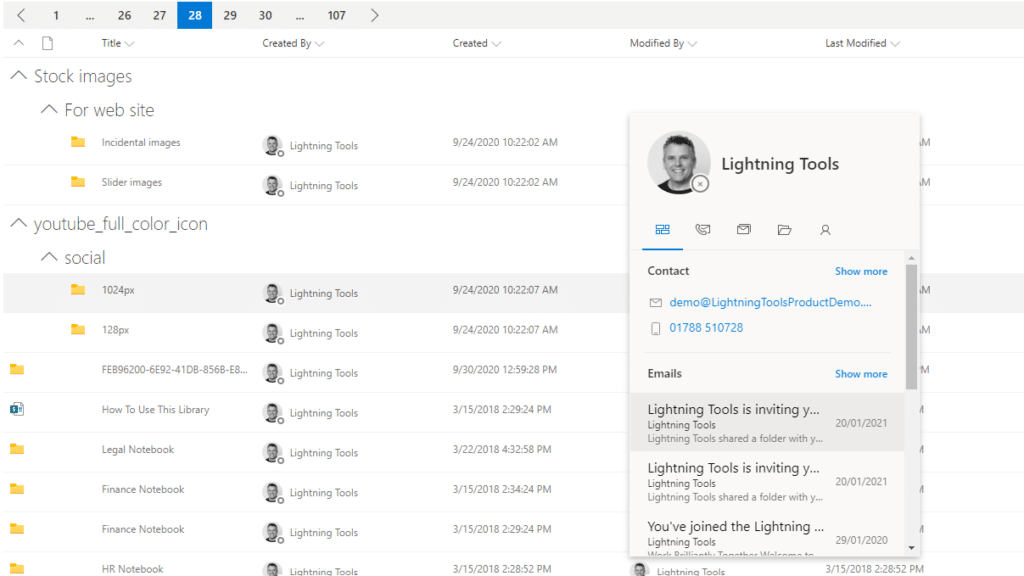
Screenshot of MODERN SHAREPOINT LIST ROLLUP
The Lightning Conductor is a SharePoint Content Aggregator that can be configured quickly by business users. The Lightning Conductor can be used to aggregate content from SharePoint Lists such as Tasks, Document Libraries, Contact Lists, and Custom Lists making it easy to view content in one place even if it is distributed across many sites and site collections. Key data can be highlighted using conditional formatting and data-bars as shown. Content from Search and Microsoft Graph can also be aggregated with the Lightning Conductor.
Screenshot of CONTENT AGGREGATION WITHIN MICROSOFT TEAMS
The Lightning Conductor Web Part can be used within Microsoft SharePoint or Microsoft Teams. Even if content is stored within SharePoint sites, it is useful to have aggregated Documents, Tasks, Announcements, Calendars or Custom Lists from multiple sites displayed in a single handy view in Microsoft Teams. The Lightning Conductor can be added as a Teams Tab in any Microsoft Teams Channel.
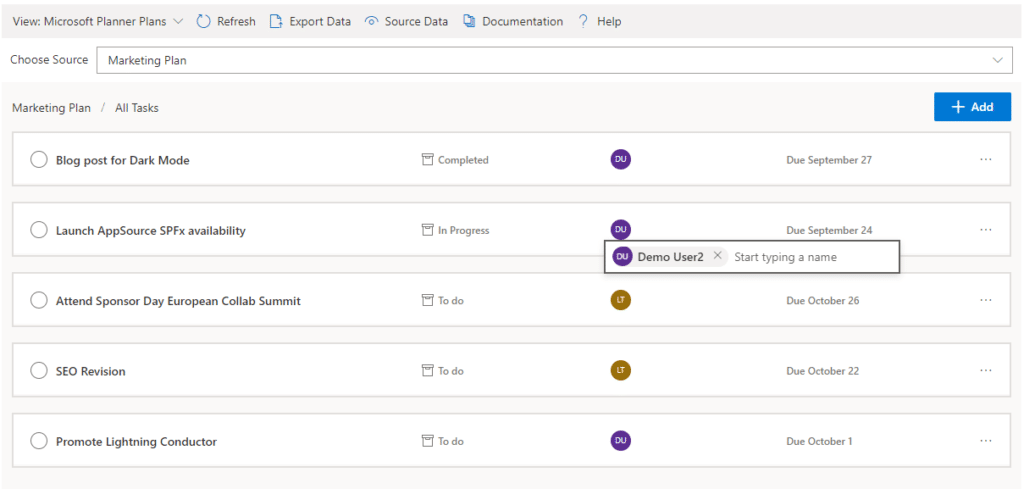
Screenshot of BUILDING REPORTS ON MICROSOFT GRAPH
The Lightning Conductor can be used (without code) to aggregate content from Microsoft Graph as well as Search and SharePoint Lists. This example displays Microsoft Planner Plans and Microsoft Planner Tasks where users can Add new Tasks, Assign Users to Planner Tasks, Delete Tasks, and Complete Tasks. The same can be performed on Microsoft To Do items and displayed within Modern SharePoint pages or Microsoft Teams Tabs. The Lighting Conductor can also contain multiple views of content, making it ideal to display all of your tasks from SharePoint Task lists, Microsoft To Do and Microsoft Planner in a single web part or Teams Tab.

*Microsoft Graph Reports are only available for SharePoint Online and not SharePoint 2019.
Screenshot of BUILDING REPORTS ON MICROSOFT 365 GROUPS
Powered by Microsoft Graph, the Microsoft 365 Group Rollup Provider enables users to aggregate content by browsing and selecting Microsoft 365 Groups. Within Microsoft 365 Groups, you’ll be able to select entities such as Drive Items, Owners, Members, Planner Plans, Planner Tasks, Events, Posts,  Sites, Lists, and Calendars.

*Microsoft Graph Reports are only available for SharePoint Online and not SharePoint 2019.
Screenshot of AGGREGATING USING SEARCH
When performance is critical, search can be used for rollups. The Lightning Conductor offers three data source configurations to get to content. Object Model (Real Time Aggregation from SharePoint Lists), Microsoft Graph (Aggregation from Graph Entities such as Planner, OneDrive, Outlook), and Search. The Search Data Source enables the aggregation of content from large SharePoint lists and libraries when performance is critical. Thousands of documents can be displayed in under a second using Search.
Screenshot of HIGHLIGHTING KEY BUSINESS DATA WITHIN VIEWS
End users and Site Owners can highlight the data that is important to them, the data that they need to prioritize. Using conditional formatting, data bars, and icons, conditions can be configured to highlight the data that is most important. Icons and Data Bars can be any color or size desired. Examples include highlighting High Priority tasks, Showing data bars for the completion progress of Tasks, or indicating which tasks are assigned to any particular user.
Screenshot of BUILT IN VIEWS
The Lightning Conductor also includes many built in views. As well as using the flexible, responsive and modern Grid View, The Lightning Conductor includes views specifically designed for Events, Microsoft Planner, Microsoft To Do, Document Tile View, Calendar View and much more. Custom views can be created using JSON.
Screenshot of WEB PART CONNECTIONS
The Lightning Conductor can consume data connections from other web parts, environment variables such as query string parameters, current user, and page title. The connections can provide a value that can be consumed for filtering content aggregated into a view, applying conditional formatting, or selecting the entire view of content based upon the connected value.

*The Connections are only available for SharePoint Online and not SharePoint 2019.
Screenshot of BUILDING CHARTS ON AGGREGATED CONTENT
Through web part connections, the Data Viewer SPFx web part can be used to build charts on the content aggregated with the Lightning Conductor. Here is an example of building charts based upon aggregated Task lists. Charts can be built on content aggregated through Microsoft Graph on entities such as Planner Tasks and display the dashboard within SharePoint or Teams. The Data Viewer is available as an addon purchase.

1 / 9

Screenshot of MODERN SHAREPOINT LIST ROLLUP The Lightning Conductor is a SharePoint Content Aggregator that can be configured quickly by business users. The Lightning Conductor can be used to aggregate content from SharePoint Lists such as Tasks, Document Libraries, Contact Lists, and Custom Lists making it easy to view content in one place even if it is distributed across many sites and site collections. Key data can be highlighted using conditional formatting and data-bars as shown. Content from Search and Microsoft Graph can also be aggregated with the Lightning Conductor.

Technical Details

Technical Details
Deployment TypesOn-Premise, SaaS
Operating SystemsWindows, Microsoft SharePoint And Teams
Mobile ApplicationNo
Supported CountriesGlobal
Supported LanguagesEnglish, French, German, Spanish, Dutch, Japanese

FAQs

How much does Lightning Tools Lightning Conductor cost?
Lightning Tools Lightning Conductor starts at $2200.
Who uses Lightning Tools Lightning Conductor?
The most common users of Lightning Tools Lightning Conductor are from B2C.