TrustRadius: an HG Insights company

Agentforce 360 for Nonprofits

Score8.5 out of 10

71 Reviews and Ratings

What is Agentforce 360 for Nonprofits?

Salesforce for Nonprofits, the Salesforce.org Nonprofit Cloud, is a nonprofit constituent relationship management platform from Salesforce, which supports constituent engagement, fundraising, and grants. Nonprofit editions contain Salesforce Lightning Edition along with the former Nonprofit Success Pack (NPSP) combined.

Read more details.

Media

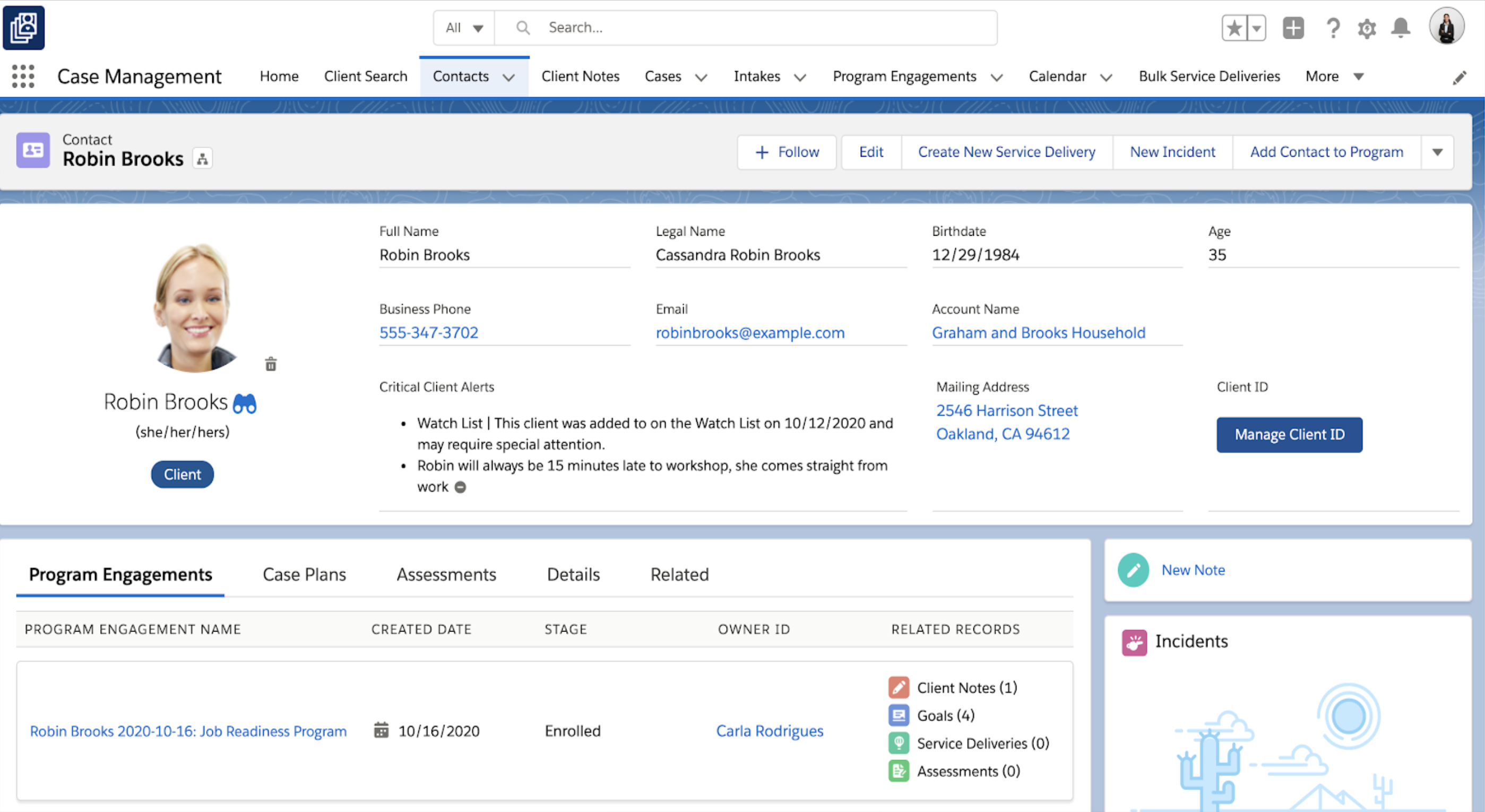
Screenshot of Case Management
Screenshot of Contact Record
Screenshot of Home Dashboard
Screenshot of Management Module
Screenshot of Marketing Cloud for Nonprofits

1 / 5

Screenshot of Case Management

Who Buys & Uses Salesforce Agentforce 360 for Nonprofits

Salesforce Nonprofit Cloud

Use Cases and Deployment Scope

We use Nonprofit Cloud to store donor information. As a nonprofit, this serves as our main donor database, and we also use it to integrate with our other core systems. We have a healthcare system called Vet, which brings in client information from our hospital clients, and another system called Setpoint for storing adoption information. We also bring in volunteer data, which helps us have a 360-degree view of anyone interacting with any of our departments.

Pros

  • I think it really helps with scalability.
  • The API integrations allow us to use the data for more data-driven decisions.
  • It also helps us better serve our clients because it integrates with our phone system — so when someone calls in, we can immediately tell what type of client they are, whether they’re a donor or a hospital client. Overall, the open platform and scalability of the API integrations have been a big advantage.

Cons

  • I’d say we’ve also used another competitor product called Blackbaud Raiser’s Edge NXT — they’ve been in the nonprofit space for a long time. I feel like Salesforce is gradually getting there. Since Salesforce Nonprofit Cloud is highly customizable, implementation really depends on how we build the system. I think if there were more out-of-the-box modules for specific functionalities, it would make things easier for nonprofits.

Return on Investment

  • It has helped with making data decisions and having a 360 degree view of our constituency or clients.

Usability

Alternatives Considered

Blackbaud Raiser's Edge NXT

Other Software Used

Microsoft 365

Good system for experienced user or a strong, well organized company but difficult for a novice

Use Cases and Deployment Scope

We use an iteration of Salesforce that was created by the national affiliate. Our organization mostly uses it for programmatic purposes (tracking communications, demographics, training, etc.). Our Advancement team used it for fundraising purposes before migrating to a new system, but some of our team still uses it for reporting and gathering other important information about volunteers. The reporting component is especially helpful with grant applications and corporate requests.

Pros

  • Tracking communications
  • Report building and dashboards
  • Organizational/relationship hierarchies

Cons

  • Organizations that are new to Salesforce need to be prepared for report building and other configurations. Customization is a great feature, but it can be overwhelming if not impossible for a brand new user.
  • Salesforce Trailhead is robust but can be confusing and overwhelming.
  • I'm currently comfortable with only using Salesforce CMS or any iteration on a desktop.

Return on Investment

  • A well set-up system can save hours of staff time everyday.
  • As part of a larger system, it is more cost effective
  • Initially required a lot more consulting and training which is costly

Usability

Other Software Used

Constant Contact, Acuity Scheduling, a Squarespace company, Squarespace

Thumbs up Salesforce CMS

Use Cases and Deployment Scope

We are a non profit and use Salesforce CMS to hold information about the companies that we interact with. Touch points, contacts, notes from meetings, reminders, etc. This is a central space that all users can go to, to find the information they need about said company so duplicate efforts are not made.

Pros

  • This CRM provides the opportunity to make positive customer relationships.
  • It is intuitive and easy to use. Navigation is a breeze, historical content is stored and able to be pulled up when called upon.
  • Multiple departments can get something out of the software from sales to finance.

Cons

  • Reporting is not as robust as I would like, but I heard that updates are coming.
  • There is not a detail audit trail of what changes were made to a record. Notifications are made that a change was made and by who, but details to what the change was is not available to my knowledge.

Return on Investment

  • We are able to provide a segment of business to our customers using Salesforce CMS that we weren't able to provide using our previous CRM. This has increased our workflow considerably.
  • We use two forms of CRM at the moment and are looking to the possibility of moving over solely to Salesforce CMS in the next 1-2 years.

Usability

Other Software Used

Andar/360

No concerns about reliability and scale ever again

Pros

  • Adaptable
  • Scales up
  • Reliable
  • Broad
  • Customizable

Cons

  • Not an easy lift right out of the box unless you completely rule out customization
  • Not "free to own" even if the grant is free because you'll need about 0.25 FTE to maintain it
  • Constantly being updated which is cool but many items are "forced" and you must respond
  • Lots and lots of customization are required to equal many canned solutions available for any one particular feature set (but none of them can cover the breadth and flexibility of SF)

Most Important Features

  • Reliability
  • Scalebility
  • Customization
  • Breadth
  • Best practices from big orgs to small

Return on Investment

  • Great amplification of limited staff and capabilities of our small staff
  • Volunteer management over the years has been great
  • Program management came with almost no added cost or customization

Positive partnership with Salesforce.org which supports our mission.

Pros

  • Managing the capture of the information we need to provide safe experiences for young people.
  • Managing the communications with young people and their parents to ensure we have the best possible customer journey.
  • Enables the organization to be data led.

Cons

  • An interface that is more intuitive for senior executives would help with adoption.
  • A simpler approach to licensing and billing of the product.

Most Important Features

  • Easy access through the web.
  • Security.
  • Management of communication with our stakeholders.
  • Management information and insights.

Return on Investment

  • Positive in terms of reputation and trust due to being able to demonstrate control and the safe handling of information with our funders.
  • Negative in terms of financial ROI but this is mostly down to the impact of COVID-19 and the inability to hit the growth targets we expected when using the product over the contract term.
  • Positive in terms of demonstrating the value of a true partnership between a non-profit and a commercial entity (salesforce.org) and seen as an exemplar of this.

Alternatives Considered

Microsoft Dynamics 365 (formerly Microsoft Dynamics CRM)

Other Software Used

Google Workspace (formerly G Suite), Smartsheet, Drupal