TrustRadius: an HG Insights company

SubmittalLink

Score8.2 out of 10

1 Reviews and Ratings

What is SubmittalLink?

SubmittalLink is construction submittal software and a project management tool that streamlines submittal workflows and provides tools for managing construction documentation, communication, and project execution. The platform digitizes submittal processes by enabling users to create, submit, track, review, and approve construction submittals through a centralized cloud-based system, replacing manual processes and email chains that often cause delays and miscommunication on construction projects.

The software addresses the critical challenge of managing submittal documentation and project coordination during construction project execution. Traditional submittal processes involve coordinating product data sheets, shop drawings, material samples, and equipment specifications across multiple project stakeholders, which frequently results in version control issues, missed deadlines, and compliance problems. SubmittalLink solves this by providing automated submittal routing, real-time status tracking, deadline notifications, and complete audit trails that ensure all parties have access to current submittal information and project data.

Construction professionals use SubmittalLink to improve project coordination, reduce submittal cycle times, and manage multiple aspects of construction administration. General contractors receive centralized oversight of all project submittals, RFIs (Requests for Information), change orders, contracts, and punchlist items with filtering and search capabilities that make it easy to locate specific submissions and project documents. Subcontractors can submit documentation directly through the platform, track RFIs, and receive faster response times from reviewing parties. Architects and engineers gain efficient review workflows with markup tools for drawings and standardized approval processes for submittals and change orders.

Key features include customizable submittal workflows that match each project's specific approval chains, RFI management for tracking questions and responses between project teams, drawing management with version control and markup capabilities, punchlist creation and tracking for quality control and project closeout, daily report generation for documenting field activities and progress, change order management for tracking project modifications and cost impacts, and contract management for organizing project agreements and documentation. The platform provides automated email notifications that alert stakeholders when action is required, mobile access for field teams to review submittals and update punchlist items on-site, and comprehensive reporting that provides visibility into submittal status, outstanding RFIs, and change order impacts across all active projects.

The software supports various submittal types including shop drawings, product data, samples, and operation and maintenance manuals, with version control that maintains complete histories of all submittal revisions, RFI responses, drawing updates, and change order approvals. SubmittalLink integrates with existing construction management platforms, allowing submittal data, RFIs, and project documentation to sync with project schedules and document management systems.

SubmittalLink serves construction companies of all sizes working on commercial construction, residential development, industrial facilities, and infrastructure projects where submittal management, RFI tracking, and construction documentation coordination are essential for maintaining project schedules, ensuring specification compliance, and delivering successful project outcomes.

Media

Screenshot of SubmittalLink showing the submittals list
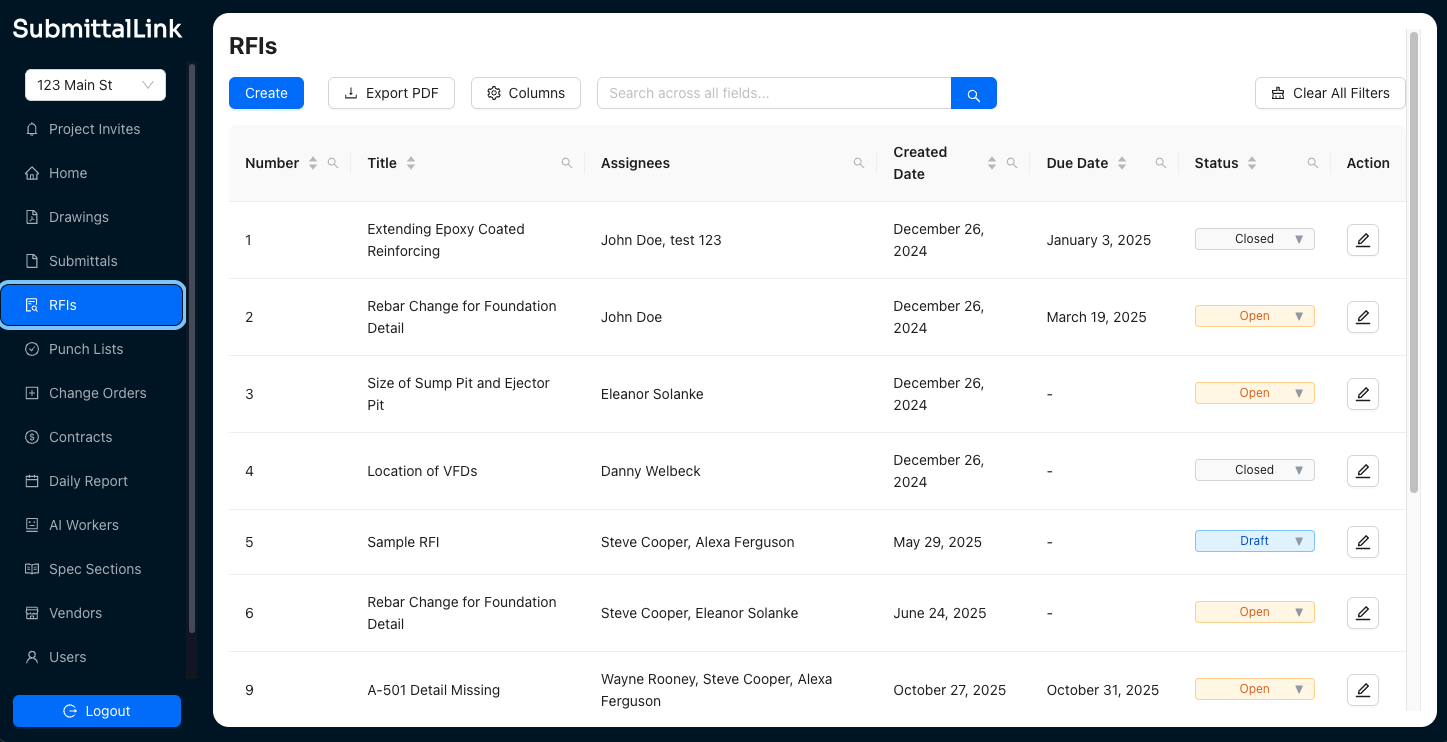
Screenshot of SubmittalLink showing the RFIs list
Screenshot of SubmittalLink showing the drawings module

1 / 3

Screenshot of SubmittalLink showing the submittals list

Top Performing Features

  • Dashboards

    Users can create, customize and share dashboards, which provide an overview of the most important metrics.

    Category average: 7.9

  • Data exportability

    Data can be exported via a CSV or Excel file for further reporting and analysis outside of the tool.

    Category average: 8

  • RFI tools

    Users can create, send, receive, and archive Requests for Information (RFIs), to record exchanges with subcontractors, vendors, and other suppliers.

    Category average: 8.3

Areas for Improvement

  • As-built drawings

    Users can generate as-built drawings upon project completion, to reflect the exact dimensions and materials of the final work, including any changes made to the initial plans during the construction process.

    Category average: 7.8

  • Mobile app

    Users can easily access the system from the field on mobile devices such as phones and tablets.

    Category average: 7.2

  • Change orders

    A change order (or variation order) is a component of the change management process in which changes in the scope of work (or project brief) agreed to by the client, contractor and architect are implemented.

    Category average: 8

Efficient Submittal software for General Contractors

Use Cases and Deployment Scope

We use Submittallink as our go to construction submittal software to manage all the document control between our subcontractors, the internal team and our design consultants. Before we made the switch, we were stuck in what I call spreadsheet hell. We were manually updating logs in Excel and constantly losing track of files in messy email threads. Now, we use the platform to keep submittals, RFIs, and drawing sets in one central spot across all our active jobs. It solves the accountability problem because everyone can see exactly who is holding up a review. It ensures our guys in the field are always looking at approved info instead of old revisions.

Pros

  • The drawing parser is a huge time saver. It automatically reads and splits full sheet sets by title and number, which used to take us hours of manual renaming.
  • The interface works a lot like Excel, so there is basically no learning curve. You can sort and update statuses right in the cells, which our subs really appreciate.
  • Centralizing all the communication has been great. The system sends out its own updates and due date reminders, which means I spend less time chasing people down for paperwork.

Cons

  • I’d like to see more flexibility with reporting. The standard logs are fine, but it would be nice to have more drag and drop options for executive reports so I don't have to clean things up in Excel.
  • The mobile app is good for looking things up quickly, but some of the advanced editing tools still feel a lot easier to use on a laptop or desktop.

Return on Investment

  • We’ve cut down our administrative work by about 15-25% because we aren't doing nearly as much manual data entry.
  • Our turnaround times are much faster now. Automating the reminders helps us keep the project on schedule and avoids those annoying material delays.
  • The cost savings are real. We moved away from a much more expensive legacy platform and saved a lot on licensing fees while getting better performance on the tools we actually use.

Usability